
8.5
SpotScore

SavvyCal Review: Is It The Right Appointment Scheduling Software For Your Team?
Best for SMB teams · Mid-market
Free Trial Available
Add to compare
Starts from $12 / User / Month
Overview
Pricing
Features
Buyer feedback
Alternatives
Media
Security & Compliance
Support
FAQ
Blogs
What is SavvyCal?
The SavvyCal app is the easiest and most powerful way for your clients to schedule appointments. The system can be used on desktop and mobile platforms and work with any website. It provides a great marketing tool that connects them to your business, allowing them to build up a relationship with your business and allow you to better connect and serve your customers.
Pricing
Starts from $12 / User / Month
Free Trial available
Best For
Built for growing teams, from small businesses to mid-market
Security & Compliance
Data residency:🇺🇸
SavvyCal Screenshots

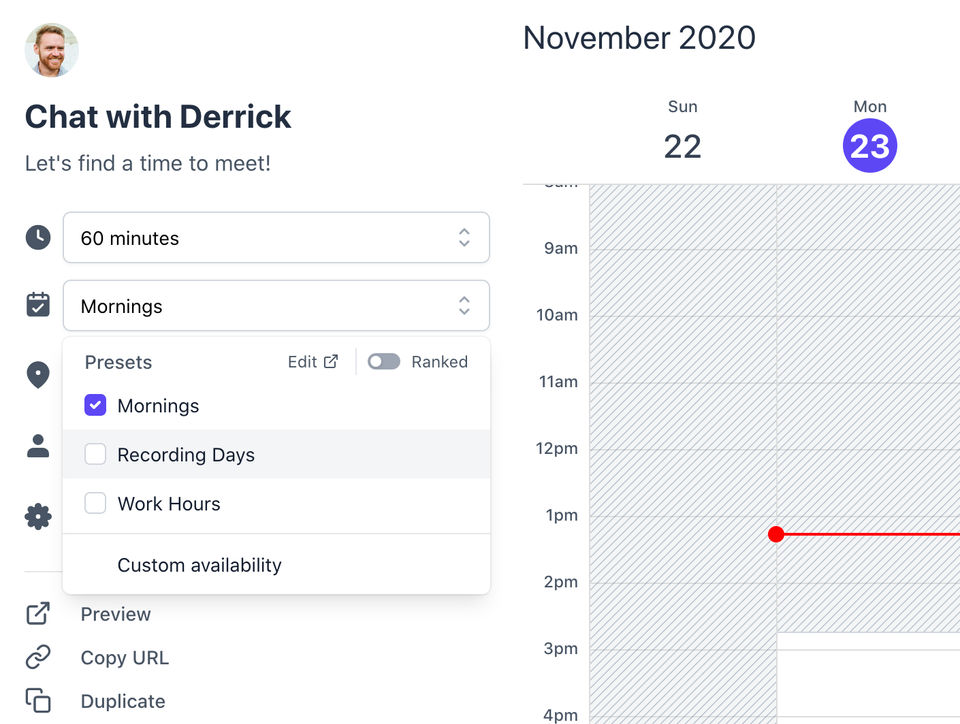

SavvyCal was reviewed internally using user feedback, in-house testing, and market research to assess its performance, reliability, and user experience. Learn how we review products and our evaluation process.

Who should consider SavvyCal
- Team types
- Medium Business, Small Business
Why teams choose SavvyCal
Offers a simple and intuitive user experience.
Integrates easily with existing websites.
Facilitates better client relationships through scheduling.
Is SavvyCal right for you?
What buyers should know before choosing SavvyCal
SavvyCal is an appointment scheduling tool built for service businesses and consultants who need calendar management without complex setup. The platform integrates directly with websites through an embeddable widget, which works well for capturing bookings on landing pages and service pages—but requires that your website uses standard HTML or a supported page builder (Webflow, WordPress, Squarespace).
Verify in a demo that the widget matches your site's design and that your booking workflow (timezone handling, buffer time between appointments, cancellation policies) maps to SavvyCal's available settings. Before shortlisting, confirm that SavvyCal's calendar sync covers your actual tools: Google Calendar, Outlook, and iCal are supported, but if you use a niche scheduling system or custom CRM, you'll need to check the integration list.
Pricing is per-user monthly, so teams with many schedulers will see costs scale quickly. Test the mobile experience during your trial—some users report that the mobile booking interface is less polished than the desktop version.
If you need advanced features like group bookings, payment collection at booking time, or custom branding beyond color/logo, evaluate whether SavvyCal's feature set matches your requirements or if a more feature-rich alternative better fits your workflow.
SavvyCal pros and cons
- SavvyCal pros
Offers a simple and intuitive user experience.
Integrates easily with existing websites.
Facilitates better client relationships through scheduling.
- SavvyCal cons
May not meet the needs of larger organizations.
Limited customization for specific workflows.
Ready to try it?
Get started with SavvyCal
Start your free trial — no credit card required.
Still comparing?
See how it stacks up
Compare SavvyCal side-by-side with top Appointment Scheduling Software alternatives.


What is the pricing of SavvyCal?
SavvyCal Pricing Plans
Weighing your options?
Not sure if SavvyCal fits your budget?
SavvyCal reviews and ratings
What buyers like
- User-friendly interface
- Desktop and mobile compatibility
- Website integration
Common complaints
- Limited advanced features
- May lack customization options
- Not suitable for large teams
Be the first to review SavvyCal
You'll help thousands of buyers make a smarter decision.

- See if SavvyCal fits your business
- Real pricing — no sales pressure
- A demo or quick answers, your call
Step 1 of 4
How big is your team?
We tailor recommendations to companies your size.















What are the features of SavvyCal?
Appointment scheduling is a vital feature of software that allows users to efficiently manage their appointments and schedule time slots for…
Automated scheduling is a type of AI that specializes in scheduling multiple assignments for a single or several users while adhering to a s…
Few people have mastered the ability to organize their calendars. It is the practice of optimizing your calendar by combining priority manag…
Employee scheduling is a difficult task. Anticipating workforce needs, handling employee demands and preferences, and guaranteeing shift cov…
Companies are beginning to look for efficient and cost-effective solutions that will improve their process efficiency and raise their produc…
Meeting Room Booking is a highly efficient feature that allows users to easily schedule and manage meetings or events within an organization…
Patients can arrange an appointment by viewing your practice's availability online via online scheduling. This tool allows you to make your…
Reservations is a software feature that allows users to schedule or book appointments, events, or resources in advance. This feature is comm…
The set of actions and methods used by businesses to efficiently assign their resources to jobs, tasks, or projects they need to perform, as…
SavvyCal security and data handling
Key compliance certifications and security features for IT and security teams evaluating SavvyCal.
Certifications

Developer & data
Alternatives to SavvyCal






SavvyCal Support Options
Frequently Asked Questions About SavvyCal
Common questions buyers ask before choosing SavvyCal.
SavvyCal is a Appointment Scheduling Software. SavvyCal offers Resource Scheduling, Reservations, Online Scheduling, Meeting Room Booking, Group Scheduling and many more functionalities.
Buyers commonly note the following limitations of SavvyCal: May not meet the needs of larger organizations.; Limited customization for specific workflows.; Advanced features may be lacking..
Some top alternatives to SavvyCal includes EssentialPIM, Agendize, ScheduFlow, Zeeg and Doodle.
SavvyCal offers Free Trial, Subscription pricing models
The starting price of SavvyCal is $12/User/Month
Ready to try it?
Get started with SavvyCal
Start your free trial — no credit card required.
About the reviewer
Rajat Gupta is the founder of Spotsaas. Over the past two years, he has reviewed 2,000+ tools across CRM, HR, AI, and finance — applying hands-on product research and a background in commerce and the CFA program to evaluate software through a business and ROI lens. His goal: help teams make software decisions they won't regret.
Disclaimer: This research has been collated from a variety of authoritative sources. We welcome your feedback at [email protected].