
7.8
SpotScore

MaestroConference Review: Is It The Right Webinar Software For Your Team?
Best for SMB teams · Mid-market · Enterprise
Free Trial Available
Add to compare
Starts from $39 / Month when Billed Yearly
 Uber
Uber Stanford University
 The World Bank
 Nextdoor
 airbnb
Trusted by teams including Uber
Overview
Pricing
Features
Buyer feedback
Alternatives
Customers
Media
Security & Compliance
Support
FAQ
Blogs
What is MaestroConference?
MaestroConference is an interactive web conferencing platform for large group events, supporting dozens to thousands of participants. It allows hosts to split the full group into smaller concurrent breakout sessions for deeper collaboration, making it suitable for webinars, training events, and virtual gatherings that require structured group engagement.
Pricing
Starts from $39 / Month when Billed Yearly
Free Trial available
Best For
Suited for small teams, SMBs, and enterprise
Security & Compliance
Data residency:🇺🇸
MaestroConference Screenshots

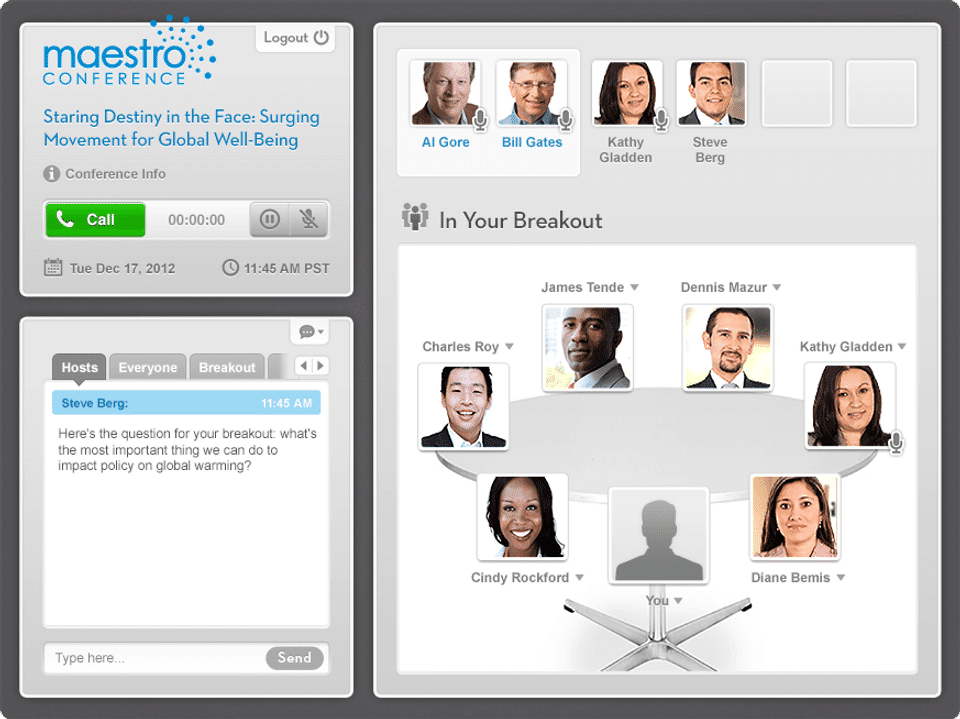
MaestroConference was reviewed internally using user feedback, in-house testing, and market research to assess its performance, reliability, and user experience. Learn how we review products and our evaluation process.

Who should consider MaestroConference
- Team types
- Large Enterprises, Medium Business
Why teams choose MaestroConference
Facilitates deep engagement through small group discussions
User-friendly interface for easy navigation
Supports large-scale events effectively
Is MaestroConference right for you?
What buyers should know before choosing MaestroConference
MaestroConference excels in creating interactive and engaging web conferences, making it suitable for large groups. Its unique ability to split participants into smaller discussions enhances collaboration.
MaestroConference pros and cons
- MaestroConference pros
Facilitates deep engagement through small group discussions
User-friendly interface for easy navigation
Supports large-scale events effectively
- MaestroConference cons
May require training for optimal use
Internet stability is crucial for performance
Ready to try it?
Get started with MaestroConference
Start your free trial — no credit card required.
Still comparing?
See how it stacks up
Compare MaestroConference side-by-side with top Webinar Software alternatives.


What is the pricing of MaestroConference?
MaestroConference Pricing Plans
Jumbo MC
Expert Training
Scheduling Events
Facebook Event Sharing
Registration Options
Free International / Skype Dialing
Show more +
Starter (Audio only)
Unlimited Events
Social Webinar
Breakout Groups
Straw Polls
Skype Access
Show more +
DIY 75 (Audio-only)
Unlimited Events
Social Webinar
Breakout Groups
Straw Polls
Skype Access
Show more +
DIY 150 (Audio-only)
App Integrations
Unlimited Events
Social Webinar
Breakout Groups
Straw Polls
Show more +
Weighing your options?
Not sure if MaestroConference fits your budget?
MaestroConference reviews and ratings
What buyers like
- Interactive web conferencing
- Supports large groups
- Facilitates small group discussions
Common complaints
- Limited branding options
- Can be complex for new users
- Requires stable internet connection
Be the first to review MaestroConference
You'll help thousands of buyers make a smarter decision.

- See if MaestroConference fits your business
- Real pricing — no sales pressure
- A demo or quick answers, your call
Step 1 of 4
How big is your team?
We tailor recommendations to companies your size.















What are the features of MaestroConference?
Attendee management is a crucial feature in software that streamlines and simplifies the process of managing attendees for events, meetings,…
Invite via email is a feature that allows users to easily extend invitations to others through email. This feature is commonly found in vari…
Polls or voting is a software feature that allows users to gather opinions, feedback, and preferences from a group of people. It is a method…
Reminders are a valuable feature found in many software programs that serve as helpful tools for users to stay organized and on top of impor…
Screen sharing is a feature that allows users to share their computer screens with others in real-time. It enables collaboration and remote…
Social sharing is a feature found in many software applications that allows users to easily share content with others on various social medi…
MaestroConference security and data handling
Key compliance certifications and security features for IT and security teams evaluating MaestroConference.
Certifications

Developer & data
Alternatives to MaestroConference


MaestroConference Customers
Uber
Stanford University
The World Bank
Nextdoor
airbnb
MaestroConference Support Options
Frequently Asked Questions About MaestroConference
Common questions buyers ask before choosing MaestroConference.
MaestroConference is a Webinar Software. MaestroConference offers Invite via Email, Screen Sharing, Reminders, Polls (Voting), Attendee Management and many more functionalities.
Buyers commonly note the following limitations of MaestroConference: May require training for optimal use; Internet stability is crucial for performance; Branding options are limited.
Some top alternatives to MaestroConference includes Cisco Webex Events, StealthSeminar, MyOwnConference, BigMarker and Welcome.
MaestroConference offers Free Trial, Subscription, Quotation Based pricing models
The starting price of MaestroConference is $39/Month when Billed Yearly
Ready to try it?
Get started with MaestroConference
Start your free trial — no credit card required.
About the reviewer
Rajat Gupta is the founder of Spotsaas. Over the past two years, he has reviewed 2,000+ tools across CRM, HR, AI, and finance — applying hands-on product research and a background in commerce and the CFA program to evaluate software through a business and ROI lens. His goal: help teams make software decisions they won't regret.
Disclaimer: This research has been collated from a variety of authoritative sources. We welcome your feedback at [email protected].