
Zoom vs RemotePC Comparison

Zoom
Starting at $13.33 /user/month
- Free Trial
- Large Enterprises
- Medium Business
Zoom is a comprehensive communication platform designed to bring teams, clients, and partners together through seamless video conferencing, messaging, and collaboration tools. Built for organizations of all sizes, it sup…

RemotePC
Starting at $22.12 /Year
- Free Trial
- Large Enterprises
- Medium Business
RemotePC provides an inexpensive way to access your PC from any web browser. RemotePC is a software that gives you the ability to work on your computer from anywhere there is an internet connection. It gives you remote a…
RemotePC leads on user satisfaction with a 3.8-star rating across 138 reviews.
Zoom vs RemotePC — at a glance
| Feature | Zoom | RemotePC |
|---|---|---|
| Rating | 3.7 / 5 | 3.8 / 5 |
| Reviews | 69,243 | 138 |
| Starting price | $13.33 /user/month | $22.12 /Year |
| Free trial | Yes | Yes |
| Free version | No | No |
| Best for | Large Enterprises, Medium Business, Small Business | Large Enterprises, Medium Business, Small Business |
| Category | Video Conferencing Software | Remote Access Software |
| Platforms | SaaS/Web/Cloud, Mobile - Android, Mobile - iOS, Installed - Windows, Installed - Mac | SaaS/Web/Cloud, Mobile - Android, Mobile - iOS, Installed - Windows, Installed - Mac |
| API | Available | — |
| Support modes | 24/7 (Live rep), Business Hours, Online | Business Hours, Online |
| Certifications | SOC 2, HIPAA, GDPR, ISO 27001 | GDPR |
| Data residency | Global | Global |
Key differences between Zoom and RemotePC
- Pricing: Zoom starts at $13.33 /user/month, while RemotePC starts at $22.12 /Year.
- User satisfaction: RemotePC scores higher with a 3.8-star average.
- Deployment: Zoom supports SaaS/Web/Cloud, Mobile - Android, Mobile - iOS, Installed - Windows, Installed - Mac; RemotePC supports SaaS/Web/Cloud, Mobile - Android, Mobile - iOS, Installed - Windows, Installed - Mac.
Zoom vs RemotePC — find the better fit before you commit.
Which tool fits your team best
Which is actually cheaper for your team size
Where each product wins, per real buyers
Most Video Conferencing Software tools look identical on paper. This comparison cuts to the differences that matter — pricing structure, team fit, and what real buyers found after signing up.
Biggest differences
Features
Pricing
Buying details
Security
Buyer feedback
Integrations
Product tour
Other options
Free PDF comparison
Download this Zoom vs RemotePC comparison
Get the full side-by-side as a PDF — these picks plus the top Video Conferencing Software tools, with verified ratings, pricing and features.
- Side-by-side on pricing, features & ratings
- Plus the category top 10, scored & ranked
- Emailed to you — no on-screen download
No file downloads on screen — we email it to you. One-click unsubscribe anytime.
Biggest differences
Start here before you go deeper into features.
Best for scalable, high-quality video meetings with strong integrations.
- You need reliable HD video and audio for large group meetings.
- Your organization uses Google Workspace, Microsoft Teams, Salesforce, or Slack.
- You require AI-powered tools like automated meeting summaries and task suggestions.
- You need extensive app marketplace options for advanced customization.
- Your users prefer very simple, minimal feature sets due to low technical expertise.
Cost-effective, easy-to-use remote access for small to mid-sized teams.
- You need quick, simple setup with an intuitive interface.
- Your team requires stable, reliable remote connections across platforms.
- You want secure access with multi-monitor support and strong encryption.
- You require advanced, highly customizable remote access workflows.
- You rely heavily on file transfers and large screen sessions on small devices.
Zoom: Best for scalable, high-quality video meetings with strong integrations. RemotePC: Cost-effective, easy-to-use remote access for small to mid-sized teams.
Description | Zoom is a comprehensive communication platform designed to bring teams, clients, and partners together through seamless video conferencing, messaging, and collaboration tools. Built for ... Read More about Zoom | RemotePC provides an inexpensive way to access your PC from any web browser. RemotePC is a software that gives you the ability to work on your computer from anywhere there is an internet ... Read More about RemotePC |
|---|---|---|
Entry Level Pricing |
|
|
Free Trial Availability | ||
SpotScoreWhat's this? ↗ | 9.8/10 | 9.1/10 |
User RatingsBased on verified Spotsaas reviews | ||
Best Company Size | 50-500 employees500-5,000+ employees | 1-50 employees51-500 employees |
Get pricing help | Get pricing help |
Where each option fits best
See where each product is strongest, which teams it fits, and what causes buyers to keep looking — before you commit.
Based on buyer reviews and verified product data collected by Spotsaas.
Key strengths
- Scalable Collaboration for Any Business Size: Zoom adapts to businesses of all sizes, from small teams hosting quick check-ins to large enterprises running global webinars and conferences. Its reliable infrastructure maintains solid performance regardless of participant numbers, while features like breakout rooms, webinar hosting, and cloud phone services let organizations expand their collaboration efforts as they grow. This makes it a dependable solution for long-term business communication needs.
- Unified Workflows Through Strong Integrations: Zoom integrates with Google Workspace, Microsoft Teams, Salesforce, and Slack, letting businesses manage all communication and collaboration needs in one place. This approach reduces switching between applications, improving efficiency and reducing errors. Teams can easily schedule meetings, share documents, track progress, and communicate within their existing software ecosystems.
- Clear Cross-Industry Communication: Zoom lets organizations across various industries connect easily with reliable video, audio, and chat features. Whether it's a healthcare consultation, an educational lecture, or a financial services meeting, the platform keeps communication clear without interruptions. Its AI-enhanced productivity tools, such as automated meeting summaries and smart task suggestions, simplify workflows and help teams save time and focus on what matters most.
- Smooth Remote Access: With RemotePC, you can easily connect to your office computer from anywhere in the world. Access important files and applications while on the go—this flexibility lets your team work without boundaries.
- Security Features: RemotePC uses strong encryption protocols and two-factor authentication to protect your sensitive data from unauthorized access, so you can focus on your work.
- User-Friendly Interface: Even if you're not tech-savvy, RemotePC's intuitive design makes it easy for anyone to manage. This means less time spent training staff and more time optimizing productivity—a key benefit for busy managers like yourself.
Best fit
- 50–5,000+ Employees
- Education, Healthcare, Financial Services, Government, Retail, Manufacturing, Technology
- Business Executives, Project Managers, Educators, Healthcare Professionals, HR Managers, Sales Executives, IT Administrators, Customer Support Leads
- 1 to 500 employees
- SaaS, Consulting, IT Services, Education, and Remote Workforce Management
- IT Administrators, Remote Support Technicians, Business Consultants, and Freelancers
Reasons buyers look elsewhere
- Some organizations opt for Microsoft Teams due to its tighter integration with Office 365 and enterprise-level controls.
- Companies in regulated industries may prefer Cisco Webex for its enhanced security and compliance features.
- Businesses already using Google Workspace often choose Google Meet for its built-in access and simpler pricing model.
- Users may seek alternatives to RemotePC for enhanced security features, especially if they handle sensitive data and require advanced encryption methods or compliance with strict regulatory standards.
- Some users might find the pricing structure of RemotePC less favorable compared to competitors offering similar features at a more competitive rate, making cost-effectiveness a priority.
- A desire for more intuitive user interfaces or better customer support can lead users to explore alternatives, particularly if they encounter difficulties in setup or troubleshooting with RemotePC.
Software Demo
Demo |  RemotePC has not given any software demo yet If you're the owner of this profile, add your demo.Contact us |
|---|
Need a second opinion?
Get shortlist help from a software advisor
Share your priorities, budget, and team needs, and we’ll help you narrow the options and understand the tradeoffs before you talk to vendors.

- Independent advice — matched to your business
- Understand the tradeoffs before you talk to vendors
- Free 15-min call with a software advisor.
Step 1 of 4
How big is your team?
We tailor recommendations to companies your size.















How do Zoom and RemotePC Compare on Features?
Total Features | 19 Features | 6 Features |
|---|---|---|
Unique Features | No unique features | No unique features |
Get Quote | Get Quote |
Compare Zoom and RemotePC on pricing
Review starting price, plan structure, and free-trial access side by side so you can see which option fits your budget and buying process.
Pricing Option | ||
|---|---|---|
Starting From |
|
|
Pricing Plans |
|
|
Pricing Page | 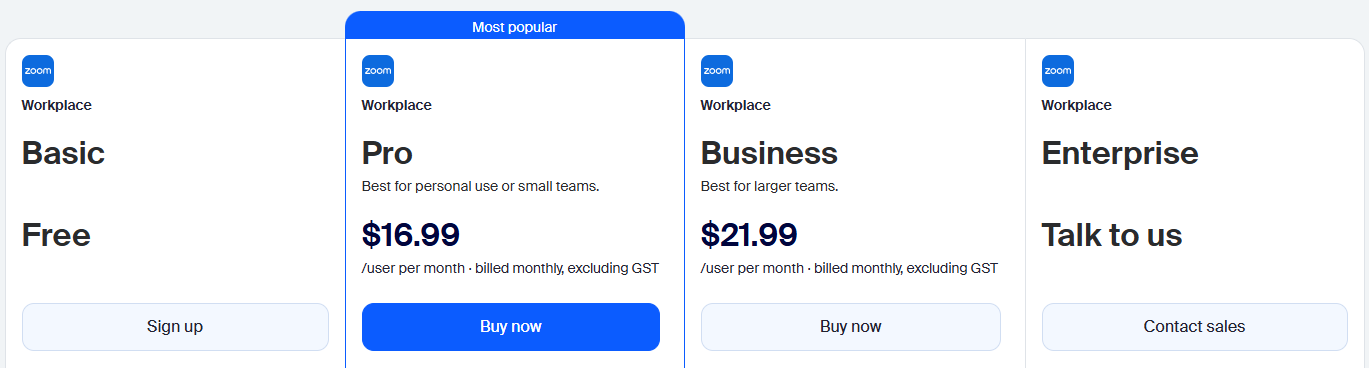 | 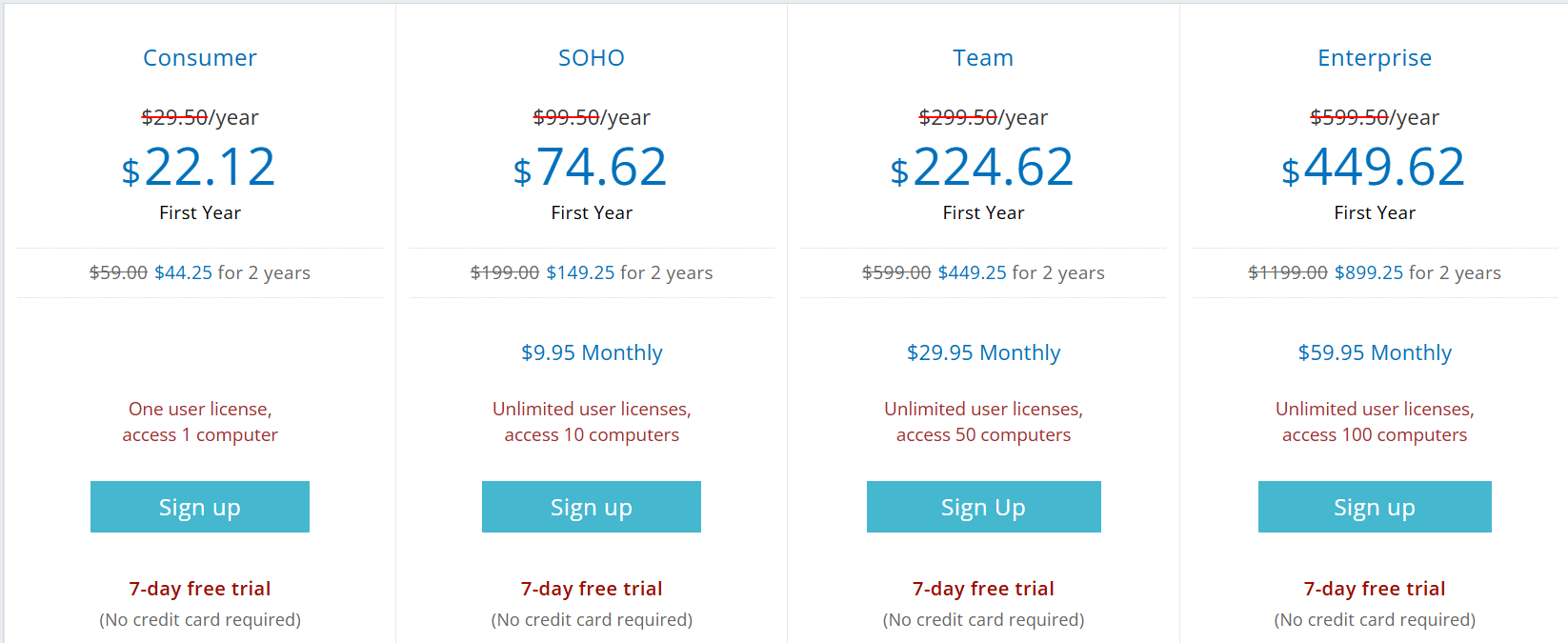 |
Other Details
Organization Types supported |
|
|
|---|---|---|
Platforms Supported |
|
|
Modes of support |
|
|
API Support |
|
|
Get help choosing | Get help choosing |
Security & Compliance
Certifications, data handling, and security controls for IT and compliance evaluators.
SOC 2 | ✓ Yes | — |
|---|---|---|
HIPAA | ✓ Yes | — |
GDPR | ✓ Yes | ✓ Yes |
ISO 27001 | ✓ Yes | — |
Single Sign-On (SSO) | ✓ Yes | — |
Multi-Factor Auth (MFA) | ✓ Yes | ✓ Yes |
Data Encryption | ✓ Yes | ✓ Yes |
Audit Logs | ✓ Yes | — |
Data Residency | 🌐 Global | 🌐 Global |
Zoom User Reviews & Rating Comparison
User Ratings | ||
|---|---|---|
Rating Distribution | ||
Spotsaas Editor’s POV generated by AI | Buyer sentiment Overall positive sentiment highlights Zoom's high-quality video/audio and ease of use, though some users find the feature set complex and customization options limited. What buyers like
Common complaints
| Buyer sentiment Users generally appreciate RemotePC for its ease of use, reliability, and cost-effectiveness, though some note minor usability issues with screen size and file transfers. What buyers like
Common complaints
|
Pros and Cons |
|
|
Positive Reviews | No reviews available for the product | No reviews available for the product |
List of Customers
Customers |  Zendesk  Veeva  Splunk | No Customers information available. |
|---|
Media and Screenshots
Screenshots | 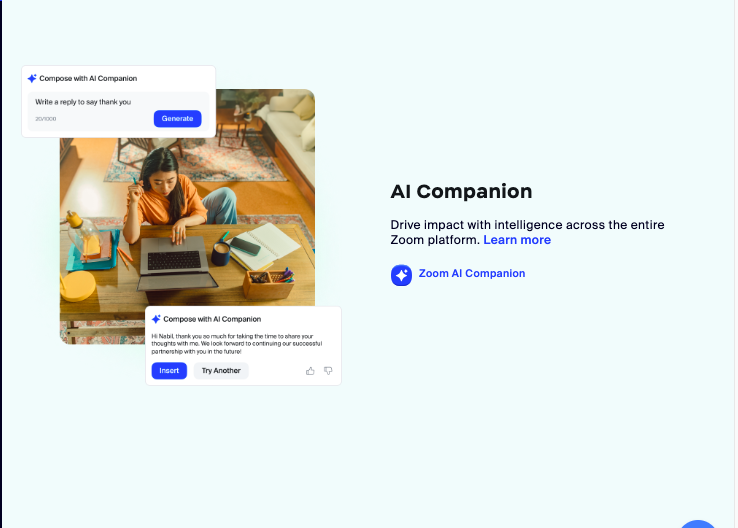 4 Screenshots |  3 Screenshots |
|---|---|---|
Videos |  6 Videos | No videos available. |
Top Alternatives to Zoom and RemotePC in 2026
Alternatives |
|---|


Add another option to compare side by side
Search by product name to compare pricing, fit, and buyer feedback in one view.Compare similar software options



Related Blogs and Articles for Remote Access Software



Disclaimer: This research has been collated from a variety of authoritative sources. We welcome your feedback at [email protected].
Frequently asked questions
- Which is better, Zoom or RemotePC?
- RemotePC edges out the other on user ratings (3.8 vs 3.7). That said, the best pick depends on your use case — use the comparison tables above to evaluate each dimension.
- Do Zoom and RemotePC offer a free trial?
- Yes, both Zoom and RemotePC offer a free trial.
- What is the starting price of Zoom vs RemotePC?
- Zoom starts at $13.33 /user/month. RemotePC starts at $22.12 /Year.
- What are the top alternatives to Zoom?
- Top alternatives to Zoom include Livestorm, Cisco Webex Meetings, Google Meet, GotoMeeting, Cisco Webex Teams.
- What are the top alternatives to RemotePC?
- Top alternatives to RemotePC include ConnectWise Control, Splashtop Remote Support, BeyondTrust Remote Support, ScreenMeet, Wayk Now.