
Social Tables vs FLOOR Comparison

Social Tables
Starting at $199 /month
- Free Trial
- Freelancers / Consultants
- Large Enterprises
Social Tables (now part of Cvent’s Event Diagramming suite) is a collaborative event planning and venue diagramming platform designed for event planners, hotels, venues, caterers, and universities. It enables teams to de…

FLOOR
Starting at $50
- Freelancers / Consultants
- Large Enterprises
FLOOR is an innovative software designed to revolutionize the world of event management. With its tagline "Virtual Space for Events", it transforms any venue into a digital experience in just a few minutes. This powerful…
FLOOR leads on user satisfaction with a 4.7-star rating across 91 reviews.
Social Tables vs FLOOR — at a glance
| Feature | Social Tables | FLOOR |
|---|---|---|
| Rating | 4.4 / 5 | 4.7 / 5 |
| Reviews | 178 | 91 |
| Starting price | $199 /month | $50 |
| Free trial | Yes | No |
| Free version | No | No |
| Best for | Freelancers / Consultants, Large Enterprises, Medium Business | Freelancers / Consultants, Large Enterprises, Medium Business |
| Category | Event Planning Software | Virtual Event Platforms |
| Platforms | SaaS/Web/Cloud, Mobile - iOS | SaaS/Web/Cloud, Mobile - Android, Mobile - iOS |
| API | Available | — |
| Support modes | 24/7 (Live rep) | 24/7 (Live rep), Online |
| Certifications | — | — |
| Data residency | — | Global |
Key differences between Social Tables and FLOOR
- Pricing: Social Tables starts at $199 /month, while FLOOR starts at $50.
- Free trial: Social Tables offers a free trial; FLOOR does not.
- User satisfaction: FLOOR scores higher with a 4.7-star average.
- Deployment: Social Tables supports SaaS/Web/Cloud, Mobile - iOS; FLOOR supports SaaS/Web/Cloud, Mobile - Android, Mobile - iOS.
Social Tables vs FLOOR — find the better fit before you commit.
Which tool fits your team best
Which is actually cheaper for your team size
Where each product wins, per real buyers
Most Event Planning Software tools look identical on paper. This comparison cuts to the differences that matter — pricing structure, team fit, and what real buyers found after signing up.
Biggest differences
Features
Pricing
Buying details
Security
Buyer feedback
Integrations
Product tour
Other options
Talk to an expert Talk to an expert |
Free PDF comparison
Download this Social Tables vs FLOOR comparison
Get the full side-by-side as a PDF — these picks plus the top Event Planning Software tools, with verified ratings, pricing and features.
- Side-by-side on pricing, features & ratings
- Plus the category top 10, scored & ranked
- Emailed to you — no on-screen download
No file downloads on screen — we email it to you. One-click unsubscribe anytime.
Biggest differences
Start here before you go deeper into features.
Best for collaborative, detailed event layout and venue diagramming with 3D visualization.
- You need precise drag-and-drop event floor planning with real-time multi-user collaboration.
- Your team benefits from photo-realistic 3D walkthroughs to visualize event spaces clearly.
- You operate in hospitality, higher education, or corporate event coordination with medium-sized teams.
- You require integrated event registration, promotion, and attendee management features.
- Your venue has unreliable or limited internet connectivity impacting platform usability.
Best for easy-to-use virtual events with integrated streaming and networking.
- You need a quick setup for virtual conferences or trade shows.
- Your team values a simple, guided platform with strong customer support.
- You want an all-in-one event space combining streaming, networking, and exhibitor booths.
- You require extensive third-party app integrations for complex workflows.
- You need highly customizable event setups without dedicated user support.
Social Tables: Best for collaborative, detailed event layout and venue diagramming with 3D visualization. FLOOR: Best for easy-to-use virtual events with integrated streaming and networking.
Description | Social Tables (now part of Cvent’s Event Diagramming suite) is a collaborative event planning and venue diagramming platform designed for event planners, hotels, venues, caterers, and ... Read More about Social Tables | FLOOR is an innovative software designed to revolutionize the world of event management. With its tagline "Virtual Space for Events", it transforms any venue into a digital experience in ... Read More about FLOOR |
|---|---|---|
Entry Level Pricing |
|
|
Free Trial Availability |
| |
SpotScoreWhat's this? ↗ | Not Available | 9.1/10 |
User RatingsBased on verified Spotsaas reviews | ||
Best Company Size | 10-50 employees51-500 employees | Small BusinessMedium Business |
Get pricing help | Get pricing help |
Where each option fits best
See where each product is strongest, which teams it fits, and what causes buyers to keep looking — before you commit.
Based on buyer reviews and verified product data collected by Spotsaas.
Key strengths
- Interactive Event Diagramming: Users can create precise floor plans and seating arrangements with drag-and-drop tools and 3D visualizations, saving time and reducing errors during planning.
- Real-Time Collaboration: Venue teams, planners, and stakeholders can work together through shared diagrams, in-app comments, and file sharing—eliminating miscommunication and version control issues.
- Lead Generation for Venues: Venues can display their event spaces using interactive and photo-realistic layouts on their websites, helping convert more prospects into clients.
No key benefits available yet.
Best fit
- 10–500 employees
- Hospitality, Event Planning, Higher Education, Corporate Events, Catering, Convention Centers
- Event Planners, Venue Managers, Sales Coordinators, Marketing Managers, University Event Officers, Catering Managers
No best-fit guidance available yet.
Reasons buyers look elsewhere
- While Social Tables offers visual tools for event layouts, users managing highly intricate or multi-day events may find the customization options less robust compared to enterprise-level event management software.
- Social Tables does not include integrated email marketing, audience segmentation, or campaign analytics, prompting some planners to seek platforms with built-in promotional capabilities.
- Users requiring attendee registration, ticketing, or payment processing may turn to full-service event management suites like Eventbrite or Bizzabo.
No alternatives guidance available yet.
Software Demo
Demo |
|---|
Need a second opinion?
Get shortlist help from a software advisor
Share your priorities, budget, and team needs, and we’ll help you narrow the options and understand the tradeoffs before you talk to vendors.

- Independent advice — matched to your business
- Understand the tradeoffs before you talk to vendors
- Free 15-min call with a software advisor.
Step 1 of 4
How big is your team?
We tailor recommendations to companies your size.















How do Social Tables and FLOOR Compare on Features?
Total Features | 8 Features | 12 Features |
|---|---|---|
Unique Features | No unique features | No unique features |
Get Quote | Get Quote |
Compare Social Tables and FLOOR on pricing
Review starting price, plan structure, and free-trial access side by side so you can see which option fits your budget and buying process.
Pricing Option | ||
|---|---|---|
Starting From |
|
|
Pricing Plans |
| |
Pricing Page | 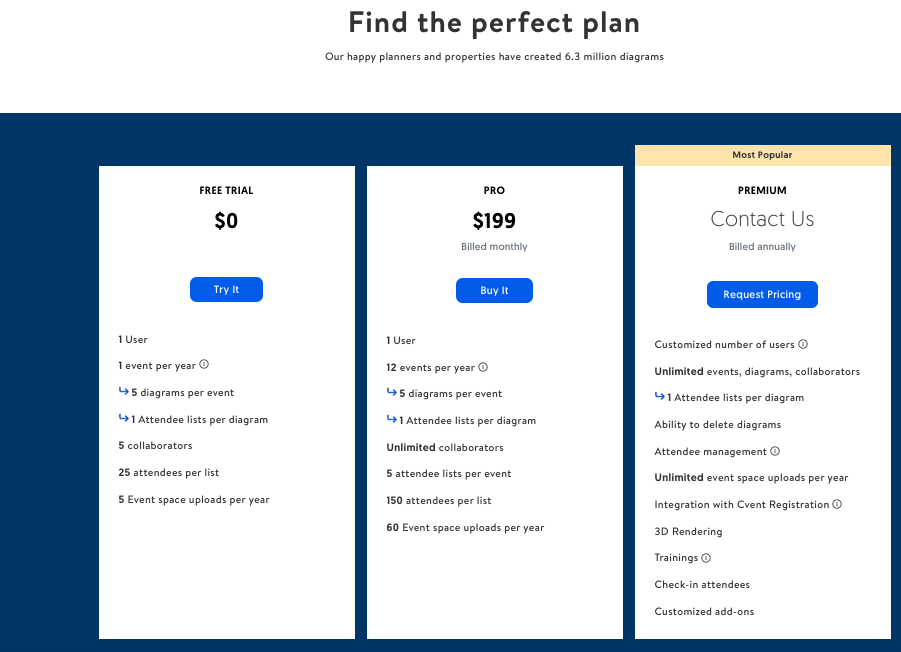 |  |
Other Details
Organization Types supported |
|
|
|---|---|---|
Platforms Supported |
|
|
Modes of support |
|
|
API Support |
|
|
Get help choosing | Get help choosing |
Security & Compliance
Certifications, data handling, and security controls for IT and compliance evaluators.
HIPAA | — | ✗ No |
|---|---|---|
Data Residency | — | 🌐 Global |
Social Tables User Reviews & Rating Comparison
User Ratings | ||
|---|---|---|
Rating Distribution | ||
Spotsaas Editor’s POV generated by AI | Buyer sentiment Buyers appreciate Social Tables for its intuitive event layout design and collaboration features but note limitations due to missing registration tools and internet dependency. What buyers like
Common complaints
| Buyer sentiment Users consistently praise FLOOR for its ease of use, professional virtual event features, and strong customer support, while noting some challenges with customization complexity and limited integrations. What buyers like
Common complaints
|
Pros and Cons |
|
|
Positive Reviews | No reviews available for the product | No reviews available for the product |
List of Customers
Customers |  Salesforce  Fairmont |  Informa Markets  Messe Dusseldorf Shanghai  UBM |
|---|
Media and Screenshots
Screenshots | 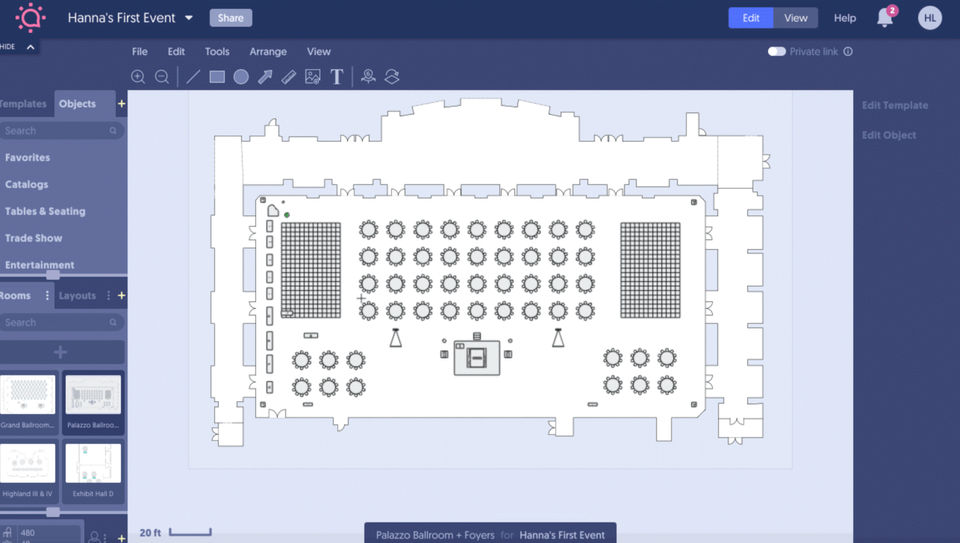 3 Screenshots |  5 Screenshots |
|---|---|---|
Videos |  2 Videos |  2 Videos |
Top Alternatives to Social Tables and FLOOR in 2026
Alternatives |
|---|


Add another option to compare side by side
Search by product name to compare pricing, fit, and buyer feedback in one view.Compare similar software options


Related Blogs and Articles for Virtual Event Platforms


Disclaimer: This research has been collated from a variety of authoritative sources. We welcome your feedback at [email protected].
Frequently asked questions
- Which is better, Social Tables or FLOOR?
- FLOOR edges out the other on user ratings (4.7 vs 4.4). That said, the best pick depends on your use case — use the comparison tables above to evaluate each dimension.
- Do Social Tables and FLOOR offer a free trial?
- Social Tables offers a free trial. FLOOR does not.
- What is the starting price of Social Tables vs FLOOR?
- Social Tables starts at $199 /month. FLOOR starts at $50.
- What are the top alternatives to Social Tables?
- Top alternatives to Social Tables include Planning Pod, AllSeated, Circa, SoPlan, EventDraw.
- What are the top alternatives to FLOOR?
- Top alternatives to FLOOR include Connect Space, Event Always, Accelevents Virtual Events, V-Tour, VES Virtual.