
Snagit vs Loom Comparison

Snagit
Starting at $29.95 One-Time License
- Free Trial
- Individuals
- Freelancers / Consultants
Snagit lets user capture anything on the screen, from videos of epic fails to the action replays in a favorite games! Record screen and narrate at the same time with Snagit's exclusive HD voice narrations. Use Screen Rec…

Loom
Starting at $15 /user/month
- Free Trial
- Large Enterprises
- Small Business
Loom is a video messaging and screen recording platform designed to help teams communicate and collaborate more effectively, especially in remote and distributed work environments. It enables users to easily record their…
Spotsaas Analysis
SnagitLoom
The core difference between Snagit and Loom lies in their target audience and pricing, with Snagit being ideal for small to medium businesses seeking a straightforward screen recording tool, while Loom caters to larger organizations with a broader range of professional roles. Snagit is best for users needing a simple interface for creating tutorials, whereas Loom is suited for teams in various sectors looking for collaborative video messaging solutions.
- Best for simple screen recording - User-friendly interface - Ideal for tutorials and training videos - HD voice quality narration - Priced at $29.95 - Suitable for small to medium businesses
- Designed for larger organizations - Supports various professional roles - Focus on collaborative video messaging - Priced at $15 - Ideal for technology, marketing, and education sectors - Scalable for teams of 10 to 5000 employees
Snagit vs Loom — at a glance
| Feature | Snagit | Loom |
|---|---|---|
| Rating | 4.7 / 5 | 4.7 / 5 |
| Reviews | 2,353 | 1,604 |
| Starting price | $29.95 One-Time License | $15 /user/month |
| Free trial | Yes | Yes |
| Free version | No | No |
| Best for | Individuals, Freelancers / Consultants, Large Enterprises | Large Enterprises, Small Business, Medium Business |
| Category | Screen Recording Software | Screen Recording Software |
| Platforms | SaaS/Web/Cloud, Installed - Windows, Installed - Mac | Browser Based (Cloud), Mobile - Android, Mobile - iOS |
| API | — | Available |
| Support modes | Online | Online |
| Certifications | — | SOC 2 |
| Data residency | US | Global |
Key differences between Snagit and Loom
- Pricing: Snagit starts at $29.95 One-Time License, while Loom starts at $15 /user/month.
- Target audience: Snagit is built for Individuals and Freelancers / Consultants, while Loom targets Large Enterprises and Small Business.
- Deployment: Snagit supports SaaS/Web/Cloud, Installed - Windows, Installed - Mac; Loom supports Browser Based (Cloud), Mobile - Android, Mobile - iOS.
Snagit vs Loom — find the better fit before you commit.
Which tool fits your team best
Which is actually cheaper for your team size
Where each product wins, per real buyers
Most Screen Recording Software tools look identical on paper. This comparison cuts to the differences that matter — pricing structure, team fit, and what real buyers found after signing up.
Biggest differences
Features
Pricing
Buying details
Security
Buyer feedback
Integrations
Product tour
Other options
Free PDF comparison
Download this Snagit vs Loom comparison
Get the full side-by-side as a PDF — these picks plus the top Screen Recording Software tools, with verified ratings, pricing and features.
- Side-by-side on pricing, features & ratings
- Plus the category top 10, scored & ranked
- Emailed to you — no on-screen download
No file downloads on screen — we email it to you. One-click unsubscribe anytime.
Snagit vs Loom: Biggest differences
Start here before you go deeper into features.
Best for simple, versatile screen recording with easy narration and sharing.
- You need a user-friendly tool for creating tutorials or training videos.
- You want to record screen and narrate simultaneously with HD voice quality.
- You prefer quick sharing options to social platforms like Facebook and YouTube.
- Your team requires advanced video editing and production capabilities.
- You need integrated project management or collaboration features within the software.
Large Enterprises, Small Business, Medium Business
Snagit typically suits Individuals and Freelancers / Consultants. Loom tends to fit Large Enterprises and Small Business better. The right choice depends on your team size, workflow, and whether a free trial matters.
Description | Snagit lets user capture anything on the screen, from videos of epic fails to the action replays in a favorite games! Record screen and narrate at the same time with Snagit's exclusive HD ... Read More about Snagit | Loom is a video messaging and screen recording platform designed to help teams communicate and collaborate more effectively, especially in remote and distributed work environments. It ... Read More about Loom |
|---|---|---|
Entry Level Pricing |
|
|
Free Trial Availability | ||
SpotScoreWhat's this? ↗ | 9.8/10 | Not Available |
User RatingsBased on verified Spotsaas reviews | ||
Best Company Size | Small BusinessMedium Business | 10 to 5000 Employees |
Get pricing help | Get pricing help |
Where each option fits best
See where each product is strongest, which teams it fits, and what causes buyers to keep looking — before you commit.
Based on buyer reviews and verified product data collected by Spotsaas.
Key strengths
- Boosted Productivity and Security: Improves productivity with built-in editing, secure sharing, and smooth integrations with workplace tools.
- Smooth Team Collaboration: Encourages team collaboration across time zones with captions, transcripts, and asynchronous viewing flexibility.
- Streamlined Communication: Simplifies communication by replacing long emails and repetitive meetings with quick, engaging video messages.
Best fit
- 10 to 5000 Employees
- Technology, Marketing, Education, Consulting, Healthcare, Customer Support, Design, Finance
- Marketing Managers, Customer Success Specialists, Product Managers, Educators, Software Engineers, Sales Executives, Team Leads, Human Resource Managers
Reasons buyers look elsewhere
- Some users prefer platforms offering advanced real-time collaboration since Loom focuses on asynchronous video communication.
- Organizations seeking deeper project management integrations may opt for alternatives with native task-tracking and workflow automation.
- Teams needing unlimited storage at no extra cost sometimes choose other solutions with more generous free plans.
Software Demo
Demo |
|---|
Need a second opinion?
Get decision help from a software advisor
Share your priorities, budget, and team needs, and we’ll help you narrow the options and understand the tradeoffs before you talk to vendors.

- Independent advice — matched to your business
- Understand the tradeoffs before you talk to vendors
- Free 15-min call with a software advisor.
Step 1 of 4
How big is your team?
We tailor recommendations to companies your size.















How do Snagit and Loom Compare on Features?
Total Features | 8 Features | 7 Features |
|---|---|---|
Unique Features | No unique features | No unique features |
Get Quote | Get Quote |
Compare Snagit and Loom on pricing
Review starting price, plan structure, and free-trial access side by side so you can see which option fits your budget and buying process.
Pricing Option | ||
|---|---|---|
Starting From |
|
|
Pricing Plans |
|
|
Pricing Page |  | 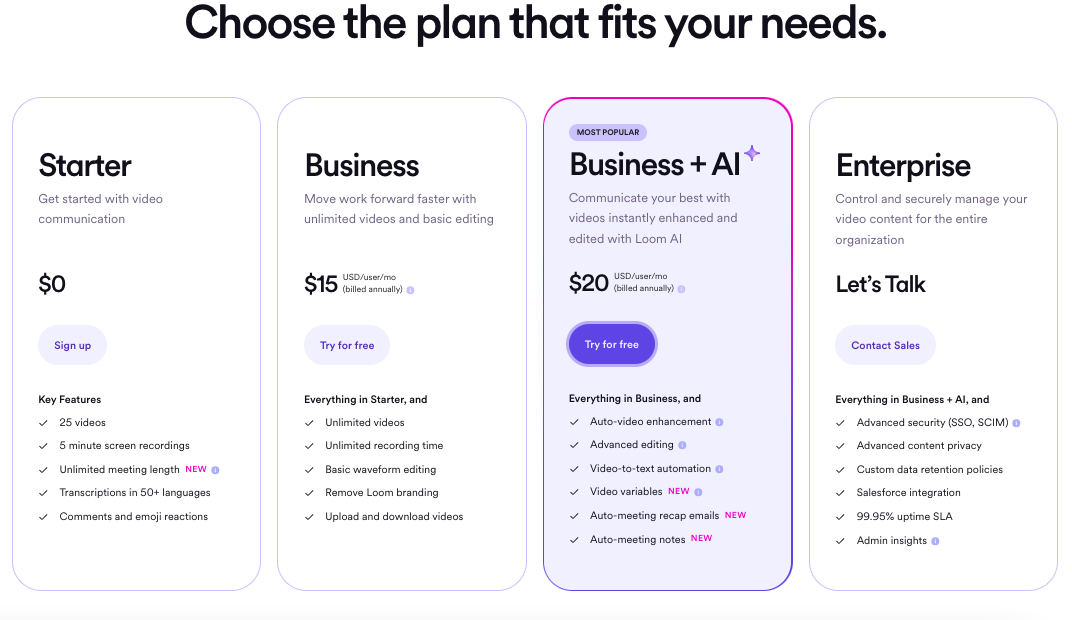 |
Snagit vs Loom: Other Details
Organization Types supported |
|
|
|---|---|---|
Platforms Supported |
|
|
Modes of support |
|
|
API Support |
|
|
Get help choosing | Get help choosing |
Snagit vs Loom Security & Compliance
Certifications, data handling, and security controls for IT and compliance evaluators.
SOC 2 | — | ✓ Yes |
|---|---|---|
HIPAA | — | ✗ No |
Data Residency | 🇺🇸 US | 🌐 Global |
Snagit User Reviews & Rating Comparison
User Ratings | ||
|---|---|---|
Rating Distribution | ||
Spotsaas Editor’s POV generated by AI | Buyer sentiment Overall, users praise Snagit for its ease of use and versatile screen recording features, despite minor update-related issues. What buyers like
Common complaints
| Buyer sentiment Buyer sentiment is very strong across 1811 reviews, with consistently positive feedback. What buyers like
Common complaints
|
Pros and Cons |
|
|
Positive Reviews | No reviews available for the product | No reviews available for the product |
| Negative Reviews | No reviews available for the product | No reviews available for the product |
Snagit and Loom Customers
Customers |  Walmart  Verizon  Fedex |  Hubspot  Disney  Ford |
|---|
Media and Screenshots
Screenshots | No screenshots available. | 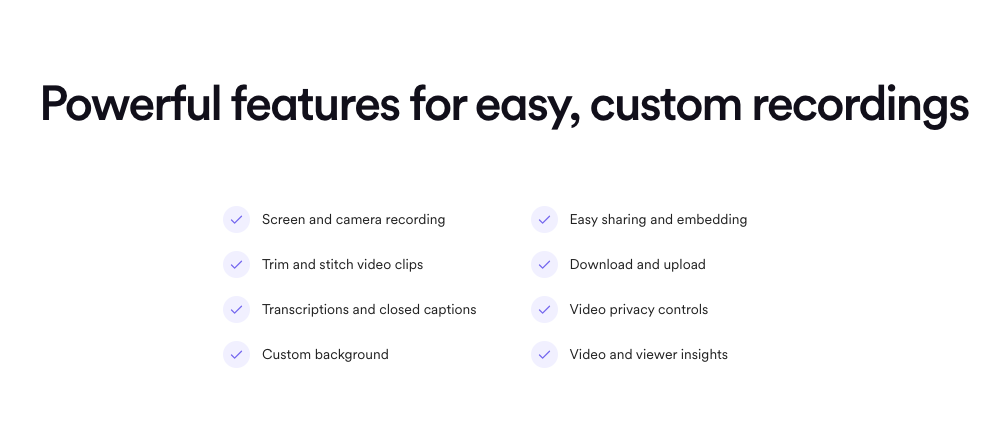 6 Screenshots |
|---|---|---|
Videos |  2 Videos |  2 Videos |


Add another option to compare side by side
Search by product name to compare pricing, fit, and buyer feedback in one view.Compare similar software options




Disclaimer: This research has been collated from a variety of authoritative sources. We welcome your feedback at [email protected].
Frequently asked questions
- Which is better, Snagit or Loom?
- Snagit and Loom are closely matched with equal user ratings of 4.7. The right choice depends on your team size, budget, and specific Screen Recording Software needs.
- Do Snagit and Loom offer a free trial?
- Yes, both Snagit and Loom offer a free trial.
- What is the starting price of Snagit vs Loom?
- Snagit starts at $29.95 One-Time License. Loom starts at $15 /user/month.
- What are the top alternatives to Snagit?
- Top alternatives to Snagit include Scribe, Vmaker, Screencastify, ScreenFlow, Filmage Screen.
- What are the top alternatives to Loom?
- Top alternatives to Loom include berrycast, Scribe, Snagit, Screenrec, Screen Studio.