
Slack vs Onshape Comparison

Slack
Starting at $2.67 /Month
- Free Trial
- Free Version
- Freelancers / Consultants
- Large Enterprises
Slack is the only unified communication platform for chatting, sharing, and collaborating. Whether in one-on-one conversations or a large group, Slack's threaded conversations keep everyone on the same page. No more emai…

Onshape
Starting at $1500 /year
- Free Trial
- Free Version
- Medium Business
- Large Enterprises
Experience the ultimate product development platform on the cloud with Onshape. With an integrated data management system, there's no need for a separate PDM system. Collaborate in real-time with your team to make change…
Slack leads on user satisfaction with a 4.8-star rating across 2,509 reviews.
Slack vs Onshape — at a glance
| Feature | Slack | Onshape |
|---|---|---|
| Rating | 4.8 / 5 | 4.7 / 5 |
| Reviews | 2,509 | 419 |
| Starting price | $2.67 /Month | $1500 /year |
| Free trial | Yes | Yes |
| Free version | Yes | Yes |
| Best for | Freelancers / Consultants, Large Enterprises, Medium Business | Medium Business, Large Enterprises |
| Category | Business Instant Messaging Software | Product Data Management Software |
| Integrations | — | 4+ apps |
| Platforms | SaaS/Web/Cloud, Mobile - Android, Mobile - iOS, Installed - Windows, Installed - Mac | SaaS/Web/Cloud |
| API | Available | — |
| Support modes | Online | — |
Key differences between Slack and Onshape
- Pricing: Slack starts at $2.67 /Month, while Onshape starts at $1500 /year.
- Target audience: Slack is built for Freelancers / Consultants and Large Enterprises, while Onshape targets Medium Business and Large Enterprises.
- User satisfaction: Slack scores higher with a 4.8-star average.
- Deployment: Slack supports SaaS/Web/Cloud, Mobile - Android, Mobile - iOS, Installed - Windows, Installed - Mac; Onshape supports SaaS/Web/Cloud.
Slack vs Onshape — find the better fit before you commit.
Which tool fits your team best
Which is actually cheaper for your team size
Where each product wins, per real buyers
Most Business Instant Messaging Software tools look identical on paper. This comparison cuts to the differences that matter — pricing structure, team fit, and what real buyers found after signing up.
Biggest differences
Features
Pricing
Buying details
Security
Buyer feedback
Integrations
Product tour
Other options
Free PDF comparison
Download this Slack vs Onshape comparison
Get the full side-by-side as a PDF — these picks plus the top Business Instant Messaging Software tools, with verified ratings, pricing and features.
- Side-by-side on pricing, features & ratings
- Plus the category top 10, scored & ranked
- Emailed to you — no on-screen download
No file downloads on screen — we email it to you. One-click unsubscribe anytime.
Slack vs Onshape: Biggest differences
Start here before you go deeper into features.
Best for streamlined team communication and collaboration across varied company sizes.
- You need a unified platform for both one-on-one and group messaging.
- Your team benefits from threaded conversations to reduce email overload.
- You want a simple, low-complexity setup for remote or cross-functional teams.
- Your organization requires specialized industry compliance features not supported by Slack.
- Your team prefers email-centric workflows over instant messaging platforms.
Best for cloud-based real-time collaborative product design and version control.
- You need seamless real-time collaboration among multiple engineers on the same design.
- Your team requires integrated product data management without separate PDM systems.
- You want cloud access from any device without installing software locally.
- Your team lacks reliable internet access for consistent cloud usage.
- You require highly specialized engineering workflows not natively supported by Onshape.
Slack: Best for streamlined team communication and collaboration across varied company sizes. Onshape: Best for cloud-based real-time collaborative product design and version control.
Description | Slack is the only unified communication platform for chatting, sharing, and collaborating. Whether in one-on-one conversations or a large group, Slack's threaded conversations keep everyone ... Read More about Slack | Experience the ultimate product development platform on the cloud with Onshape. With an integrated data management system, there's no need for a separate PDM system. Collaborate in ... Read More about Onshape |
|---|---|---|
Entry Level Pricing |
|
|
Free Trial Availability |
| |
SpotScoreWhat's this? ↗ | Not Available | 9.8/10 |
User RatingsBased on verified Spotsaas reviews | ||
Best Company Size | 1-50 employees500+ employees | 201-500 employeesLarge Enterprises |
Get pricing help | Get pricing help |
Where each option fits best
See where each product is strongest, which teams it fits, and what causes buyers to keep looking — before you commit.
Based on buyer reviews and verified product data collected by Spotsaas.
Key strengths
- Scalable engineering workflows: The platform supports integrations through its App Store, enabling companies to extend CAD capabilities with simulation, manufacturing, and product lifecycle tools. This allows engineering teams to build a complete product development workflow.
- Cloud accessibility: Since Onshape runs in a browser, users can access their designs from any device with internet access. Engineers can review models, make edits, and collaborate with teammates without installing specialized CAD software.
- Automatic version control: The platform automatically tracks design revisions and maintains a complete history of changes. Engineers can compare versions, revert to previous designs, and manage product development iterations without manually saving files.
Best fit
- 201–500
- Computer-Aided Design (CAD), Product Design Software, Mechanical Engineering Software, Manufacturing Technology, Industrial Design
- Mechanical Engineer, Product Designer, CAD Engineer, Manufacturing Engineer, Design Engineer, Engineering Manager, Industrial Designer, Hardware Engineer, Product Development Engineer, R&D Engineer
Reasons buyers look elsewhere
- Onshape’s subscription pricing can become expensive for organizations with large engineering teams. Some companies prefer solutions that offer perpetual licensing or different pricing structures.
- Many companies already rely on established CAD systems integrated with their manufacturing or product lifecycle management tools. Switching to a new CAD platform can require redesigning workflows and migrating large design libraries.
- Certain industries require extremely specialized CAD features such as advanced surface modeling, complex simulations, or legacy CAD compatibility. In those cases, organizations may prefer platforms designed specifically for highly advanced mechanical engineering workflows.
Software Demo
Demo |
|---|
Need a second opinion?
Get decision help from a software advisor
Share your priorities, budget, and team needs, and we’ll help you narrow the options and understand the tradeoffs before you talk to vendors.

- Independent advice — matched to your business
- Understand the tradeoffs before you talk to vendors
- Free 15-min call with a software advisor.
Step 1 of 4
How big is your team?
We tailor recommendations to companies your size.















How do Slack and Onshape Compare on Features?
Total Features | 8 Features | 8 Features |
|---|---|---|
Unique Features | No unique features | No unique features |
Get Quote | Get Quote |
Compare Slack and Onshape on pricing
Review starting price, plan structure, and free-trial access side by side so you can see which option fits your budget and buying process.
Pricing Option | ||
|---|---|---|
Starting From |
|
|
Pricing Plans |
|
|
Pricing Page |  | 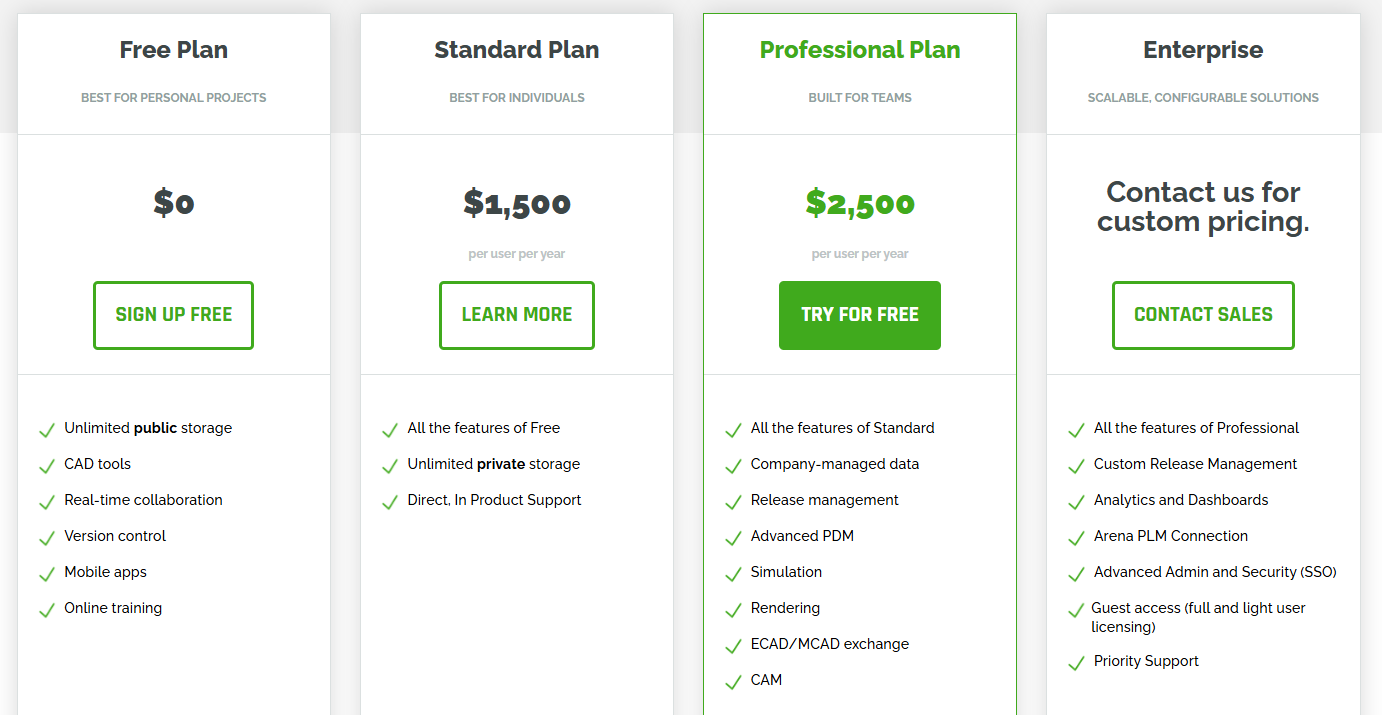 |
Slack vs Onshape: Other Details
Organization Types supported |
|
|
|---|---|---|
Platforms Supported |
|
|
Modes of support |
|
|
API Support |
|
|
Get help choosing | Get help choosing |
Slack User Reviews & Rating Comparison
User Ratings | 4.7 (based on 419 reviews) | |
|---|---|---|
Rating Distribution | ||
Spotsaas Editor’s POV generated by AI | Buyer sentiment Overall, users appreciate Slack for its ease of communication and collaboration but note challenges with pricing and information overload. What buyers like
Common complaints
| Buyer sentiment Users highly value Onshape's cloud-based collaboration and version control features but note challenges with internet dependency and adapting from traditional CAD tools. What buyers like
Common complaints
|
Pros and Cons |
|
|
Positive Reviews | No reviews available for the product | No reviews available for the product |
Integrations
Integration with other apps | No Integration information available. |
|---|


Slack and Onshape Customers
Customers |  Slack_customers_0  Slack_customers_1  Slack_customers_2 |  Nvidia  Trek bicycle  Kichler |
|---|
Media and Screenshots
Screenshots |  7 Screenshots | 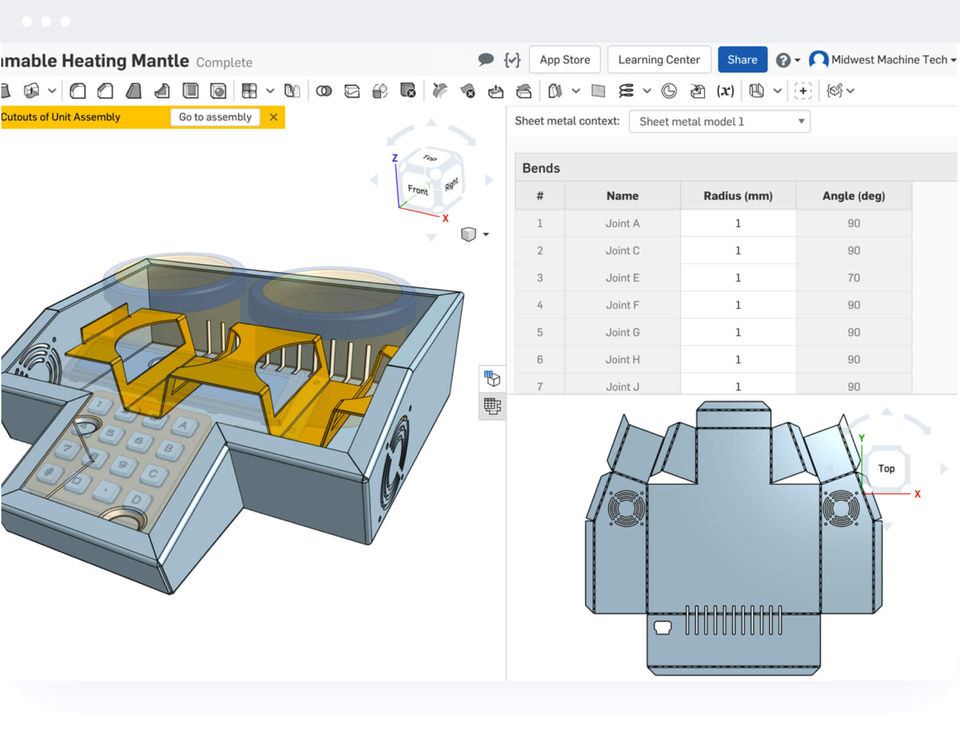 4 Screenshots |
|---|---|---|
Videos |  1 Videos |  2 Videos |


Add another option to compare side by side
Search by product name to compare pricing, fit, and buyer feedback in one view.Compare similar software options


Related Blogs and Articles for Product Data Management Software


Disclaimer: This research has been collated from a variety of authoritative sources. We welcome your feedback at [email protected].
Frequently asked questions
- Which is better, Slack or Onshape?
- Slack edges out the other on user ratings (4.8 vs 4.7). That said, the best pick depends on your use case, so use the comparison tables above to evaluate each dimension.
- Do Slack and Onshape offer a free trial?
- Yes, both Slack and Onshape offer a free trial.
- What is the starting price of Slack vs Onshape?
- Slack starts at $2.67 /Month. Onshape starts at $1500 /year.
- What are the top alternatives to Slack?
- Top alternatives to Slack include Pumble, Hubgets, Hibox, Zulip, Crypho.
- What are the top alternatives to Onshape?
- Top alternatives to Onshape include OpenBOM, Siemens Teamcenter, Duro, PTC Windchill, OpenPDM.
- What is missing from Slack?
- The case for Slack: unified platform for messaging and collaboration; threaded conversations that reduce email overload. The case against: pricing details are not fully transparent and may require sales contact; may lack advanced project management features. It also lacks Contact Management and Project Management.
- Would you recommend Onshape?
- What buyers praise about Onshape: real-time collaboration with multiple engineers working on the same design; cloud-based access from any device without software installation. What they raise as reservations: dependence on stable internet connection for efficient use; some specialized workflows require third-party app integrations. It does not include Report Generation and Lifecycle Management.