
Lightdash vs Qualified Comparison

Lightdash
Starting at Free free
- Free Trial
- Small Business
- Mid-Market
Lightdash is an open-source, dbt-native business intelligence platform designed for modern data teams. It connects directly to dbt models and metrics, letting analysts publish a governed semantic layer that non-technical…

Qualified
Starting at Contact for pricing
- Large Enterprises
- Medium Business
Qualified is an AI-powered conversational marketing platform designed to help modern B2B marketing and sales teams convert website traffic into qualified pipeline. Its flagship feature, Piper the AI SDR Agent, automates…
Qualified leads on user satisfaction with a 4.8-star rating across 55 reviews.
Lightdash vs Qualified — at a glance
| Feature | Lightdash | Qualified |
|---|---|---|
| Rating | 4.6 / 5 | 4.8 / 5 |
| Reviews | 68 | 55 |
| Starting price | Free free | Contact for pricing |
| Free trial | Yes | No |
| Free version | No | No |
| Best for | Small Business, Mid-Market, Enterprise | Large Enterprises, Medium Business, Small Business |
| Category | Business Intelligence Software | Conversational Marketing Software |
| Integrations | — | 7+ apps |
| Platforms | Cloud, On-Premise, Linux | SaaS/Web/Cloud, Mobile - Android, Mobile - iOS |
| API | Available | Available |
| Support modes | Email Support, Community Forum, Help Center, Dedicated CSM (Enterprise) | Online |
Key differences between Lightdash and Qualified
- Pricing: Lightdash starts at Free free. Qualified pricing is not publicly listed.
- Free trial: Lightdash offers a free trial; Qualified does not.
- Target audience: Lightdash is built for Small Business and Mid-Market, while Qualified targets Large Enterprises and Medium Business.
- User satisfaction: Qualified scores higher with a 4.8-star average.
- Deployment: Lightdash supports Cloud, On-Premise, Linux; Qualified supports SaaS/Web/Cloud, Mobile - Android, Mobile - iOS.
Lightdash vs Qualified — find the better fit before you commit.
Which tool fits your team best
Which is actually cheaper for your team size
Where each product wins, per real buyers
Most Business Intelligence Software tools look identical on paper. This comparison cuts to the differences that matter — pricing structure, team fit, and what real buyers found after signing up.
Biggest differences
Features
Pricing
Buying details
Security
Buyer feedback
Integrations
Product tour
Other options
Free PDF comparison
Download this Lightdash vs Qualified comparison
Get the full side-by-side as a PDF — these picks plus the top Business Intelligence Software tools, with verified ratings, pricing and features.
- Side-by-side on pricing, features & ratings
- Plus the category top 10, scored & ranked
- Emailed to you — no on-screen download
No file downloads on screen — we email it to you. One-click unsubscribe anytime.
Biggest differences
Start here before you go deeper into features.
Small Business, Mid-Market, Enterprise
Large Enterprises, Medium Business, Small Business
Lightdash typically suits Small Business and Mid-Market. Qualified tends to fit Large Enterprises and Medium Business better. The right choice depends on your team size, workflow, and whether a free trial matters.
Description | Lightdash is an open-source, dbt-native business intelligence platform designed for modern data teams. It connects directly to dbt models and metrics, letting analysts publish a governed ... Read More about Lightdash | Qualified is an AI-powered conversational marketing platform designed to help modern B2B marketing and sales teams convert website traffic into qualified pipeline. Its flagship feature, ... Read More about Qualified |
|---|---|---|
Entry Level Pricing |
|
|
Free Trial Availability |
| |
SpotScoreWhat's this? ↗ | 9.2/10 | Not Available |
User RatingsBased on verified Spotsaas reviews | ||
Best Company Size | — | 50–1,000 Employees |
Get pricing help | Get pricing help |
Where each option fits best
See where each product is strongest, which teams it fits, and what causes buyers to keep looking — before you commit.
Based on buyer reviews and verified product data collected by Spotsaas.
Key strengths
- Single Source of Truth for Metrics: By building directly on dbt models, Lightdash confirms every dashboard uses the same metric definitions — eliminating the "two people with different numbers" problem.
- Self-Serve Without SQL: Business stakeholders can explore data and build their own views via drag-and-drop, reducing analyst ticket backlogs without sacrificing data governance.
- BI in Your Git Workflow: Dashboard changes go through the same review, testing, and deployment process as code — catching errors before they reach production and creating a full audit trail.
- Automated 24/7 Lead Engagement: Piper AI SDR handles real-time chat, qualification, email follow-up, and meeting booking, keeping high-intent visitors engaged around the clock.
- Deep Conversational Personalization: Messaging designed for specific companies based on intent data and behavior increases relevance and conversion potential.
- Reliable CRM and Marketing Stack Integration: Natively connects with tools like Salesforce, HubSpot, Marketo, Slack, Outreach, and Demandbase to simplify workflows and data sync.
Best fit
- Data teams of 3-15 analysts supporting 50-500 internal stakeholders without per-seat BI cost overhead
- dbt-first data stacks looking for a governed Looker alternative at lower TCO
- Companies with strict data residency or IP requirements that need self-hosted BI
- 50–1,000 Employees
- B2B SaaS, Enterprise Technology, Financial Services, Professional Services, Healthcare Tech
- VP of Marketing, Demand Generation Manager, SDR/BDR Team Lead, Revenue Operations Manager, Director of Sales Development
Reasons buyers look elsewhere
No alternatives guidance available yet.
- While enterprise-grade, Qualified can be feature-heavy for small teams seeking simplicity and speed to launch.
- Admins note some navigational complexity and overlapping routing logic, which could be challenging without dedicated technical staff.
- Users request more advanced qualitative analytics on chat transcripts and smart‑button performance.
Software Demo
Demo |
|---|
Need a second opinion?
Get shortlist help from a software advisor
Share your priorities, budget, and team needs, and we’ll help you narrow the options and understand the tradeoffs before you talk to vendors.

- Independent advice — matched to your business
- Understand the tradeoffs before you talk to vendors
- Free 15-min call with a software advisor.
Step 1 of 4
How big is your team?
We tailor recommendations to companies your size.















How do Lightdash and Qualified Compare on Features?
Total Features | 8 Features | 15 Features |
|---|---|---|
Unique Features | No unique features | No unique features |
Get Quote | Get Quote |
Compare Lightdash and Qualified on pricing
Review starting price, plan structure, and free-trial access side by side so you can see which option fits your budget and buying process.
Pricing Option | ||
|---|---|---|
Starting From |
|
|
Pricing Plans |
| |
Pricing Page | Pricing information not available | 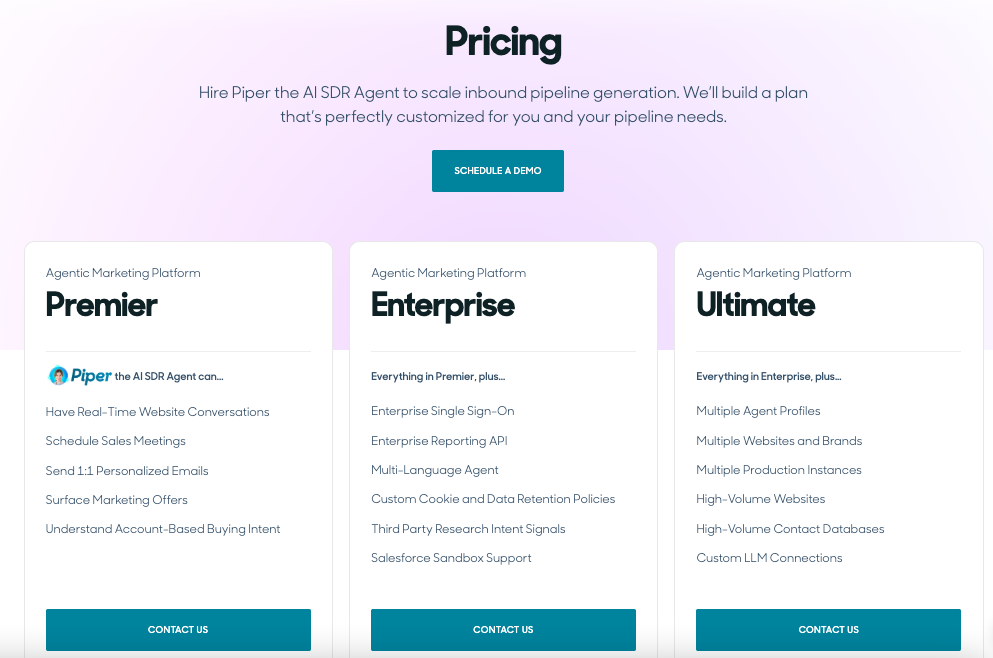 |
Other Details
Organization Types supported |
|
|
|---|---|---|
Platforms Supported |
|
|
Modes of support |
|
|
API Support |
|
|
Get help choosing | Get help choosing |
Lightdash User Reviews & Rating Comparison
User Ratings | 4.6 (based on 68 reviews) | |
|---|---|---|
Rating Distribution | ||
Spotsaas Editor’s POV generated by AI | Buyer sentiment Buyer sentiment is very strong across 68 reviews, with consistently positive feedback. What buyers like
Common complaints
| Buyer sentiment Buyer sentiment is very strong across 105 reviews, with consistently positive feedback. What buyers like
Common complaints
|
Pros and Cons |
|
|
Positive Reviews | No reviews available for the product | No reviews available for the product |
Integrations
Integration with other apps | No Integration information available. |
|---|


List of Customers
Customers | No Customers information available. |  Box  Greenhouse  asana |
|---|
Media and Screenshots
Screenshots | No screenshots available. | 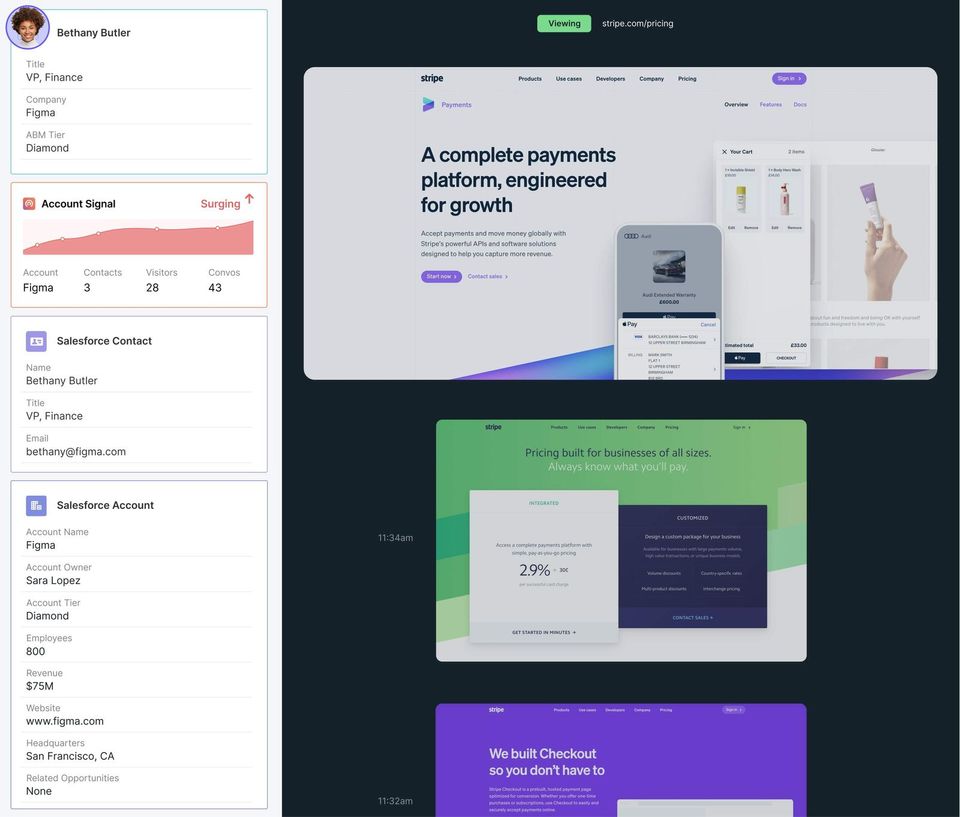 5 Screenshots |
|---|---|---|
Videos | No videos available. |  1 Videos |
Top Alternatives to Lightdash and Qualified in 2026
Alternatives | No Alternative products available. |
|---|
Add another option to compare side by side
Search by product name to compare pricing, fit, and buyer feedback in one view.Compare similar software options


Related Blogs and Articles for Conversational Marketing Software
Disclaimer: This research has been collated from a variety of authoritative sources. We welcome your feedback at [email protected].
Frequently asked questions
- Which is better, Lightdash or Qualified?
- Qualified edges out the other on user ratings (4.8 vs 4.6). That said, the best pick depends on your use case — use the comparison tables above to evaluate each dimension.
- Do Lightdash and Qualified offer a free trial?
- Lightdash offers a free trial. Qualified does not.
- What is the starting price of Lightdash vs Qualified?
- Lightdash starts at Free free. Qualified starts at Contact for pricing.
- What are the top alternatives to Qualified?
- Top alternatives to Qualified include Conversica, Automat, ChatFunnels, Konverse AI, Conversational AI Bot.