
Jira vs ClickUp Comparison

Jira
Starting at $7.53 /user/month
- Free Trial
- Large Enterprises
- Medium Business
Jira is every team's tool for project management, making it easy to track progress, priorities, and workload, while staying connected across teams. The platform helps plan, track, and launch world-class products. From si…

ClickUp
Starting at $7 /User/Month
- Free Trial
- Freelancers / Consultants
- Large Enterprises
ClickUp is a versatile cloud-based project management platform designed to cater to both individual project needs and the complex demands of enterprise-level teams. Offering a customizable planning experience, it allows…
ClickUp leads on user satisfaction with a 4.9-star rating across 2,716 reviews.
ClickUp vs Jira: who else has to use it?
Jira is the default for software delivery. Backlogs, sprints, estimates, releases and the reports engineering leaders expect are native, and the whole Atlassian ecosystem assumes it.
ClickUp covers software work too, and adds everything around it: docs, goals, time tracking and a task model that marketing and operations will also tolerate.
The decision usually turns on one question. If only engineers use the tool, Jira's depth wins. If the same tool has to serve engineers and everyone else, ClickUp is the compromise most companies land on.
Consider monday.com
Comparing Jira and ClickUp? monday.com is another option worth a look: visual boards, 200+ templates and a free plan for up to 2 seats.
We may earn a commission. Affiliate disclosure
What Jira does that ClickUp does not match
- Workflow control: states, transitions, conditions and permissions configured per project and enforced properly.
- Agile reporting: burndown, velocity and sprint reports that engineering managers already know how to read.
- Ecosystem: a deep marketplace, plus Confluence and Bitbucket links that assume Jira is the system of record.
- Scale: large organisations with audit and permission requirements tend to end up here.
What ClickUp does that Jira does not match
- One tool for mixed teams: a designer, a marketer and a developer can all work in it without three licences and three habits.
- Built-in extras: docs, goals, whiteboards and time tracking arrive included instead of as separate purchases.
- Setup speed: a usable space exists on day one, where Jira usually wants someone to design the workflow first.
- Views: list, board, calendar, timeline and table on the same work, which non-engineers use far more than they admit.
Jira vs ClickUp — at a glance
| Feature | Jira | ClickUp |
|---|---|---|
| Rating | 4.8 / 5 | 4.9 / 5 |
| Reviews | 1,066 | 2,716 |
| Starting price | $7.53 /user/month | $7 /User/Month |
| Free trial | Yes | Yes |
| Free version | No | No |
| Best for | Large Enterprises, Medium Business, Small Business | Freelancers / Consultants, Large Enterprises, Medium Business |
| Category | Product Management Software | Collaboration Software |
| Integrations | — | 1+ apps |
| Platforms | SaaS/Web/Cloud, Mobile - Android, Mobile - iOS, Installed - Windows, Installed - Mac | SaaS/Web/Cloud, Mobile - Android, Mobile - iOS, Installed - Windows, Installed - Mac |
| API | Available | Available |
| Support modes | 24/7 (Live rep), Online | 24/7 (Live rep), Business Hours, Online |
| Certifications | SOC 2, HIPAA, GDPR, ISO 27001 | SOC 2, HIPAA, GDPR |
| Data residency | Global | Global |
Key differences between Jira and ClickUp
- Pricing: Jira starts at $7.53 /user/month, while ClickUp starts at $7 /User/Month.
- Target audience: Jira is built for Large Enterprises and Medium Business, while ClickUp targets Freelancers / Consultants and Large Enterprises.
- User satisfaction: ClickUp scores higher with a 4.9-star average.
- Deployment: Jira supports SaaS/Web/Cloud, Mobile - Android, Mobile - iOS, Installed - Windows, Installed - Mac; ClickUp supports SaaS/Web/Cloud, Mobile - Android, Mobile - iOS, Installed - Windows, Installed - Mac.
Jira vs ClickUp — find the better fit before you commit.
Which tool fits your team best
Which is actually cheaper for your team size
Where each product wins, per real buyers
Most Product Management Software tools look identical on paper. This comparison cuts to the differences that matter — pricing structure, team fit, and what real buyers found after signing up.
Biggest differences
Features
Pricing
Buying details
Security
Buyer feedback
Integrations
Product tour
Other options
Free PDF comparison
Download this Jira vs ClickUp comparison
Get the full side-by-side as a PDF — these picks plus the top Product Management Software tools, with verified ratings, pricing and features.
- Side-by-side on pricing, features & ratings
- Plus the category top 10, scored & ranked
- Emailed to you — no on-screen download
No file downloads on screen — we email it to you. One-click unsubscribe anytime.
Jira vs ClickUp: Biggest differences
Start here before you go deeper into features.
Best for Agile teams needing customizable, robust project management.
- You manage SaaS product development or consulting projects with Agile methods.
- Your team requires highly configurable workflows and detailed real-time reporting.
- You need strong integration capabilities with popular development and collaboration tools.
- Your team prefers simple, minimal project management without complexity.
- You require extensive third-party app integrations beyond Jira Marketplace limits.
Best for customizable, all-in-one project management in mid-to-large teams.
- You need highly customizable workflows adaptable to diverse project methods.
- Your team values an intuitive interface that streamlines task and workflow management.
- You want a single platform consolidating tasks, docs, goals, and chat.
- Your team lacks technical expertise and may struggle with a steep learning curve.
- You require extensive third-party app integrations and marketplace connectors.
Jira: Best for Agile teams needing customizable, robust project management. ClickUp: Best for customizable, all-in-one project management in mid-to-large teams.
Description | Jira is every team's tool for project management, making it easy to track progress, priorities, and workload, while staying connected across teams. The platform helps plan, track, and ... Read More about Jira | ClickUp is a versatile cloud-based project management platform designed to cater to both individual project needs and the complex demands of enterprise-level teams. Offering a customizable ... Read More about ClickUp |
|---|---|---|
Entry Level Pricing |
|
|
Free Trial Availability | ||
SpotScoreWhat's this? ↗ | 9.8/10 | 9.8/10 |
User RatingsBased on verified Spotsaas reviews | ||
Best Company Size | 50-500 employees501-5,000 employees | 50-500 employeesLarge enterprises |
Get pricing help | Get pricing help |
Where each option fits best
See where each product is strongest, which teams it fits, and what causes buyers to keep looking — before you commit.
Based on buyer reviews and verified product data collected by Spotsaas.
Key strengths
- Project Management: With Jira, teams can easily plan, track, and manage projects in one centralized platform. It improves collaboration and keeps everyone on the same page.
- Customizable Workflows: Jira offers the flexibility to tailor workflows according to your team's unique processes. This adaptability means you can optimize productivity without compromising your established practices.
- Real-Time Reporting & Analytics: Managers can use Jira's reporting features to track project progress and team performance. These metrics support decision-making and strategic planning.
- Streamlined Project Management: ClickUp offers an intuitive platform that simplifies project management, allowing teams to easily collaborate, set priorities, and track progress. As a manager, you’ll find that this clarity boosts productivity across your organization.
- Customizable Workflows: ClickUp's flexible features let you design workflows for your specific needs. Whether you're an administrator looking to speed up processes or an executive wanting a bird's-eye view of operations, this adaptability keeps everyone aligned.
- All-in-One Tool: Say goodbye to juggling multiple applications. ClickUp brings together tasks, docs, goals, and chat in one smooth experience. This means less time switching between tools and more time focusing on what truly matters—driving results.
Best fit
- 50 to 5,000 employees
- SaaS, Consulting, Fintech, Martech, and Revtech
- Project Managers, Software Developers, Agile Coaches, Product Owners, and QA Engineers
- 50 to 500 employees
- Martech, SaaS, Consulting, Fintech, Project Management, and Creative Agencies
- Project Managers, Product Managers, Marketing Coordinators, Team Leaders, and Operations Managers
Reasons buyers look elsewhere
- Users may seek alternatives to Jira due to its complexity, particularly for smaller teams or projects that require a more straightforward, user-friendly interface without the steep learning curve associated with Jira's extensive features.
- Budget constraints can drive users to consider alternatives, as some options offer similar functionalities at a lower cost, making them more accessible for startups or smaller organizations with limited resources.
- Teams might look for solutions that better integrate with their existing tools and workflows, as Jira's integration capabilities can sometimes be limited or cumbersome compared to other platforms designed for seamless connectivity.
- Simpler interfaces appeal to teams with low technical expertise — Asana and Monday.com both score higher on ease-of-use reviews
- Overwhelming feature set drives migration to Trello, Jira, or Notion for teams needing focused workflows without configuration overhead
- Lower-cost alternatives like Asana ($10.99/user/month) and Monday.com ($8/user/month) compete on price; ClickUp starts at $7/user/month but requires paid add-ons for core features
Software Demo
Demo |
|---|
Need a second opinion?
Get decision help from a software advisor
Share your priorities, budget, and team needs, and we’ll help you narrow the options and understand the tradeoffs before you talk to vendors.

- Independent advice — matched to your business
- Understand the tradeoffs before you talk to vendors
- Free 15-min call with a software advisor.
Step 1 of 4
How big is your team?
We tailor recommendations to companies your size.















How do Jira and ClickUp Compare on Features?
Total Features | 41 Features | 44 Features |
|---|---|---|
Unique Features | No unique features | No unique features |
Get Quote | Get Quote |
Compare Jira and ClickUp on pricing
Review starting price, plan structure, and free-trial access side by side so you can see which option fits your budget and buying process.
Pricing Option | ||
|---|---|---|
Starting From |
|
|
Pricing Plans |
|
|
Pricing Page | 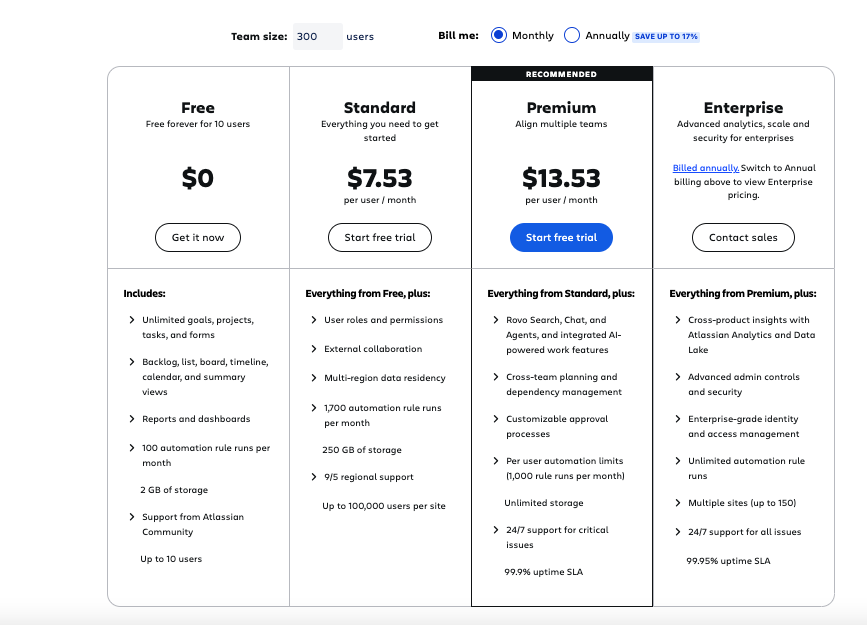 | 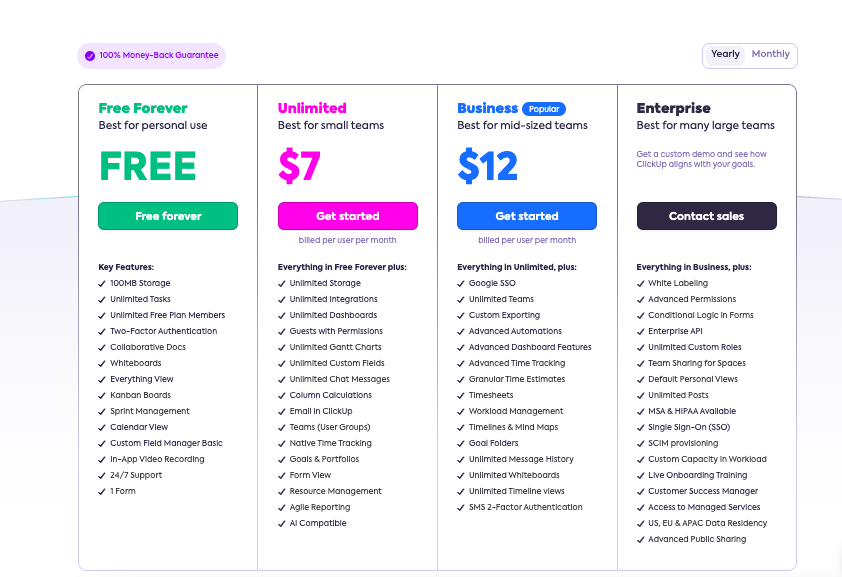 |
Jira vs ClickUp: Other Details
Organization Types supported |
|
|
|---|---|---|
Platforms Supported |
|
|
Modes of support |
|
|
API Support |
|
|
Get help choosing | Get help choosing |
Jira vs ClickUp Security & Compliance
Certifications, data handling, and security controls for IT and compliance evaluators.
SOC 2 | ✓ Yes | ✓ Yes |
|---|---|---|
HIPAA | ✓ Yes | ✓ Yes |
GDPR | ✓ Yes | ✓ Yes |
ISO 27001 | ✓ Yes | ✗ No |
Single Sign-On (SSO) | ✓ Yes | ✓ Yes |
Multi-Factor Auth (MFA) | ✓ Yes | ✓ Yes |
Data Encryption | ✓ Yes | ✓ Yes |
Audit Logs | ✓ Yes | ✓ Yes |
Data Residency | 🌐 Global | 🌐 Global |
Jira User Reviews & Rating Comparison
User Ratings | ||
|---|---|---|
Rating Distribution | ||
Spotsaas Editor’s POV generated by AI | Buyer sentiment Overall, users highly value Jira for its powerful Agile support, customization, and integration, though some find it complex initially. What buyers like
Common complaints
| Buyer sentiment Overall positive sentiment highlighting versatility, customization, and strong customer support, tempered by concerns over initial learning difficulty and limited marketplace options. What buyers like
Common complaints
|
Pros and Cons |
|
|
Positive Reviews | No reviews available for the product | No reviews available for the product |
Integrations
Integration with other apps | No Integration information available. |
|---|

Jira and ClickUp Customers
Customers |  Cisco  ebay  Square |  Samsung  IBM  Booking.com |
|---|
Media and Screenshots
Screenshots |  6 Screenshots |  5 Screenshots |
|---|---|---|
Videos |  1 Videos |  5 Videos |


Add another option to compare side by side
Search by product name to compare pricing, fit, and buyer feedback in one view.Compare similar software options


Related Blogs and Articles for Collaboration Software




Disclaimer: This research has been collated from a variety of authoritative sources. We welcome your feedback at [email protected].
Cost
Our listing data (last refreshed May 2026) starts ClickUp at $7 per user per month and Jira at $7.53 per user per month, with free trials on both and free tiers for small teams, so seat price will not decide this. The costs that do show up later are the Jira marketplace add-ons teams buy to fill gaps, and, on the other side, the ClickUp features you turn on and then have to govern. Trial both with one real sprint, and include a non-engineer in the test if non-engineers will be using it.
Frequently asked questions
- Is ClickUp a good replacement for Jira?
- For small and mid-sized teams, often yes, and the saving is real when one tool covers engineering and the rest of the company. Teams with strict workflow rules, heavy agile reporting or deep Atlassian ties usually stay on Jira.
- Is Jira only for agile software teams?
- It is built around software delivery and that is where it is strongest. Other teams can use it, though they generally need someone to simplify the workflows first, which is exactly the work ClickUp avoids.
- Which is cheaper, ClickUp or Jira?
- They are within cents at entry level: ClickUp from $7 per user per month and Jira from $7.53 (our data, May 2026). Judge the total instead, including Jira marketplace add-ons and which plan holds the features you need.
- Can I migrate from Jira to ClickUp?
- ClickUp provides a Jira import for issues, comments and attachments. Custom workflows and automation rules do not carry across, so plan to rebuild those and migrate one project before committing.