
Jig Workshop Pro vs Matterport Comparison

Jig Workshop Pro
Starting at $49 /User/Month
- Free Trial
- Free Version
- Large Enterprises
- Medium Business
Jig has plenty of additional functions that allow users to add details in order to make creation based on a 3D model more realistic than ever before. Fully interactive and animated 3D models imported directly from popula…
Matterport
Starting at $12 /month
- Free Version
- Large Enterprises
- Medium Business
Matterport is a digital twin platform that enables users to create immersive 3D virtual models of physical spaces, ideal for showing, managing, and optimizing properties remotely. Designed for real estate agents, constru…
Matterport leads on user satisfaction with a 4.7-star rating across 69 reviews.
Jig Workshop Pro vs Matterport — at a glance
| Feature | Jig Workshop Pro | Matterport |
|---|---|---|
| Rating | — | 4.7 / 5 |
| Reviews | — | 69 |
| Starting price | $49 /User/Month | $12 /month |
| Free trial | Yes | No |
| Free version | Yes | Yes |
| Best for | Large Enterprises, Medium Business, Small Business | Large Enterprises, Medium Business, Small Business |
| Category | 3D Modeling Software | 3D Modeling Software |
| Platforms | SaaS/Web/Cloud, Mobile - iOS | SaaS/Web/Cloud, Mobile - Android, Mobile - iOS |
| API | — | Available |
| Support modes | Online | Online |
Key differences between Jig Workshop Pro and Matterport
- Pricing: Jig Workshop Pro starts at $49 /User/Month, while Matterport starts at $12 /month.
- Free trial: Jig Workshop Pro offers a free trial; Matterport does not.
- Deployment: Jig Workshop Pro supports SaaS/Web/Cloud, Mobile - iOS; Matterport supports SaaS/Web/Cloud, Mobile - Android, Mobile - iOS.
Jig Workshop Pro vs Matterport — find the better fit before you commit.
Which tool fits your team best
Which is actually cheaper for your team size
Where each product wins, per real buyers
Most 3D Modeling Software tools look identical on paper. This comparison cuts to the differences that matter — pricing structure, team fit, and what real buyers found after signing up.
Biggest differences
Features
Pricing
Buying details
Security
Buyer feedback
Integrations
Product tour
Other options
Talk to an expert Talk to an expert | Talk to an expert Talk to an expert |
Free PDF comparison
Download this Jig Workshop Pro vs Matterport comparison
Get the full side-by-side as a PDF — these picks plus the top 3D Modeling Software tools, with verified ratings, pricing and features.
- Side-by-side on pricing, features & ratings
- Plus the category top 10, scored & ranked
- Emailed to you — no on-screen download
No file downloads on screen — we email it to you. One-click unsubscribe anytime.
Jig Workshop Pro vs Matterport: Biggest differences
Start here before you go deeper into features.
Best for creating detailed, interactive 3D models from diverse formats.
- You need to import and animate models from multiple 3D software formats.
- You require advanced detailing to enhance realism in architecture or engineering models.
- Your team consists of professional 3D modelers or product designers in medium to large companies.
- You are a freelancer or hobbyist seeking simple, easy-to-use 3D modeling tools.
- You need extensive customer support, training, or transparent pricing information.
Large Enterprises, Medium Business, Small Business
Jig Workshop Pro typically suits Large Enterprises and Medium Business. Matterport tends to fit Large Enterprises and Medium Business better. The right choice depends on your team size, workflow, and whether a free trial matters.
Description | Jig has plenty of additional functions that allow users to add details in order to make creation based on a 3D model more realistic than ever before. Fully interactive and animated 3D ... Read More about Jig Workshop Pro | Matterport is a digital twin platform that enables users to create immersive 3D virtual models of physical spaces, ideal for showing, managing, and optimizing properties remotely. Designed ... Read More about Matterport |
|---|---|---|
Entry Level Pricing |
|
|
Free Trial Availability |
| |
SpotScoreWhat's this? ↗ | 8.5/10 | Not Available |
User RatingsBased on verified Spotsaas reviews | ||
Best Company Size | Medium BusinessLarge Enterprises | 10–1,000 Employees |
Get pricing help | Get pricing help |
Where each option fits best
See where each product is strongest, which teams it fits, and what causes buyers to keep looking — before you commit.
Based on buyer reviews and verified product data collected by Spotsaas.
Key strengths
- High Fidelity 3D Digital Twins: Creates detailed, immersive 3D tours, accurate floor plans, and visual “dollhouse” views that help stakeholders visualize space
- Integrated Capture and Hosting: Offers an all-in-one model combining scanning hardware, cloud processing, tour hosting, and management tools.
- AEC Workflow Integration: Connects with Procore, Autodesk, AWS IoT TwinMaker, and BIM tools to support construction, property, and facilities workflows.
Best fit
- 10–1,000 Employees
- Real Estate, Architecture & Construction, Facilities Management, Hospitality, Engineering
- Real Estate Agent, Architect, Facility Manager, Construction Manager, BIM Specialist, Marketing Director, Property Manager
Reasons buyers look elsewhere
- The proprietary camera systems (e.g., Pro2, Pro3) and ongoing subscriptions make Matterport relatively expensive, especially for smaller businesses or occasional users
- Predefined tour aesthetics and limited branding control can feel restrictive compared to platforms offering more style flexibility
- Effective scanning often requires Matterport’s own cameras; third-party devices may not provide access to all features
Software Demo
Demo |
|---|
Need a second opinion?
Get decision help from a software advisor
Share your priorities, budget, and team needs, and we’ll help you narrow the options and understand the tradeoffs before you talk to vendors.

- Independent advice — matched to your business
- Understand the tradeoffs before you talk to vendors
- Free 15-min call with a software advisor.
Step 1 of 4
How big is your team?
We tailor recommendations to companies your size.















How do Jig Workshop Pro and Matterport Compare on Features?
Total Features | 6 Features | 8 Features |
|---|---|---|
Unique Features | No unique features | No unique features |
Get Quote | Get Quote |
Compare Jig Workshop Pro and Matterport on pricing
Review starting price, plan structure, and free-trial access side by side so you can see which option fits your budget and buying process.
Pricing Option | ||
|---|---|---|
Starting From |
|
|
Pricing Plans |
| |
Pricing Page |  | 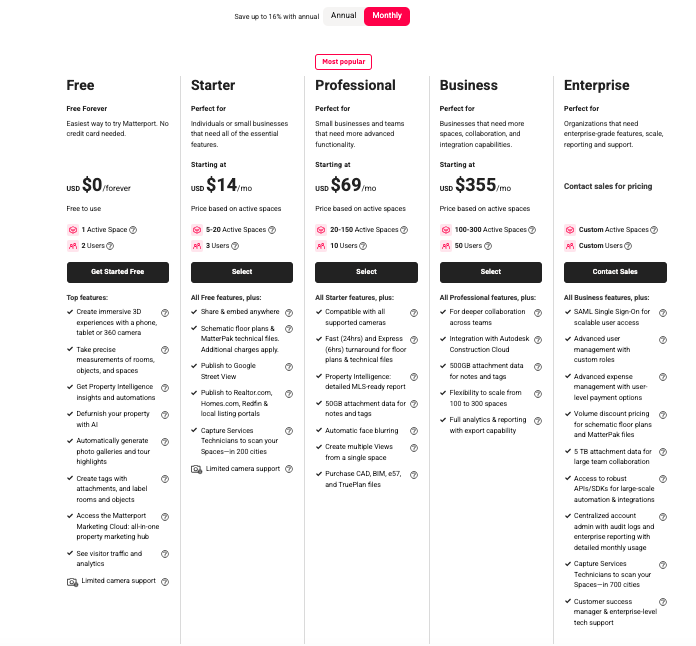 |
Jig Workshop Pro vs Matterport: Other Details
Organization Types supported |
|
|
|---|---|---|
Platforms Supported |
|
|
Modes of support |
|
|
API Support |
|
|
Get help choosing | Get help choosing |
Jig Workshop Pro User Reviews & Rating Comparison
User Ratings | No reviews available for the product | |
|---|---|---|
Rating Distribution | No reviews available for this product | |
Spotsaas Editor’s POV generated by AI | Buyer sentiment No user reviews or ratings available to determine buyer sentiment. What buyers like
Common complaints
| Buyer sentiment Buyer sentiment is very strong across 90 reviews, with consistently positive feedback. What buyers like
Common complaints
|
Pros and Cons |
|
|
Positive Reviews | No reviews available for the product | No reviews available for the product |
Jig Workshop Pro and Matterport Customers
Customers |  Roche  Schlumberger  Pratt |  wework  AWS  VMware |
|---|
Media and Screenshots
Screenshots |  2 Screenshots | 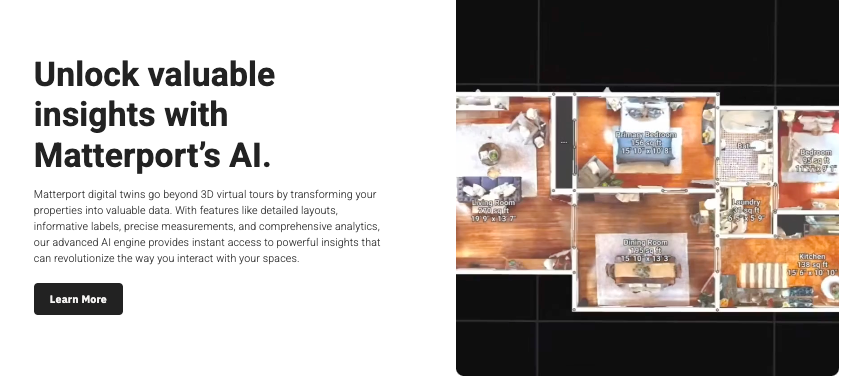 4 Screenshots |
|---|---|---|
Videos |  1 Videos |  2 Videos |
Top Alternatives to Jig Workshop Pro and Matterport in 2026
Alternatives |
|---|


Add another option to compare side by side
Search by product name to compare pricing, fit, and buyer feedback in one view.Compare similar software options


Related Blogs and Articles for 3d Modeling Software
Disclaimer: This research has been collated from a variety of authoritative sources. We welcome your feedback at [email protected].
Frequently asked questions
- Which is better, Jig Workshop Pro or Matterport?
- Matterport has a user rating of 4.7, while Jig Workshop Pro has no user ratings yet. The right choice depends on your team size, budget, and specific 3D Modeling Software needs.
- Do Jig Workshop Pro and Matterport offer a free trial?
- Jig Workshop Pro offers a free trial. Matterport does not.
- What is the starting price of Jig Workshop Pro vs Matterport?
- Jig Workshop Pro starts at $49 /User/Month. Matterport starts at $12 /month.
- What are the top alternatives to Jig Workshop Pro?
- Top alternatives to Jig Workshop Pro include Modo, Adobe Dimension, Amazon Sumerian, Avataar, SketchUp.
- What are the top alternatives to Matterport?
- Top alternatives to Matterport include Intergraph Smart 3D, Blender, SkyCiv, Pool Studio, Cadasio.
- What are the main drawbacks of Jig Workshop Pro?
- The case for Jig Workshop Pro: supports import of multiple popular 3D graphic formats; enables creation of fully interactive and animated 3D models. The case against: lack of publicly available pricing information; no user ratings or reviews to assess user satisfaction. It also lacks Customer Support and Content Management.
- What are the common complaints about Matterport?
- What buyers praise about Matterport: high-quality 3D tours, floor plans, and photography impress buyers and clients; supports everything from smartphones to Pro3 cameras for versatile scanning. What they raise as reservations: hardware and monthly subscriptions can make ROI longer for smaller projects; tour appearance is largely locked to Matterport's default interface. It does not include Customer Support and Content Management.
More 3D Modeling Software comparisons
Side by side breakdowns of the same products against other options in this category.
- Jig Workshop Pro vs Intergraph Smart 3D
- Jig Workshop Pro vs Blender
- Jig Workshop Pro vs SkyCiv
- Jig Workshop Pro vs Pool Studio
- Jig Workshop Pro vs Cadasio
- Jig Workshop Pro vs Adobe Dimension
- Jig Workshop Pro vs Wings 3D
- Jig Workshop Pro vs ArcGIS 3D Analyst
- Jig Workshop Pro vs Amazon Sumerian
- Jig Workshop Pro vs Pano2VR