
GoDaddy Website Builder vs Landingi vs Unbounce Comparison

GoDaddy Website Builder
Starting at $9.99 /Month
- Free Version
- Individuals
- Freelancers / Consultants
GoDaddy Website Builder is a user-friendly platform that allows you to create a professional and efficient website without any coding knowledge. With endless pages and content, social media and email marketing features,…

Landingi
Starting at $29 /month
- Free Trial
- Freelancers / Consultants
- Large Enterprises
Landingi is a landing page builder for marketers and agencies who need to create and manage multiple campaign pages without developer involvement. Its drag-and-drop editor and large template library let teams publish con…

Unbounce
Starting at $81 /Month
- Free Trial
- Free Version
- Freelancers / Consultants
- Large Enterprises
Unbounce is a landing page builder for marketers that lets you design and publish high-converting landing pages -- without having to write a single line of code. Unbounce's powerful drag-and-drop editor means you don't h…
Landingi leads on user satisfaction with a 4.6-star rating across 303 reviews.
GoDaddy Website Builder vs Landingi vs Unbounce — at a glance
| Feature | GoDaddy Website Builder | Landingi | Unbounce |
|---|---|---|---|
| Rating | 4.3 / 5 | 4.6 / 5 | 4.5 / 5 |
| Reviews | 161 | 303 | 338 |
| Starting price | $9.99 /Month | $29 /month | $81 /Month |
| Free trial | No | Yes | Yes |
| Free version | Yes | No | Yes |
| Best for | Individuals, Freelancers / Consultants, Medium Business | Freelancers / Consultants, Large Enterprises, Medium Business | Freelancers / Consultants, Large Enterprises, Medium Business |
| Category | Website Builder Software | Landing Page Software | Landing Page Software |
| Integrations | 9+ apps | 2+ apps | — |
| Platforms | SaaS/Web/Cloud, Installed - Windows | SaaS/Web/Cloud, Browser Based (Cloud) | SaaS/Web/Cloud |
| API | — | — | Available |
| Support modes | — | Business Hours, Online | 24/7 (Live rep), Business Hours, Online |
Key differences between GoDaddy Website Builder and Landingi
- Pricing: GoDaddy Website Builder starts at $9.99 /Month, while Landingi starts at $29 /month.
- Free trial: Landingi offers a free trial; GoDaddy Website Builder does not.
- Target audience: GoDaddy Website Builder is built for Individuals and Freelancers / Consultants, while Landingi targets Freelancers / Consultants and Large Enterprises.
- User satisfaction: Landingi scores higher with a 4.6-star average.
- Deployment: GoDaddy Website Builder supports SaaS/Web/Cloud, Installed - Windows; Landingi supports SaaS/Web/Cloud, Browser Based (Cloud).
Compare GoDaddy Website Builder vs Landingi vs Unbounce — and walk away knowing which one fits.
Which tool fits your team best
Which is actually cheaper for your team size
Where each product wins, per real buyers
Most Website Builder Software tools look identical on paper. This comparison cuts to the differences that matter — pricing structure, team fit, and what real buyers found after signing up.
Biggest differences
Features
Pricing
Buying details
Security
Buyer feedback
Integrations
Product tour
Other options
Talk to an expert Talk to an expert |
Free PDF comparison
Download this GoDaddy Website Builder vs Landingi vs Unbounce comparison
Get the full side-by-side as a PDF — these picks plus the top Website Builder Software tools, with verified ratings, pricing and features.
- Side-by-side on pricing, features & ratings
- Plus the category top 10, scored & ranked
- Emailed to you — no on-screen download
No file downloads on screen — we email it to you. One-click unsubscribe anytime.
GoDaddy Website Builder, Landingi vs Unbounce: Biggest differences
Start here before you go deeper into features.
Individuals, Freelancers / Consultants, Medium Business
Best for small to mid-sized teams needing easy, mobile-friendly landing pages.
- You want a simple drag-and-drop builder with minimal setup complexity.
- You need extensive, ready-to-use templates for quick landing page creation.
- You value strong, responsive customer support during onboarding and use.
- Your business requires advanced integrations and a large app marketplace.
- You prefer deep customization without relying on onboarding or support.
Best for marketers needing easy, code-free, high-converting landing pages.
- You want a drag-and-drop editor that non-developers can use easily.
- You need built-in A/B testing and conversion analytics to optimize campaigns.
- You require integration with popular CRMs like Hubspot and Salesforce.
- Your team needs extensive custom development or advanced third-party integrations.
- You want access to a large app marketplace for extended functionality.
GoDaddy Website Builder typically suits Individuals and Freelancers / Consultants. Landingi tends to fit Freelancers / Consultants and Large Enterprises better. The right choice depends on your team size, workflow, and whether a free trial matters.
Description | GoDaddy Website Builder is a user-friendly platform that allows you to create a professional and efficient website without any coding knowledge. With endless pages and content, social media ... Read More about GoDaddy Website Builder | Landingi is a landing page builder for marketers and agencies who need to create and manage multiple campaign pages without developer involvement. Its drag-and-drop editor and large ... Read More about Landingi | Unbounce is a landing page builder for marketers that lets you design and publish high-converting landing pages -- without having to write a single line of code. Unbounce's powerful ... Read More about Unbounce |
|---|---|---|---|
Entry Level Pricing |
|
|
|
Free Trial Availability |
| ||
SpotScoreWhat's this? ↗ | 8.6/10 | 9.6/10 | 9.8/10 |
User RatingsBased on verified Spotsaas reviews | |||
Best Company Size | 201–500 | 1-50 employees51-500 employees | Small BusinessMedium Business |
Get pricing help | Get pricing help |
Where each option fits best
See where each product is strongest, which teams it fits, and what causes buyers to keep looking — before you commit.
Based on buyer reviews and verified product data collected by Spotsaas.
Key strengths
- Responsive templates and mobile-friendly design: Every GoDaddy Website Builder template is responsive and optimized for mobile devices. This means visitors on smartphones and tablets experience pages that automatically adapt to different screen sizes. Mobile optimization boosts user engagement, improves search engine ranking signals, and helps small businesses present a professional digital presence across all devices.
- Simplified ecommerce for small sellers: GoDaddy Website Builder supports basic ecommerce features like product listings, payment processing, and inventory management. Small shops and individual sellers can start selling online quickly without complex setup. Integrated payment options like Stripe and PayPal make checkout easier for buyers, helping small businesses enter online commerce with minimal technical barriers.
- Built-in marketing tools to grow visibility: The platform includes marketing features such as SEO guidance, site stats, Google integration, and social media sharing. These tools help users improve visibility on search engines and promote content across channels without needing separate marketing software, which is particularly useful for small businesses with limited marketing resources.
Best fit
- 201–500
- Small Business & Local Services, Retail & E-commerce, Professional Services, Restaurants & Hospitality, Creative Services, Health & Wellness, Education & Coaching, Nonprofit & Community Organizations
- Small Business Owner, Marketing Manager, Digital Marketing Specialist, Website Administrator, Operations Manager, Founder, Entrepreneur, Content Manager
Reasons buyers look elsewhere
- Teams focused on data and personalization may choose solutions with built-in customer segmentation, A/B testing, and behavioral analytics. These capabilities help tailor user experiences and optimize conversions more deeply than GoDaddy’s standard analytics and site stats.
- Content-driven brands often want platforms with deep SEO controls, blog management, and content optimization tools. Alternatives like WordPress or HubSpot CMS provide fine-grained SEO settings, editorial workflows, and blogging features that surpass the basic built-in SEO workflows of GoDaddy.
- Some users favor platforms with rich plugin marketplaces so they can extend functionality through community tools (SEO extensions, analytics suites, booking plugins). GoDaddy’s builder doesn’t support a large third-party plugin ecosystem, pushing power users toward WordPress or similar.
Software Demo
Demo |
|---|
Need a second opinion?
Get decision help from a software advisor
Share your priorities, budget, and team needs, and we’ll help you narrow the options and understand the tradeoffs before you talk to vendors.

- Independent advice — matched to your business
- Understand the tradeoffs before you talk to vendors
- Free 15-min call with a software advisor.
Step 1 of 4
How big is your team?
We tailor recommendations to companies your size.















How do GoDaddy Website Builder, Landingi and Unbounce Compare on Features?
Total Features | 12 Features | 21 Features | 13 Features |
|---|---|---|---|
Unique Features | No unique features | No unique features | No unique features |
Get Quote | Get Quote |
Compare GoDaddy Website Builder, Landingi and Unbounce on pricing
Review starting price, plan structure, and free-trial access side by side so you can see which option fits your budget and buying process.
Pricing Option | |||
|---|---|---|---|
Starting From |
|
|
|
Pricing Plans |
|
|
|
Pricing Page | 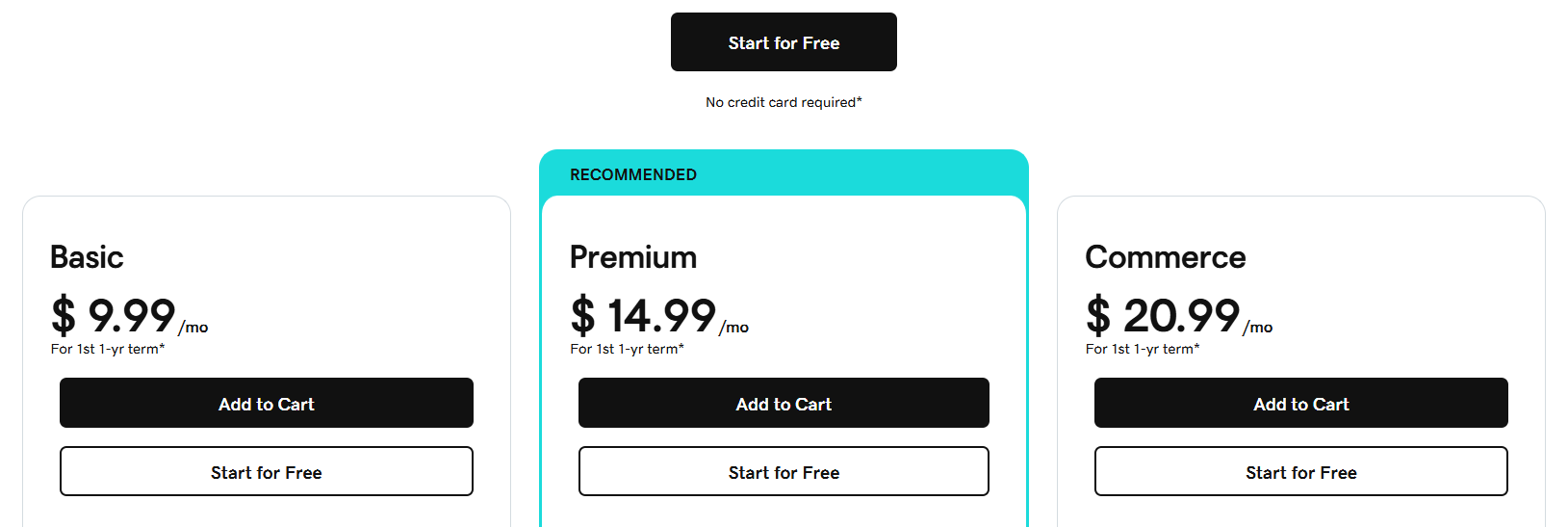 |  |  |
GoDaddy Website Builder, Landingi vs Unbounce: Other Details
Organization Types supported |
|
|
|
|---|---|---|---|
Platforms Supported |
|
|
|
Modes of support |
|
|
|
API Support |
|
|
|
Get help choosing | Get help choosing |
GoDaddy Website Builder vs Landingi User Reviews & Rating Comparison
User Ratings | |||
|---|---|---|---|
Rating Distribution | |||
Spotsaas Editor’s POV generated by AI | Buyer sentiment Buyer sentiment is positive across 192 reviews, with strong overall satisfaction. What buyers like
Common complaints
| Buyer sentiment Overall positive user sentiment highlights ease of use, template variety, and customer support as key strengths. What buyers like
Common complaints
| Buyer sentiment Users generally praise Unbounce for its ease of use, powerful integrations, and effective A/B testing, though some find the feature set complex and the app marketplace limited. What buyers like
Common complaints
|
Pros and Cons |
|
|
|
Positive Reviews | No reviews available for the product | No reviews available for the product | No reviews available for the product |
Integrations
Integration with other apps | No Integration information available. |
|---|




GoDaddy Website Builder, Landingi and Unbounce Customers
Customers | No Customers information available. |  Warner Bros  Bonduelle |  Unbounce_customers_0  Unbounce_customers_1  Unbounce_customers_2 |
|---|
Media and Screenshots
Screenshots | No screenshots available. |  7 Screenshots |
|---|---|---|
Videos |  3 Videos |  1 Videos |
Alternatives to GoDaddy Website Builder, Landingi, Unbounce
Alternatives |
|---|



Add another option to compare side by side
Search by product name to compare pricing, fit, and buyer feedback in one view.Compare similar software options


Related Blogs and Articles for Landing Page Software
Disclaimer: This research has been collated from a variety of authoritative sources. We welcome your feedback at [email protected].
Frequently asked questions
- Which is better, GoDaddy Website Builder or Landingi?
- Landingi edges out the other on user ratings (4.6 vs 4.3). That said, the best pick depends on your use case, so use the comparison tables above to evaluate each dimension.
- Do GoDaddy Website Builder and Landingi offer a free trial?
- Landingi offers a free trial. GoDaddy Website Builder does not.
- What is the starting price of GoDaddy Website Builder vs Landingi?
- GoDaddy Website Builder starts at $9.99 /Month. Landingi starts at $29 /month.
- What are the top alternatives to GoDaddy Website Builder?
- Top alternatives to GoDaddy Website Builder include Unbounce, VWO Deploy, Adalte Travel Platform, Vonza, SITE123.
- What are the top alternatives to Landingi?
- Top alternatives to Landingi include Unbounce, Instapage, LanderBolt, ClickFunnels, OptimizePress.
- What do reviewers criticise about GoDaddy Website Builder?
- Two things to weigh on GoDaddy Website Builder. It does these well: includes many visually appealing templates and themes to create professional websites quickly; extremely beginner-friendly with no coding knowledge required. These are the trade-offs: limited customization options beyond the provided templates, which may restrict advanced users. It does not cover Billing and Invoicing and Multi-Currency.
- What are the trade-offs with Landingi?
- Landingi rates highly on the following: user-friendly drag-and-drop interface suitable for beginners; extensive template library enabling quick customization. The common criticisms: limited marketplace for additional apps and connectors; feature richness can be overwhelming for new users. It does not include Contact Management and Purchase Order Management, which would need a separate product.
More Landing Page Software comparisons
Side by side breakdowns of the same products against other options in this category.
- GoDaddy Website Builder vs Instapage
- GoDaddy Website Builder vs LanderBolt
- GoDaddy Website Builder vs ClickFunnels
- GoDaddy Website Builder vs OptimizePress
- GoDaddy Website Builder vs BEE
- GoDaddy Website Builder vs Marcom Robot
- GoDaddy Website Builder vs Brizy Cloud
- GoDaddy Website Builder vs Kickofflabs
- GoDaddy Website Builder vs Taplink
- GoDaddy Website Builder vs AdPage