
DataRails vs InvoicePages Comparison

DataRails
Starting at Contact for pricing
- Free Trial
- Large Enterprises
- Medium Business
DataRails is the perfect choice for Excel users who wish to benefit from automated financial planning. It simplifies the process of collecting, analysing and reporting data, while also providing accurate forecasting and…

InvoicePages
Starting at $10.00 per 20 Invoices
- Free Trial
- Large Enterprises
- Small Business
InvoicePages is an invoicing platform that automates invoice creation, delivery, and follow-up for businesses managing multiple clients or products. Clients access a unique link to enter their details and generate invoic…
DataRails leads on user satisfaction with a 4.7-star rating across 121 reviews.
DataRails vs InvoicePages — at a glance
| Feature | DataRails | InvoicePages |
|---|---|---|
| Rating | 4.7 / 5 | — |
| Reviews | 121 | — |
| Starting price | Contact for pricing | $10.00 per 20 Invoices |
| Free trial | Yes | Yes |
| Free version | No | No |
| Best for | Large Enterprises, Medium Business, Small Business | Large Enterprises, Small Business, Medium Business |
| Category | Accounting Software | Invoice Management Software |
| Integrations | 8+ apps | — |
| Platforms | SaaS/Web/Cloud, Installed - Windows | Browser Based (Cloud) |
| API | — | — |
| Support modes | Online | Online |
Key differences between DataRails and InvoicePages
- Pricing: InvoicePages starts at $10.00 per 20 Invoices. DataRails pricing is not publicly listed.
- Deployment: DataRails supports SaaS/Web/Cloud, Installed - Windows; InvoicePages supports Browser Based (Cloud).
DataRails vs InvoicePages — find the better fit before you commit.
Which tool fits your team best
Which is actually cheaper for your team size
Where each product wins, per real buyers
Most Accounting Software tools look identical on paper. This comparison cuts to the differences that matter — pricing structure, team fit, and what real buyers found after signing up.
Biggest differences
Features
Pricing
Buying details
Security
Buyer feedback
Integrations
Product tour
Other options
Talk to an expert Talk to an expert |
Free PDF comparison
Download this DataRails vs InvoicePages comparison
Get the full side-by-side as a PDF — these picks plus the top Accounting Software tools, with verified ratings, pricing and features.
- Side-by-side on pricing, features & ratings
- Plus the category top 10, scored & ranked
- Emailed to you — no on-screen download
No file downloads on screen — we email it to you. One-click unsubscribe anytime.
DataRails vs InvoicePages: Biggest differences
Start here before you go deeper into features.
Large Enterprises, Medium Business, Small Business
Best for small to medium businesses needing automated, user-friendly invoicing.
- You want to reduce manual invoicing with automation
- You need personalized invoice templates for varied products
- Your team prefers a simple invoicing workflow
- Your company requires deep ERP integration capabilities
- You need advanced tax compliance and complex invoicing features
DataRails typically suits Large Enterprises and Medium Business. InvoicePages tends to fit Large Enterprises and Small Business better. The right choice depends on your team size, workflow, and whether a free trial matters.
Description | DataRails is the perfect choice for Excel users who wish to benefit from automated financial planning. It simplifies the process of collecting, analysing and reporting data, while also ... Read More about DataRails | InvoicePages is an invoicing platform that automates invoice creation, delivery, and follow-up for businesses managing multiple clients or products. Clients access a unique link to enter ... Read More about InvoicePages |
|---|---|---|
Entry Level Pricing |
|
|
Free Trial Availability | ||
User RatingsBased on verified Spotsaas reviews | ||
Best Company Size | 201–500 employees | 1-50 employees51-1000+ employees |
Get pricing help | Get pricing help |
Where each option fits best
See where each product is strongest, which teams it fits, and what causes buyers to keep looking — before you commit.
Based on buyer reviews and verified product data collected by Spotsaas.
Key strengths
- Scalable planning workflows: As organizations grow, Datarails scales with them by supporting additional data sources, more complex models, and broader collaboration. Finance teams can expand planning processes across departments, regions, and scenarios without rebuilding systems, keeping planning workflows effective as business complexity increases.
- Improved visibility: Interactive dashboards and KPI tracking give finance leaders real-time insight into performance across revenue, expenses, cash flow, and profitability. Trends and variances are easier to spot early, allowing faster responses to risks or opportunities. This visibility supports proactive management rather than reactive reporting.
- Consistent, centralized models: Datarails replaces fragmented spreadsheets with a single, governed financial environment. Version control and audit trails show exactly who changed what and when, so everyone works from the same numbers. This consistency reduces confusion, prevents conflicting reports, and builds trust in financial outputs across departments and leadership teams.
Best fit
- 201–500 employees
- Finance & Professional Services, Technology/SaaS, Healthcare, Manufacturing, Retail & Consumer Goods, Real Estate, Construction, Media & Advertising, Nonprofit & Education
- CFO, VP of Finance, Finance Director, Financial Planning & Analysis Manager, FP&A Analyst, Controller, Accounting Manager, ERP/Finance Systems Admin, Budgeting & Forecasting Specialist
Reasons buyers look elsewhere
- Groups without reliance on Excel might choose platform-native FP&A suites with more graphical modeling interfaces and less spreadsheet dependency.
- Smaller companies with limited budgeting complexity sometimes prefer lightweight budgeting tools or add-ons that don’t require enterprise FP&A investment.
- Teams focused mainly on cross-department analytics beyond finance may opt for full BI systems (e.g., Power BI, Tableau) that offer broader operational insights across units.
Software Demo
Demo |  InvoicePages has not given any software demo yet If you're the owner of this profile, add your demo.Contact us |
|---|
Need a second opinion?
Get decision help from a software advisor
Share your priorities, budget, and team needs, and we’ll help you narrow the options and understand the tradeoffs before you talk to vendors.

- Independent advice — matched to your business
- Understand the tradeoffs before you talk to vendors
- Free 15-min call with a software advisor.
Step 1 of 4
How big is your team?
We tailor recommendations to companies your size.















How do DataRails and InvoicePages Compare on Features?
Total Features | 11 Features | 6 Features |
|---|---|---|
Unique Features | No unique features | No unique features |
Get Quote | Get Quote |
Compare DataRails and InvoicePages on pricing
Review starting price, plan structure, and free-trial access side by side so you can see which option fits your budget and buying process.
Pricing Option | ||
|---|---|---|
Starting From |
|
|
Pricing Plans |
| |
Pricing Page | 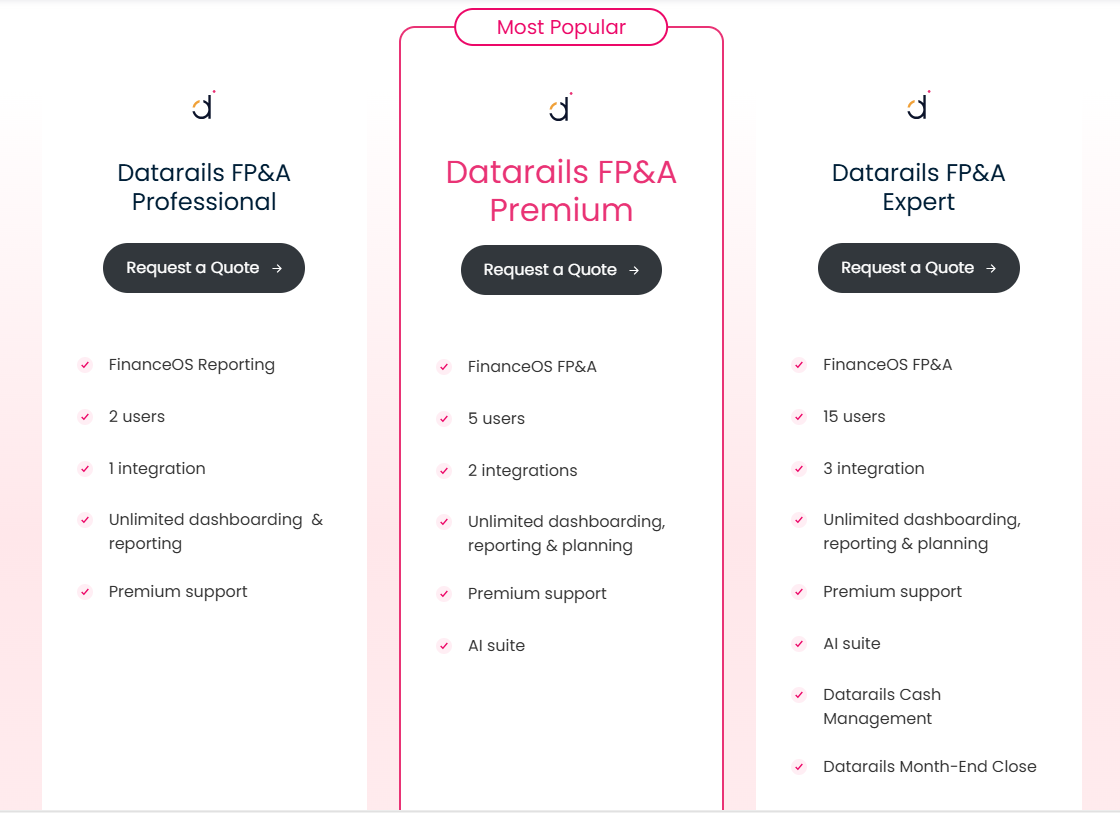 |  |
DataRails vs InvoicePages: Other Details
Organization Types supported |
|
|
|---|---|---|
Platforms Supported |
|
|
Modes of support |
|
|
API Support |
|
|
Get help choosing | Get help choosing |
DataRails User Reviews & Rating Comparison
User Ratings | No reviews available for the product | |
|---|---|---|
Rating Distribution | No reviews available for this product | |
Spotsaas Editor’s POV generated by AI | Buyer sentiment Buyer sentiment is very strong across 131 reviews, with consistently positive feedback. What buyers like
Common complaints
| Buyer sentiment No available user reviews or ratings to assess buyer sentiment. |
Pros and Cons |
|
|
Positive Reviews | No reviews available for the product | No reviews available for the product |
Integrations
Integration with other apps | No Integration information available. |
|---|


DataRails and InvoicePages Customers
Customers |  Bauer  AGNC  Kelso | No Customers information available. |
|---|
Media and Screenshots
Screenshots | 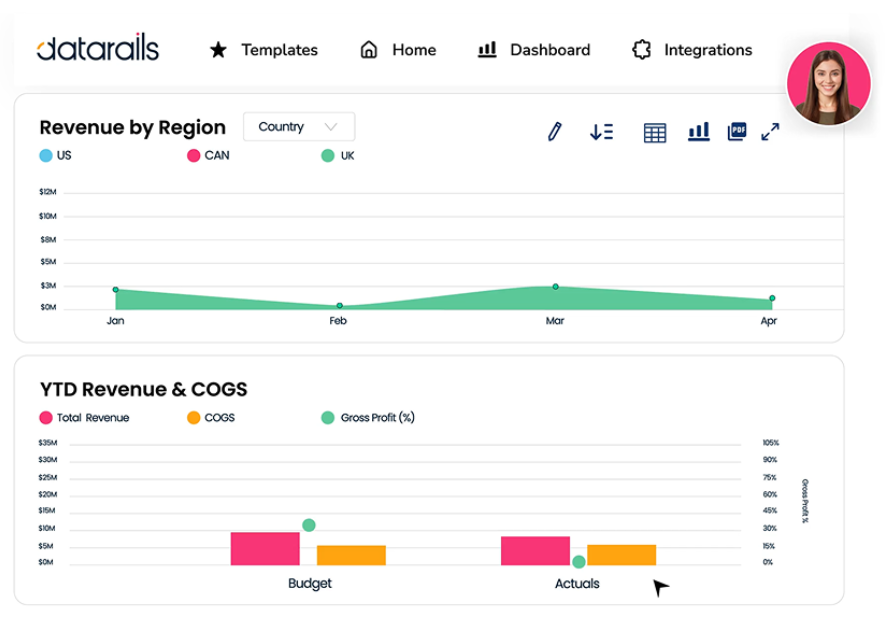 4 Screenshots |  2 Screenshots |
|---|
Top Alternatives to DataRails and InvoicePages in 2026
Alternatives |
|---|


Add another option to compare side by side
Search by product name to compare pricing, fit, and buyer feedback in one view.Compare similar software options




Related Blogs and Articles for Invoice Management Software
Disclaimer: This research has been collated from a variety of authoritative sources. We welcome your feedback at [email protected].
Frequently asked questions
- Which is better, DataRails or InvoicePages?
- DataRails has a user rating of 4.7, while InvoicePages has no user ratings yet. The right choice depends on your team size, budget, and specific Invoice Management Software needs.
- Do DataRails and InvoicePages offer a free trial?
- Yes, both DataRails and InvoicePages offer a free trial.
- What is the starting price of DataRails vs InvoicePages?
- DataRails starts at Contact for pricing. InvoicePages starts at $10.00 per 20 Invoices.
- What are the top alternatives to DataRails?
- Top alternatives to DataRails include Xero, Zoho Books, Kashoo, Nimble Staffing, Countingup.
- What are the top alternatives to InvoicePages?
- Top alternatives to InvoicePages include Fonoa Invoicing, ZenVoice, Airtable Invoice Maker, Invoice Simple, InvoiceEase.
- What do reviewers criticise about DataRails?
- DataRails is credited with the following: scalable insights & analytics: Dashboards and KPI tracking provide real-time visibility into financial performance; reliable planning & forecasting: Supports dynamic budgeting, forecasting, and scenario modeling with live data. The recurring reservations: integration setup: Connecting multiple data sources (ERP, CRM, BI) may require initial IT support or coordination. It does not include Accounts Payable and Accounts Receivable.
- What are the downsides of InvoicePages?
- It depends what you need. In its favour: automated invoicing process reduces manual effort; user-friendly interface with personalized templates. Against it: lack of publicly available pricing details; no user ratings or reviews to validate performance. Note that it does not include Expense Tracking and Multi-Currency.
More Invoice Management Software comparisons
Side by side breakdowns of the same products against other options in this category.