
CAdashboard vs Soraban Comparison

CAdashboard
Starting at Contact for pricing
- Large Enterprises
- Medium Business
CAdashboard helps professionals manage compliance effectively. With just a few clicks, invoicing customers is easy and automatic reminder emails help users get paid quickly. Get insights on billable hours and expenses an…

Soraban
Starting at Contact for pricing
- Individuals
- Freelancers / Consultants
Looking for a hassle-free way to manage your taxes and accounting? Look no further than Soraban! Our software provides a comprehensive solution for self-employed individuals, freelancers, and small to medium-sized busine…
CAdashboard vs Soraban — at a glance
| Feature | CAdashboard | Soraban |
|---|---|---|
| Rating | — | — |
| Reviews | — | — |
| Starting price | Contact for pricing | Contact for pricing |
| Free trial | No | No |
| Free version | No | No |
| Best for | Large Enterprises, Medium Business, Small Business | Individuals, Freelancers / Consultants, Medium Business |
| Category | Accounting Practice Management Software | Accounting Practice Management Software |
| Integrations | — | 8+ apps |
| Platforms | SaaS/Web/Cloud, Mobile - Android, Mobile - iOS | SaaS/Web/Cloud |
| API | — | — |
| Support modes | Online | Online |
| Certifications | — | — |
| Data residency | Global | Global |
Key differences between CAdashboard and Soraban
- Target audience: CAdashboard is built for Large Enterprises and Medium Business, while Soraban targets Individuals and Freelancers / Consultants.
- Deployment: CAdashboard supports SaaS/Web/Cloud, Mobile - Android, Mobile - iOS; Soraban supports SaaS/Web/Cloud.
CAdashboard vs Soraban — find the better fit before you commit.
Which tool fits your team best
Which is actually cheaper for your team size
Where each product wins, per real buyers
Most Accounting Practice Management Software tools look identical on paper. This comparison cuts to the differences that matter — pricing structure, team fit, and what real buyers found after signing up.
Biggest differences
Features
Pricing
Buying details
Security
Buyer feedback
Integrations
Product tour
Other options
Talk to an expert Talk to an expert | Talk to an expert Talk to an expert |
Biggest differences
Start here before you go deeper into features.
Best for SMEs needing streamlined compliance and automated invoicing.
- You are an accounting firm or compliance team managing financial compliance.
- You want automated invoicing with reminder emails to improve cash flow.
- You need real-time visibility into compliance status and billable hours.
- You are a freelancer or sole proprietor with minimal compliance needs.
- You require detailed pricing transparency and extensive user reviews before purchase.
Best for accounting firms needing streamlined tax data intake and workflow automation.
- You want to automate client data intake and reduce manual tax entry errors.
- Your firm uses major tax engines like ProSeries, Drake, or Lacerte for integration.
- You need automated reminders and communications to improve client response rates.
- You require a full practice management suite including billing, scheduling, and CRM.
- Your firm prioritizes deep client engagement features like portals and real-time collaboration.
CAdashboard: Best for SMEs needing streamlined compliance and automated invoicing. Soraban: Best for accounting firms needing streamlined tax data intake and workflow automation.
Description | CAdashboard helps professionals manage compliance effectively. With just a few clicks, invoicing customers is easy and automatic reminder emails help users get paid quickly. Get insights on ... Read More about CAdashboard | Looking for a hassle-free way to manage your taxes and accounting? Look no further than Soraban! Our software provides a comprehensive solution for self-employed individuals, freelancers, ... Read More about Soraban |
|---|---|---|
Free Trial Availability |
|
|
Best Company Size | 11-500 employees501-1000 employees | 5–500 |
Get pricing help | Get pricing help |
Where each option fits best
See where each product is strongest, which teams it fits, and what causes buyers to keep looking — before you commit.
Based on buyer reviews and verified product data collected by Spotsaas.
Key strengths
No key benefits available yet.
- Improved Client Experience: Clients enjoy a simplified onboarding and document submission process with guided questionnaires, secure file uploads, and mobile-friendly experiences. Automated notifications and deadline reminders help keep clients on track. This polished interaction reduces frustration, supports faster response rates, and enhances the professional perception of the firm.
- Seamless Integration With Tax Engines: The platform connects with popular tax engines like ProSeries, Lacerte, ATX, TaxWise, and Drake, allowing client information and documents to transfer directly into preparation software. This eliminates redundant data entry, minimizes transcription errors, and keeps workflows synchronized across systems. Firms benefit from smoother handoffs and fewer interruptions between intake and return assembly.
- Faster Tax Data Collection: Soraban streamlines how firms gather client information, replacing emailed forms and PDFs with intelligent questionnaires. Clients can complete responses easily, and data flows directly into firm workflows. Automated reminders and progress tracking reduce follow-ups, freeing staff time while improving accuracy. Faster data collection accelerates tax preparation timelines and reduces bottlenecks during peak seasons.
Best fit
No best-fit guidance available yet.
- 5–500
- Accounting firms, Tax preparation services, CPA practices, Professional services, Financial advisory
- CPA, Tax manager, Accounting manager, Partner, Firm administrator, Tax preparer
Reasons buyers look elsewhere
No alternatives guidance available yet.
- Smaller practices with light tax intake needs may find simpler tools or direct tax engine workflows sufficient. If client data volume and complexity are low, a full intake platform may feel more than required, leading some firms to opt for lighter alternatives.
- Some firms want deeper client engagement features, such as messaging, portals, and real-time collaboration directly in the platform. While Soraban facilitates reminders and secure data intake, alternatives with native client portal features may feel more cohesive for firms seeking unified client communications.
- Firms seeking a full practice management suite — including scheduling, billing, time tracking, and CRM — may prefer platforms that bundle these capabilities with tax workflows. Soraban focuses on intake and workflow optimization, so users needing an all-in-one practice system might choose alternatives.
Software Demo
Demo |  Soraban has not given any software demo yet If you're the owner of this profile, add your demo.Contact us |
|---|
Need a second opinion?
Get shortlist help from a software advisor
Share your priorities, budget, and team needs, and we’ll help you narrow the options and understand the tradeoffs before you talk to vendors.
How do CAdashboard and Soraban Compare on Features?
Total Features | 4 Features | 13 Features |
|---|---|---|
Unique Features | No unique features | No unique features |
Get Quote | Get Quote |
Compare CAdashboard and Soraban on pricing
Review starting price, plan structure, and free-trial access side by side so you can see which option fits your budget and buying process.
Pricing Option | ||
|---|---|---|
Pricing Plans |
|
|
Pricing Page |  | 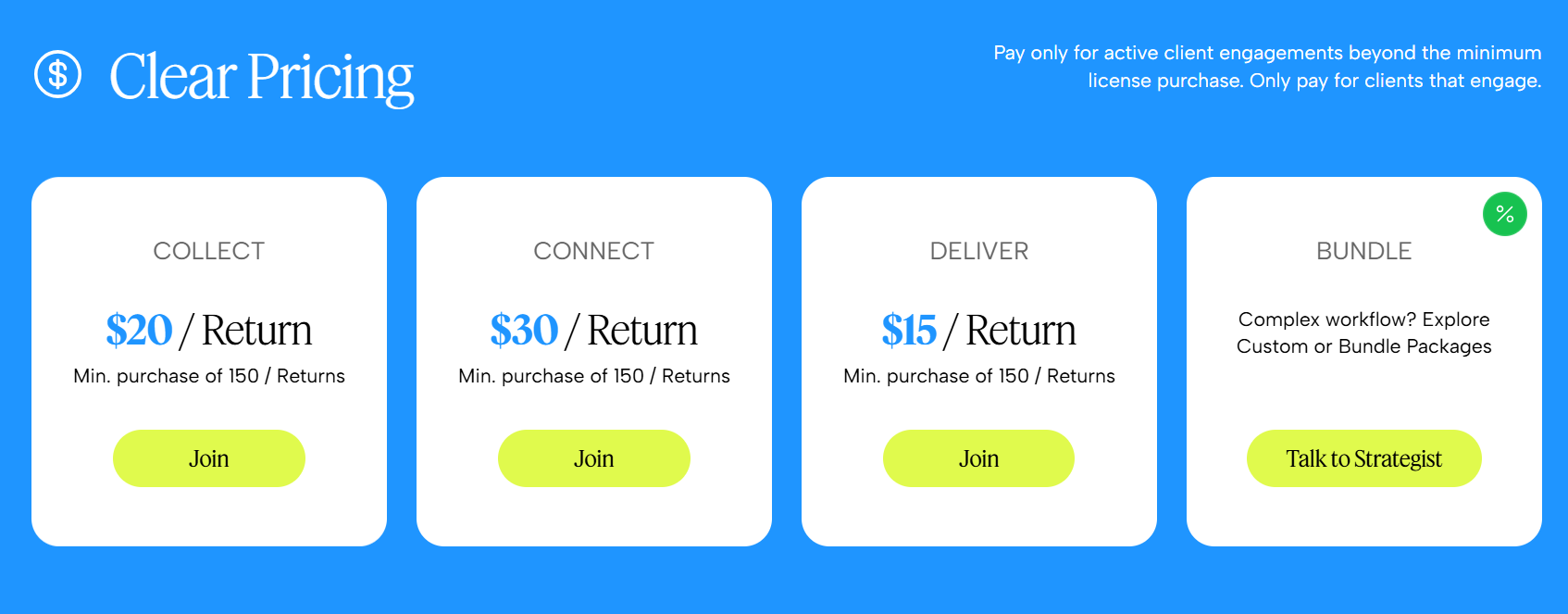 |
Other Details
Organization Types supported |
|
|
|---|---|---|
Platforms Supported |
|
|
Modes of support |
|
|
API Support |
|
|
Get help choosing | Get help choosing |
Security & Compliance
Certifications, data handling, and security controls for IT and compliance evaluators.
HIPAA | ✗ No | ✗ No |
|---|---|---|
Data Residency | 🌐 Global | 🌐 Global |
CAdashboard User Reviews & Rating Comparison
Spotsaas Editor’s POV generated by AI | Buyer sentiment No user reviews or ratings available to assess buyer sentiment. What buyers like
Common complaints
| What buyers like
Common complaints
|
|---|---|---|
Pros and Cons |
|
|
Integrations
Integration with other apps | No Integration information available. |
|---|


List of Customers
Customers | No Customers information available. |  Hughes  Wilson  Music City Tax & Accounting |
|---|
Media and Screenshots
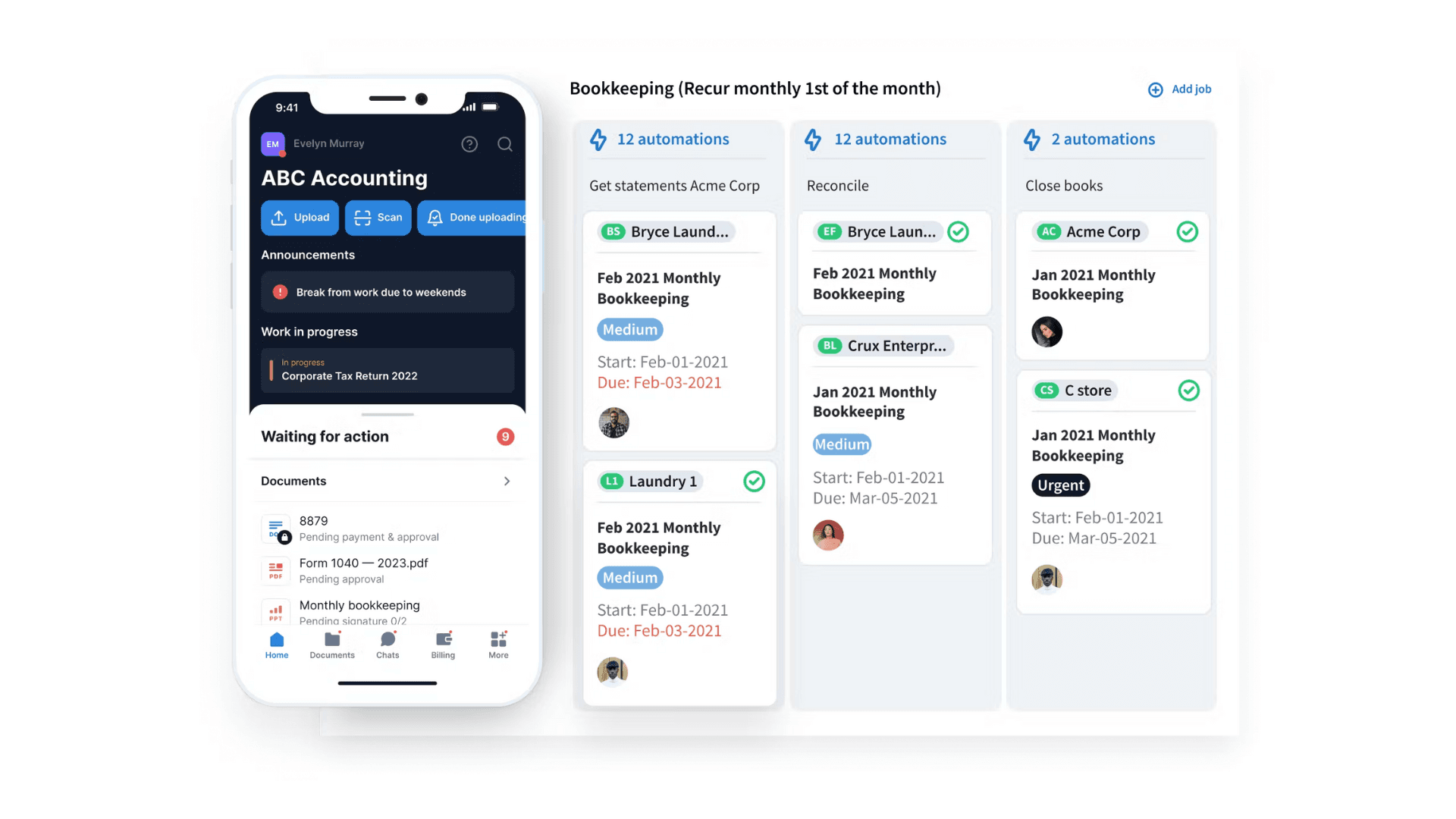
Screenshots | No screenshots available. |  2 Screenshots |
|---|---|---|
Videos |  3 Videos | No videos available. |
Top Alternatives to CAdashboard and Soraban in 2026


Add another option to compare side by side
Search by product name to compare pricing, fit, and buyer feedback in one view.Compare similar software options


/logo_1689568035.883892.png)


Related Blogs and Articles for Accounting Practice Management Software
Disclaimer: This research has been collated from a variety of authoritative sources. We welcome your feedback at [email protected].
Frequently asked questions
- Which is better, CAdashboard or Soraban?
- CAdashboard and Soraban are closely matched with equal user ratings of -1.0. The right choice depends on your team size, budget, and specific Accounting Practice Management Software needs.
- Do CAdashboard and Soraban offer a free trial?
- Neither CAdashboard nor Soraban currently lists a free trial.
- What is the starting price of CAdashboard vs Soraban?
- CAdashboard starts at Contact for pricing. Soraban starts at Contact for pricing.
- What are the top alternatives to CAdashboard?
- Top alternatives to CAdashboard include ReliaBills, Qualified, Checkeden, Healthicity Compliance Software, Invoice Simple.
- What are the top alternatives to Soraban?
- Top alternatives to Soraban include Saasu, ClientSuccess, Freshdesk Customer Success (Formely Freshsuccess), Checkeden, Freely.