
Bill.com vs Precoro Comparison

Bill.com
Starting at $0 /user/month
- Free Trial
- Freelancers / Consultants
- Large Enterprises
Bill.com is a financial operations platform for small businesses that handles invoicing, bill payments, and expense tracking. It supports electronic document exchange, ACH, credit card, and international payments, and in…

Precoro
Starting at $499 /month
- Free Trial
- Large Enterprises
- Medium Business
Precoro is a cloud-based accounts payable and procurement software designed to help businesses automate and streamline invoice processing, purchase order management, and expense tracking. It eliminates manual paperwork b…
Precoro leads on user satisfaction with a 4.7-star rating across 49 reviews.
Bill.com vs Precoro — at a glance
| Feature | Bill.com | Precoro |
|---|---|---|
| Rating | 3.9 / 5 | 4.7 / 5 |
| Reviews | 729 | 49 |
| Starting price | $0 /user/month | $499 /month |
| Free trial | Yes | Yes |
| Free version | No | No |
| Best for | Freelancers / Consultants, Large Enterprises, Medium Business | Large Enterprises, Medium Business, Small Business |
| Category | Accounting Software | Procure to Pay Software |
| Platforms | SaaS/Web/Cloud, Mobile - Android, Mobile - iOS | SaaS/Web/Cloud |
| API | Available | Available |
| Support modes | Business Hours, Online | Online |
| Certifications | SOC 2, GDPR | SOC 2, GDPR |
| Data residency | US | Global |
Key differences between Bill.com and Precoro
- Pricing: Bill.com starts at $0 /user/month, while Precoro starts at $499 /month.
- Target audience: Bill.com is built for Freelancers / Consultants and Large Enterprises, while Precoro targets Large Enterprises and Medium Business.
- User satisfaction: Precoro scores higher with a 4.7-star average.
- Deployment: Bill.com supports SaaS/Web/Cloud, Mobile - Android, Mobile - iOS; Precoro supports SaaS/Web/Cloud.
Bill.com vs Precoro — find the better fit before you commit.
Which tool fits your team best
Which is actually cheaper for your team size
Where each product wins, per real buyers
Most Accounting Software tools look identical on paper. This comparison cuts to the differences that matter — pricing structure, team fit, and what real buyers found after signing up.
Biggest differences
Features
Pricing
Buying details
Security
Buyer feedback
Integrations
Product tour
Other options
Free PDF comparison
Download this Bill.com vs Precoro comparison
Get the full side-by-side as a PDF — these picks plus the top Accounting Software tools, with verified ratings, pricing and features.
- Side-by-side on pricing, features & ratings
- Plus the category top 10, scored & ranked
- Emailed to you — no on-screen download
No file downloads on screen — we email it to you. One-click unsubscribe anytime.
Biggest differences
Start here before you go deeper into features.
Best for small to mid-sized businesses streamlining invoicing and payment workflows.
- You need a simple, user-friendly platform to automate invoicing and bill payments.
- Your business uses QuickBooks, Xero, or similar accounting software requiring seamless integration.
- You want real-time visibility and automated notifications for invoice and payment status.
- Your company requires extensive cross-border payments with multi-currency support.
- You rely heavily on responsive, personalized customer support for financial software.
Best for medium businesses seeking simple, automated procure-to-pay workflows.
- You need an intuitive, user-friendly interface for procurement management.
- You want centralized automation of purchasing, budget control, and approvals.
- You value regular product updates enhancing functionality and user experience.
- Your company requires extensive third-party app integrations beyond Precoro’s limited marketplace.
- You need highly advanced or customizable procurement features beyond standard workflows.
Bill.com: Best for small to mid-sized businesses streamlining invoicing and payment workflows. Precoro: Best for medium businesses seeking simple, automated procure-to-pay workflows.
Description | Bill.com is a financial operations platform for small businesses that handles invoicing, bill payments, and expense tracking. It supports electronic document exchange, ACH, credit card, and ... Read More about Bill.com | Precoro is a cloud-based accounts payable and procurement software designed to help businesses automate and streamline invoice processing, purchase order management, and expense tracking. ... Read More about Precoro |
|---|---|---|
Entry Level Pricing |
|
|
Free Trial Availability | ||
SpotScoreWhat's this? ↗ | 9.2/10 | 7.5/10 |
User RatingsBased on verified Spotsaas reviews | ||
Best Company Size | 1-50 employees51-500 employees | 50-500 employeesMedium business |
Get pricing help | Get pricing help |
Where each option fits best
See where each product is strongest, which teams it fits, and what causes buyers to keep looking — before you commit.
Based on buyer reviews and verified product data collected by Spotsaas.
Key strengths
- Streamlined Payment Processes: With Bill.com, I’ve seen firsthand how easy it is to automate your accounts payable and receivable. This means less time spent on manual data entry and more focus on strategic initiatives.
- Cash Flow Management: Managers value the real-time visibility into cash flow that Bill.com provides. You can track payments, send reminders, and predict cash needs more accurately, which supports better financial planning.
- Smooth Integration: Bill.com integrates easily with popular accounting software like QuickBooks and Xero. This simplifies your workflow and reduces the risk of errors from data duplication.
- Streamlined Procurement Process: Precoro simplifies the entire procurement workflow, allowing teams to easily create purchase orders, manage suppliers, and track expenses—all in one user-friendly platform. You’ll find that it saves time and reduces administrative burdens.
- Real-Time Visibility and Control: With Precoro, you get real-time insights into spending patterns and supplier performance. This transparency helps managers make informed decisions and improve budgets.
- Increased Compliance and Reduced Errors: By automating approval workflows and standardizing procurement processes, Precoro helps minimize human errors and keeps compliance with company policies. Administrators can rest easy knowing that everything is in line with regulations.
Best fit
- 1 to 500 employees
- Fintech, SaaS, Consulting, Accounting, and Professional Services
- Finance Managers, Accounts Payable Specialists, CFOs, Bookkeepers, and Small Business Owners
- 50-500 employees.
- Industries include SaaS, Consulting, E-commerce, Retail, Manufacturing, and Non-Profit.
- Typical users are Procurement Managers, Finance Directors, Operations Managers, and Supply Chain Coordinators.
Reasons buyers look elsewhere
- Users may seek alternatives to Bill.com due to high subscription costs, especially if their business is small or just starting, making budget-friendly options more appealing for managing invoicing and payments.
- Some businesses may require more customizable features than what Bill.com offers, prompting them to explore alternatives that allow for tailored workflows and specific integrations with their existing systems.
- Companies experiencing rapid growth might find that Bill.com lacks scalability, leading them to consider solutions that can better accommodate their evolving financial management needs without sacrificing efficiency.
- Users may seek alternatives to Precoro due to specific industry needs that require tailored features or functionalities not fully supported by the platform, leading to inefficiencies in procurement processes.
- Cost considerations can drive users to explore alternatives, especially if they find comparable solutions that offer similar capabilities at a lower price point, enhancing their budget management.
- Some organizations may require more robust integration options with existing software systems, prompting a search for platforms that seamlessly connect with their current tech stack for improved workflow.
Software Demo
Demo |
|---|
Need a second opinion?
Get shortlist help from a software advisor
Share your priorities, budget, and team needs, and we’ll help you narrow the options and understand the tradeoffs before you talk to vendors.

- Independent advice — matched to your business
- Understand the tradeoffs before you talk to vendors
- Free 15-min call with a software advisor.
Step 1 of 4
How big is your team?
We tailor recommendations to companies your size.















How do Bill.com and Precoro Compare on Features?
Total Features | 15 Features | 23 Features |
|---|---|---|
Unique Features | No unique features | No unique features |
Get Quote | Get Quote |
Compare Bill.com and Precoro on pricing
Review starting price, plan structure, and free-trial access side by side so you can see which option fits your budget and buying process.
Pricing Option | ||
|---|---|---|
Starting From |
|
|
Pricing Plans |
|
|
Pricing Page | 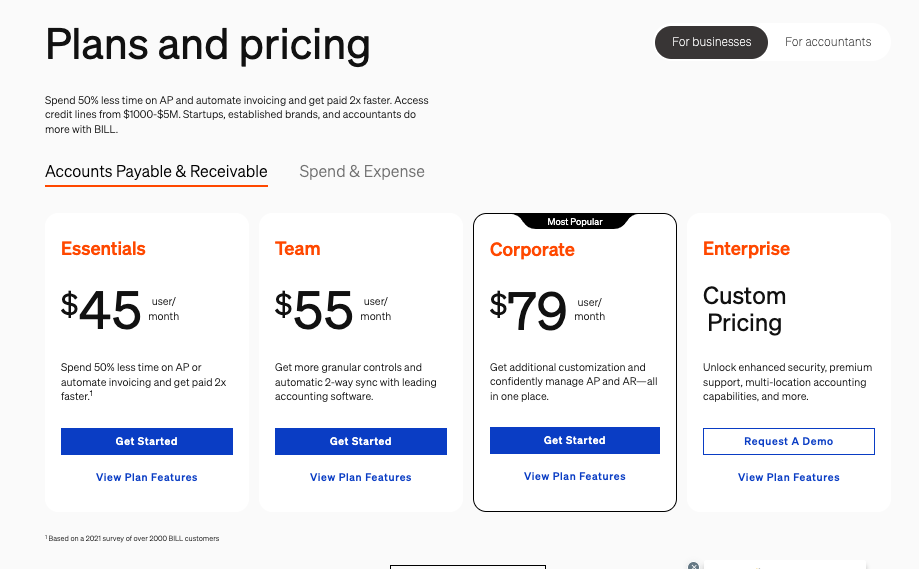 |  |
Other Details
Organization Types supported |
|
|
|---|---|---|
Platforms Supported |
|
|
Modes of support |
|
|
API Support |
|
|
Get help choosing | Get help choosing |
Security & Compliance
Certifications, data handling, and security controls for IT and compliance evaluators.
SOC 2 | ✓ Yes | ✓ Yes |
|---|---|---|
HIPAA | ✗ No | ✗ No |
GDPR | ✓ Yes | ✓ Yes |
Single Sign-On (SSO) | ✓ Yes | ✓ Yes |
Multi-Factor Auth (MFA) | ✓ Yes | ✓ Yes |
Data Encryption | ✓ Yes | ✓ Yes |
Audit Logs | ✓ Yes | ✓ Yes |
Data Residency | 🇺🇸 US | 🌐 Global |
Bill.com User Reviews & Rating Comparison
User Ratings | ||
|---|---|---|
Rating Distribution | ||
Spotsaas Editor’s POV generated by AI | Buyer sentiment Users generally appreciate Bill.com for its ease of use and efficiency in automating payments, though customer support and international payment features receive notable criticism. What buyers like
Common complaints
| Buyer sentiment Overall, buyers appreciate Precoro’s ease of use, efficient procurement workflows, and continuous product improvements, though some desire more integrations and richer features. What buyers like
Common complaints
|
Pros and Cons |
|
|
Positive Reviews | No reviews available for the product | No reviews available for the product |
| Negative Reviews | No reviews available for the product | No reviews available for the product |
List of Customers
Customers |  Wag  Marine Layer  Quicken |  Indiqube  Agriprotein  CHEERZ |
|---|
Media and Screenshots
Screenshots | 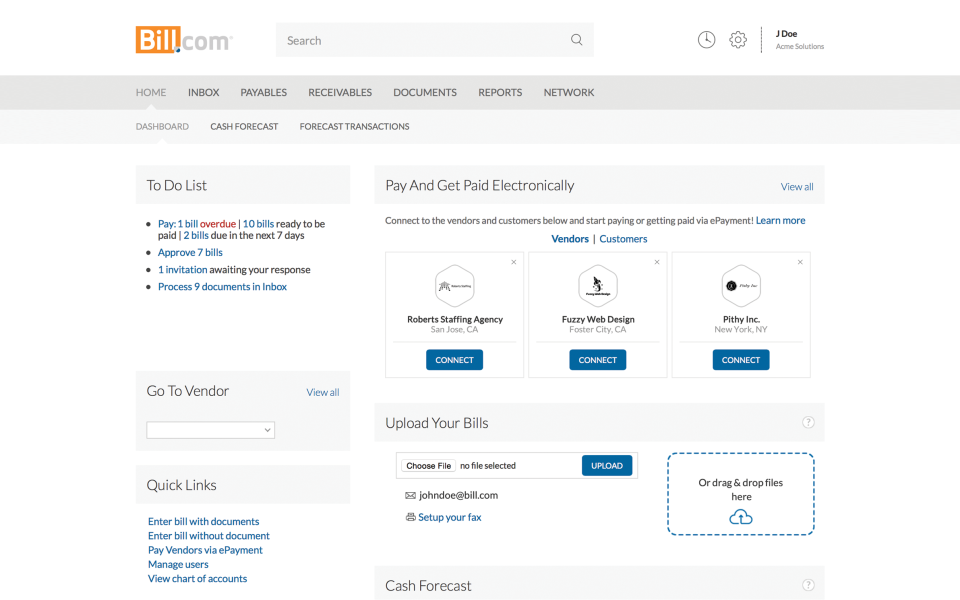 10 Screenshots |  5 Screenshots |
|---|---|---|
Videos |  1 Videos |  2 Videos |
Top Alternatives to Bill.com and Precoro in 2026
Alternatives |
|---|


Add another option to compare side by side
Search by product name to compare pricing, fit, and buyer feedback in one view.Compare similar software options





Related Blogs and Articles for Procure To Pay Software


Disclaimer: This research has been collated from a variety of authoritative sources. We welcome your feedback at [email protected].
Frequently asked questions
- Which is better, Bill.com or Precoro?
- Precoro edges out the other on user ratings (4.7 vs 3.9). That said, the best pick depends on your use case — use the comparison tables above to evaluate each dimension.
- Do Bill.com and Precoro offer a free trial?
- Yes, both Bill.com and Precoro offer a free trial.
- What is the starting price of Bill.com vs Precoro?
- Bill.com starts at $0 /user/month. Precoro starts at $499 /month.
- What are the top alternatives to Bill.com?
- Top alternatives to Bill.com include Xero, Zoho Books, AvidXchange, APXPRESS, Paypool.
- What are the top alternatives to Precoro?
- Top alternatives to Precoro include Procuras.io, ProcurementFlow, SutiProcure, PairSoft, BirchStreet Procure-to-Pay.