
Adobe Photoshop vs Plask Motion Comparison

Adobe Photoshop
Starting at $22.99 /month
- Free Trial
- Individuals
- Freelancers / Consultants
Photoshop is the industry-standard photo editing software used by professional photographers and designers around the world. Get unrivaled power and performance with this photo editing software. This photo editing softwa…

Plask Motion
Starting at $50.00 per month
- Free Trial
- Indie Developers
- Makerspaces
Unveiling Plask Motion, a cutting-edge AI-enhanced motion capture animation tool for creators and professionals. This innovative software combines video and AI technology to streamline the animation process, making it id…
Adobe Photoshop leads on user satisfaction with a 5.0-star rating across 507 reviews.
Adobe Photoshop vs Plask Motion — at a glance
| Feature | Adobe Photoshop | Plask Motion |
|---|---|---|
| Rating | 5.0 / 5 | — |
| Reviews | 507 | — |
| Starting price | $22.99 /month | $50.00 per month |
| Free trial | Yes | Yes |
| Free version | No | No |
| Best for | Individuals, Freelancers / Consultants, Large Enterprises | Indie Developers, Makerspaces |
| Category | Photo Editing Software | 3D Modeling Software |
| Integrations | 5+ apps | — |
| Platforms | SaaS/Web/Cloud, Mobile - Android, Mobile - iOS, Installed - Windows, Installed - Mac | — |
| API | Available | — |
| Support modes | 24/7 (Live rep), Online | |
| Certifications | GDPR | — |
| Data residency | Global | Global |
Key differences between Adobe Photoshop and Plask Motion
- Pricing: Adobe Photoshop starts at $22.99 /month, while Plask Motion starts at $50.00 per month.
- Target audience: Adobe Photoshop is built for Individuals and Freelancers / Consultants, while Plask Motion targets Indie Developers and Makerspaces.
Adobe Photoshop vs Plask Motion — find the better fit before you commit.
Which tool fits your team best
Which is actually cheaper for your team size
Where each product wins, per real buyers
Most Photo Editing Software tools look identical on paper. This comparison cuts to the differences that matter — pricing structure, team fit, and what real buyers found after signing up.
Biggest differences
Features
Pricing
Buying details
Security
Buyer feedback
Integrations
Product tour
Other options
Talk to an expert Talk to an expert | Talk to an expert Talk to an expert |
Free PDF comparison
Download this Adobe Photoshop vs Plask Motion comparison
Get the full side-by-side as a PDF — these picks plus the top Photo Editing Software tools, with verified ratings, pricing and features.
- Side-by-side on pricing, features & ratings
- Plus the category top 10, scored & ranked
- Emailed to you — no on-screen download
No file downloads on screen — we email it to you. One-click unsubscribe anytime.
Biggest differences
Start here before you go deeper into features.
Best for professional-grade, versatile photo editing and creative design workflows.
- You need advanced image manipulation with extensive layering and masking tools.
- You require seamless integration with Adobe Creative Cloud for team collaboration.
- You are a graphic or UI/UX designer working in marketing, media, or creative services.
- You want a simple, minimal photo editor with a shallow learning curve.
- Your team depends heavily on a broad third-party app marketplace and connectors.
AI-powered motion capture tool ideal for rapid 3D animation prototyping.
- You need to accelerate animation workflows using AI-enhanced motion capture.
- You want to quickly prototype diverse 3D motion graphics or game animations.
- Your team is small to mid-sized and values flexible, configurable workflows.
- Your studio requires extensive traditional animation features without AI focus.
- You need transparent pricing and detailed cost information upfront.
Adobe Photoshop: Best for professional-grade, versatile photo editing and creative design workflows. Plask Motion: AI-powered motion capture tool ideal for rapid 3D animation prototyping.
Description | Photoshop is the industry-standard photo editing software used by professional photographers and designers around the world. Get unrivaled power and performance with this photo editing ... Read More about Adobe Photoshop | Unveiling Plask Motion, a cutting-edge AI-enhanced motion capture animation tool for creators and professionals. This innovative software combines video and AI technology to streamline the ... Read More about Plask Motion |
|---|---|---|
Entry Level Pricing |
|
|
Free Trial Availability | ||
SpotScoreWhat's this? ↗ | 9.5/10 | 8.8/10 |
User RatingsBased on verified Spotsaas reviews | ||
Best Company Size | Small BusinessLarge Enterprises | 1-50 employees51-200 employees |
Get pricing help | Get pricing help |
Where each option fits best
See where each product is strongest, which teams it fits, and what causes buyers to keep looking — before you commit.
Based on buyer reviews and verified product data collected by Spotsaas.
Key strengths
- Continuous Updates & Innovation: Subscribers receive regular updates, new features, and performance improvements without purchasing new versions. Adobe consistently adds capabilities such as AI-powered tools, automation, and workflow improvements. This keeps users current with changing creative standards and technologies, making Creative Cloud a long-term investment for professionals who want access to the latest creative tools.
- Scalable Collaboration & Cloud Workflows: Creative Cloud supports collaboration through shared libraries, cloud documents, version history, and integrations with tools like Slack and Microsoft Teams. Teams can review, comment, and iterate without constant file transfers. Cloud storage and sync features allow creatives to work across devices and locations, supporting remote and hybrid workflows while keeping assets organized and accessible.
- Industry-Standard Tools & File Compatibility: Adobe tools are accepted across creative industries, agencies, and enterprises. Using Creative Cloud maintains compatibility with clients, collaborators, and production partners worldwide. Standard file formats reduce friction during handoffs, reviews, and revisions. This matters for professionals working on large teams, cross-company projects, or client-facing deliverables where compatibility and reliability are key.
No key benefits available yet.
Best fit
- 10,000+
- Design and creative services, Marketing and advertising, Media and entertainment, Technology, Education, Ecommerce, Publishing
- Graphic designer, UI/UX designer, Video editor, Motion graphics designer, Creative director, Marketing designer
No best-fit guidance available yet.
Reasons buyers look elsewhere
- Requires powerful hardware for smooth performance — older devices or lower-spec machines experience slowdowns, making browser-based or lightweight alternatives more practical
- Distributed teams often prefer cloud-first or real-time collaboration platforms over Adobe's ecosystem when speed and native collaboration matter more than breadth
- Single-task tools like Photoshop-only or Figma appeal to users who find the full suite overwhelming — faster to learn and fewer features to manage
No alternatives guidance available yet.
Software Demo
Demo |
|---|
Need a second opinion?
Get shortlist help from a software advisor
Share your priorities, budget, and team needs, and we’ll help you narrow the options and understand the tradeoffs before you talk to vendors.

- Independent advice — matched to your business
- Understand the tradeoffs before you talk to vendors
- Free 15-min call with a software advisor.
Step 1 of 4
How big is your team?
We tailor recommendations to companies your size.















How do Adobe Photoshop and Plask Motion Compare on Features?
Total Features | 13 Features | 7 Features |
|---|---|---|
Unique Features | No unique features | No unique features |
Get Quote | Get Quote |
Compare Adobe Photoshop and Plask Motion on pricing
Review starting price, plan structure, and free-trial access side by side so you can see which option fits your budget and buying process.
Pricing Option | ||
|---|---|---|
Starting From |
|
|
Pricing Plans |
|
|
Pricing Page | 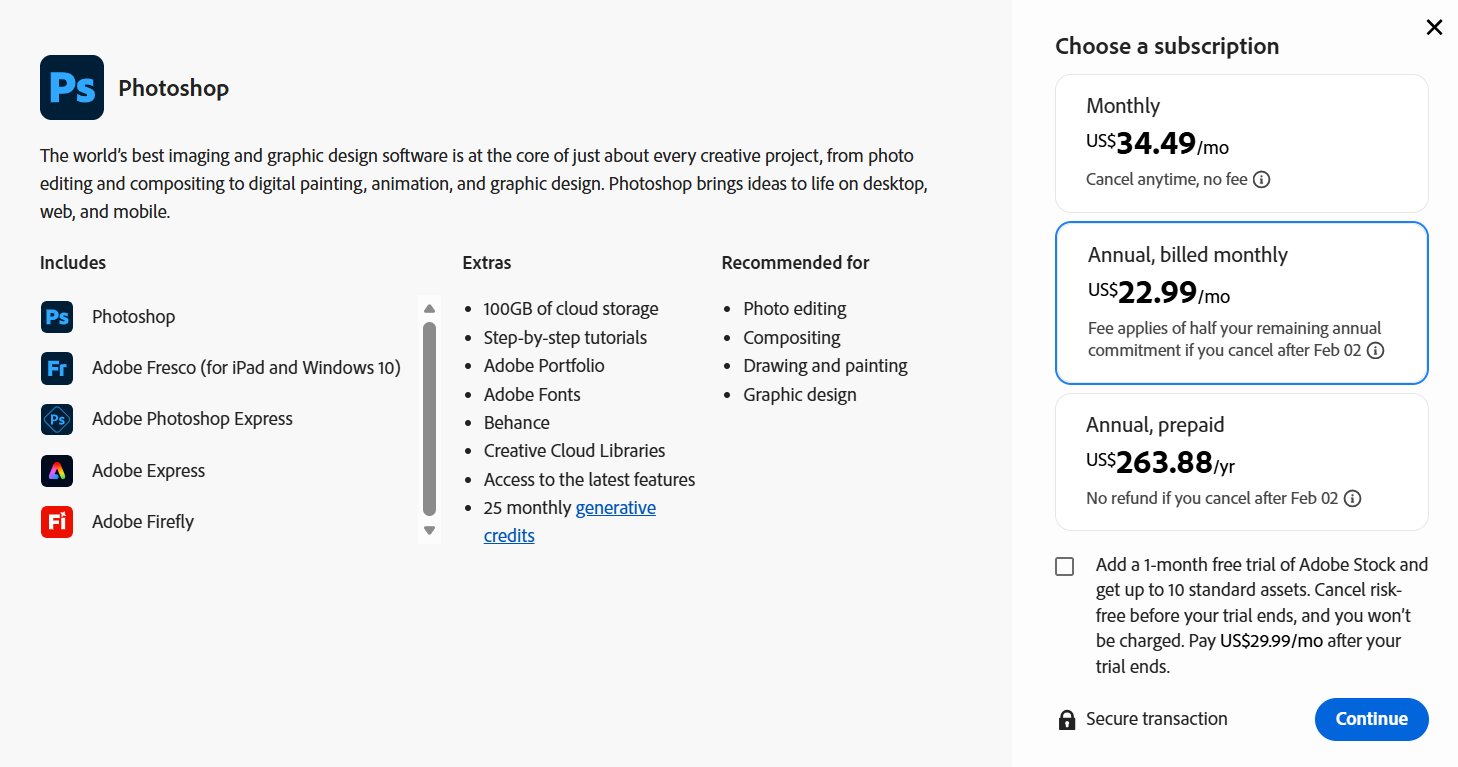 |  |
Other Details
Organization Types supported |
|
|
|---|---|---|
Platforms Supported |
|
|
Modes of support |
|
|
API Support |
|
|
Get help choosing | Get help choosing |
Security & Compliance
Certifications, data handling, and security controls for IT and compliance evaluators.
HIPAA | — | ✗ No |
|---|---|---|
GDPR | ✓ Yes | — |
Data Residency | 🌐 Global | 🌐 Global |
Adobe Photoshop User Reviews & Rating Comparison
User Ratings | No reviews available for the product | |
|---|---|---|
Rating Distribution | No reviews available for this product | |
Spotsaas Editor’s POV generated by AI | Buyer sentiment Overall, buyers highly appreciate Photoshop’s versatility, powerful features, and integration with Creative Cloud, though some find the complexity challenging. What buyers like
Common complaints
| Buyer sentiment Insufficient review data available to determine overall buyer sentiment. |
Pros and Cons |
|
|
Positive Reviews | No reviews available for the product | No reviews available for the product |
Integrations
Integration with other apps | No Integration information available. |
|---|



List of Customers
Customers |  Nike  IBM  Coca-Cola |  Activision  NEXON  SQUAREENIX |
|---|
Media and Screenshots
Screenshots |  1 Screenshots | No screenshots available. |
|---|---|---|
Videos |  2 Videos |  2 Videos |
Top Alternatives to Adobe Photoshop and Plask Motion in 2026
Alternatives |
|---|


Add another option to compare side by side
Search by product name to compare pricing, fit, and buyer feedback in one view.Compare similar software options


Related Blogs and Articles for 3d Modeling Software

Disclaimer: This research has been collated from a variety of authoritative sources. We welcome your feedback at [email protected].
Frequently asked questions
- Which is better, Adobe Photoshop or Plask Motion?
- Adobe Photoshop edges out the other on user ratings (5.0 vs -1.0). That said, the best pick depends on your use case — use the comparison tables above to evaluate each dimension.
- Do Adobe Photoshop and Plask Motion offer a free trial?
- Yes, both Adobe Photoshop and Plask Motion offer a free trial.
- What is the starting price of Adobe Photoshop vs Plask Motion?
- Adobe Photoshop starts at $22.99 /month. Plask Motion starts at $50.00 per month.
- What are the top alternatives to Adobe Photoshop?
- Top alternatives to Adobe Photoshop include Adobe Premiere Pro, Adobe Photoshop Elements, Adobe Photoshop Express, Adobe Photoshop Lightroom, Cutout.pro.
- What are the top alternatives to Plask Motion?
- Top alternatives to Plask Motion include Jig Workshop Pro, Animant, Modo, SkyCiv, ANYTHING WORLD.