
Schedulefly: Comparing the Latest Pricing, Features & Alternatives for Scheduling Software in 2026

Managing staff schedules can be as demanding as running a busy kitchen during the dinner rush. In 2026, Schedulefly has become a practical option for restaurant managers who want more order in their shift planning.
This article covers their latest offerings: pricing that adapts to your team’s size, features built for restaurateurs, and a comparison with other tools on the market so you can judge where the value is and which plan matches your headcount.
The sections below look at what Schedulefly does well, how its pricing works as your staff count changes, and where a different scheduling tool may fit your operation better. Use them to decide whether Schedulefly covers your needs or whether one of the alternatives is a closer match.
Key Takeaways
- Schedulefly is built for the restaurant industry, with features like drag-and-drop scheduling, direct messaging, forecasting tools, a job posting board, and an information storage hub.
- The software offers flexible pricing based on staff size that scales as your business grows, a cost-effective option for both small cafes and large restaurants.
- Alternative software options to consider include 7shifts with its team communication and labor compliance tools; ZoomShift’s visual schedule builder and GPS clock-ins; Sling’s payroll integration capabilities; Push Operations’ HR management system; and Planday’s strong emphasis on integration with other systems.
- User reviews of Schedulefly are generally positive, specifically mentioning how easy it is to create schedules and manage tasks, along with responsive customer support.
- The right scheduling software, such as Schedulefly, can simplify restaurant operations by improving staff coordination and overall efficiency.
Understanding Schedulefly: An Overview
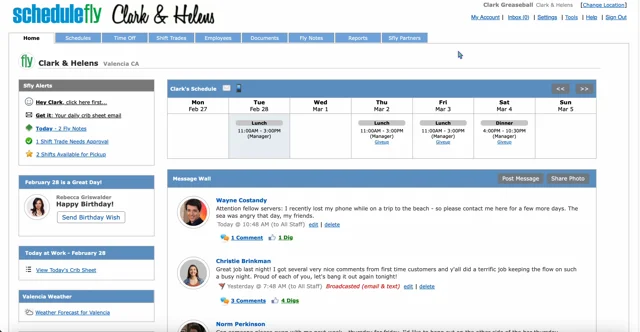
Schedulefly is a straightforward employee scheduling app built for the restaurant industry. With forecasting, messaging, job-posting, and information storage in a single platform, it covers most of what a restaurant needs for staff management, from writing the weekly schedule to keeping the team in the loop on changes.
Who can use Schedulefly?
Restaurants of all sizes use Schedulefly for their staff management needs. Whether it is a cozy local cafe, a bustling diner, or an upscale eatery, this scheduling software simplifies creating and communicating shift schedules.
Managers save time with its intuitive design, while employees can check their shifts on the go with the mobile scheduling app.
It is not limited to restaurants. Bars and breweries can also use Schedulefly to coordinate their teams and cover shifts across changing hours. With messaging, job posting, and information storage in one platform, businesses across the hospitality sector can keep operations organized without juggling several separate tools.
The next section looks in detail at the features that set Schedulefly apart among employee scheduling solutions, and how each one maps to a task a restaurant manager handles every week.
Features offered by Schedulefly
Schedulefly packs a range of features built for restaurant management and staff scheduling. The software simplifies operations and keeps employee coordination efficient and easy to manage.
- Employee Scheduling: Schedulefly makes building work schedules simple with a drag-and-drop interface. Managers can assign shifts, manage time-off requests, and handle shift changes without hassle.
- Forecasting Tools: This function projects staffing needs based on past trends or expected business levels. Accurate forecasting helps prevent overstaffing or understaffing during critical hours.
- Direct Messaging: Communication matters in the restaurant industry. Schedulefly’s built-in messaging system keeps staff and management in touch, so everyone stays informed and up to date.
- Job Posting Board: When it is time to expand the team, Schedulefly offers an easy job posting feature. Restaurants can advertise openings directly to a targeted audience that already has experience in the sector.
- Information Storage Hub: Schedulefly serves as a central repository for your important documents. Upload and access everything from training materials to recipes in one secure place, available to all relevant personnel.
Schedulefly Pricing: A Breakdown
Schedulefly uses a simple pricing structure based on the number of staff members, so businesses can pick a plan that suits their needs and budget. The transparent model keeps costs predictable and scalable as your business grows.
Pricing based on staff size
Your choice of employee scheduling software should fit your team’s size without breaking the bank. Schedulefly uses a tiered pricing structure that adjusts to different staff sizes, so you only pay for what you need.
Whether you run a cozy cafe or a bustling restaurant, there is a monthly pricing option for your number of staff members. That flexibility makes it a good fit for restaurant managers who want to keep shift scheduling and staff management simple.
Schedulefly can be a cost-effective choice because its rates scale with your team’s growth. There are no abrupt price jumps here; each level is reasonably priced to accommodate expansion at every stage.
The system grows with your business, so no surprise costs throw off your budget planning as you hire more people. Because the plan is tied to staff size rather than a long feature list, you can forecast the monthly cost as your team expands or contracts through the seasons. The goal is the right scheduling tools at the right price, matched to the part of your operation that matters most: your people.
Top Features of Schedulefly
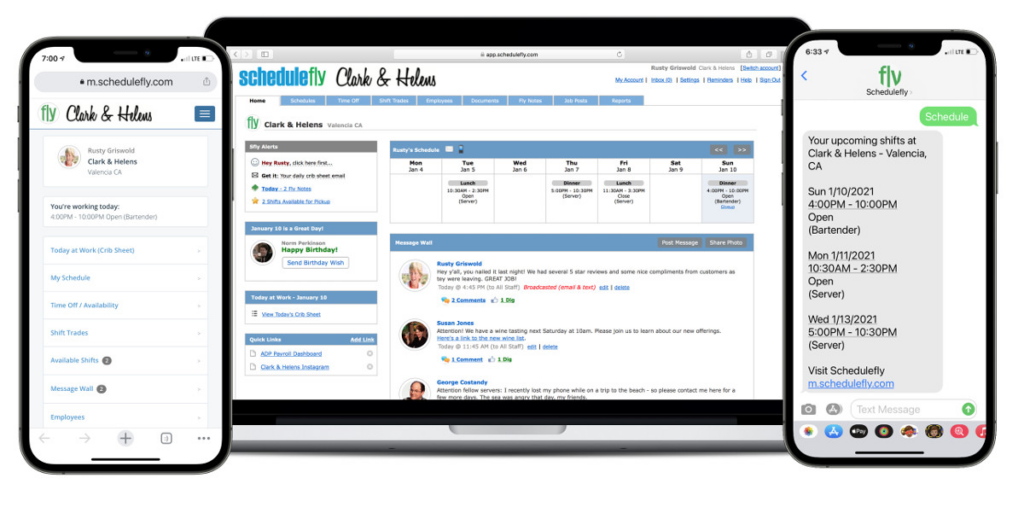
Schedulefly’s top features include employee scheduling, forecasting, messaging, job-posting, and information storage. Read on to see how these can support your restaurant management needs in 2026.
Employee scheduling
Employee scheduling software is central to efficient staff management in the restaurant industry. It lets managers create and distribute shift schedules that cover every shift while accounting for employee availability and preferences.
With mobile scheduling apps, messaging, and time clock integration, these tools simplify managing staff schedules and improve day-to-day operational efficiency. Managers spend less time reworking the roster, and staff always have the latest version of their shifts in hand.
Employee scheduling software also gives you a central place to store information about staff members and their schedules. With it, restaurants can reduce scheduling conflicts and let employees check their schedules from anywhere.
Forecasting
Forecasting in Schedulefly helps you predict future staffing needs from historical data and upcoming events. You can build schedules that match expected customer traffic, which supports both staff efficiency and service quality.
By reading trends and patterns, forecasting helps restaurant managers manage labor costs while keeping enough coverage during busy periods. Instead of guessing how many people to put on the floor, they can staff to the demand they expect for each day and shift.
The forecasting tool can also improve employee satisfaction, since it helps prevent overstaffing or understaffing and keeps the workload balanced for the whole team.
Messaging
Beyond forecasting, messaging is another important Schedulefly feature. It supports clear communication between staff members and management.
With the messaging feature, employees stay updated on shift changes, important announcements, or anything else tied to their role at the restaurant. Managers can reach specific team members or broadcast a message to everyone.
The messaging feature keeps communication clear and makes sure all staff members are well informed and connected in real time, whether they are on shift or checking in from home before a change takes effect.
Job-posting
Schedulefly offers a convenient job-posting feature that lets managers post open shifts quickly. This tool speeds up filling empty shifts, so staffing needs are met without unnecessary delay.
In a few clicks, managers can broadcast open shifts to available staff members, which prompts quick responses and keeps scheduling flexible.
The job-posting feature also makes it easier to find replacements for last-minute shift changes or unexpected absences. With it, managers keep their teams fully staffed, reduce disruptions to daily operations, and maintain service.
Information storage
For organization and easy access to important data, Schedulefly includes a solid information storage feature. It lets users securely store and manage essential documents such as employee contracts, schedules, certifications, and other records.
By keeping these resources inside the scheduling software, managers can retrieve files quickly during audits or when resolving staff-related matters.
With the ability to upload and categorize documents in a systematic way, Schedulefly’s information storage helps simplify administrative tasks. Managers can locate a specific document without digging through paperwork or scattered digital folders.
As businesses work toward efficiency and compliance with documentation rules, this feature is a genuinely useful asset.
Alternatives to Schedulefly
Looking for other options? Consider 7shifts, ZoomShift, Sling, Push Operations, and Planday as alternatives to Schedulefly. Read on to see how these scheduling tools compare and which one may fit your needs best.
7shifts
7shifts is a straightforward employee scheduling app built for the restaurant industry. It offers shift scheduling, a time clock, and a mobile scheduling app to help restaurant managers run their staff efficiently.
Its pricing is based on the number of staff, making it affordable for restaurants of all sizes, from a single location to a growing group of sites.
Beyond employee scheduling, 7shifts also provides tools for labor cost control and labor compliance to right-size staffing levels and keep operations within labor laws. Its clear interface and integration with other restaurant management systems make it a useful tool for day-to-day operations in a fast-paced restaurant.
ZoomShift
Next is ZoomShift, another popular scheduling alternative. ZoomShift offers a clear interface and strong features for employee scheduling and management.
With its intuitive design, users can create schedules, manage shifts, track time and attendance, and message their teams in real time. The mobile app adds accessibility, letting staff check their schedules, swap shifts, and get important updates on the go.
ZoomShift includes drag-and-drop scheduling tools, labor cost forecasting, messaging, digital job posting for open shifts or available positions, and secure storage for essential documents such as employee contracts or training materials. That combination covers scheduling, communication, and record-keeping in one place, which suits managers who want fewer separate systems to maintain.
Sling
For restaurant scheduling software, Sling is a versatile platform with staff management tools for businesses of all sizes. Its clear interface simplifies shift scheduling, time clock management, and communication among employees.
The app’s flexible pricing structure supports custom plans based on the number of staff members, a good fit for restaurants that want to keep scheduling on budget.
Sling also provides tools for task assignment and time-off requests, so managers can keep staffing levels efficient and handle coverage gaps before they become a problem. Its mobile scheduling app lets staff check schedules on the go, which improves communication and reduces scheduling errors across the team.
Push Operations
Push Operations is a full employee scheduling software with advanced features for staff management. Its intuitive interface simplifies creating and managing shifts, keeping operations running for restaurants and other businesses.
Along with shift scheduling and time clock functions, Push Operations provides strong messaging for team communication. It also offers job-posting and information storage features to reduce restaurant management busywork.
For businesses that want a reliable employee scheduling solution, Push Operations is a versatile tool that fits the specific needs of restaurant staff scheduling, and it can grow into wider workforce management as those needs expand.
Planday
Planday offers a full staff management solution for businesses of all sizes. It provides user-friendly features for employee scheduling, time clock management, and communication that keep the process organized.
With its intuitive interface and mobile app, Planday simplifies shift scheduling and helps restaurant managers oversee their staff.
Its pricing is based on the number of staff members, so it works for teams of varying sizes and scales as headcount changes. Planday stands out among scheduling tools for its focus on restaurant scheduling and its ability to handle all aspects of staff management in one place, from the schedule to the tools it connects with.
Comparing Schedulefly with Other Scheduling Software
Scheduling software is changing quickly, with many applications working to improve workforce management. Schedulefly is one of the contenders. Here is how it stacks up against other leading solutions:
7shifts: Unlike Schedulefly, which caters mainly to the restaurant industry, 7shifts has broader appeal across sectors. It stands out with team communication, time-clocking, and advanced labor compliance tools. Its AI-driven auto-scheduling can save managers significant time, whereas Schedulefly leans toward simplicity and ease of use.
ZoomShift: A strong alternative, ZoomShift is known for its drag-and-drop schedule builder, which contrasts with Schedulefly’s simpler, less visual interface. ZoomShift also offers GPS clock-ins for businesses that want stricter time tracking, a feature Schedulefly does not currently offer.
Sling: This platform stands out for its ability to connect with other work tools, including payroll services, which Schedulefly does not support directly. Sling’s free version is a good starting point for small businesses that want to try scheduling software without upfront investment.
Push Operations: Push Operations is geared toward broader HR solutions, including payroll and HR management, on top of scheduling. Businesses focused on full HR systems may find Schedulefly’s dedicated scheduling and communication tools narrower by comparison.
Planday: An alternative known for its emphasis on integration, Planday connects the scheduling system with payroll, POS, and other tools. Schedulefly keeps its focus on core scheduling, which may suit businesses that want a dedicated scheduling application.
Each alternative brings its own mix of features, integrations, and pricing, aimed at different business needs and preferences. When weighing Schedulefly against its competitors, decision-makers should consider the specific demands of their operations, the size of their team, and the practical benefits each solution delivers. A small cafe and a multi-site restaurant group will often land on different answers.
User Reviews of Schedulefly
After comparing Schedulefly with other scheduling software, here is what users say about the platform. They praise Schedulefly for its intuitive interface and straightforward functionality.
Many find it easy to create schedules, communicate with staff, and manage various parts of restaurant operations efficiently, even during a busy service. Users also value the mobile app’s convenience for on-the-go scheduling and communication when they are away from the office.
The positive feedback extends to customer support, with users reporting responsive help whenever they need it. Overall, reviews point to Schedulefly as a reliable and user-friendly solution for restaurant scheduling, and a popular choice among industry professionals who want effective staff management tools.
Conclusion
On close comparison, Schedulefly is a capable scheduling solution for restaurant staff management. Its user-friendly interface simplifies employee scheduling and messaging, and it also provides tools for forecasting and job posting.
With flexible pricing based on staff size, it is a cost-effective option for businesses of all scales.
Measured against alternatives such as 7shifts, ZoomShift, Sling, Push Operations, and Planday, Schedulefly stands out for its intuitive features and competitive pricing structure.
User reviews back up its efficiency at handling restaurant scheduling tasks, from building the weekly roster to keeping the team informed about changes.
For busy restaurant management, Schedulefly is a reliable choice that fits the varied needs of modern businesses. For teams that want smooth staff coordination and efficiency, it is worth considering.
(Image credit: Schedulefly)
Frequently Asked Questions
1. What are the key features of Schedulefly in 2026?
The latest features of Schedulefly include shift scheduling, communication tools, staff availability tracking, and management reporting.
2. How does the pricing for Schedulefly compare to its alternatives in 2026?
In 2026, the pricing for Schedulefly is competitive compared to its alternatives, offering various subscription plans based on company size and needs.
3. Can I integrate Schedulefly with other software platforms for scheduling purposes?
Yes, you can integrate Schedulefly with various popular software platforms such as POS systems and payroll services for smooth scheduling operations.
4. Are there any notable improvements or updates to the latest version of Schedulefly in 2026?
The latest version of Schedulefly in 2026 introduces improved mobile capabilities and user interface updates for a more intuitive experience.
5. Does Schedulefly offer customer support options for technical assistance or troubleshooting?
Yes, customers have access to customer support options including email support and knowledge base resources for technical assistance related to using Schedulefly.
Compare alternatives to the tools in this post

- Independent picks for exactly what you just read about
- Matched to your team size & needs
- Vendors don't pay for placement
Step 1 of 4
How big is your team?
We tailor recommendations to companies your size.















Related Articles
AI Software
AI Receptionist in 2026: What It Does, What It Costs and How to Choose
Continue reading →
Customer Support Software
Best Free Help Desk Software in 2026: Free Plans and Open Source Tools Compared
Continue reading →
AI Software
Best AI Voice Agents in 2026: Contact-Center and Developer Platforms Compared
Continue reading →
AI Software
AI Customer Service in 2026: Use Cases, Platforms, Pricing and Metrics
Continue reading →