
OneLaunch is a desktop app that brings together over 20 tools in one platform. It offers fast access to news, weather, directions, and more. You can customize the app and use its built-in address bar for quick online searches.
Key Takeaways
- OneLaunch is a free desktop integration tool for Windows.
- OneLaunch includes a customizable dashboard, weather and news updates, a search tool, privacy features, a screenshot tool, and clipboard history.
- Users appreciate OneLaunch’s simple interface and convenient tools like clipboard history and the screenshot feature.
- Alternatives include RocketDock, ObjectDock, Launchy, Winstep Nexus, and Executor. These tools offer different features, like advanced customization and command-based setups, suited to different user preferences.
What is OneLaunch?
OneLaunch acts as a launcher for your computer, giving you access to your favorite websites, apps, and tools in one place. It shows up as a toolbar on your desktop, so you can quickly find and open the things you use most often.
OneLaunch is a desktop integration tool built to simplify the Windows experience. It’s built on Chromium, which means it uses the same underlying technology as Google Chrome and other Chromium-based browsers.
OneLaunch Features and Pricing
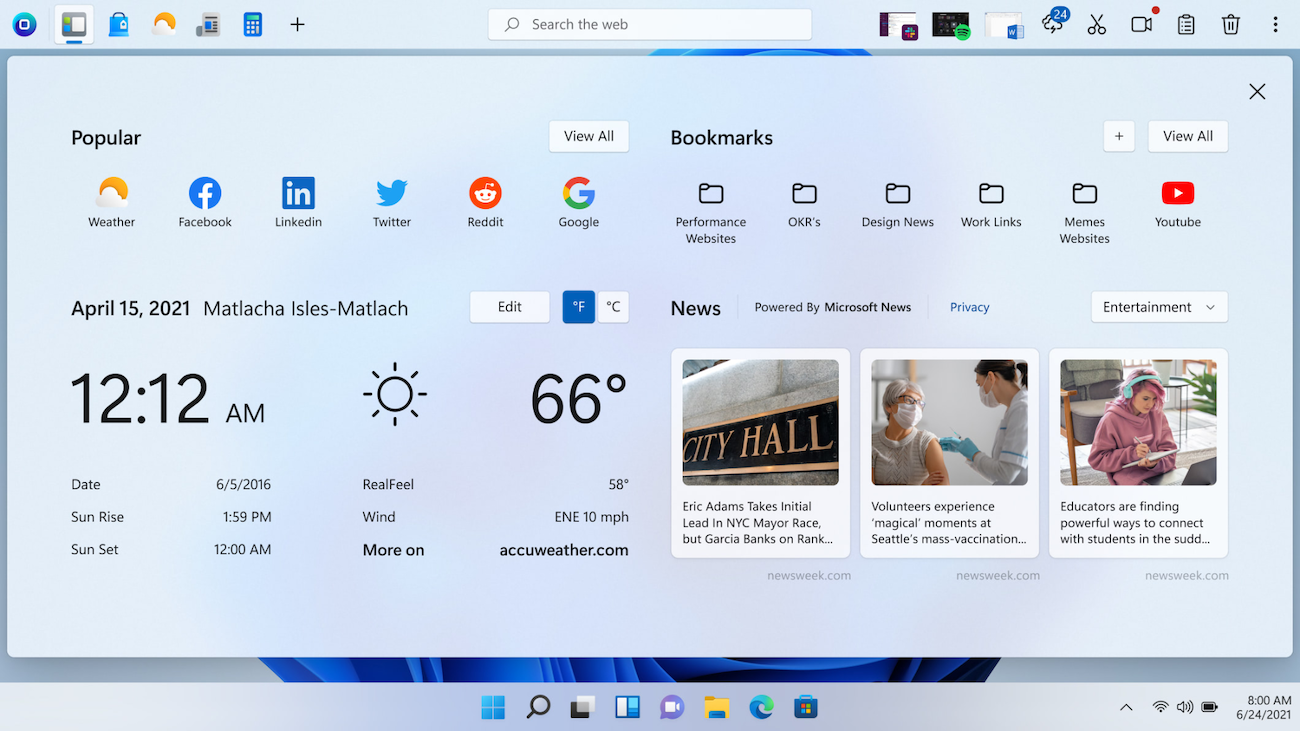
OneLaunch bundles a set of tools meant to make everyday desktop tasks faster:
- Custom Dashboard: OneLaunch offers a customizable dashboard, so you can set up shortcuts and quick access to your favorite features and tools.
- Weather and News Updates: Real-time weather forecasts and the latest news show up right on your dashboard, so you don’t need to visit separate websites or apps for updates.
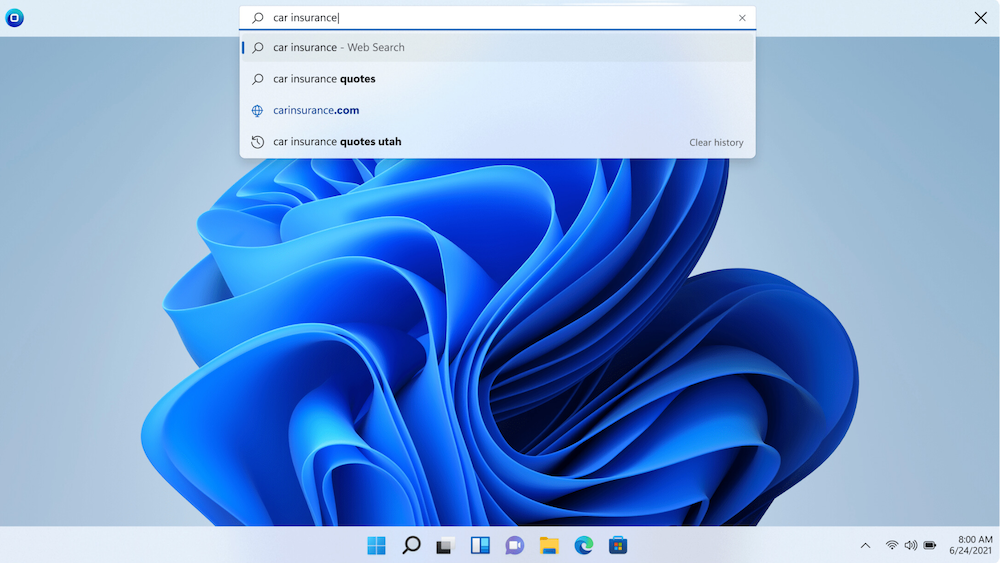
- Search Tool: OneLaunch includes a built-in search tool that lets you search the web quickly.
- Privacy Features: It offers privacy features meant to guard your online activity and personal information from unwanted tracking or data collection.
- Screenshot Tool: Capture and edit screenshots with the built-in tool. You can take snapshots of your screen and add notes or highlights without installing additional software.
- Clipboard History: This feature keeps a record of text, images, or links you’ve copied, so you can retrieve them later instead of losing them the moment you copy something new.
OneLaunch is free to download and use. The basic version gives users a desktop toolbar for quick access to popular websites, apps, and other shortcuts at no cost.
OneLaunch does not currently offer a paid tier, so all users get the same version, supported by ads.
OneLaunch Reviews and User Feedback
| Pros | Cons |
|---|---|
| Clean and simple interface | Distracting ads |
| Convenient tools like the clipboard history and screenshot tool | Limited customization options |
| Quick access to weather, news, and a search tool in one place | Automatically installs with other software downloads |
| Free to download |
OneLaunch has a simple interface. Many users find the clipboard history and screenshot tools especially useful for daily tasks, since both save time compared to switching apps. The weather and news updates, along with the search tool, are also convenient and easy to reach. Users also mention that OneLaunch is completely free.
Some users are less happy with the ads, which they find distracting while using the app. OneLaunch also has limited customization options for certain features, and some users wish those were more flexible. It sometimes installs alongside other software downloads too, which feels unexpected to people who didn’t ask for it.
OneLaunch Alternatives
Some alternatives to OneLaunch include RocketDock, ObjectDock, Launchy, Winstep Nexus, and Executor:
| Product | Key Features | Best For | Pricing |
|---|---|---|---|
| OneLaunch | All-in-one launcher, built-in browser, customizable dashboard, quick access to apps and websites | Users looking for a simple, all-in-one productivity tool | Free |
| RocketDock | Customizable dock, easy drag-and-drop shortcuts, lightweight design | Basic, streamlined desktop launcher | Free |
| ObjectDock | Highly customizable dock, tabbed docks, animated transitions | Users seeking detailed customization options | Free version, Paid version payment of $19.95 |
| Launchy | Keyboard-based launcher, quick search, minimal design | Users preferring keyboard navigation | Free (Open-source) |
| Winstep Nexus | Multiple docks, themes, and animations | Advanced users who want a polished, feature-rich dock | Free version, $12.95 for a Paid version |
| Executor | Command-based launcher, customizable commands, lightweight | Power users who like command-driven setup | Free |
- RocketDock is a simple, lightweight dock built for Windows users who want easy access to their favorite apps and files. People who want an easy, no-frills launcher tend to like it.
- ObjectDock offers a more feature-rich experience, with a customizable dock and options like animated transitions and tabbed docks. It gives more flexibility and visual polish than a basic launcher.
- Launchy is a keyboard-driven launcher for fast, text-based access to files and apps. You open apps by typing a few letters of their names, which makes it quick and hands-free.
- Winstep Nexus is a visually engaging dock with multiple docks and themes on offer. It suits users who want their desktop to look polished and organized, with more advanced animations than most alternatives.
- Executor is a command-based launcher with a minimalist interface, built for people who want to open files or apps using custom commands rather than clicking through menus.
Compared with these alternatives, OneLaunch is easier to pick up for beginners. It’s not as deep as ObjectDock or Winstep Nexus, but it does let users customize their dashboard with links and tools, which makes it flexible enough for a range of needs.
Questions about OneLaunch
Is OneLaunch malware?
OneLaunch is not classified as malware. Some users consider it a potentially unwanted program (PUP) because of how it advertises and bundles with other downloads.
Is OneLaunch safe?
OneLaunch is safe to use. It’s a desktop toolbar application that gives quick access to popular websites, apps, and shortcuts. Like many similar programs, though, it may show ads or recommendations based on your activity.
Because of that, it’s worth downloading OneLaunch from the official website or a trusted source, so you avoid modified or malicious versions.
How does OneLaunch get on your computer?
OneLaunch is a desktop integration tool for Windows users, and you can download it for free directly.
How to remove OneLaunch?
To uninstall OneLaunch from your computer:
- Go to the Control Panel.
- Select Programs > Uninstall a Program.
- Find OneLaunch, and click Uninstall.
Also read 10 Best Backup Software For Windows
Conclusion: Is OneLaunch the Right Choice for You?
Whether OneLaunch is worth installing comes down to whether you want a faster way to reach various PC tools without opening a browser first. It works for a wide range of users, from freelancers to larger businesses. If the feature set above covers what you need, it’s a reasonable pick for cutting down on daily clicking.
(Image Source: OneLaunch)
Frequently Asked Questions
What does OneLaunch software do?
OneLaunch software provides a convenient way to access apps, search the web, and organize your desktop.
Is OneLaunch free?
OneLaunch is free to download.
Can I install OneLaunch on any computer?
OneLaunch is designed for Windows-based computers, so you can install it on any PC that runs Windows.
Does OneLaunch have customer support if I run into issues?
Yes, there is customer support available if you have problems using OneLaunch software.
Are there similar programs to OneLaunch that I could use instead?
There are alternatives to OneLaunch such as RocketDock and ObjectDock that provide some of the same features.

- Independent picks for exactly what you just read about
- Matched to your team size & needs
- Vendors don't pay for placement
Step 1 of 4
How big is your team?
We tailor recommendations to companies your size.















Related Articles
IT Management
Microsoft Intune Pricing 2026: Plan 1, Plan 2, Suite and What Microsoft 365 Includes
Continue reading →
IT Management
Best Remote Access Software 2026: 11 Tools Compared by Price
Continue reading →
IT Management
Splashtop Pricing 2026: Solo, Pro, Performance and SOS Costs
Continue reading →
IT Management
Atera Pricing 2026: Every Plan, Per-Technician Cost and What You’ll Pay
Continue reading →