
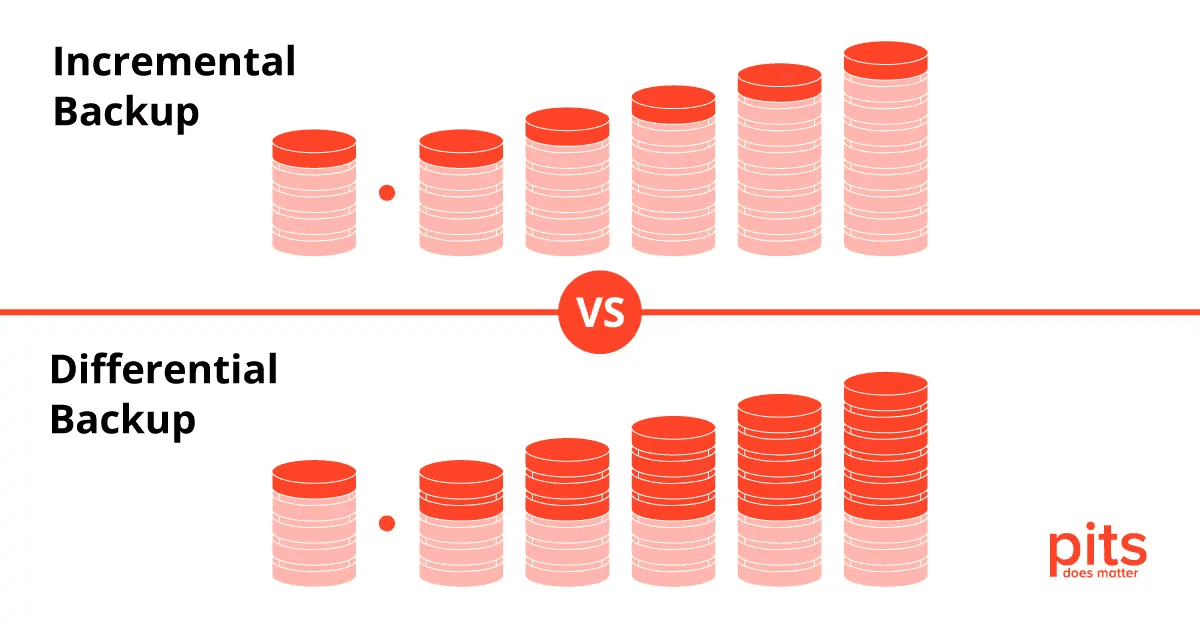
Not sure which backup method is right for protecting your data? It’s a common question, since both incremental and differential backups have real strengths depending on what you need. This article breaks down these two backup strategies — what they are, their advantages and disadvantages, and the key differences between them, so you can match the right method to your storage capacity, restore-time needs, and how often your files actually change.
Key Takeaways
- Incremental backup captures only the changes made since the last full or incremental backup, resulting in faster backup durations.
- Differential backup saves all changes made since the last full backup, offering quicker restores but taking up more storage space over time.
- Incremental backups require less storage space compared to differential backups and are more cost-effective.
- The restoration process for incremental backups involves accessing the last full backup along with each subsequent incremental backup. Restoring from differential backups requires accessing the last full backup and the most recent differential backup.
Understanding the Types of Backups
There are three main types of backups: full backup, differential backup, and incremental backup.
Full Backup
A full backup saves every file and folder in the system. It’s a comprehensive process that captures all data at a single point in time, giving you complete data protection at the cost of substantial storage space, since nothing is left out and every file gets copied regardless of whether it changed recently.
Running a full backup takes noticeably longer, especially with large volumes of data or slower systems. Despite the extra time and storage it consumes, it simplifies recovery, since everything is stored together in one place and there’s no need to pull from any other backup during restoration.
Companies often rely on dedicated software to run these backups efficiently, using compression and de-duplication to keep the network load down during the process.
Differential Backup
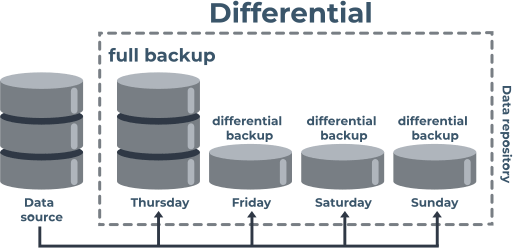
A differential backup only saves the changes made since the last full backup. That means it captures every file and piece of data that’s been modified or added since that last full backup ran.
Unlike incremental backups, which only save changes since the previous backup (whether that was a full or incremental one), differential backups keep growing in size as more changes accumulate.
That growth means larger file sizes and slower backups over time, but it also means faster restores, since every change since the last full backup sits in one place. Differential backups suit situations where restoration speed matters most, such as recovering quickly from a system failure or disaster.
Incremental Backup
Incremental backup only stores the changes made since the last full or incremental backup. This approach saves time and reduces storage space, since it focuses on backing up just the modified or new files.
An incremental backup usually finishes noticeably faster than the other methods, which makes it efficient for regular, ongoing backups. The tradeoff shows up during recovery: restoring from a chain of incremental backups is more involved than restoring from a single full backup.
Overall, incremental backups fit scenarios where backups run frequently and storage space is limited.
Pros and Cons of Incremental Backup
Incremental backup offers real benefits, like reduced backup time and lower storage space requirements, but it also comes with drawbacks, including more complexity and longer restoration times.
Benefits of incremental backup
Incremental backup has several advantages that make it a popular choice for data protection. The biggest one is time savings: unlike full or differential backups, it only backs up files that changed since the last backup, which means much faster backup durations and less disruption to whatever else is running on the system at the time.
Because only changed files get stored, this method also needs significantly less disk space and fewer storage resources than the alternatives. That keeps costs down and makes better use of the storage capacity you already have.
Restoration also gets easier in one specific sense: you just need the latest full backup plus each subsequent incremental backup, applied in order, to reach the point in time you want.
Drawbacks of incremental backup
One drawback of incremental backup is the longer restoration process. Since each incremental backup only captures changes made since the previous one, restoring data means working through multiple backups to rebuild the most recent version.
That can take time and require more steps than restoring a full or differential backup.
Another drawback is the risk of data loss if one of the incremental backups in the chain gets corrupted or lost. Unlike a full backup, which stores everything in a single image file, incremental backups depend on the backups before them to restore missing data.
If any of those backups are damaged or inaccessible, it can mean permanent data loss.
Managing and organizing a growing set of incremental backups can also get complicated over time. As more copies pile up, you need to keep track of which files belong to which backup set, when each one ran, and in what order they need to be applied.
Without solid organization, that tracking problem can lead to confusion when you’re trying to recover a specific file or version.
Pros and Cons of Differential Backup
Differential backup lets you quickly restore files from any point in time, since it captures all changes since the last full backup in one place. The downside is storage: it needs more space than incremental backup, because each differential backup includes every change made since the last full backup, not just the newest ones, which is a tradeoff worth planning around before you commit to a storage budget.
Benefits of differential backup
Differential backup has its own set of benefits for efficient data storage. Unlike incremental backup, which only saves files changed since the last full or incremental backup, differential backup captures everything changed since the last full backup.
That means every differential backup run includes all files modified after the original full backup. The main payoff is a faster, simpler restoration process compared to incremental backups, since you only need two backups: the most recent full backup and the latest differential one.
Differential backups can also cut down on the number of image files you need to manage. They generally require less processing power and time than a synthetic full backup, since there’s no need to combine multiple backups to restore.
Drawbacks of differential backup
Differential backups have their drawbacks too. The main one is storage: since each differential backup includes everything changed since the last full backup, the backup grows larger with every subsequent run.
That can be a real problem if your storage capacity is limited, since a differential backup will eventually take up more disk space than incremental backups would. Restoration can also be slower than incremental backups, since you need both the last full backup and the latest differential backup to restore.
So while differential backups can be faster to run in some cases, these tradeoffs are worth weighing before you build your backup strategy around them.
| Pros of Differential Backup | Cons of Differential Backup |
|---|---|
| Faster Restoration: Only needs the latest full backup and the latest differential backup. | Storage Space: Grows larger over time and can require more space than incremental backups. |
| Space Savings: Reduces the number of required image files compared to incremental backups. | Restoration Speed: Can be slower as both the last full backup and latest differential backup are needed. |
| Less Processing Power: Doesn’t require combining multiple backups. |
Key Differences between Incremental and Differential Backup
The key differences between incremental and differential backup come down to backup speed, storage space, costs, the restoration process, and which use cases each one suits.
Backup speed
Incremental backup runs faster than differential backup, because it only backs up files changed since the last full or incremental backup, which keeps each backup window shorter.
Differential backup, by contrast, has to back up every changed file since the last full backup regardless of whether it’s already been captured in an earlier differential run. That extra work takes longer and adds to completion time.
If speed and efficiency matter most for your backup routine, incremental backups are the better fit.
Storage space
Incremental backups need less storage space than differential backups, because they only store changes made since the last backup, which keeps file sizes small.
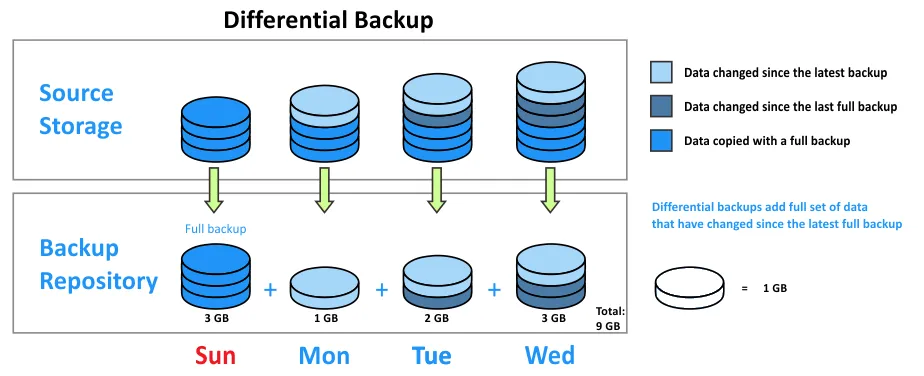
Differential backups, on the other hand, save every change made since the last full backup, and that accumulates over time into a larger footprint. If your storage capacity is tight or you want to keep usage efficient, incremental backups are the more practical choice.
Costs
Incremental backups tend to be more cost-effective than differential backups, since they only store changes since the last backup, keeping file sizes smaller and storage needs lower.
With a smaller storage footprint, businesses can spend less on backup solutions or cloud storage subscriptions. The backup process itself also runs faster, since it only needs to copy the files that changed.
That adds up to real time savings for businesses and individual users running regular backups.
Restoration process
Restoring data from incremental backups is a fairly direct process. To get the most recent version of your data, you access the last full backup and then apply every subsequent incremental backup in chronological order.
That approach restores quickly, since it only has to process and transfer the changed files from each backup in the chain. Restoring an older version, though, means you need the last full backup plus every incremental backup leading up to that point.
Restoring from differential backups also means accessing two types of backups: the last full backup and the most recent differential backup created since then.
Unlike incremental backups, which only hold changes made after each previous backup, differential backups contain every change made since the last full backup. That means restoring an older version of your files with differential backups takes fewer steps than doing the same with incremental backups.
Suitable use cases
Incremental backup works well in situations with frequent, small changes to files. It’s a common choice for backing up databases or email servers that generate a lot of daily updates but only a relatively small amount of new data each time, where running a full backup every day would waste both time and storage.
By backing up only the changed files since the last backup, incremental backups save time and storage space compared to full backups. They also fit neatly into existing backup schedules and can be automated with backup software.
Good use cases for incremental backup include preserving version history, minimizing downtime during backups, and cutting down on network bandwidth usage for remote backups.
Conclusion
Understanding the differences between incremental backup and differential backup matters for choosing the option that best fits your data protection needs. Incremental backup offers fast backups, saves storage space, and keeps costs down, which makes it a strong default for anyone backing up frequently.
Its tradeoff is a longer restoration process. Differential backup, on the other hand, gives you quicker restores but takes up more storage space over time, which makes more sense when restore speed matters more than storage efficiency. Weigh your specific requirements and priorities — how often your data changes, how much storage you have, and how fast you need to recover — before deciding which backup method suits you best.
Frequently Asked Questions
1. What are the differences between incremental backup and differential backup?
Incremental backup refers to the process of saving only those file changes made since the last successful backup, whereas differential backup saves data alterations made from the last full backup.
2. What are some advantages and disadvantages of these two types of backups?
The main advantage of an incremental backup is that it uses less storage space and is quicker to perform than a differential one. However, recovery can be slower because each increment must be restored sequentially. Differential backups take up more storage capacity but they offer faster recovery since you just need the latest full and differential backups.
3. Can I manage these backups efficiently in my business?
Yes! Smart Backup management allows scheduling both Incremental And Differential Backups based on your specific needs for efficient use of storage resources.
4. Are there other types of backups available too?
Certainly! Other than incremental or differential, there’s a synthetic full backup that combines all updates with a previous full archive; thus creating an updated version without needing to back up everything afresh.
5. How does the cloud factor into these different kinds of backups?
Cloud technology offers flexibility when performing any type such as incremental or differential by storing backed-up data offsite while ensuring easy access during times of restoration or recovery.

- Independent picks for exactly what you just read about
- Matched to your team size & needs
- Vendors don't pay for placement
Step 1 of 4
How big is your team?
We tailor recommendations to companies your size.















Related Articles
IT Management
Microsoft Intune Pricing 2026: Plan 1, Plan 2, Suite and What Microsoft 365 Includes
Continue reading →
IT Management
Best Remote Access Software 2026: 11 Tools Compared by Price
Continue reading →
IT Management
Splashtop Pricing 2026: Solo, Pro, Performance and SOS Costs
Continue reading →
IT Management
Atera Pricing 2026: Every Plan, Per-Technician Cost and What You’ll Pay
Continue reading →