
FingerCheck is an HR management platform that handles payroll, benefits, and recruitment for companies of many sizes. It connects with major HR systems such as Gusto and QuickBooks Online Advanced, and it uses fingerprint or facial recognition for time tracking on Android and iOS devices.
Plans begin at $5.00 per month, so the platform fits both freelancers and large corporations. Reviewers tend to praise its customer service and payroll processing, though some ask for better biometric accuracy and easier integrations. Options such as TestGorilla or Timesheets.com cover a different mix of features.
Key Takeaways
- FingerCheck is an all-in-one HR platform for time and attendance, payroll processing, and employee scheduling.
- Pricing starts at $5 per user per month, with subscription options for businesses of various sizes; new users also get a free trial.
- The platform uses biometric technology for secure clock-ins, but some feedback asks for more accurate recognition.
- FingerCheck connects with popular business software such as QuickBooks Online Advanced and Gusto, so data moves between applications.
- Alternatives such as TestGorilla, QuickBooks Time, Rippling, and Gusto offer a different feature mix that may suit some businesses better; weigh factors like scalability and customer support when you choose.
Understanding FingerCheck: An Overview
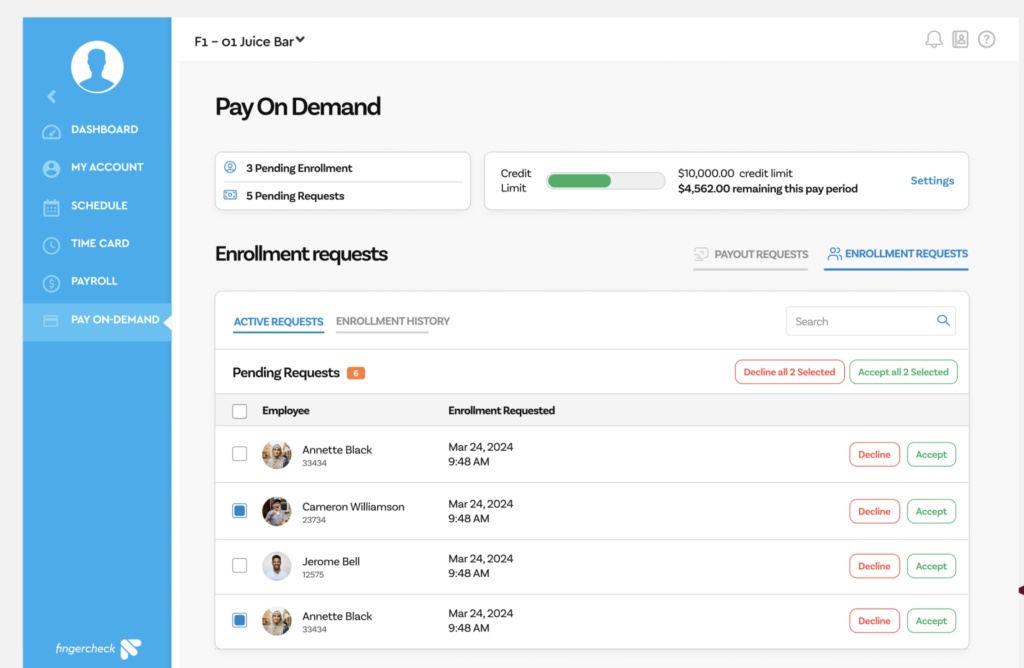
FingerCheck is a human resource management platform built to handle payroll, benefits administration, and recruitment for companies of all sizes.
Employees can clock in with a fingerprint or facial recognition, and the platform connects with other major HR systems such as Gusto and QuickBooks Online Advanced. Because the clock-in method ties to a person rather than a shared code or card, the attendance record stays tied to the right employee from the start.
The technology runs on Android and iOS devices, so employees can clock in from a phone or tablet as well as from a fixed device. FingerCheck backs that up with several support channels, so users of different sizes and skill levels can get help when they need it.
Built for everyone from solo freelancers to large corporations, FingerCheck starts at $5.00 per month. That entry price keeps it within reach of very small teams while still covering the payroll and time-tracking work larger companies need. Reviewers give it high marks for customer service and payroll processing, though some point to biometric accuracy and integration as areas to improve.
Teams that want other options can look at TestGorilla or Timesheets.com, which cover a different set of features that may fit specific business requirements.
Weighing these choices can improve how your company handles core HR work. Use this guide to see what FingerCheck offers, or to find a tool that maps more closely to your goals. The sections below cover pricing, features, reviews, and alternatives, and they explain how the right pick can reshape your HR workflow.
Core functionalities of FingerCheck
FingerCheck handles time and attendance with a set of tools built for modern workplaces. Employers can record employee hours through time clocks, mobile punch-ins, and web-based check-ins, so on-site, field, and remote staff can each log their time in whichever way fits how they work.
Its biometric authentication adds security by using fingerprints or facial recognition technology to confirm who is clocking in or out.
Integration with common business software is straightforward. FingerCheck connects with Gusto, QuickBooks Online Advanced, ADP Workforce Now, and Microsoft Excel. That range covers the payroll and accounting tools many businesses already run, so hours captured in FingerCheck can move into the system a company uses to pay people.
That connectivity keeps payroll accurate and cuts administrative time by reducing manual errors. When attendance data flows straight into these systems, staff spend less time re-entering hours by hand. The API also lets companies build custom setups that match their own workflows while keeping control over their time-tracking data.
Who benefits from using FingerCheck?
Small businesses, freelancers, and non-profits use FingerCheck to run payroll and track time. Its layout keeps employee scheduling and compliance management simple, so these organizations can manage their workforce without a large HR department. For a small team, that means one tool covers work that might otherwise take several separate systems or a dedicated hire.
Mid-sized businesses and large enterprises use FingerCheck for more complex HR work. They rely on biometric time clocks that tighten security and improve accuracy in attendance logs.
Public administrations value the compliance features, which help them meet regulatory standards while handling employee onboarding and benefits administration. For bodies that answer to strict rules on record-keeping, having those steps tracked in one place reduces the risk of a missed requirement.
A working payroll system helps these organizations run more smoothly across departments, since accurate hours and benefits data feed into every team that relies on them.
FingerCheck Pricing
Knowing how FingerCheck prices its plans matters for any business trying to run HR without overspending. The subscription options are built for organizations of different needs and sizes, so you can pick a plan that fits your budget and your human resource demands.
Subscription options and what they include
FingerCheck’s subscription plans start at $5.00 per user each month. Every plan covers the core work: human resources management, payroll processing, and time tracking.
A free trial lets businesses test the product before they commit, so they can confirm that FingerCheck is the right fit for their needs. During the trial a team can run a real pay cycle and see how the clock-ins, schedules, and payroll steps hold up before any money changes hands.
Each plan includes tools for attendance tracking and a clear cost structure for budgeting, so finance teams can predict what they will pay as headcount changes. Reviewers rate its value for money 4.7 out of 5 based on real reviews.
Pricing is transparent, so there are no hidden costs. You pay for software that grows with your business, and the price reflects what you get.
Comparison with traditional HR management costs
It helps to weigh FingerCheck’s subscription against traditional HR management. Older methods often rely on several systems and manual steps, which cost both money and time. Paper timesheets, spreadsheets, and standalone payroll tools each carry their own fees and their own chances for error.
At $5.00 per month to start, FingerCheck cuts cost by bundling payroll processing and benefits administration into one platform.
It also pulls HR duties together through integrations with common applications such as Gusto and QuickBooks Online Advanced.
Those integrations save money that companies would otherwise spend on separate providers for each HR function, and they cut the double data entry that comes with running disconnected tools. The mobile app adds on-the-go management at no extra charge, something traditional HR setups often lack or bill as a premium.
A tool like FingerCheck can save real money while giving businesses the management features they need day to day.
FingerCheck Features
FingerCheck’s feature set is built to make time tracking and payroll management easier. You can explore how it aims to raise productivity and give employees a self-service portal they can reach from any device.
Time tracking and payroll management
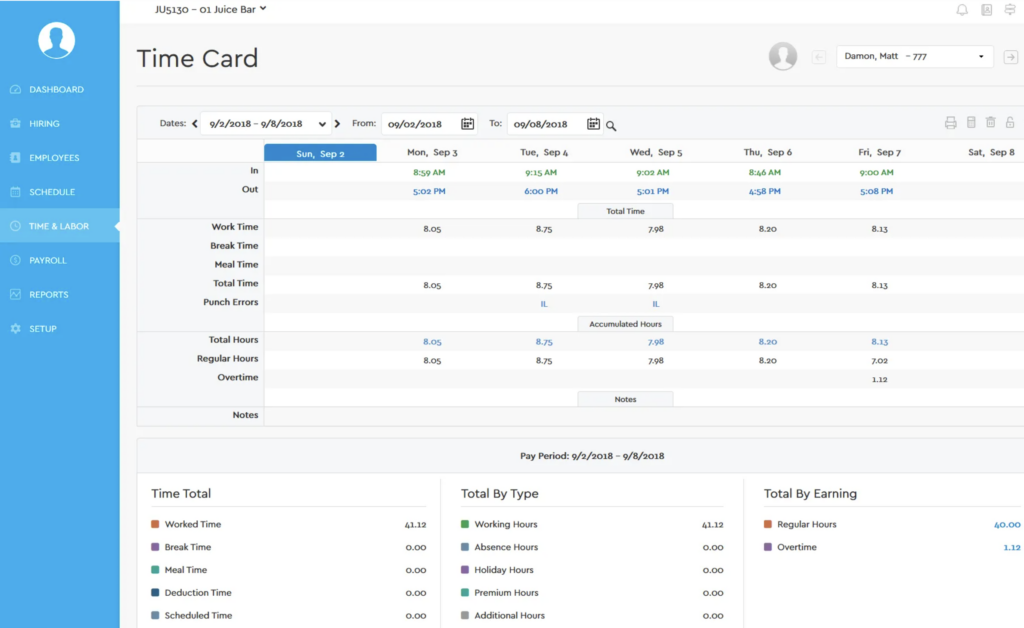
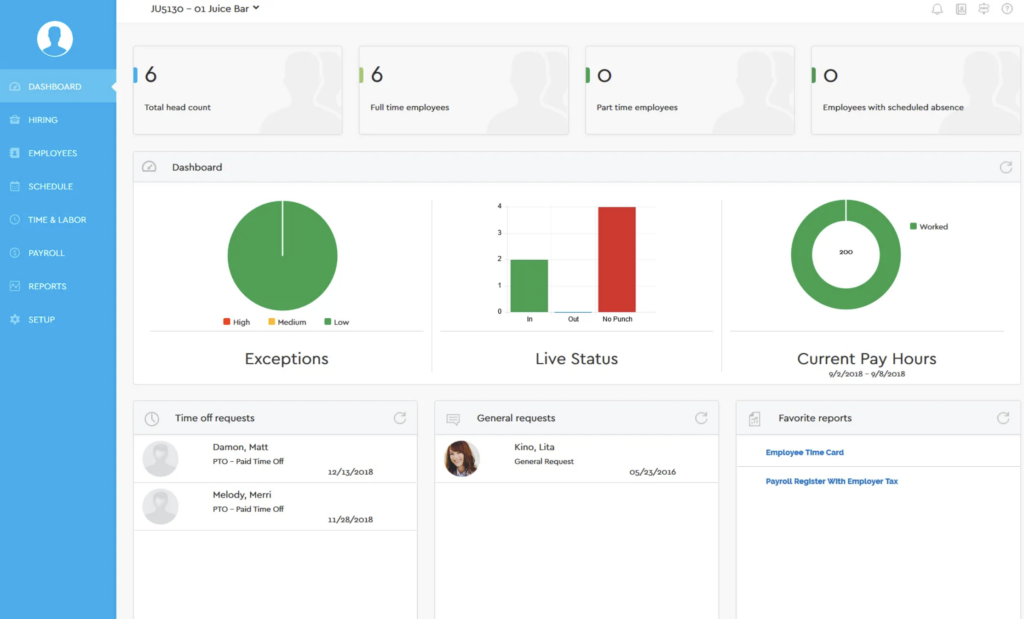
FingerCheck records employee time and attendance with precision. It uses biometric fingerprints and facial recognition to keep time tracking accurate and easy to monitor.
By capturing exact working hours, these features help businesses cut errors in payroll processing. Biometric clock-ins also make it harder for one worker to punch in for another, which keeps the recorded hours honest.
The platform does more than log clock-in times. It feeds those details straight into its payroll management system, so attendance logs turn into paychecks without extra steps. That flow works for small business owners and scales up for mid-sized or large enterprises, and it helps employees get paid on time.
Benefits and Insurance Administration
Handling employee benefits and insurance is a core part of FingerCheck. It centralizes the data, which cuts down on the errors and gaps that come with manual methods.
Employers manage benefit plans such as health, dental, vision, and retirement savings from one place, without drowning in paperwork or compliance worries. Keeping all of these plans in a single record also means changes to one benefit do not get lost across separate spreadsheets or files.
Updating a policy or adding a new employee takes little effort, and staff get accurate details about their benefits quickly. That structure also makes audits and reporting easier, which matters for any business keeping clean records for internal reviews or outside regulations. When the numbers already sit in one system, pulling a report for an auditor is a matter of a few clicks rather than a hunt across files.
Mobile app and employee self-service portal
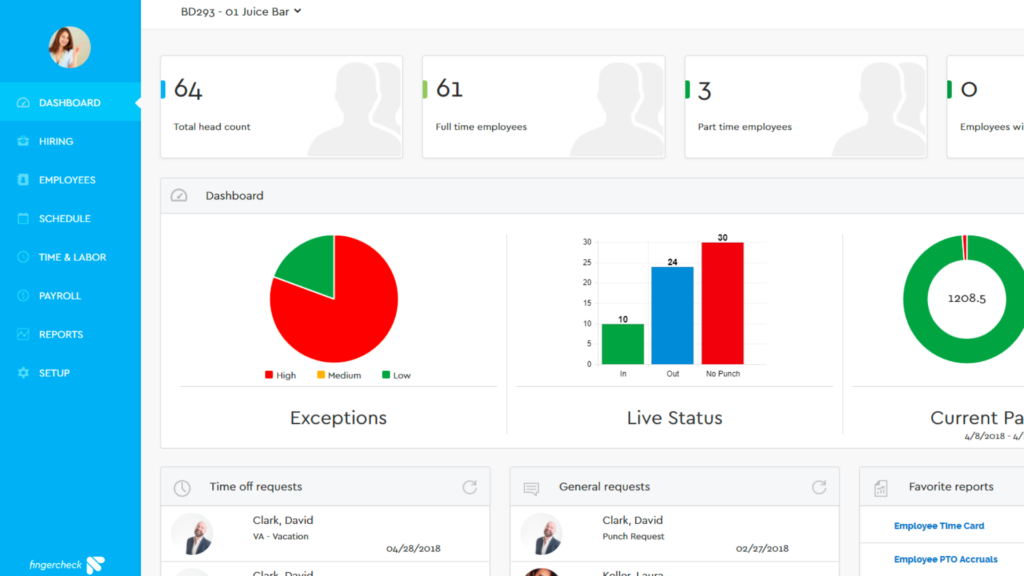
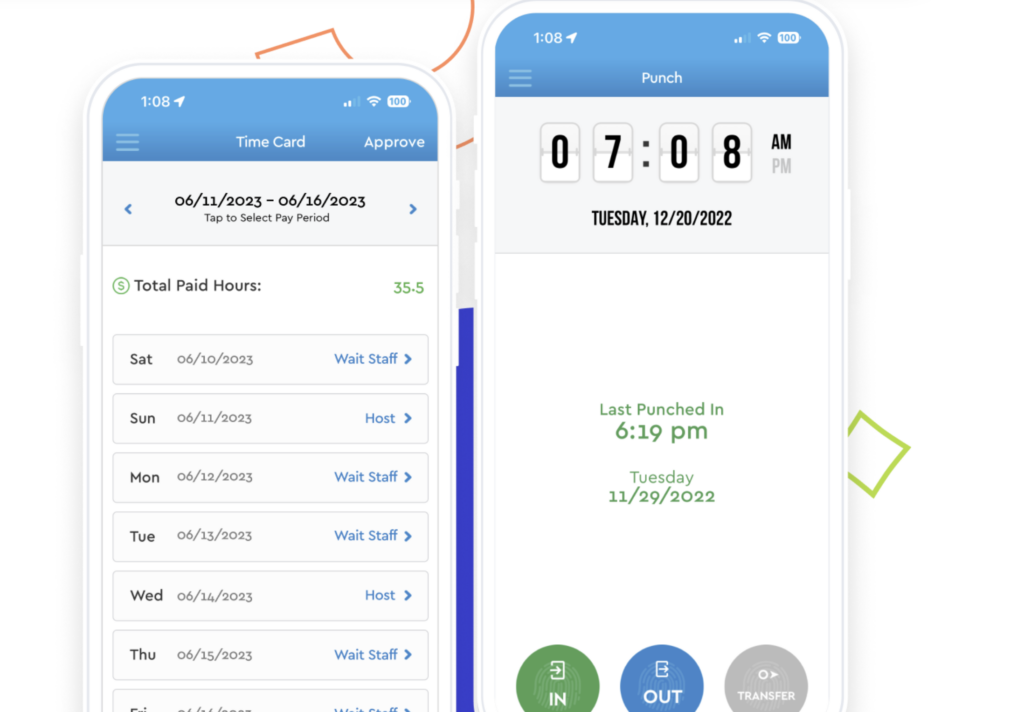
Alongside benefits administration, the FingerCheck mobile app and self-service portal let workers manage their own time. Employees download the app and use mobile time clocks from their phones, punching in and out whether they work remotely or on-site.
That flexibility matters for a workforce that leans on remote work tracking, where staff may not share one office or clock.
The self-service portal lets employees handle scheduling, view payroll details, and update personal data without waiting on HR. That cuts the back-and-forth for routine questions, such as checking a pay stub or fixing a home address. Together, these tools simplify workforce management and keep attendance records accurate, which the payroll integration depends on.
Fingercheck Reviews
Real users hold mixed opinions of FingerCheck. Some praise it for simplifying HR work, while others share feedback that points to parts of the product worth improving.
Positive feedback and success stories
Clients who use FingerCheck often praise its payroll processing and its mobile app. With an overall rating of 4.5 out of 5 stars from real users, the platform draws steady approval for its customer service and its feature set.
Businesses report real time savings and smoother HR operations thanks to FingerCheck’s system, with the hours once spent on manual attendance and payroll freed up for other work.
Satisfaction goes past day-to-day efficiency. Many reviews call out a support team that responds when questions come up, and that reliability is part of why users recommend the tool to managers and employees alike. For a small business without its own HR staff, quick answers on a payroll question can matter as much as the features themselves.
Critiques and areas for improvement
Some users hit snags with the biometric technology. Reports say both the fingerprint and facial recognition tools sometimes misread or fail to recognize authorized users, which causes frustration.
That points to a need for better accuracy if FingerCheck wants to keep pace in the HR software market, where a clock-in that fails at the start of a shift is more than a minor annoyance for the worker affected.
Connecting FingerCheck with existing HR systems and accounting software can also be a hurdle for companies that want clean data flow between platforms. Others say the interface is harder to learn than they expected. Fixing these rough edges would make the product easier for new customers to adopt.
FingerCheck Alternatives
FingerCheck covers a lot of HR ground, but looking at its alternatives can point organizations toward tools that fit their own requirements more closely. A company focused mainly on hiring, for instance, may want something built around screening rather than time and attendance.
Comparing a few platforms helps a business choose with confidence and pick the software that gives it the best mix of features and value for workforce management. What suits a five-person shop rarely suits a large enterprise, so it pays to test how each option handles your own size and process.
A look at TestGorilla as an alternative
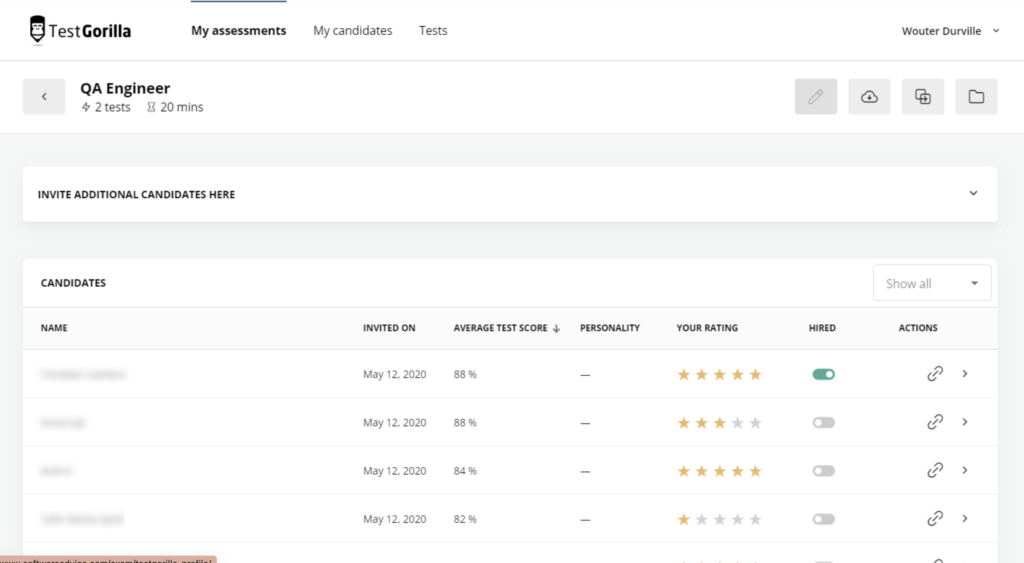
TestGorilla is a strong alternative to FingerCheck, with a clear focus on pre-employment screening and skills testing. This platform offers assessment tools that help when you are filtering candidates.
Businesses can start with TestGorilla on a subscription from $29 per month, and a free trial lets them try it first.
With its global reach, TestGorilla integrates with popular HR software such as BambooHR and Greenhouse.
Dedicated customer support helps users get value from the product, especially while a hiring team learns how to build and score its first assessments.
Whether your organization is small or large, TestGorilla offers features aimed at speeding up hiring and improving HR practices. Its screening tests give hiring teams a way to compare candidates on skills before an interview, which can shorten the time it takes to fill a role.
Comparison with Timesheets.com
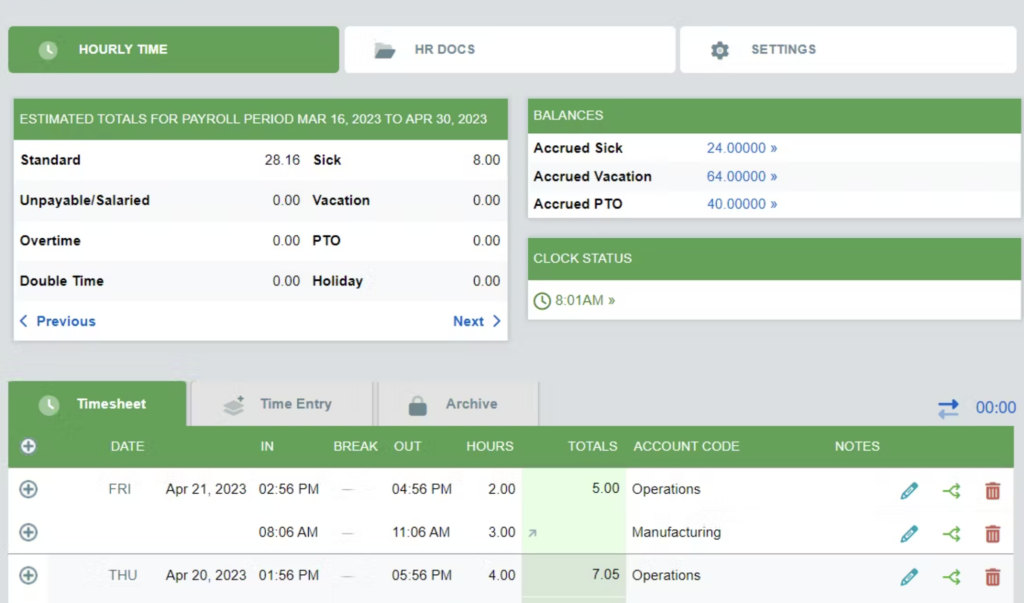
Timesheets.com is a real competitor to FingerCheck in employee time tracking and HR management. Both offer solid tools, but FingerCheck pairs payroll software and HR functions in one integrated system.
Users point out how it ties staff scheduling, automated time tracking, and workforce management into a single setup, so the same hours that build a schedule also feed payroll.
Timesheets.com keeps a simple experience centered on time and attendance, while FingerCheck’s wider feature set covers more business needs. Reviewers cite its ease of use, its value for money, and customer service that helps teams run their operations.
Other leading HR management software options
QuickBooks Time, Rippling, and Gusto are strong HR management options for businesses that want alternatives to FingerCheck. Employers use them to manage employee time and attendance, run payroll, and oversee their people.
Each has pricing tiers that start around $5 per user per month, with features aimed at business sizes from freelancers to large enterprises. That shared starting point makes them easy to line up against FingerCheck on price before you weigh the feature differences.
These platforms deliver integrated HR features and connect with popular applications such as QuickBooks Online Advanced or ADP Workforce Now. Their workforce management tools cover HR and payroll and fit into existing workflows. Since each connects to accounting and payroll systems many companies already run, switching to one of them rarely means rebuilding the rest of your stack.
Decision-Making Factors: Why Choose FingerCheck or an Alternative?
Picking the right HR tool, whether FingerCheck or a competitor, comes down to matching your company’s needs with what a platform offers. Weigh business size, the features you want, customer support quality, and integration options to reach a decision that simplifies your admin work and lifts productivity.
Matching business needs with the right solution
Start by understanding what your business needs. If time tracking and attendance top your list, FingerCheck is a strong candidate.
It uses biometric authentication and facial recognition to run workforce management, an approach that improves on manual methods and removes much of the guesswork about who worked when.
Businesses that want to connect payroll software with other applications will value FingerCheck’s flexibility. It links with platforms such as Gusto and QuickBooks Online Advanced, which simplifies scheduling and payroll. A subscription from $5 per month plus a free trial makes it easy to try without paying upfront.
Considering scalability, support, and integration capabilities
The right HR software should grow with your company. Scalability is a key factor, and FingerCheck is built to handle rising employee counts and changing processes.
The platform scales as your needs get more complex, so the investment keeps paying off as you add staff, locations, or new pay rules.
Support and integration also weigh heavily in the decision. Strong support means less downtime and faster fixes, which keeps your operations running. Integration with widely used applications such as QuickBooks Online Advanced or Gusto moves data smoothly and cuts manual entry errors, so FingerCheck fits into your existing tech stack without friction.
Conclusion
Deciding whether FingerCheck fits your business means weighing its features against your specific HR and payroll needs. Treat this guide as a starting point for improving how you manage your workforce.
Looking at alternatives helps too, so you can make an informed choice that supports your organization’s growth and efficiency. Even if FingerCheck ends up being the pick, seeing what else exists confirms you are not missing a feature that matters to your team.
Final thoughts on investing in FingerCheck or its alternatives
Choosing between FingerCheck and other HR software comes down to how well the system matches your company’s needs. Weigh ease of use, integration options, and customer service to land on the right choice for employee management and payroll.
FingerCheck earns a high user satisfaction rating, covers time tracking and workforce scheduling, and connects with leading accounting software, which keeps hours and pay data in sync across the tools a business already uses.
Comparing options helps you find a platform that scales with your growth. Timesheets.com or Rippling may match your human capital management needs better.
Each alternative brings different features and benefits, and each fits differently into daily operations. A tool that works for you at your current size should still hold up as you add people and processes, so the choice is about tomorrow’s success as much as today’s need.
For a closer look at how TestGorilla compares, read our analysis of TestGorilla’s latest pricing, features, and best alternatives.
Frequently Asked Questions
What is FingerCheck?
FingerCheck is an online platform that offers time tracking and payroll services for businesses.
How much does FingerCheck cost?
The price of FingerCheck depends on the plan you choose, since each plan includes different features.
What kind of features does FingerCheck have?
FingerCheck includes employee time tracking, payroll processing, scheduling, and attendance management.
Can I use FingerCheck on my mobile device?
Yes. You can track time and manage schedules with the FingerCheck mobile app on your smartphone or tablet.
Are there any alternatives to FingerCheck?
Yes. Alternatives that offer similar services include ADP, QuickBooks Time (formerly TSheets), and Gusto.
Compare alternatives to the tools in this post

- Independent picks for exactly what you just read about
- Matched to your team size & needs
- Vendors don't pay for placement
Step 1 of 4
How big is your team?
We tailor recommendations to companies your size.















Related Articles
Applicant Tracking Software
monday.com for HR and Recruiting (2026): Hiring Pipelines, Onboarding and When You Need an ATS
Continue reading →
HR software
Gusto vs QuickBooks Payroll 2026: Prices, Features and Verdict
Continue reading →
Best Tools
Best PEO for Small Business in 2026: 8 Providers, Prices and Certification
Continue reading →
HR software
Gusto vs Paychex 2026: Published Prices vs Quote-Based Payroll
Continue reading →