

Ocerra Review: Is It The Right AP Automation Software For Your Team?
Best for SMB teams · Mid-market · Enterprise
Free Trial Available
Add to compare
Starts from $49 / Month
Overview
Pricing
Features
Buyer feedback
Alternatives
Media
Security & Compliance
Support
FAQ
Blogs
What is Ocerra?
Introducing Ocerra - your ultimate AP automation solution. This cutting-edge software simplifies the account payable process by centralizing supplier invoice tracking. Its advanced technology automatically captures and extracts key invoice data, streamlining approval and export to your accounting system. With email and text notifications, you can easily automate your workflow. Whether you are a small, medium, or large company, Ocerra's user-friendly interface makes it the perfect choice for all your AP needs. Upgrade to Ocerra today and experience faster, more efficient invoice management.
Pricing
Starts from $49 / Month
Free Trial available
Best For
Suited for small teams, SMBs, and enterprise
Security & Compliance
Data residency:🇺🇸
Ocerra Screenshots

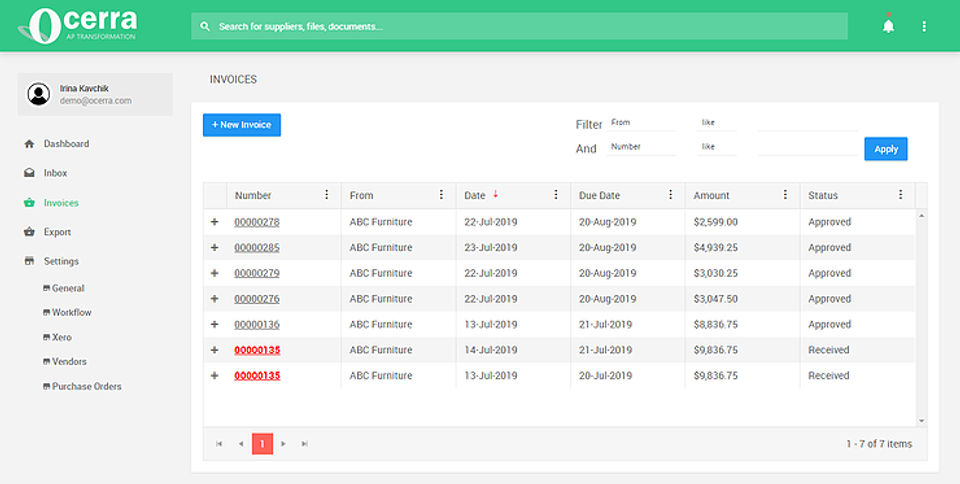
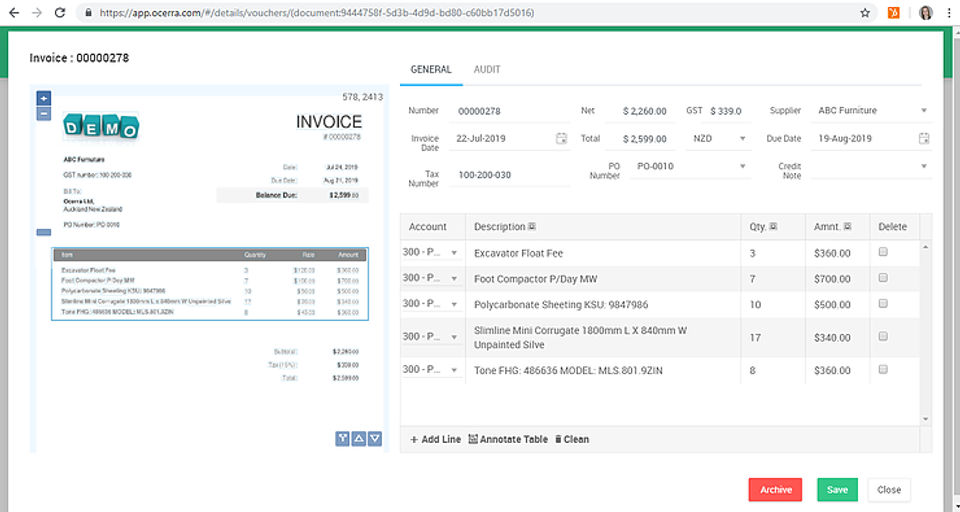
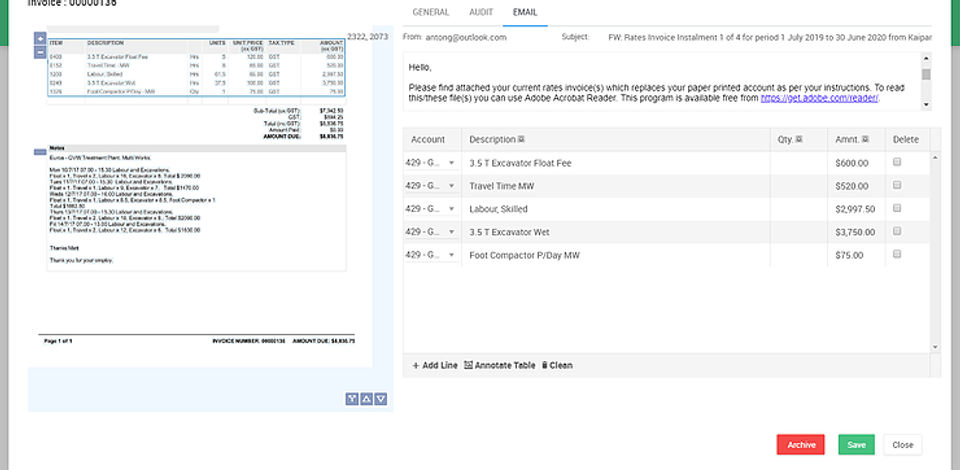
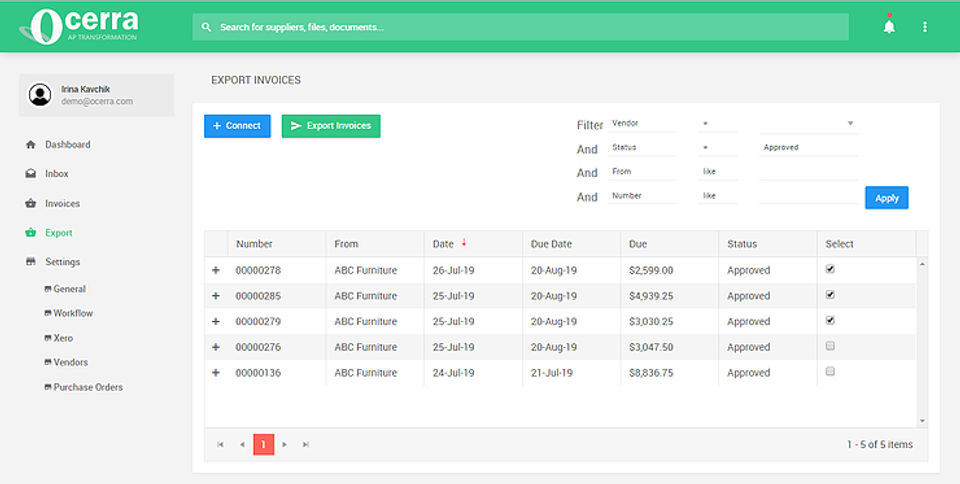
Ocerra was reviewed internally using user feedback, in-house testing, and market research to assess its performance, reliability, and user experience. Learn how we review products and our evaluation process.

Who should consider Ocerra
- Use cases
- Martech, Revtech, Fintech
- Team types
- Sales Managers, Account Executives
- Company size
- 50 to 500 employees
Why teams choose Ocerra
Ocerra simplifies invoice management by consolidating all supplier invoices in one platform, enhancing visibility and organization across AP workflows.
The software uses intelligent extraction tools to auto-capture key invoice data, significantly reducing manual entry and human error.
Invoices can be exported directly to the accounting system, streamlining financial processing and reducing delays in bookkeeping.
Is Ocerra right for you?
Best for mid-sized firms needing streamlined AP invoice capture and export.
Choose Ocerra if
- You want to centralize all supplier invoices in one platform for better visibility.
- You need automatic extraction of key invoice data to reduce manual entry errors.
- You require seamless export of invoices directly into your accounting system.
Consider alternatives if
- You need advanced AP features like PO matching, expense classification, or audit trails.
- Your organization demands deep, customizable ERP integrations or highly tailored workflows.
What buyers should know before choosing Ocerra
Ocerra has proven to be a reliable and efficient solution for automating our accounts payable process. The platform’s centralized invoice tracking and automatic data capture have streamlined our operations and drastically cut down on manual input.
Notifications help keep our team on top of approvals, and integration with our accounting software makes exporting seamless. The user interface is clean and intuitive, making onboarding smooth even for new users.
While we’d like to see more advanced reporting or PO matching features in the future, Ocerra delivers solid AP automation and has become a vital part of our finance workflow.
Ocerra pros and cons
- Ocerra pros
Ocerra simplifies invoice management by consolidating all supplier invoices in one platform, enhancing visibility and organization across AP workflows.
The software uses intelligent extraction tools to auto-capture key invoice data, significantly reducing manual entry and human error.
Invoices can be exported directly to the accounting system, streamlining financial processing and reducing delays in bookkeeping.
- Ocerra cons
While basic functionality is well described, there is little mention of advanced tools such as PO matching, expense classification, or audit trails.
Automated alerts are useful but could become intrusive without customizable notification settings.
Ready to try it?
Get started with Ocerra
Start your free trial — no credit card required.
Still comparing?
See how it stacks up
Compare Ocerra side-by-side with top AP Automation Software alternatives.


What is the pricing of Ocerra?
Ocerra Pricing Plans
Essential
$49
/Month
Up to 150 invoices
One centralised invoice system
Machine learning and line extraction
Automated invoice routing
Visibility into the AP process
Show more +
Business
$99
/Month
Up to 250 invoices
Includes features of Essential plan
Premium
$199
/Month
Up to 500 invoices
Includes features of Essential plan
**Essential Plan - $49/Month**
The Essential Plan is perfect for small businesses or startups looking to streamline their invoicing process without breaking the bank. With features like a centralized invoice system, machine learning for line extraction, and visibility into the accounts payable process, this plan provides a solid foundation for efficient financial management.
**Business Plan - $99/Month**
Designed for growing businesses that handle a higher volume of invoices, the Business Plan accommodates up to 250 invoices per month and includes all the features of the Essential Plan. This plan adds enhanced automated invoice routing and deeper financial insights, making it an ideal choice for teams that need to optimize their accounts payable operations.
**Premium Plan - $199/Month**
The Premium Plan is tailored for larger enterprises managing up to 500 invoices monthly, offering comprehensive features from both the Essential and Business Plans. This plan stands out with its advanced analytics and reporting capabilities, empowering finance teams to gain strategic insights and drive informed decision-making in their invoicing processes.
Weighing your options?
Not sure if Ocerra fits your budget?
Ocerra reviews and ratings
What buyers like
- Ocerra simplifies invoice management by consolidating all supplier invoices in one platform, enhancing visibility and organization across AP workflows.
- The software uses intelligent extraction tools to auto-capture key invoice data, significantly reducing manual entry and human error.
- Invoices can be exported directly to the accounting system, streamlining financial processing and reducing delays in bookkeeping.
Common complaints
- While basic functionality is well described, there is little mention of advanced tools such as PO matching, expense classification, or audit trails.
- Automated alerts are useful but could become intrusive without customizable notification settings.
- Although it supports accounting system exports, the depth and ease of integration with specific ERP platforms may require further exploration.
Be the first to review Ocerra
You'll help thousands of buyers make a smarter decision.

- See if Ocerra fits your business
- Real pricing — no sales pressure
- A demo or quick answers, your call
Step 1 of 4
How big is your team?
We tailor recommendations to companies your size.















What are the features of Ocerra?
Accounting has four main features: recording, classifying, summarising, and interpreting. Accounting is the science of keeping track of tran…
Ocerra connects with ERP and financial software, synchronizing data flow between systems. This feature eliminates manual data entry, maintai…
Ocerra's Approval Workflow routes invoices to designated approvers based on user-defined rules. The feature supports multi-level approval ch…
The Dashboard in Ocerra presents real-time visualizations of key AP metrics such as invoice status, approval progress, and payment schedules…
Ocerra protects the confidentiality and integrity of sensitive financial information through encryption, user access controls, and secure cl…
Ocerra's Integrations Management supports real-time connection with various accounting, ERP, and business systems. This feature maintains au…
SMS Notification in Ocerra provides timely alerts for actions such as invoice approvals, payment reminders, or exception handling. This feat…
Workflow Automation in Ocerra automates repetitive AP tasks, such as invoice data capture, validation, routing, and payment scheduling. It u…
Ocerra security and data handling
Key compliance certifications and security features for IT and security teams evaluating Ocerra.
Certifications

Developer & data
Alternatives to Ocerra
Recommended
Smarter Spending, Faster Approvals, ...
7.5
Excellent





Why buyers keep looking beyond Ocerra
Lacks advanced analytics and third-party integrations for industry-specific workflows
Pricing exceeds budgets for small teams or cost-conscious buyers
Interface complexity slows adoption — teams prefer simpler, more intuitive platforms
Cannot scale efficiently beyond 100+ concurrent users without performance degradation
Support response times exceed 24 hours for non-critical issues, frustrating teams needing faster resolution
Ocerra Support Options
Frequently Asked Questions About Ocerra
Common questions buyers ask before choosing Ocerra.
Ocerra is a AP Automation Software. Ocerra offers SMS Notification, Approval Workflow, Workflow Automation, Accounting Features, Accounting Integration and many more functionalities.
Ocerra is a strong fit if: You want to centralize all supplier invoices in one platform for better visibility.; You need automatic extraction of key invoice data to reduce manual entry errors.. Consider alternatives if: You need advanced AP features like PO matching, expense classification, or audit trails.; Your organization demands deep, customizable ERP integrations or highly tailored workflows..
Buyers commonly note the following limitations of Ocerra: While basic functionality is well described, there is little mention of advanced tools such as PO matching, expense classification, or audit trails.; Automated alerts are useful but could become intrusive without customizable notification settings.; Although it supports accounting system exports, the depth and ease of integration with specific ERP platforms may require further exploration..
Some top alternatives to Ocerra includes Precoro, Yooz, Tipalti, Melio and AvidXchange.
Ocerra offers Free Trial, Subscription pricing models
The starting price of Ocerra is $49/Month
Free buyer scorecard
Evaluate Ocerra with the AP automation software buyer scorecard
A weighted AP automation software scorecard to assess Ocerra objectively and compare it against the alternatives.
- Weighted criteria you can edit
- Score vendors side-by-side
- Shareable with your buying committee
No file downloads on screen — we email it to you. One-click unsubscribe anytime.
Ready to try it?
Get started with Ocerra
Start your free trial — no credit card required.
About the reviewer
Rajat Gupta is the founder of Spotsaas. Over the past two years, he has reviewed 2,000+ tools across CRM, HR, AI, and finance — applying hands-on product research and a background in commerce and the CFA program to evaluate software through a business and ROI lens. His goal: help teams make software decisions they won't regret.
Disclaimer: This research has been collated from a variety of authoritative sources. We welcome your feedback at [email protected].