
8.4
SpotScore

Icinga Review: Is It The Right Application Performance Monitoring (APM) Tools For Your Team?
Best for SMB teams · Mid-market · Enterprise
 GDPR
GDPRIcinga offers custom pricing plan
Overview
Pricing
Features
Buyer feedback
Alternatives
Media
Security & Compliance
Support
FAQ
Blogs
Spotsaas Analysis for Icinga
Icinga is an application performance monitoring tool widely used by System Administrators and DevOps Engineers in medium-sized businesses. With a rating of 4.4 out of 5 from 26 user reviews, it is broadly validated, indicating strong user satisfaction and reliability in its niche.
Icinga excels in enhancing IT service management by integrating traditional monitoring with modern technologies, which helps reduce downtime and boost efficiency. Its versatile notification options ensure teams are promptly alerted to issues, facilitating quick response times. However, potential users should be aware that Icinga can be resource-intensive, which might impact system performance if not optimized correctly.
Quick facts about Icinga
What is Icinga?
Icinga is a monitoring tool that enables your team to monitor and track the health and performance of IT infrastructure resources, applications and services. Icinga combines the advantages of a traditional monitoring tool with modern technologies to increase IT service management efficiency. Icinga features an easy-to-use web interface, notification options, and the ability to create custom plugins.
Pricing
Icinga offers custom pricing plan
Best For
Suited for small teams, SMBs, and enterprise
Security & Compliance
GDPRSingle Sign-On (SSO)
Data residency:Global
Platform
Web-based — no mobile app
Installed - Windows
Installed - Mac
Icinga Screenshots

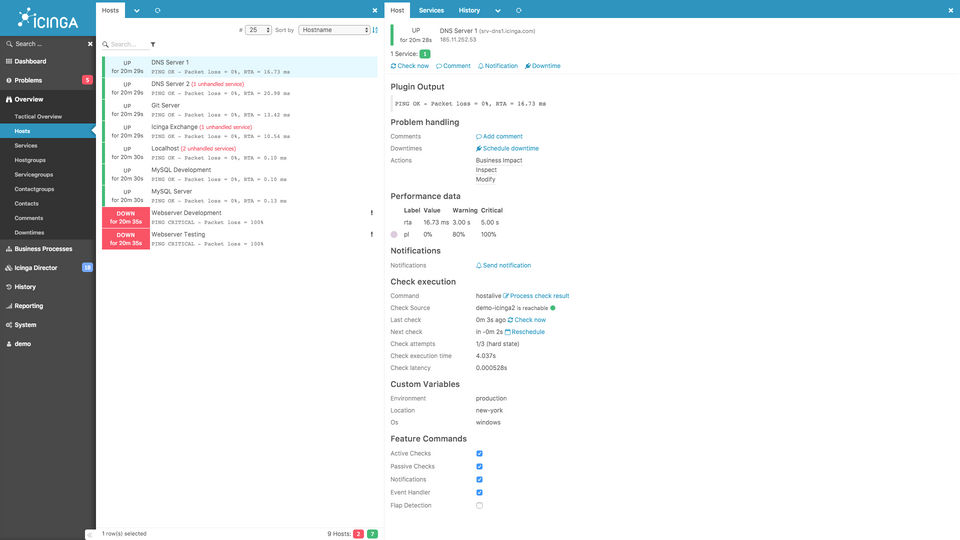
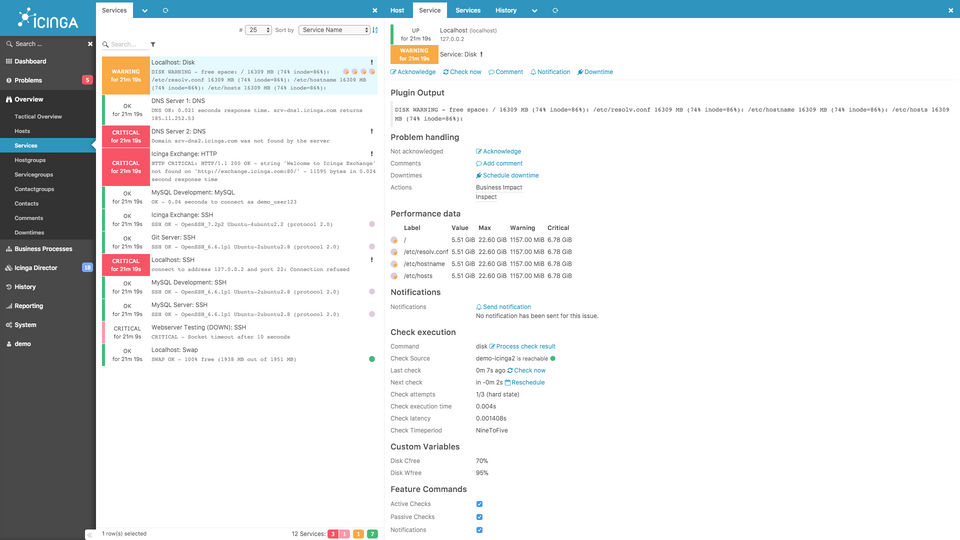
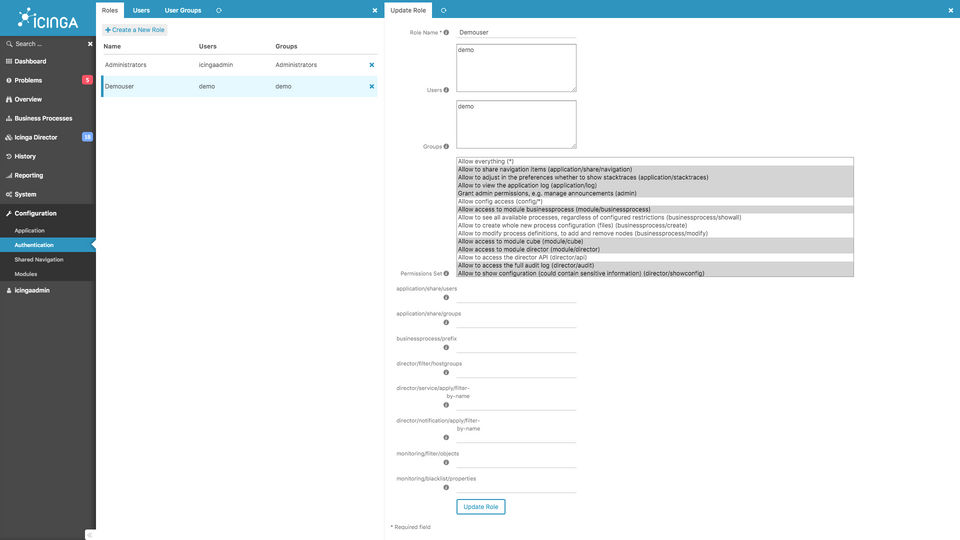
Icinga was reviewed internally using user feedback, in-house testing, and market research to assess its performance, reliability, and user experience. Learn how we review products and our evaluation process.

Who should consider Icinga
- Use cases
- IT Services, SaaS, Telecommunications
- Team types
- System Administrators, Network Engineers
- Company size
- 200-5000 employees, Medium Business
- Workflow style
- Flexible and configurable
- Setup complexity
- Medium
Why teams choose Icinga
Combines traditional monitoring with modern technologies to improve IT service management
Versatile notification options for prompt issue alerts
Supports custom plugins for tailored monitoring solutions
Is Icinga right for you?
Best for flexible, customizable IT infrastructure and application monitoring.
Choose Icinga if
- You need a monitoring tool that supports custom plugins for tailored solutions.
- Your team requires versatile notification options to promptly address issues.
- You want to combine traditional monitoring with modern IT service management.
Consider alternatives if
- Your organization needs lightweight monitoring with minimal resource consumption.
- You prefer out-of-the-box advanced features without complex setup or configuration.
What buyers should know before choosing Icinga
Icinga requires significant upfront investment in setup time, particularly if you need custom plugins or monitoring rules tailored to your environment. The web interface is functional but not intuitive—plan for a learning curve if your team lacks experience with command-line tools.
During demos, verify that Icinga's notification system integrates with your existing alerting channels (email, Slack, PagerDuty) and confirm CPU/memory requirements for your infrastructure size. Key limitations to assess: Icinga can consume substantial server resources under heavy monitoring loads, especially with frequent custom checks.
The documentation assumes Linux system administration knowledge—Windows environments require additional configuration steps. Before committing, test whether your existing monitoring plugins are compatible and whether your IT team has capacity for ongoing maintenance, as Icinga doesn't auto-update configurations when your infrastructure changes.
Pricing is straightforward (open-source with optional commercial support), but factor in labor costs for initial deployment and ongoing tuning. If you're evaluating Icinga against commercial alternatives, confirm whether your team prefers managing infrastructure directly or outsourcing monitoring to a SaaS provider.
Icinga pros and cons
- Icinga pros
Combines traditional monitoring with modern technologies to improve IT service management
Versatile notification options for prompt issue alerts
Supports custom plugins for tailored monitoring solutions
- Icinga cons
Can be resource-intensive, potentially impacting system performance
Advanced features may require additional tools or complex configurations
Ready to try it?
Get started with Icinga
Connect with the team for a personalised demo.
Still comparing?
See how it stacks up
Compare Icinga side-by-side with top Application Performance Monitoring (APM) Tools alternatives.



What is the pricing of Icinga?
Icinga uses custom pricing — plans are tailored to your team size and needs. Contact them for a quote.
Icinga Pricing Plans
Basic
Custom
Response Times:
1st Level - NBD
2nd Level - NBD
3rd Level - 8h
Amount of Conditions :
Show more +
Premium
Custom
Response Times:
1st Level - NBD
2nd Level - 8h
3rd Level - 4h
Amount of Conditions :
Show more +
Enterprise
Custom
Response Times:
1st Level - NBD
2nd Level - 4h
3rd Level - 2h
Amount of Conditions :
Show more +
Weighing your options?
Not sure if Icinga fits your budget?
Icinga reviews and ratings
Buyer sentiment
Users appreciate Icinga's flexibility, comprehensive monitoring capabilities, and customizable alerts, though some find setup and resource demands challenging.
What buyers like
- Flexibility and customizability
- Notification options
- User-friendly web interface
Common complaints
- Resource intensity
- Complex setup process
Are you using Icinga?

- See if Icinga fits your business
- Real pricing — no sales pressure
- A demo or quick answers, your call
Step 1 of 4
How big is your team?
We tailor recommendations to companies your size.















What are the features of Icinga?
With the API Monitoring feature, Icinga continuously checks the availability, responsiveness, and overall health of your organization's APIs…
An app or software sends out alerts, which are actionable and content-rich push notifications. These alerts can be for various reasons, incl…
Icinga's Application Performance Metrics feature tracks key performance indicators (KPIs) such as response times, transaction speeds, databa…
The Dashboard feature within Icinga provides a centralized, intuitive interface that lets managers and administrators quickly see the curren…
Icinga's Event Logs feature systematically captures and organizes event data from monitored systems into easily searchable logs. Administrat…
The Mobile User Monitoring capability within Icinga tracks performance metrics for mobile user experiences. It assesses mobile application r…
Real-user Monitoring captures actual user interactions with your web applications or services in real-time within Icinga. It provides insigh…
SSL Monitoring in Icinga continuously checks the validity status, expiration dates, certificate authenticity, and security compliance of SSL…
The Uptime Reporting feature in Icinga provides detailed reports on system availability, helping administrators and executives track reliabi…
Icinga security and data handling
Key compliance certifications and security features for IT and security teams evaluating Icinga.
Certifications
Security features
Developer & data
Alternatives to Icinga


Why buyers keep looking beyond Icinga
Users might seek alternatives if they prefer simpler setup and configuration, as Icinga can be complex and require significant technical expertise for initial implementation.
Organizations looking for more intuitive user interfaces or visually richer dashboards may explore alternatives offering enhanced visualization and ease-of-use features.
Companies requiring extensive built-in integrations with cloud platforms or modern DevOps tools might consider other solutions that offer broader native integration capabilities.
Teams with budget constraints or seeking predictable pricing models may opt for alternative monitoring solutions that have clearer or more affordable pricing structures.
Businesses needing scalable cloud-native monitoring functionality might prefer alternatives specifically designed for seamless scalability and optimized performance in cloud environments.
Icinga Support Options
Frequently Asked Questions About Icinga
Common questions buyers ask before choosing Icinga.
Icinga is a Application Performance Monitoring (APM) Tools. Icinga offers Dashboard, Uptime Reporting, API Monitoring, Event Logs, Mobile User Monitoring and many more functionalities.
Icinga is a strong fit if: You need a monitoring tool that supports custom plugins for tailored solutions.; Your team requires versatile notification options to promptly address issues.. Consider alternatives if: Your organization needs lightweight monitoring with minimal resource consumption.; You prefer out-of-the-box advanced features without complex setup or configuration..
Buyers commonly note the following limitations of Icinga: Can be resource-intensive, potentially impacting system performance; Advanced features may require additional tools or complex configurations; Setup and custom plugin configuration can be time-consuming.
Some top alternatives to Icinga includes Splunk Cloud, ManageEngine Applications Manager, Rakuten SixthSense Observability, Atatus and eG Enterprise.
Icinga offers Quotation Based pricing model
The starting price is not disclosed by Icinga. You can visit Icinga pricing page to get the latest pricing.
Ready to try it?
Get started with Icinga
Get connected with the team for a personalised demo.
About the reviewer
Rajat Gupta is the founder of Spotsaas. Over the past two years, he has reviewed 2,000+ tools across CRM, HR, AI, and finance — applying hands-on product research and a background in commerce and the CFA program to evaluate software through a business and ROI lens. His goal: help teams make software decisions they won't regret.
Disclaimer: This research has been collated from a variety of authoritative sources. We welcome your feedback at [email protected].