
8.0
SpotScore

Callbird Review: Is It The Right Appointment Scheduling Software For Your Team?
Best for SMB teams · Mid-market · Enterprise
Free Plan Available
Add to compare
Starts from $19 / seat / month when monthly, also offers free forever plan
Integrates with
 Calendly
 HubSpot CRM
 Slack
Slack Cal.com
Overview
Pricing
Features
Buyer feedback
Alternatives
Integrations
Media
Security & Compliance
Support
FAQ
Blogs
What is Callbird?
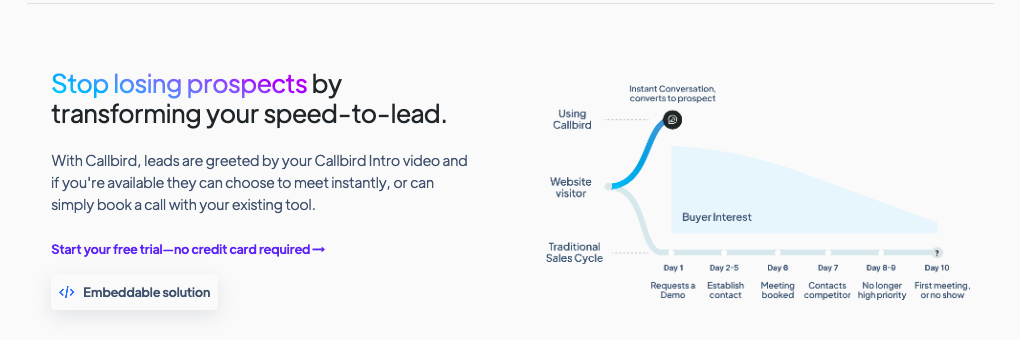
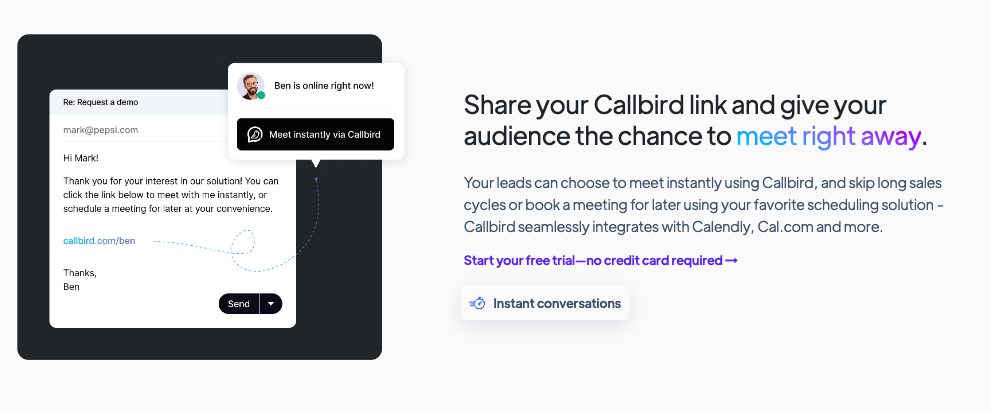
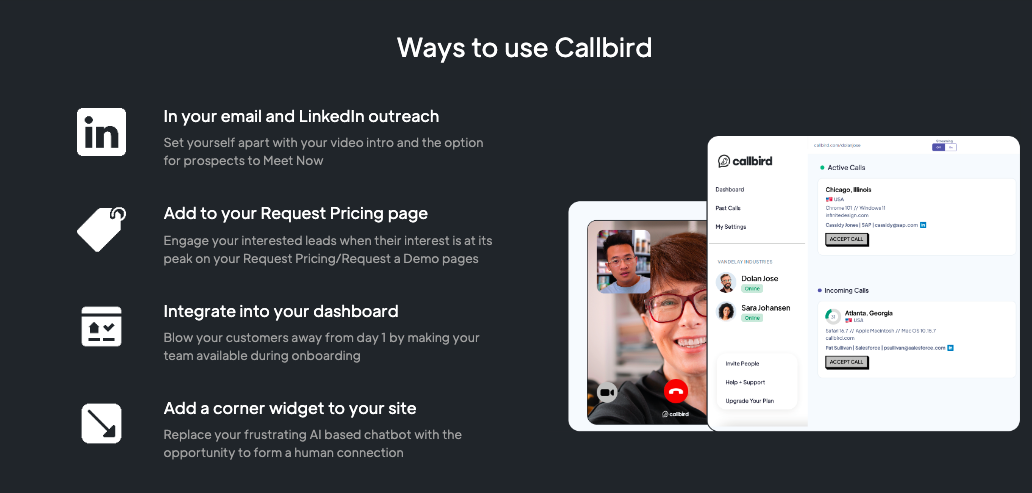
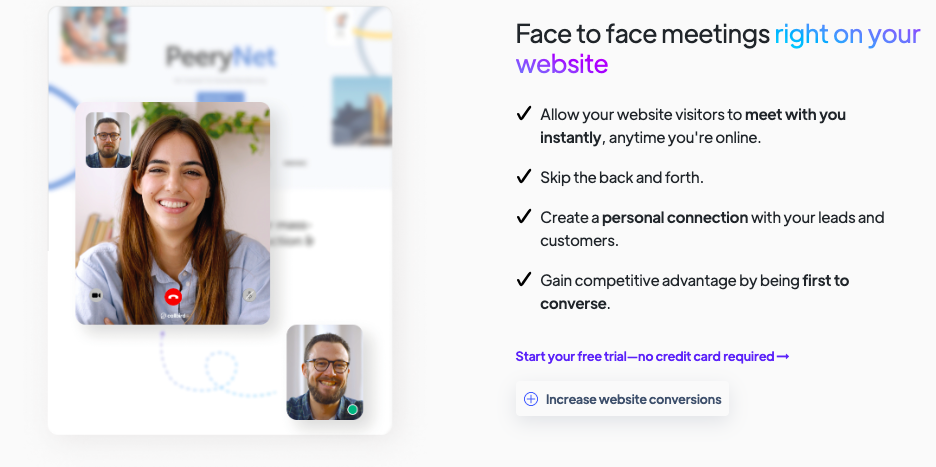
Callbird is a user-friendly video communication tool designed to help sales, customer success, onboarding, and support teams instantly connect with prospects and customers through live video calls. The platform allows users to embed instant “Meet Now” video call options directly on websites, emails, dashboards, and landing pages—reducing delays in follow-ups and helping convert leads faster. Built for professionals who value human connection, Callbird enables teams to display customized intro videos, manage availability, and offer immediate or scheduled meetings. It's particularly useful for B2B sales reps, onboarding specialists, and support agents. Callbird integrates seamlessly with popular scheduling tools like Calendly and Cal.com, making it easy to offer live conversations or let users book calls for later. With simple setup, personalized intro videos, and embeddable widgets, Callbird helps businesses increase engagement, shorten sales cycles, and build trust quickly.
Pricing
Starts from $19 / seat / month when monthly
Best For
Suited for small teams, SMBs, and enterprise
Security & Compliance
Data residency:🇺🇸
Platform
Browser Based (Cloud)
Desktop only — no mobile app
Callbird Screenshots

Callbird was reviewed internally using user feedback, in-house testing, and market research to assess its performance, reliability, and user experience. Learn how we review products and our evaluation process.

Who should consider Callbird
- Use cases
- SaaS, ECommerce, Online Education
- Team types
- Sales Development Representative, Customer Success Manager
- Company size
- 1–200 Employees
Why teams choose Callbird
Users can engage leads in real time directly from websites, minimizing delays and increasing conversion chances.
Callbird allows users to display custom intro videos depending on online status, adding a human touch to interactions.
The platform is beginner-friendly and can be implemented without technical expertise.
Is Callbird right for you?
What buyers should know before choosing Callbird
Callbird delivers a refreshingly simple yet powerful way to connect with leads and customers through instant video calls embedded on your website. I found it particularly effective for accelerating sales conversations and improving the quality of customer onboarding.
The personalized intro videos add a genuine human touch, and I appreciated how easily it integrated with my existing scheduling tools. While it doesn’t offer group call functionality or advanced CRM features, it excels in what it sets out to do—creating seamless, one-on-one human engagement online.
For small to mid-sized teams looking to boost conversions through immediacy and authenticity, Callbird is a smart, accessible solution.
Callbird pros and cons
- Callbird pros
Users can engage leads in real time directly from websites, minimizing delays and increasing conversion chances.
Callbird allows users to display custom intro videos depending on online status, adding a human touch to interactions.
The platform is beginner-friendly and can be implemented without technical expertise.
- Callbird cons
No built-in analytics, CRM integrations, or advanced call routing, which may be essential for larger organizations.
The platform is focused solely on one-to-one interactions, limiting team meeting use.
Ready to try it?
Get started with Callbird
Try the free plan and upgrade when ready.
Still comparing?
See how it stacks up
Compare Callbird side-by-side with top Appointment Scheduling Software alternatives.


What is the pricing of Callbird?
Callbird Pricing Plans
Basic
$19
/ seat / month
Benefit from:
A Callbird Page for each team member
Callbird Intro
Scheduling tool integration
SMS and Slack notifications
Show more +
Standard
$29
/ seat / month
Everything from Basic; plus:
Company pages
Callbird Widget on your website
Callbird embedded on landing pages
Phone call notifications
Show more +
Pro (Coming Soon)
Custom
Everything from Standard; plus:
Call recording
Call transcription
Hide Callbird branding
Pass variables from your server
Show more +
Weighing your options?
Not sure if Callbird fits your budget?
Callbird reviews and ratings
What buyers like
- Users can engage leads in real time directly from websites, minimizing delays and increasing conversion chances.
- Callbird allows users to display custom intro videos depending on online status, adding a human touch to interactions.
- The platform is beginner-friendly and can be implemented without technical expertise.
Common complaints
- No built-in analytics, CRM integrations, or advanced call routing, which may be essential for larger organizations.
- The platform is focused solely on one-to-one interactions, limiting team meeting use.
- Heavily reliant on user availability for real-time meetings, which can lead to missed connections if not managed carefully.
Be the first to review Callbird
You'll help thousands of buyers make a smarter decision.

- See if Callbird fits your business
- Real pricing — no sales pressure
- A demo or quick answers, your call
Step 1 of 4
How big is your team?
We tailor recommendations to companies your size.















What are the features of Callbird?
Callbird's appointment scheduling feature lets prospects and customers book meetings by selecting available time slots through a web interfa…
Callbird supports automated scheduling through its smooth integration with external calendar and booking platforms. Once connected, the syst…
Calendar Management in Callbird is facilitated through integrations with third-party scheduling tools, allowing users to sync availability,…
Although Callbird is primarily designed for one-on-one instant video meetings, group scheduling can be managed by directing users to integra…
Callbird does not offer traditional meeting room booking for physical spaces. However, its digital "Meet Now" functionality acts as a virtua…
Callbird supports multi-location scheduling by allowing team members across different time zones or office locations to be available through…
Callbird's online scheduling lets prospects and clients book meetings through a shared link or embedded website page. Users select available…
Callbird offers basic resource scheduling by letting businesses assign specific team members to incoming video call requests or scheduled me…
Callbird security and data handling
Key compliance certifications and security features for IT and security teams evaluating Callbird.
Certifications

Developer & data
Alternatives to Callbird


Why buyers keep looking beyond Callbird
Lacks native CRM integrations with Salesforce or HubSpot — teams needing unified lead tracking typically add a separate CRM platform
Limited white-labeling and customization options — enterprises requiring consistent brand presentation across tools often switch to platforms with deeper branding controls
Designed for one-on-one video calls, not multi-participant conferencing — teams needing group video meetings use Zoom or Google Meet instead
Requires live availability — businesses with global teams or asynchronous workflows prefer Loom or scheduling tools
No detailed engagement or performance analytics — sales and customer success teams tracking ROI and workflow optimization need dedicated analytics platforms
Lacks enterprise-grade security, administrative controls, and scalability — organizations over 500 employees typically require platforms with more advanced governance features
Callbird Integrations
Callbird Support Options
Frequently Asked Questions About Callbird
Common questions buyers ask before choosing Callbird.
Callbird is a Appointment Scheduling Software. Callbird offers Appointment Scheduling, Meeting Room Booking, Group Scheduling, Online Scheduling, Resource Scheduling and many more functionalities.
Buyers commonly note the following limitations of Callbird: No built-in analytics, CRM integrations, or advanced call routing, which may be essential for larger organizations.; The platform is focused solely on one-to-one interactions, limiting team meeting use.; Heavily reliant on user availability for real-time meetings, which can lead to missed connections if not managed carefully..
Some top alternatives to Callbird includes Engageware, TimeZest, Timely, 10to8 and OnSched.
Callbird offers Freemium, Quotation Based, Subscription pricing models
Yes, Callbird can integrate with Calendly, HubSpot CRM, SlackYou can find more integration for Callbird here
The starting price of Callbird is $19/ seat / month when monthly
Ready to try it?
Get started with Callbird
Get started with the free plan — no credit card required.
About the reviewer
Rajat Gupta is the founder of Spotsaas. Over the past two years, he has reviewed 2,000+ tools across CRM, HR, AI, and finance — applying hands-on product research and a background in commerce and the CFA program to evaluate software through a business and ROI lens. His goal: help teams make software decisions they won't regret.
Disclaimer: This research has been collated from a variety of authoritative sources. We welcome your feedback at [email protected].