
Wix vs UserX vs Figma Comparison

Wix
Starting at $2.76 /month
- Free Trial
- Freelancers / Consultants
- Large Enterprises
Wix is a cloud-based website builder platform that allows you to create professional websites for business, personal or charitable use. It is easy to learn and use, and you can do it all from your computer, tablet or sma…

UserX
Starting at $299 /Month
- Free Trial
- Large Enterprises
- Medium Business
UserX is a UX analytics platform used by product teams at software businesses to consolidate disparate UX metrics—session recordings, heatmaps, user feedback—into a single unified view instead of toggling between separat…

Figma
Starting at $12 /User/Month
- Freelancers / Consultants
- Large Enterprises
Figma is a browser-based UI design and prototyping tool used by product designers, UX teams, and front-end developers to collaborate on interface design in real time from any operating system. It replaces desktop design…
Wix leads on user satisfaction with a 4.1-star rating across 3,544 reviews.
Wix vs UserX vs Figma — at a glance
| Feature | Wix | UserX | Figma |
|---|---|---|---|
| Rating | 4.1 / 5 | — | 4.6 / 5 |
| Reviews | 3,544 | — | 1,047 |
| Starting price | $2.76 /month | $299 /Month | $12 /User/Month |
| Free trial | Yes | Yes | No |
| Free version | No | No | No |
| Best for | Freelancers / Consultants, Large Enterprises, Medium Business | Large Enterprises, Medium Business, Small Business | Freelancers / Consultants, Large Enterprises, Medium Business |
| Category | Website Builder Software | UX Software | UX Software |
| Integrations | 8+ apps | — | — |
| Platforms | SaaS/Web/Cloud, Mobile - Android, Mobile - iOS | SaaS/Web/Cloud | SaaS/Web/Cloud, Mobile - Android, Mobile - iOS, Installed - Windows, Installed - Mac |
| API | Available | Available | Available |
| Support modes | Business Hours, Online | Business Hours | Online |
| Certifications | SOC 2, GDPR | — | SOC 2, GDPR |
| Data residency | Global | US | — |
Key differences between Wix and UserX
- Pricing: Wix starts at $2.76 /month, while UserX starts at $299 /Month.
- Target audience: Wix is built for Freelancers / Consultants and Large Enterprises, while UserX targets Large Enterprises and Medium Business.
- Deployment: Wix supports SaaS/Web/Cloud, Mobile - Android, Mobile - iOS; UserX supports SaaS/Web/Cloud.
Compare Wix vs UserX vs Figma — and walk away knowing which one fits.
Which tool fits your team best
Which is actually cheaper for your team size
Where each product wins, per real buyers
Most Website Builder Software tools look identical on paper. This comparison cuts to the differences that matter — pricing structure, team fit, and what real buyers found after signing up.
Biggest differences
Features
Pricing
Buying details
Security
Buyer feedback
Integrations
Product tour
Other options
Free PDF comparison
Download this Wix vs UserX vs Figma comparison
Get the full side-by-side as a PDF — these picks plus the top Website Builder Software tools, with verified ratings, pricing and features.
- Side-by-side on pricing, features & ratings
- Plus the category top 10, scored & ranked
- Emailed to you — no on-screen download
No file downloads on screen — we email it to you. One-click unsubscribe anytime.
Biggest differences
Start here before you go deeper into features.
Best for small to mid-sized businesses needing easy, customizable websites.
- You want a user-friendly platform with minimal technical skills required.
- You need creative freedom with customizable design and responsive templates.
- You value strong, responsive customer support for setup and troubleshooting.
- You require advanced ecommerce features beyond mid-size shop capabilities.
- You are a large enterprise needing highly customized or complex web solutions.
Large Enterprises, Medium Business, Small Business
Best for UX/UI teams needing real-time remote collaboration and versatile design tools.
- You require seamless real-time collaboration for remote UX/UI design teams.
- You want an intuitive, beginner-friendly interface with advanced prototyping features.
- You need a cross-platform tool with strong community support and scalable subscriptions.
- Your organization demands highly customizable billing and detailed account management.
- You need extensive enterprise-level support with responsive customer service.
Wix typically suits Freelancers / Consultants and Large Enterprises. UserX tends to fit Large Enterprises and Medium Business better. The right choice depends on your team size, workflow, and whether a free trial matters.
Description | Wix is a cloud-based website builder platform that allows you to create professional websites for business, personal or charitable use. It is easy to learn and use, and you can do it all ... Read More about Wix | UserX is a UX analytics platform used by product teams at software businesses to consolidate disparate UX metrics—session recordings, heatmaps, user feedback—into a single unified view ... Read More about UserX | Figma is a browser-based UI design and prototyping tool used by product designers, UX teams, and front-end developers to collaborate on interface design in real time from any operating ... Read More about Figma |
|---|---|---|---|
Entry Level Pricing |
|
|
|
Free Trial Availability |
| ||
SpotScoreWhat's this? ↗ | 9.7/10 | 8.0/10 | 9.8/10 |
User RatingsBased on verified Spotsaas reviews | |||
Best Company Size | 1-50 employees51-500 employees | — | Small BusinessMedium Business |
Get pricing help | Get pricing help |
Where each option fits best
See where each product is strongest, which teams it fits, and what causes buyers to keep looking — before you commit.
Based on buyer reviews and verified product data collected by Spotsaas.
Key strengths
- Every Wix template is fully responsive and optimized for mobile, so websites look great on phones and tablets without extra work. This mobile-friendly design improves user experience, helps with search engine rankings, and supports conversions from visitors on the go. For businesses targeting local or mobile audiences, responsive design built into the platform removes a technical barrier when launching or updating a site.
- Flexible ecommerce features for small to mid-size shops: With Wix Stores, users can build online shops that support product listings, inventory, payment processing, shipping options, and order management. Integrations with payment gateways like Stripe, PayPal, and Square simplify checkout processes. While not as advanced as dedicated ecommerce giants, Wix covers core commerce needs easily — perfect for small to mid-size retailers, artisans, and service-based businesses wanting to sell products online quickly.
- Built-in marketing tools to boost visibility: Wix includes a suite of marketing features such as SEO guides, integrated site analytics, email campaigns, and social sharing options. These tools help users optimize their site for search engines, track visitor behavior, and engage audiences through newsletters and promotional campaigns. Small businesses benefit from having these capabilities without needing separate third-party solutions, making it easier to attract traffic and convert visitors into leads or customers.
No key benefits available yet.
No key benefits available yet.
Best fit
- 201–500
- Small Business & Local Services, Retail & E-commerce, Creative & Design, Professional Services, Hospitality & Food Services, Health & Wellness, Education & Coaching, Nonprofit & Community Organizations
- Small Business Owner, Marketing Manager, Website Administrator, Digital Marketer, Creative Director, E-commerce Manager, Operations Manager, Freelancer / Consultant
No best-fit guidance available yet.
No best-fit guidance available yet.
Reasons buyers look elsewhere
- Wix provides basic site stats and integrations with tools like Google Analytics. However, teams focused on deep audience segmentation, conversion journeys, and revenue attribution may choose platforms with native analytics dashboards or built-in BI tools that go beyond what Wix offers out of the box.
- Brands that depend on advanced content marketing, editorial workflows, detailed SEO configuration, and large multisite networks may prefer enterprise CMS platforms (e.g., Drupal, Adobe Experience Manager) that offer sophisticated taxonomy, permissions, and publishing tools beyond Wix’s basic site analytics and SEO features.
- Platforms such as WordPress or headless CMS solutions have extensive plugin libraries and developer ecosystems. Businesses that need thousands of third-party extensions — for SEO, membership, learning management, forums, or analytics — may look beyond Wix to platforms with broader extensibility.
No alternatives guidance available yet.
No alternatives guidance available yet.
Software Demo
Demo |  UserX has not given any software demo yet If you're the owner of this profile, add your demo.Contact us |
|---|
Need a second opinion?
Get shortlist help from a software advisor
Share your priorities, budget, and team needs, and we’ll help you narrow the options and understand the tradeoffs before you talk to vendors.

- Independent advice — matched to your business
- Understand the tradeoffs before you talk to vendors
- Free 15-min call with a software advisor.
Step 1 of 4
How big is your team?
We tailor recommendations to companies your size.















How do Wix, UserX and Figma Compare on Features?
Total Features | 15 Features | 7 Features | 8 Features |
|---|---|---|---|
Unique Features | No unique features | No unique features | No unique features |
Get Quote | Get Quote |
Compare Wix, UserX and Figma on pricing
Review starting price, plan structure, and free-trial access side by side so you can see which option fits your budget and buying process.
Pricing Option | |||
|---|---|---|---|
Starting From |
|
|
|
Pricing Plans |
|
|
|
Pricing Page | 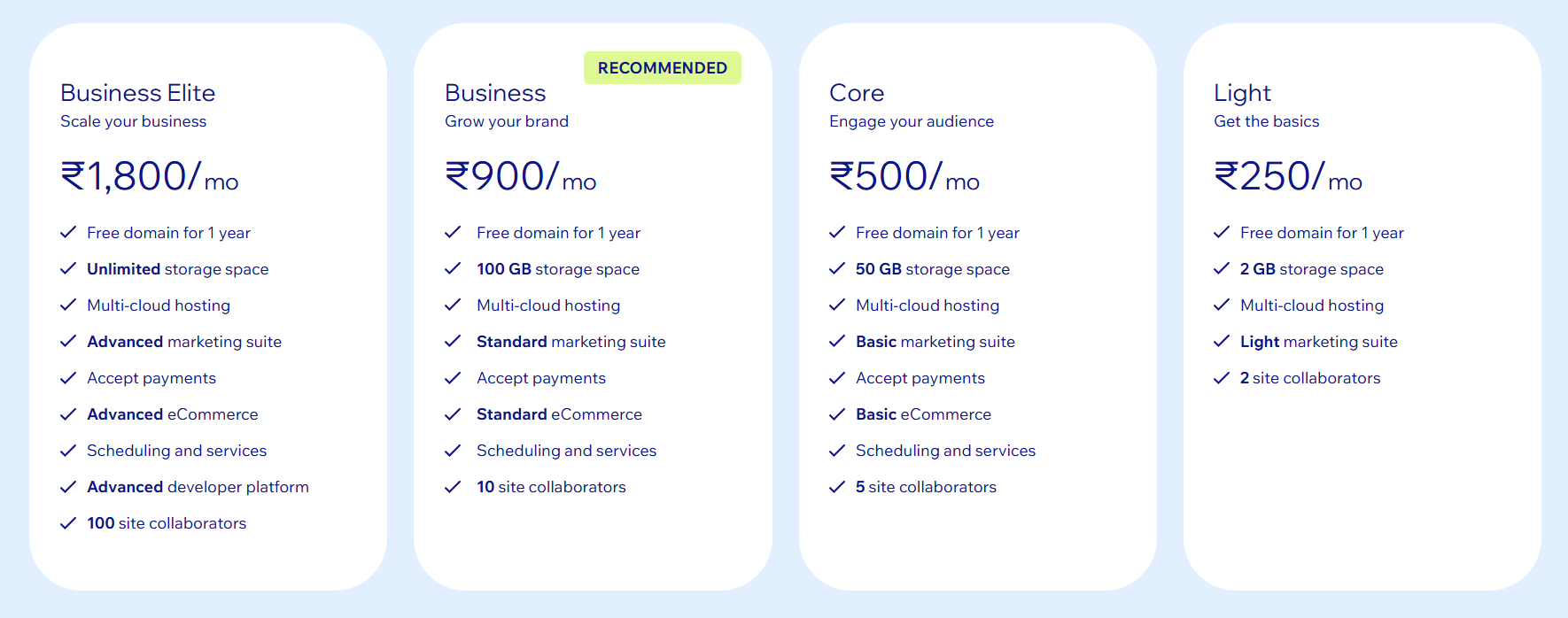 |  |  |
Other Details
Organization Types supported |
|
|
|
|---|---|---|---|
Platforms Supported |
|
|
|
Modes of support |
|
|
|
API Support |
|
|
|
Get help choosing | Get help choosing |
Security & Compliance
Certifications, data handling, and security controls for IT and compliance evaluators.
SOC 2 | ✓ Yes | — |
|---|---|---|
HIPAA | ✗ No | ✗ No |
GDPR | ✓ Yes | — |
ISO 27001 | — | — |
Single Sign-On (SSO) | ✓ Yes | — |
Multi-Factor Auth (MFA) | ✓ Yes | — |
Data Encryption | ✓ Yes | — |
Data Residency | 🌐 Global | 🇺🇸 US |
Wix vs UserX User Reviews & Rating Comparison
User Ratings | No reviews available for the product | ||
|---|---|---|---|
Rating Distribution | No reviews available for this product | ||
Spotsaas Editor’s POV generated by AI | Buyer sentiment Overall positive sentiment highlights ease of use, creative flexibility, and strong customer support, tempered by some billing and support navigation frustrations. What buyers like
Common complaints
| What buyers like
Common complaints
| Buyer sentiment Overall positive sentiment highlights Figma's ease of use, collaboration strengths, and versatile design features, tempered by concerns over billing and customer support. What buyers like
Common complaints
|
Pros and Cons |
|
|
|
Positive Reviews | No reviews available for the product | No reviews available for the product | No reviews available for the product |
| Negative Reviews | No reviews available for the product | No reviews available for the product | No reviews available for the product |
Integrations
Integration with other apps | No Integration information available. | No Integration information available. |
|---|


List of Customers
Customers | No Customers information available. | No Customers information available. |  Uber  Zoom  Buffer |
|---|
Media and Screenshots
Screenshots | 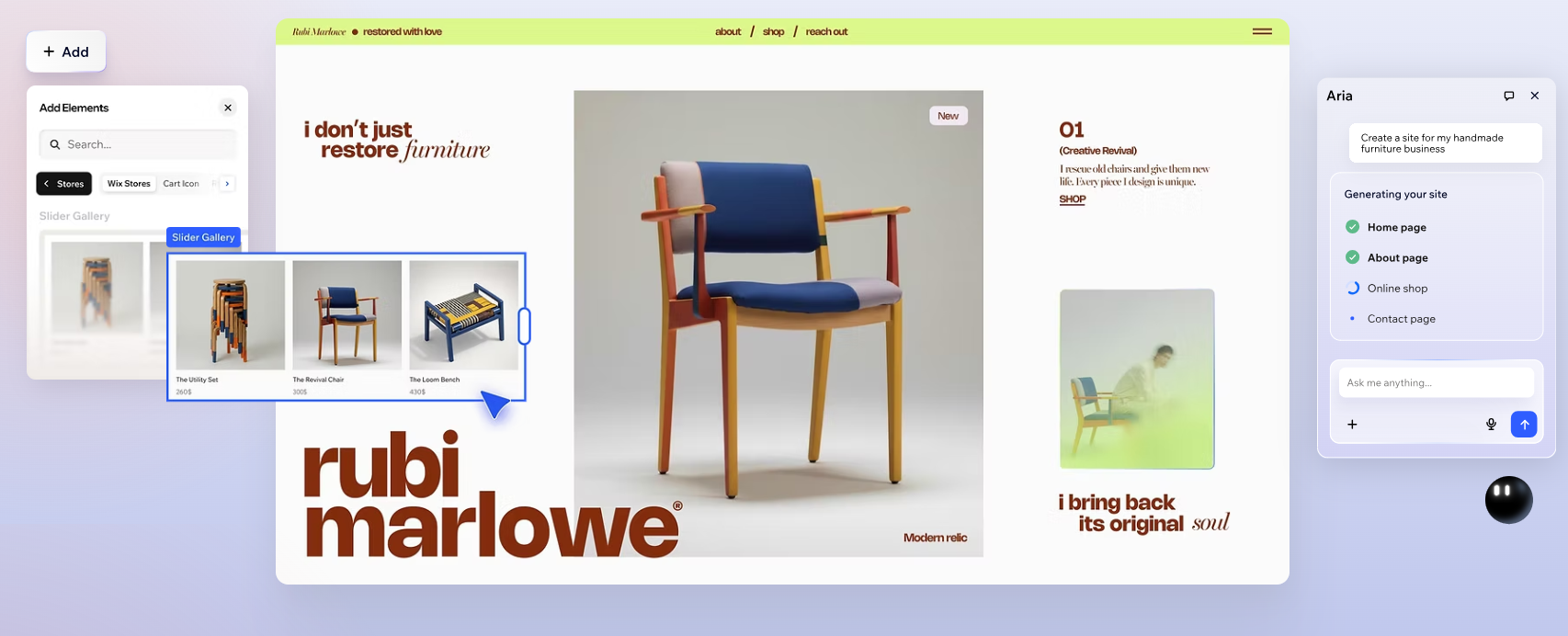 1 Screenshots | No screenshots available. |
|---|---|---|
Videos |  3 Videos | No videos available. |





Add another option to compare side by side
Search by product name to compare pricing, fit, and buyer feedback in one view.Compare similar software options


Disclaimer: This research has been collated from a variety of authoritative sources. We welcome your feedback at [email protected].
Frequently asked questions
- Which is better, Wix or UserX?
- Wix edges out the other on user ratings (4.1 vs -1.0). That said, the best pick depends on your use case — use the comparison tables above to evaluate each dimension.
- Do Wix and UserX offer a free trial?
- Yes, both Wix and UserX offer a free trial.
- What is the starting price of Wix vs UserX?
- Wix starts at $2.76 /month. UserX starts at $299 /Month.
- What are the top alternatives to Wix?
- Top alternatives to Wix include Unbounce, VWO Deploy, WordPress, SITE123, Squarespace.
- What are the top alternatives to UserX?
- Top alternatives to UserX include Figma, UX-App, UXCam, UXtweak, UserExperior.