
Wix vs Google Docs Comparison

Wix
Starting at $2.76 /month
- Free Trial
- Freelancers / Consultants
- Large Enterprises
Wix is a cloud-based website builder platform that allows you to create professional websites for business, personal or charitable use. It is easy to learn and use, and you can do it all from your computer, tablet or sma…

Google Docs
Starting at $6 /User/Month
- Free Trial
- Individuals
- Freelancers / Consultants
Google Docs is a free, web-based word processor that allows user to create rich documents, spreadsheets, and presentations. It features real-time collaboration capabilities so that user can share documents with others at…
Google Docs leads on user satisfaction with a 4.7-star rating across 338 reviews.
Wix vs Google Docs — at a glance
| Feature | Wix | Google Docs |
|---|---|---|
| Rating | 4.1 / 5 | 4.7 / 5 |
| Reviews | 3,544 | 338 |
| Starting price | $2.76 /month | $6 /User/Month |
| Free trial | Yes | Yes |
| Free version | No | No |
| Best for | Freelancers / Consultants, Large Enterprises, Medium Business | Individuals, Freelancers / Consultants, Large Enterprises |
| Category | Website Builder Software | Document Creation Software |
| Integrations | 8+ apps | — |
| Platforms | SaaS/Web/Cloud, Mobile - Android, Mobile - iOS | SaaS/Web/Cloud, Mobile - Android, Mobile - iOS |
| API | Available | Available |
| Support modes | Business Hours, Online | 24/7 (Live rep), Online |
| Certifications | SOC 2, GDPR | SOC 2, HIPAA, GDPR, ISO 27001 |
| Data residency | Global | Global |
Key differences between Wix and Google Docs
- Pricing: Wix starts at $2.76 /month, while Google Docs starts at $6 /User/Month.
- Target audience: Wix is built for Freelancers / Consultants and Large Enterprises, while Google Docs targets Individuals and Freelancers / Consultants.
- User satisfaction: Google Docs scores higher with a 4.7-star average.
- Deployment: Wix supports SaaS/Web/Cloud, Mobile - Android, Mobile - iOS; Google Docs supports SaaS/Web/Cloud, Mobile - Android, Mobile - iOS.
Wix vs Google Docs — find the better fit before you commit.
Which tool fits your team best
Which is actually cheaper for your team size
Where each product wins, per real buyers
Most Website Builder Software tools look identical on paper. This comparison cuts to the differences that matter — pricing structure, team fit, and what real buyers found after signing up.
Biggest differences
Features
Pricing
Buying details
Security
Buyer feedback
Integrations
Product tour
Other options
Talk to an expert Talk to an expert |
Free PDF comparison
Download this Wix vs Google Docs comparison
Get the full side-by-side as a PDF — these picks plus the top Website Builder Software tools, with verified ratings, pricing and features.
- Side-by-side on pricing, features & ratings
- Plus the category top 10, scored & ranked
- Emailed to you — no on-screen download
No file downloads on screen — we email it to you. One-click unsubscribe anytime.
Biggest differences
Start here before you go deeper into features.
Best for small to mid-sized businesses needing easy, customizable websites.
- You want a user-friendly platform with minimal technical skills required.
- You need creative freedom with customizable design and responsive templates.
- You value strong, responsive customer support for setup and troubleshooting.
- You require advanced ecommerce features beyond mid-size shop capabilities.
- You are a large enterprise needing highly customized or complex web solutions.
Best for easy, real-time collaborative document editing in cloud environments.
- You need seamless real-time collaboration for remote or distributed teams.
- You want a free, web-based tool with simple setup and cloud integration.
- Your team values easy sharing and access control within Google Workspace.
- You require advanced desktop publishing or complex document formatting features.
- Your workflow demands offline-first document editing without internet dependency.
Wix: Best for small to mid-sized businesses needing easy, customizable websites. Google Docs: Best for easy, real-time collaborative document editing in cloud environments.
Description | Wix is a cloud-based website builder platform that allows you to create professional websites for business, personal or charitable use. It is easy to learn and use, and you can do it all ... Read More about Wix | Google Docs is a free, web-based word processor that allows user to create rich documents, spreadsheets, and presentations. It features real-time collaboration capabilities so that user can ... Read More about Google Docs |
|---|---|---|
Entry Level Pricing |
|
|
Free Trial Availability | ||
SpotScoreWhat's this? ↗ | 9.7/10 | Not Available |
User RatingsBased on verified Spotsaas reviews | ||
Best Company Size | 1-50 employees51-500 employees | 1-50 employees51-500 employees |
Get pricing help | Get pricing help |
Where each option fits best
See where each product is strongest, which teams it fits, and what causes buyers to keep looking — before you commit.
Based on buyer reviews and verified product data collected by Spotsaas.
Key strengths
- Every Wix template is fully responsive and optimized for mobile, so websites look great on phones and tablets without extra work. This mobile-friendly design improves user experience, helps with search engine rankings, and supports conversions from visitors on the go. For businesses targeting local or mobile audiences, responsive design built into the platform removes a technical barrier when launching or updating a site.
- Flexible ecommerce features for small to mid-size shops: With Wix Stores, users can build online shops that support product listings, inventory, payment processing, shipping options, and order management. Integrations with payment gateways like Stripe, PayPal, and Square simplify checkout processes. While not as advanced as dedicated ecommerce giants, Wix covers core commerce needs easily — perfect for small to mid-size retailers, artisans, and service-based businesses wanting to sell products online quickly.
- Built-in marketing tools to boost visibility: Wix includes a suite of marketing features such as SEO guides, integrated site analytics, email campaigns, and social sharing options. These tools help users optimize their site for search engines, track visitor behavior, and engage audiences through newsletters and promotional campaigns. Small businesses benefit from having these capabilities without needing separate third-party solutions, making it easier to attract traffic and convert visitors into leads or customers.
No key benefits available yet.
Best fit
- 201–500
- Small Business & Local Services, Retail & E-commerce, Creative & Design, Professional Services, Hospitality & Food Services, Health & Wellness, Education & Coaching, Nonprofit & Community Organizations
- Small Business Owner, Marketing Manager, Website Administrator, Digital Marketer, Creative Director, E-commerce Manager, Operations Manager, Freelancer / Consultant
No best-fit guidance available yet.
Reasons buyers look elsewhere
- Wix provides basic site stats and integrations with tools like Google Analytics. However, teams focused on deep audience segmentation, conversion journeys, and revenue attribution may choose platforms with native analytics dashboards or built-in BI tools that go beyond what Wix offers out of the box.
- Brands that depend on advanced content marketing, editorial workflows, detailed SEO configuration, and large multisite networks may prefer enterprise CMS platforms (e.g., Drupal, Adobe Experience Manager) that offer sophisticated taxonomy, permissions, and publishing tools beyond Wix’s basic site analytics and SEO features.
- Platforms such as WordPress or headless CMS solutions have extensive plugin libraries and developer ecosystems. Businesses that need thousands of third-party extensions — for SEO, membership, learning management, forums, or analytics — may look beyond Wix to platforms with broader extensibility.
No alternatives guidance available yet.
Software Demo
Demo |
|---|
Need a second opinion?
Get shortlist help from a software advisor
Share your priorities, budget, and team needs, and we’ll help you narrow the options and understand the tradeoffs before you talk to vendors.

- Independent advice — matched to your business
- Understand the tradeoffs before you talk to vendors
- Free 15-min call with a software advisor.
Step 1 of 4
How big is your team?
We tailor recommendations to companies your size.















How do Wix and Google Docs Compare on Features?
Total Features | 15 Features | 4 Features |
|---|---|---|
Unique Features | No unique features | No unique features |
Get Quote | Get Quote |
Compare Wix and Google Docs on pricing
Review starting price, plan structure, and free-trial access side by side so you can see which option fits your budget and buying process.
Pricing Option | ||
|---|---|---|
Starting From |
|
|
Pricing Plans |
|
|
Pricing Page | 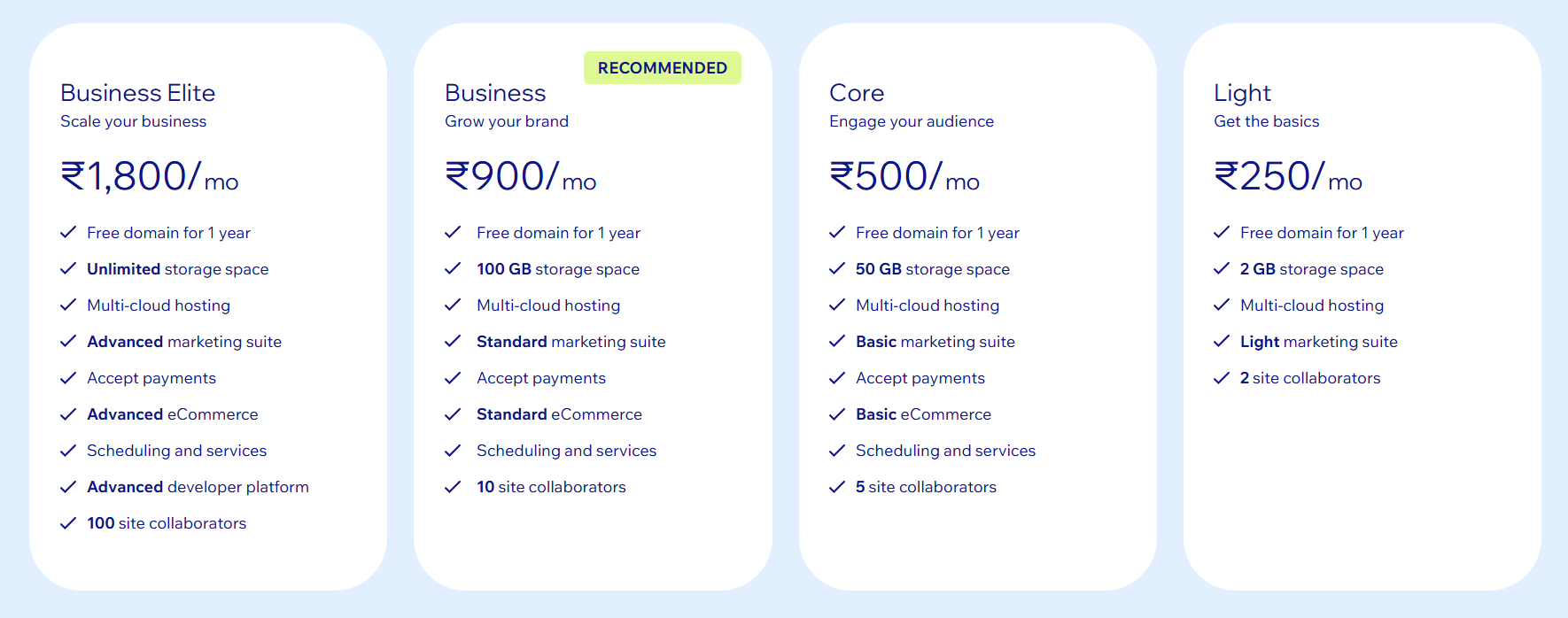 |  |
Other Details
Organization Types supported |
|
|
|---|---|---|
Platforms Supported |
|
|
Modes of support |
|
|
API Support |
|
|
Get help choosing | Get help choosing |
Security & Compliance
Certifications, data handling, and security controls for IT and compliance evaluators.
SOC 2 | ✓ Yes | ✓ Yes |
|---|---|---|
HIPAA | ✗ No | ✓ Yes |
GDPR | ✓ Yes | ✓ Yes |
ISO 27001 | — | ✓ Yes |
Single Sign-On (SSO) | ✓ Yes | ✓ Yes |
Multi-Factor Auth (MFA) | ✓ Yes | ✓ Yes |
Data Encryption | ✓ Yes | ✓ Yes |
Audit Logs | — | ✓ Yes |
Data Residency | 🌐 Global | 🌐 Global |
Wix User Reviews & Rating Comparison
User Ratings | ||
|---|---|---|
Rating Distribution | ||
Spotsaas Editor’s POV generated by AI | Buyer sentiment Overall positive sentiment highlights ease of use, creative flexibility, and strong customer support, tempered by some billing and support navigation frustrations. What buyers like
Common complaints
| Buyer sentiment Users overwhelmingly appreciate Google Docs for its ease of use, real-time collaboration, and free access, though some note limitations in advanced features and offline use. What buyers like
Common complaints
|
Pros and Cons |
|
|
Positive Reviews | No reviews available for the product | No reviews available for the product |
| Negative Reviews | No reviews available for the product | No reviews available for the product |
Integrations
Integration with other apps | No Integration information available. |
|---|


Media and Screenshots
Screenshots | 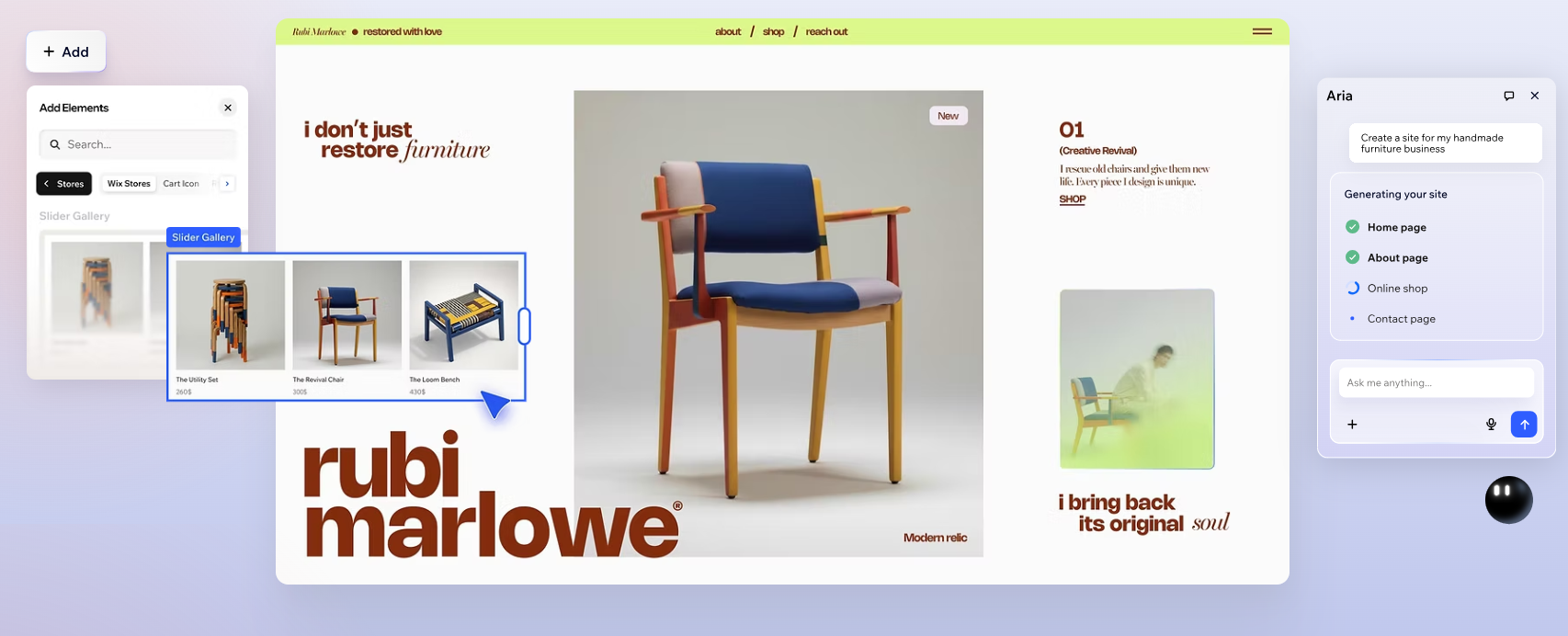 1 Screenshots |  2 Screenshots |
|---|---|---|
Videos |  3 Videos |  3 Videos |
Top Alternatives to Wix and Google Docs in 2026
Alternatives |
|---|



Add another option to compare side by side
Search by product name to compare pricing, fit, and buyer feedback in one view.Compare similar software options





Disclaimer: This research has been collated from a variety of authoritative sources. We welcome your feedback at [email protected].
Frequently asked questions
- Which is better, Wix or Google Docs?
- Google Docs edges out the other on user ratings (4.7 vs 4.1). That said, the best pick depends on your use case — use the comparison tables above to evaluate each dimension.
- Do Wix and Google Docs offer a free trial?
- Yes, both Wix and Google Docs offer a free trial.
- What is the starting price of Wix vs Google Docs?
- Wix starts at $2.76 /month. Google Docs starts at $6 /User/Month.
- What are the top alternatives to Wix?
- Top alternatives to Wix include Unbounce, VWO Deploy, WordPress, SITE123, Squarespace.
- What are the top alternatives to Google Docs?
- Top alternatives to Google Docs include Nimbus Note, Microsoft OneNote, Google Sheets, Documint, Dropbox Paper.