
Vectr vs Bootstrap Shuffle vs Looka Comparison

Vectr
Starting at $1.99 /month
- Freelancers / Consultants
- Medium Business
Vectr is a free graphic design program for Mac, PC, & Mobile. Vectr's clean interface lets user easily create amazing designs with simple shapes and powerful tools. For the first time, use a single software tool to creat…

Bootstrap Shuffle
Starting at $60 One-Time Payment
- Free Trial
- Individuals
- Freelancers / Consultants
Bootstrap Shuffle is a graphic design software for Mac and PC, it's also completely free. It's simple to use, yet powerful enough for professional graphic designers. Bootstrap Shuffle is a multi-platform graphics tool th…

Looka
Starting at $4.99 /Month
- Individuals
- Medium Business
The looka design suite comprises a full software environment for every stage of a designer's work. The suite enables designers to create and share a seamless style in every image. With looka, any image can have a consist…
Vectr leads on user satisfaction with a 4.5-star rating across 51 reviews.
SpotSaaS Analysis
VectrBootstrap ShuffleLooka
The core difference between Vectr and Bootstrap Shuffle lies in Vectr being a free, user-friendly graphic design tool ideal for small teams and individuals, while Bootstrap Shuffle is a paid tool that likely caters to users needing more specialized features for web design. Ideal buyers for Vectr are small businesses and freelancers seeking straightforward design solutions, whereas Bootstrap Shuffle may attract users looking for a more robust web design framework.
- Best free graphic design tool for simple projects - Ideal for small teams and freelancers - Cross-platform accessibility - No user account limits - Low learning curve for quick adoption - Suitable for various creative roles
- Paid tool for web design projects - Specific features not detailed - Target audience not specified - Price point at $60 - Potentially more advanced than Vectr - May appeal to developers and designers needing customization
Vectr vs Bootstrap Shuffle vs Looka — at a glance
| Feature | Vectr | Bootstrap Shuffle | Looka |
|---|---|---|---|
| Rating | 4.5 / 5 | — | 4.1 / 5 |
| Reviews | 51 | — | 11,322 |
| Starting price | $1.99 /month | $60 One-Time Payment | $4.99 /Month |
| Free trial | No | Yes | No |
| Free version | No | No | No |
| Best for | Freelancers / Consultants, Medium Business, Small Business | Individuals, Freelancers / Consultants, Medium Business | Individuals, Medium Business, Small Business |
| Category | Graphic Design Software | Graphic Design Software | Graphic Design Software |
| Platforms | SaaS/Web/Cloud, Installed - Windows, Installed - Mac | SaaS/Web/Cloud, Mobile - Android, Mobile - iOS | SaaS/Web/Cloud |
| API | — | — | — |
| Support modes | Online | Online | Online |
| Certifications | — | — | GDPR |
| Data residency | Global | US | US |
Key differences between Vectr and Bootstrap Shuffle
- Pricing: Vectr starts at $1.99 /month, while Bootstrap Shuffle starts at $60 One-Time Payment.
- Free trial: Bootstrap Shuffle offers a free trial; Vectr does not.
- Target audience: Vectr is built for Freelancers / Consultants and Medium Business, while Bootstrap Shuffle targets Individuals and Freelancers / Consultants.
- Deployment: Vectr supports SaaS/Web/Cloud, Installed - Windows, Installed - Mac; Bootstrap Shuffle supports SaaS/Web/Cloud, Mobile - Android, Mobile - iOS.
Compare Vectr vs Bootstrap Shuffle vs Looka — and walk away knowing which one fits.
Which tool fits your team best
Which is actually cheaper for your team size
Where each product wins, per real buyers
Most Graphic Design Software tools look identical on paper. This comparison cuts to the differences that matter — pricing structure, team fit, and what real buyers found after signing up.
Biggest differences
Features
Pricing
Buying details
Security
Buyer feedback
Integrations
Product tour
Other options
Talk to an expert Talk to an expert |
Biggest differences
Start here before you go deeper into features.
Best free, easy-to-use graphic design tool for simple projects and collaboration.
- You need a free, cross-platform graphic design tool with no user account limits.
- Your team values simple, intuitive design tools with a low learning curve.
- You want efficient real-time collaboration via URL sharing across devices.
- You require advanced vector design features for complex or professional projects.
- You need offline functionality or high-performance software without internet dependency.
Individuals, Freelancers / Consultants, Medium Business
Best for quick, easy logo and brand identity design for small teams.
- You need fast, simple logo creation with minimal learning curve.
- You want consistent brand styling across multiple images effortlessly.
- You value responsive, personalized customer support for design issues.
- Your team requires advanced design features and deep customization.
- You represent a large enterprise needing complex design workflows.
Vectr typically suits Freelancers / Consultants and Medium Business. Bootstrap Shuffle tends to fit Individuals and Freelancers / Consultants better. The right choice depends on your team size, workflow, and whether a free trial matters.
Description | Vectr is a free graphic design program for Mac, PC, & Mobile. Vectr's clean interface lets user easily create amazing designs with simple shapes and powerful tools. For the first time, use ... Read More about Vectr | Bootstrap Shuffle is a graphic design software for Mac and PC, it's also completely free. It's simple to use, yet powerful enough for professional graphic designers. Bootstrap Shuffle is a ... Read More about Bootstrap Shuffle | The looka design suite comprises a full software environment for every stage of a designer's work. The suite enables designers to create and share a seamless style in every image. With ... Read More about Looka |
|---|---|---|---|
Entry Level Pricing |
|
|
|
Free Trial Availability |
|
| |
Spotsaas ScoreWhat's this? ↗ | 8.8/10 | 8.3/10 | 9.1/10 |
User RatingsBased on verified Spotsaas reviews | |||
Best Company Size | 1-50 employees51-500 employees | — | 1-50 employees51-200 employees |
Get pricing help | Get pricing help |
Where each option fits best
See where each product is strongest, which teams it fits, and what causes buyers to keep looking — before you commit.
Based on buyer reviews and verified product data collected by Spotsaas.
Best fit
- 11–50
- Graphic Design, Marketing & Advertising, Education, Media & Publishing, Creative Agencies, Freelancers
- Graphic Designer, UI Designer, Marketing Manager, Content Creator, Creative Director, Illustrator, Social Media Manager
No best-fit guidance available yet.
No best-fit guidance available yet.
Reasons buyers look elsewhere
- Vectr is well suited for simple vector graphics, small projects, and beginner designers. Larger design teams working on brand identity systems, digital product design, or high-volume marketing assets often require software with advanced automation, design system support, and extensive customization options. Organizations planning to scale their design operations may therefore choose platforms that provide deeper functionality and long-term flexibility.
- Vectr operates primarily as a standalone design platform with limited integrations into larger creative ecosystems. Companies that rely on connected workflows across marketing, design, and project management platforms may require tools that integrate with cloud storage systems, creative asset managers, or collaborative design environments. Software with stronger integration ecosystems can help streamline design collaboration and file sharing across teams.
- Although Vectr supports standard vector formats like SVG, some users require a broader range of file export options for professional publishing and design workflows. Agencies and design teams often work with multiple file types such as AI, EPS, PDF, or high-resolution production files. When teams need flexible export options for printing, publishing, or multi-platform design usage, they may prefer tools that support a wider range of professional formats.
No alternatives guidance available yet.
No alternatives guidance available yet.
Software Demo
Demo |
|---|
Need a second opinion?
Get shortlist help from a software advisor
Share your priorities, budget, and team needs, and we’ll help you narrow the options and understand the tradeoffs before you talk to vendors.
How do Vectr, Bootstrap Shuffle and Looka Compare on Features?
Total Features | 5 Features | 5 Features | 6 Features |
|---|---|---|---|
Unique Features | No unique features | No unique features | No unique features |
Get Quote | Get Quote |
Compare Vectr, Bootstrap Shuffle and Looka on pricing
Review starting price, plan structure, and free-trial access side by side so you can see which option fits your budget and buying process.
Pricing Option | |||
|---|---|---|---|
Starting From |
|
|
|
Pricing Plans |
|
| |
Pricing Page | 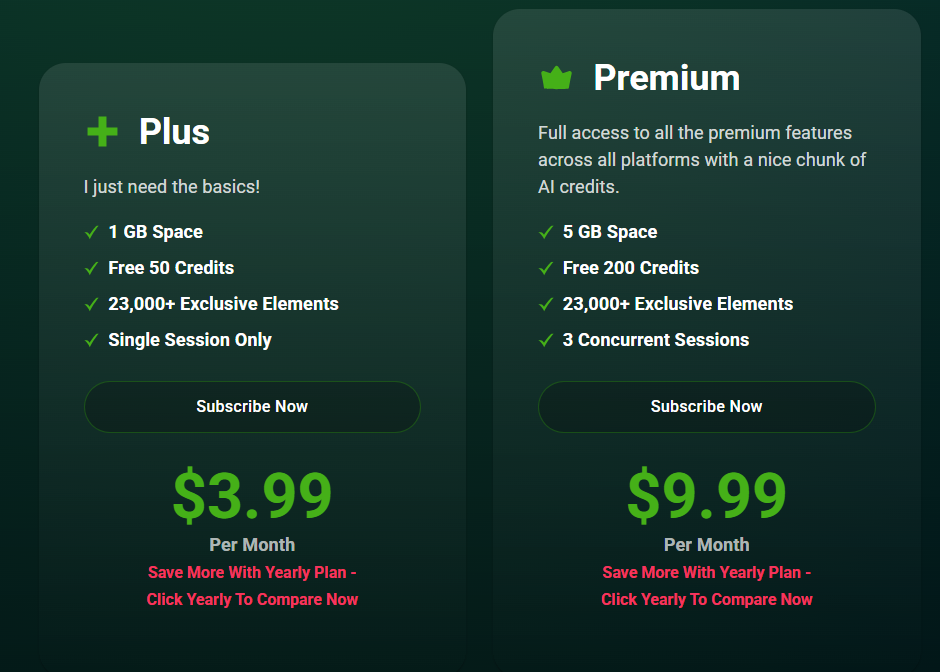 |  |  |
Other Details
Organization Types supported |
|
|
|
|---|---|---|---|
Platforms Supported |
|
|
|
Modes of support |
|
|
|
API Support |
|
|
|
Get help choosing | Get help choosing |
Security & Compliance
Certifications, data handling, and security controls for IT and compliance evaluators.
HIPAA | ✗ No | ✗ No |
|---|---|---|
GDPR | — | — |
Data Residency | 🌐 Global | 🇺🇸 US |
Vectr vs Bootstrap Shuffle User Reviews & Rating Comparison
User Ratings | No reviews available for the product | ||
|---|---|---|---|
Rating Distribution | No reviews available for this product | ||
Spotsaas Editor’s POV generated by AI | Buyer sentiment Users generally appreciate Vectr's ease of use and free access but note limitations in advanced features and occasional performance issues. What buyers like
Common complaints
| What buyers like
Common complaints
| Buyer sentiment Users generally appreciate Looka for its ease of use and outstanding customer support, though some note limitations in advanced features and occasional technical issues. What buyers like
Common complaints
|
Pros and Cons |
|
|
|
Positive Reviews | No reviews available for the product | No reviews available for the product | No reviews available for the product |
Media and Screenshots
Screenshots |  1 Screenshots |  2 Screenshots |
|---|---|---|
Videos |  3 Videos |  2 Videos |
Alternatives
Alternatives |
|---|




Add another option to compare side by side
Search by product name to compare pricing, fit, and buyer feedback in one view.Compare similar software options


Related Blogs and Articles for Graphic Design Software


Disclaimer: This research has been collated from a variety of authoritative sources. We welcome your feedback at [email protected].
Frequently asked questions
- Which is better, Vectr or Bootstrap Shuffle?
- Vectr edges out the other on user ratings (4.5 vs -1.0). That said, the best pick depends on your use case — use the comparison tables above to evaluate each dimension.
- Do Vectr and Bootstrap Shuffle offer a free trial?
- Bootstrap Shuffle offers a free trial. Vectr does not.
- What is the starting price of Vectr vs Bootstrap Shuffle?
- Vectr starts at $1.99 /month. Bootstrap Shuffle starts at $60 One-Time Payment.
- What are the top alternatives to Vectr?
- Top alternatives to Vectr include Looka, Venngage, Canva, GIMP, Sketch.
- What are the top alternatives to Bootstrap Shuffle?
- Top alternatives to Bootstrap Shuffle include Looka, grid.studio, STUDIO, Gridbox, Designmodo Startup Framework.