
Radio.co vs Riverside.fm vs Zencastr Comparison

Radio.co
Starting at $35 /month
- Free Trial
- Large Enterprises
- Medium Business
Radio.co is an all-in-one internet radio platform designed to help broadcasters of all skill levels launch, manage, and grow their own stations with ease. Whether you're a solo creator, media brand, educational instituti…

Riverside.fm
Starting at $24 /month
- Free Trial
- Large Enterprises
- Medium Business
Riverside.FM is a highly advanced audio and video recording platform that helps podcasters and media agencies to record remote interviews of exceptional quality. With Riverside.FM, users can invite up to 8 guests to join…

Zencastr
Starting at $18 /Month
- Free Trial
- Individuals
- Large Enterprises
Zencastr is a cutting-edge podcasting software designed specifically for recording remote interviews. With its web-based platform, users can easily invite guests and record from any location with internet access. The sof…
Radio.co leads on user satisfaction with a 4.3-star rating across 4 reviews.
Radio.co vs Riverside.fm vs Zencastr — at a glance
| Feature | Radio.co | Riverside.fm | Zencastr |
|---|---|---|---|
| Rating | 4.3 / 5 | 3.8 / 5 | 3.9 / 5 |
| Reviews | 4 | 15 | 21 |
| Starting price | $35 /month | $24 /month | $18 /Month |
| Free trial | Yes | Yes | Yes |
| Free version | No | No | No |
| Best for | Large Enterprises, Medium Business, Small Business | Large Enterprises, Medium Business, Small Business | Individuals, Large Enterprises, Medium Business |
| Category | Audio Editing Software | Audio Editing Software | Audio Editing Software |
| Integrations | — | 6+ apps | — |
| Platforms | SaaS/Web/Cloud | SaaS/Web/Cloud | SaaS/Web/Cloud |
| API | Available | — | — |
| Support modes | Online | Online | Online |
| Certifications | — | GDPR | — |
| Data residency | Global | US | Global |
Key differences between Radio.co and Riverside.fm
- Pricing: Radio.co starts at $35 /month, while Riverside.fm starts at $24 /month.
- User satisfaction: Radio.co scores higher with a 4.3-star average.
- Deployment: Radio.co supports SaaS/Web/Cloud; Riverside.fm supports SaaS/Web/Cloud.
Compare Radio.co vs Riverside.fm vs Zencastr — and walk away knowing which one fits.
Which tool fits your team best
Which is actually cheaper for your team size
Where each product wins, per real buyers
Most Audio Editing Software tools look identical on paper. This comparison cuts to the differences that matter — pricing structure, team fit, and what real buyers found after signing up.
Biggest differences
Features
Pricing
Buying details
Security
Buyer feedback
Integrations
Product tour
Other options
Free PDF comparison
Download this Radio.co vs Riverside.fm vs Zencastr comparison
Get the full side-by-side as a PDF — these picks plus the top Audio Editing Software tools, with verified ratings, pricing and features.
- Side-by-side on pricing, features & ratings
- Plus the category top 10, scored & ranked
- Emailed to you — no on-screen download
No file downloads on screen — we email it to you. One-click unsubscribe anytime.
Biggest differences
Start here before you go deeper into features.
Large Enterprises, Medium Business, Small Business
Best for podcasters needing high-quality remote audio and video recordings.
- You require separate local audio and video tracks for each participant to enable detailed editing.
- You want an all-in-one browser-based platform combining recording, editing, live streaming, and content repurposing.
- You need to host remote interviews with up to 8 guests without requiring them to install software.
- You are a hobbyist or beginner with a limited budget seeking a low-cost solution.
- You need flawless automated transcription, audio processing, or show-note generation without manual correction.
Best for simple, high-quality remote podcast audio recording.
- You need separate, lossless WAV tracks for each remote guest.
- You want a web-based platform requiring no guest software installation.
- You are an individual or small team focused on podcast production.
- You require advanced multi-track mixing and audio editing features.
- You need integrated video recording or live streaming capabilities.
Radio.co typically suits Large Enterprises and Medium Business. Riverside.fm tends to fit Large Enterprises and Medium Business better. The right choice depends on your team size, workflow, and whether a free trial matters.
Description | Radio.co is an all-in-one internet radio platform designed to help broadcasters of all skill levels launch, manage, and grow their own stations with ease. Whether you're a solo creator, ... Read More about Radio.co | Riverside.FM is a highly advanced audio and video recording platform that helps podcasters and media agencies to record remote interviews of exceptional quality. With Riverside.FM, users ... Read More about Riverside.fm | Zencastr is a cutting-edge podcasting software designed specifically for recording remote interviews. With its web-based platform, users can easily invite guests and record from any ... Read More about Zencastr |
|---|---|---|---|
Entry Level Pricing |
|
|
|
Free Trial Availability | |||
User RatingsBased on verified Spotsaas reviews | |||
Best Company Size | 1–100 Employees | Small businessMedium business | IndividualsSmall Business |
Get pricing help | Get pricing help | Get pricing help |
Where each option fits best
See where each product is strongest, which teams it fits, and what causes buyers to keep looking — before you commit.
Based on buyer reviews and verified product data collected by Spotsaas.
Key strengths
- All-in-One Simplicity: Radio.co streamlines every aspect of running a radio station—from broadcasting and automation to audience insights—through a single, user-friendly dashboard that requires no technical background.
- Reliable Global Streaming Infrastructure: With 10+ years in the industry and a presence in 175 countries, Radio.co delivers secure, high-availability broadcasting with consistent performance, even for large audiences.
- Outstanding Customer Support: The platform is well-regarded for its responsive support team, which offers live chat, 1-on-1 onboarding, video tutorials, and expert guidance regardless of time zone or technical ability.
- Complete recording and editing workflow: The platform combines recording, editing, live streaming, and content repurposing in one place. This reduces the need for multiple tools and simplifies the overall content production process for creators and teams.
- Built-in transcription and AI tools: Riverside includes automatic transcription, clip generation, and text-based editing features. These tools help creators turn long recordings into short clips, social media content, and written transcripts more efficiently.
- Separate audio and video tracks: Each participant’s audio and video are recorded on separate tracks. This allows creators to edit speakers individually, adjust audio levels, remove mistakes, and improve overall production quality during post-production.
No key benefits available yet.
Best fit
- 1–100 Employees
- Media, Broadcasting, Sports, Education, Retail, Fitness, Hospitality, Religious Institutions, Nonprofits
- Radio Presenters, Station Managers, DJs, Content Creators, Media Directors, Event Organizers, Marketing Coordinators, Educators, Community Managers
- 51–200
- Podcasting Software, Video Production Software, Content Creation Tools, Media & Entertainment, Digital Marketing, Broadcasting
- Podcaster, Video Content Creator, Podcast Producer, Media Producer, Digital Marketer, Content Strategist, Journalist, YouTuber, Marketing Manager, Social Media Manager
No best-fit guidance available yet.
Reasons buyers look elsewhere
- Radio.co is a fully cloud-based platform, which may not appeal to broadcasters seeking advanced customization or control via on-premise infrastructure for highly regulated or secured environments.
- Unlike some competitors, Radio.co does not natively support ad insertion, dynamic ad replacement, or monetization dashboards, which could limit revenue opportunities for commercial stations.
- Users must independently secure music streaming rights, as Radio.co does not offer integrated music licensing services, a feature that some competitors provide to streamline compliance.
- Although Riverside includes built-in editing and AI features, some creators prefer specialized editing platforms that offer more advanced audio or video editing capabilities. This leads users to consider alternatives focused more heavily on post-production workflows.
- Riverside works best on specific browsers like Chrome or Edge, and some features are restricted on other browsers or mobile devices. Users who prefer broader compatibility across browsers and devices may look for tools that offer more flexible access.
- Some users report problems such as audio distortion, out-of-sync tracks, or slow uploads when exporting recordings. These issues can disrupt production workflows, especially for time-sensitive interviews or live sessions.
No alternatives guidance available yet.
Software Demo
Demo |
|---|
Need a second opinion?
Get shortlist help from a software advisor
Share your priorities, budget, and team needs, and we’ll help you narrow the options and understand the tradeoffs before you talk to vendors.

- Independent advice — matched to your business
- Understand the tradeoffs before you talk to vendors
- Free 15-min call with a software advisor.
Step 1 of 4
How big is your team?
We tailor recommendations to companies your size.















How do Radio.co, Riverside.fm and Zencastr Compare on Features?
Total Features | 5 Features | 8 Features | 4 Features |
|---|---|---|---|
Unique Features | No unique features | No unique features | No unique features |
Get Quote | Get Quote | Get Quote |
Compare Radio.co, Riverside.fm and Zencastr on pricing
Review starting price, plan structure, and free-trial access side by side so you can see which option fits your budget and buying process.
Pricing Option | |||
|---|---|---|---|
Starting From |
|
|
|
Pricing Plans |
|
| |
Pricing Page |  | 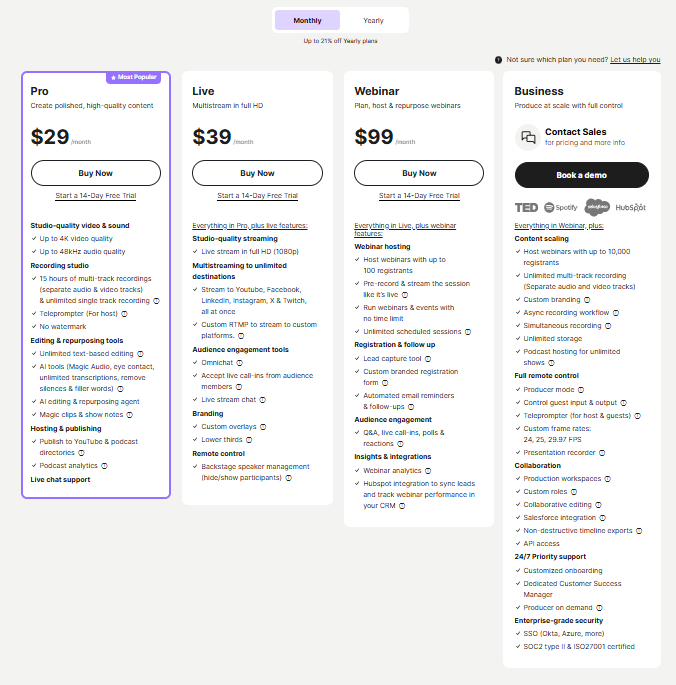 |  |
Other Details
Organization Types supported |
|
|
|
|---|---|---|---|
Platforms Supported |
|
|
|
Modes of support |
|
|
|
API Support |
|
|
|
Get help choosing | Get help choosing | Get help choosing |
Security & Compliance
Certifications, data handling, and security controls for IT and compliance evaluators.
HIPAA | ✗ No | ✗ No | ✗ No |
|---|---|---|---|
GDPR | — | ✓ Yes | — |
Data Encryption | — | ✓ Yes | ✓ Yes |
Data Residency | 🌐 Global | 🇺🇸 US | 🌐 Global |
Radio.co vs Riverside.fm User Reviews & Rating Comparison
User Ratings | |||
|---|---|---|---|
Rating Distribution | |||
Spotsaas Editor’s POV generated by AI | Buyer sentiment Buyer sentiment is positive across 8 reviews, with strong overall satisfaction. What buyers like
Common complaints
| Buyer sentiment Users appreciate the high-quality local recordings and integrated editing tools but note occasional glitches and a higher price point for beginners. What buyers like
Common complaints
| Buyer sentiment Users appreciate Zencastr’s ease of use and high-quality remote audio recording but note limitations in advanced editing and pricing clarity. What buyers like
Common complaints
|
Pros and Cons |
|
|
|
Positive Reviews | No reviews available for the product | No reviews available for the product | No reviews available for the product |
| Negative Reviews | No reviews available for the product | No reviews available for the product | No reviews available for the product |
Integrations
Integration with other apps | No Integration information available. | No Integration information available. |
|---|



List of Customers
Customers |  VICE  Soho Radio  CAMELOT |  Microsoft  Shopify  Spotify | No Customers information available. |
|---|
Media and Screenshots
Screenshots | 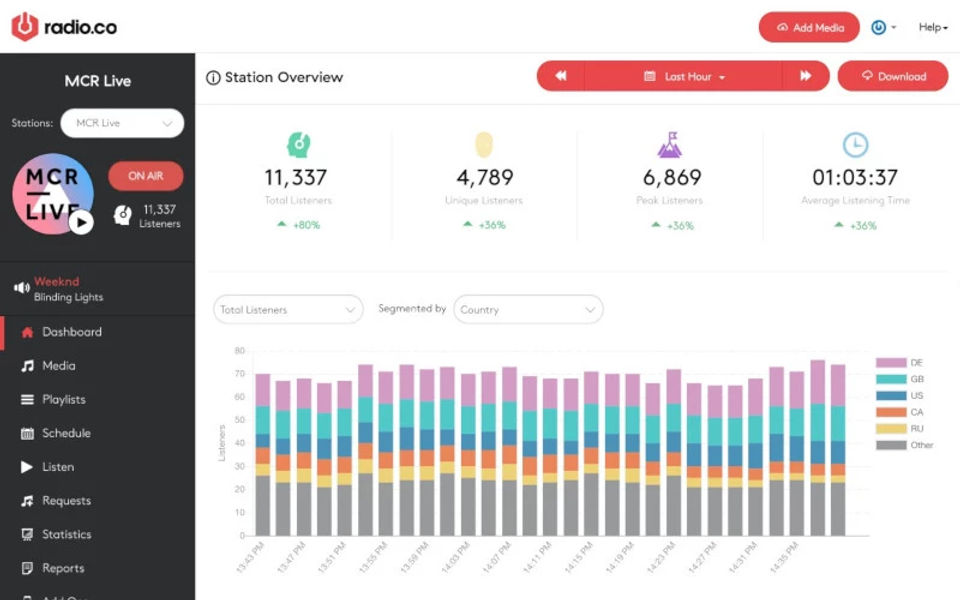 4 Screenshots | No screenshots available. | No screenshots available. |
|---|---|---|---|
Videos |  3 Videos |  2 Videos |  4 Videos |
Alternatives




Add another option to compare side by side
Search by product name to compare pricing, fit, and buyer feedback in one view.Compare similar software options





Related Blogs and Articles for Audio Editing Software


Disclaimer: This research has been collated from a variety of authoritative sources. We welcome your feedback at [email protected].
Frequently asked questions
- Which is better, Radio.co or Riverside.fm?
- Radio.co edges out the other on user ratings (4.3 vs 3.8). That said, the best pick depends on your use case — use the comparison tables above to evaluate each dimension.
- Do Radio.co and Riverside.fm offer a free trial?
- Yes, both Radio.co and Riverside.fm offer a free trial.
- What is the starting price of Radio.co vs Riverside.fm?
- Radio.co starts at $35 /month. Riverside.fm starts at $24 /month.
- What are the top alternatives to Radio.co?
- Top alternatives to Radio.co include Podsite, Streann Studio, Gradio, Space, Qualified.
- What are the top alternatives to Riverside.fm?
- Top alternatives to Riverside.fm include StreamYard, Clips by Riverside.fm, Stream Club, Streann Studio, SquadCast.