
cobby vs RepairLink Comparison

cobby
Starting at Contact for pricing
- Free Trial
- Large Enterprises
- Medium Business
Cobby is a powerful PIM platform that seamlessly integrates with Excel to streamline your online store maintenance. With real-time data synchronization, you can easily create new products, update prices, and upload image…

RepairLink
Starting at Contact for pricing
- Small Business
- Medium Business
RepairLink is a web and mobile-based platform designed to streamline the auto parts ordering process for repair shops and dealerships. Built for repair professionals, auto shops, and OEM dealers, the platform provides di…
cobby vs RepairLink — at a glance
| Feature | cobby | RepairLink |
|---|---|---|
| Rating | — | — |
| Reviews | — | — |
| Starting price | Contact for pricing | Contact for pricing |
| Free trial | Yes | No |
| Free version | No | No |
| Best for | Large Enterprises, Medium Business, Small Business | Small Business, Medium Business |
| Category | Product Information Management (PIM) Software | Product Information Management (PIM) Software |
| Integrations | — | 4+ apps |
| Platforms | SaaS/Web/Cloud | SaaS/Web/Cloud |
| API | Available | — |
| Support modes | Online | Online, Business Hours |
| Certifications | GDPR | — |
| Data residency | Global | US |
Key differences between cobby and RepairLink
- Free trial: cobby offers a free trial; RepairLink does not.
- Target audience: cobby is built for Large Enterprises and Medium Business, while RepairLink targets Small Business and Medium Business.
- Deployment: cobby supports SaaS/Web/Cloud; RepairLink supports SaaS/Web/Cloud.
cobby vs RepairLink — find the better fit before you commit.
Which tool fits your team best
Which is actually cheaper for your team size
Where each product wins, per real buyers
Most Product Information Management (PIM) Software tools look identical on paper. This comparison cuts to the differences that matter — pricing structure, team fit, and what real buyers found after signing up.
Biggest differences
Features
Pricing
Buying details
Security
Buyer feedback
Integrations
Product tour
Other options
Talk to an expert Talk to an expert | Talk to an expert Talk to an expert |
Free PDF comparison
Download this cobby vs RepairLink comparison
Get the full side-by-side as a PDF — these picks plus the top Product Information Management (PIM) Software tools, with verified ratings, pricing and features.
- Side-by-side on pricing, features & ratings
- Plus the category top 10, scored & ranked
- Emailed to you — no on-screen download
No file downloads on screen — we email it to you. One-click unsubscribe anytime.
Biggest differences
Start here before you go deeper into features.
Best for Excel users needing seamless PIM integration with e-commerce platforms.
- You manage product data primarily in Excel and want real-time synchronization.
- You need to update product info, prices, and images directly from Excel.
- You use Magento or Shopware and want one-click updates from your spreadsheet.
- You require a standalone PIM solution without reliance on Excel.
- You need advanced PIM features beyond basic Excel integration and synchronization.
Best for OEM auto parts ordering with precise VIN-based compatibility.
- You operate an automotive repair shop or dealership needing accurate OEM parts.
- You want real-time pricing and stock visibility to speed up ordering decisions.
- You prefer a free platform without subscription or transaction fees.
- You require aftermarket or non-OEM parts beyond affiliated dealer offerings.
- You need integrated payment processing within the parts ordering platform.
cobby: Best for Excel users needing seamless PIM integration with e-commerce platforms. RepairLink: Best for OEM auto parts ordering with precise VIN-based compatibility.
Description | Cobby is a powerful PIM platform that seamlessly integrates with Excel to streamline your online store maintenance. With real-time data synchronization, you can easily create new products, ... Read More about cobby | RepairLink is a web and mobile-based platform designed to streamline the auto parts ordering process for repair shops and dealerships. Built for repair professionals, auto shops, and OEM ... Read More about RepairLink |
|---|---|---|
Free Trial Availability |
|
|
Best Company Size | — | 1-50 employees51-500 employees |
Get pricing help | Get pricing help |
Where each option fits best
See where each product is strongest, which teams it fits, and what causes buyers to keep looking — before you commit.
Based on buyer reviews and verified product data collected by Spotsaas.
Key strengths
No key benefits available yet.
- RepairLink uses VIN-based searches to identify the correct parts, reducing order errors and confirming compatibility with manufacturer specifications. This accuracy maintains repair quality and reduces costly returns or incorrect installations.
- Direct Access to OEM Parts and Dealers: The platform provides a direct connection to a wide network of authorized OEM dealers, giving repair shops fast access to genuine parts from brands like GM, Toyota, Hyundai, and more. This not only maintains quality but also simplifies procurement by eliminating middlemen.
- No-Cost Access for Repair Shops: RepairLink is completely free for repair shops to use, offering ordering, tracking, and search features without any subscription or transaction fees. This makes it an especially useful tool for small to mid-sized repair businesses seeking efficiency without added cost.
Best fit
No best-fit guidance available yet.
- 1–50 Employees
- Automotive Repair, Fleet Maintenance, Collision Repair, Dealership Service Centers, Auto Parts Distribution
- Service Advisor, Parts Manager, Shop Owner, Automotive Technician, Operations Manager, Procurement Specialist
Reasons buyers look elsewhere
No alternatives guidance available yet.
- PartsTech and Nexpart stock both OEM and aftermarket parts, reducing sourcing costs compared to RepairLink's OEM-only inventory.
- Epicor and AutoFluent handle payment and invoicing in-app; RepairLink requires external tools for billing.
- Competitors with larger dealership networks report higher engagement in certain regions.
Software Demo
Demo |  RepairLink has not given any software demo yet If you're the owner of this profile, add your demo.Contact us |
|---|
Need a second opinion?
Get shortlist help from a software advisor
Share your priorities, budget, and team needs, and we’ll help you narrow the options and understand the tradeoffs before you talk to vendors.

- Independent advice — matched to your business
- Understand the tradeoffs before you talk to vendors
- Free 15-min call with a software advisor.
Step 1 of 4
How big is your team?
We tailor recommendations to companies your size.















How do cobby and RepairLink Compare on Features?
Total Features | 4 Features | 8 Features |
|---|---|---|
Unique Features | No unique features | No unique features |
Get Quote | Get Quote |
Compare cobby and RepairLink on pricing
Review starting price, plan structure, and free-trial access side by side so you can see which option fits your budget and buying process.
Pricing Option | ||
|---|---|---|
Pricing Plans |
|
|
Pricing Page | 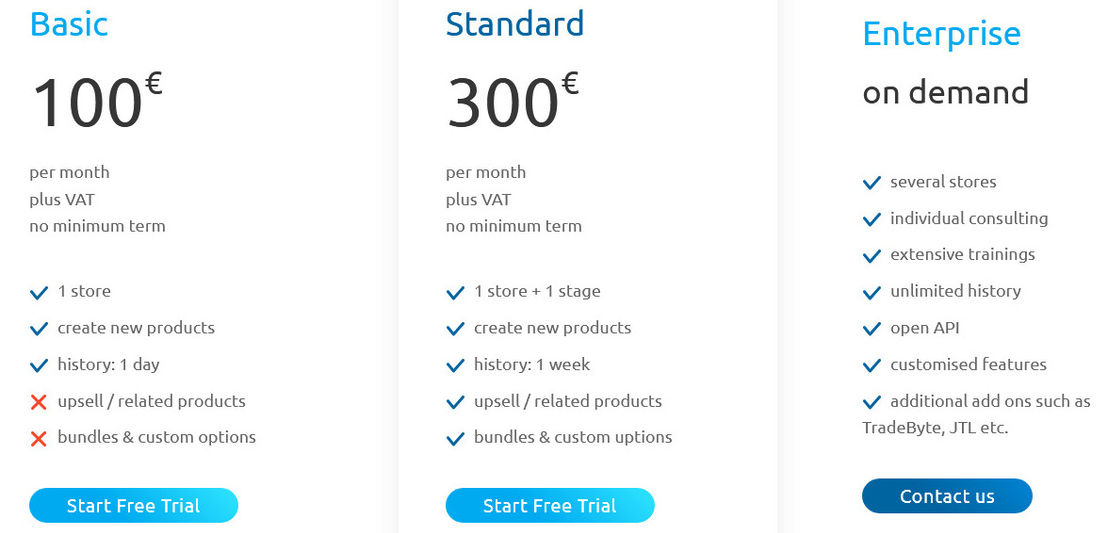 |  |
Other Details
Organization Types supported |
|
|
|---|---|---|
Platforms Supported |
|
|
Modes of support |
|
|
API Support |
|
|
Get help choosing | Get help choosing |
Security & Compliance
Certifications, data handling, and security controls for IT and compliance evaluators.
HIPAA | ✗ No | ✗ No |
|---|---|---|
GDPR | ✓ Yes | — |
Data Residency | 🌐 Global | 🇺🇸 US |
cobby User Reviews & Rating Comparison
Spotsaas Editor’s POV generated by AI | What buyers like
Common complaints
| Buyer sentiment Users appreciate RepairLink’s accuracy, free access, and integration capabilities but note limitations in parts variety and payment processing. What buyers like
Common complaints
|
|---|---|---|
Pros and Cons |
|
|
Integrations
Integration with other apps | No Integration information available. |
|---|



Media and Screenshots
Screenshots | No screenshots available. | 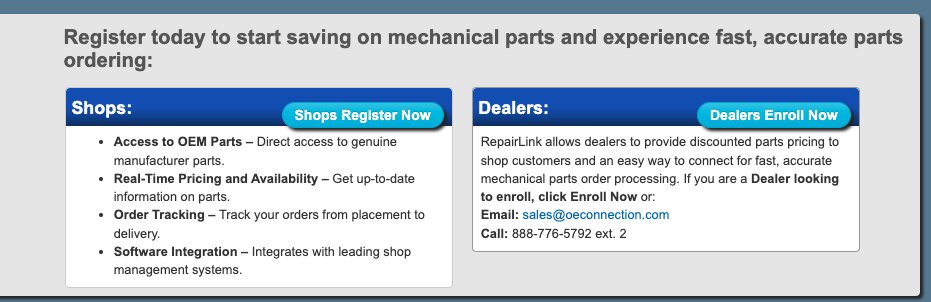 2 Screenshots |
|---|---|---|
Videos |  2 Videos | No videos available. |
Top Alternatives to cobby and RepairLink in 2026
Alternatives |
|---|


Add another option to compare side by side
Search by product name to compare pricing, fit, and buyer feedback in one view.Compare similar software options


Disclaimer: This research has been collated from a variety of authoritative sources. We welcome your feedback at [email protected].
Frequently asked questions
- Which is better, cobby or RepairLink?
- cobby and RepairLink are closely matched with equal user ratings of -1.0. The right choice depends on your team size, budget, and specific Product Information Management (PIM) Software needs.
- Do cobby and RepairLink offer a free trial?
- cobby offers a free trial. RepairLink does not.
- What is the starting price of cobby vs RepairLink?
- cobby starts at Contact for pricing. RepairLink starts at Contact for pricing.
- What are the top alternatives to cobby?
- Top alternatives to cobby include PIMworks, EnterWorks, Perfion PIM, Sales Layer PIM, Akeneo PIM.
- What are the top alternatives to RepairLink?
- Top alternatives to RepairLink include Label Insight, NeuroPixel.ai, Syndigo CXH, Salsify, Amaze PXM.