
Clips by Riverside.fm vs Riverside.fm Comparison

Clips by Riverside.fm
Starting at $24 /month
- Large Enterprises
- Medium Business
Clips by Riverside.fm lets content creators repurpose long audio and video recordings into short highlights for social media. You mark key moments in your content and the platform generates shareable clips without requir…

Riverside.fm
Starting at $24 /month
- Free Trial
- Large Enterprises
- Medium Business
Riverside.FM is a highly advanced audio and video recording platform that helps podcasters and media agencies to record remote interviews of exceptional quality. With Riverside.FM, users can invite up to 8 guests to join…
Riverside.fm leads on user satisfaction with a 4.9-star rating across 891 reviews.
Clips by Riverside.fm vs Riverside.fm — at a glance
| Feature | Clips by Riverside.fm | Riverside.fm |
|---|---|---|
| Rating | — | 4.9 / 5 |
| Reviews | — | 891 |
| Starting price | $24 /month | $24 /month |
| Free trial | No | Yes |
| Free version | No | No |
| Best for | Large Enterprises, Medium Business, Small Business | Large Enterprises, Medium Business, Small Business |
| Category | Content Creation Software | Audio Editing Software |
| Integrations | 5+ apps | 6+ apps |
| Platforms | SaaS/Web/Cloud | SaaS/Web/Cloud |
| API | — | — |
| Support modes | Online | Online |
| Certifications | — | GDPR |
| Data residency | Global | US |
Key differences between Clips by Riverside.fm and Riverside.fm
- Pricing: Clips by Riverside.fm starts at $24 /month, while Riverside.fm starts at $24 /month.
- Free trial: Riverside.fm offers a free trial; Clips by Riverside.fm does not.
- Deployment: Clips by Riverside.fm supports SaaS/Web/Cloud; Riverside.fm supports SaaS/Web/Cloud.
Clips by Riverside.fm vs Riverside.fm — find the better fit before you commit.
Which tool fits your team best
Which is actually cheaper for your team size
Where each product wins, per real buyers
Most Content Creation Software tools look identical on paper. This comparison cuts to the differences that matter — pricing structure, team fit, and what real buyers found after signing up.
Biggest differences
Features
Pricing
Buying details
Security
Buyer feedback
Integrations
Product tour
Other options
Talk to an expert Talk to an expert | Talk to an expert Talk to an expert |
Free PDF comparison
Download this Clips by Riverside.fm vs Riverside.fm comparison
Get the full side-by-side as a PDF — these picks plus the top Content Creation Software tools, with verified ratings, pricing and features.
- Side-by-side on pricing, features & ratings
- Plus the category top 10, scored & ranked
- Emailed to you — no on-screen download
No file downloads on screen — we email it to you. One-click unsubscribe anytime.
Clips by Riverside.fm vs Riverside.fm: Biggest differences
Start here before you go deeper into features.
Large Enterprises, Medium Business, Small Business
Best for podcasters needing high-quality remote audio and video recordings.
- You require separate local audio and video tracks for each participant to enable detailed editing.
- You want an all-in-one browser-based platform combining recording, editing, live streaming, and content repurposing.
- You need to host remote interviews with up to 8 guests without requiring them to install software.
- You are a hobbyist or beginner with a limited budget seeking a low-cost solution.
- You need flawless automated transcription, audio processing, or show-note generation without manual correction.
Clips by Riverside.fm typically suits Large Enterprises and Medium Business. Riverside.fm tends to fit Large Enterprises and Medium Business better. The right choice depends on your team size, workflow, and whether a free trial matters.
Description | Clips by Riverside.fm lets content creators repurpose long audio and video recordings into short highlights for social media. You mark key moments in your content and the platform generates ... Read More about Clips by Riverside.fm | Riverside.FM is a highly advanced audio and video recording platform that helps podcasters and media agencies to record remote interviews of exceptional quality. With Riverside.FM, users ... Read More about Riverside.fm |
|---|---|---|
Entry Level Pricing |
|
|
Free Trial Availability |
| |
User RatingsBased on verified Spotsaas reviews | ||
Best Company Size | 1–500 employees | Small businessMedium business |
Get pricing help | Get pricing help |
Where each option fits best
See where each product is strongest, which teams it fits, and what causes buyers to keep looking — before you commit.
Based on buyer reviews and verified product data collected by Spotsaas.
Key strengths
- Low Learning Curve: The interface is designed for non-editors. Even users without video editing experience can generate polished clips quickly, making it suitable for creators, social managers, and marketing teams alike.
- Higher Content Velocity: By reducing editing effort, Clips lets creators and marketing teams publish more frequently. This supports consistent social presence, repurposing strategies, and better returns from long-form content like podcasts, webinars, or interviews.
- Built-In Captions and Transcripts: Automatic captions improve accessibility and engagement, especially for mobile and silent viewing. Users can quickly add readable subtitles without exporting files to third-party captioning tools.
- Complete recording and editing workflow: The platform combines recording, editing, live streaming, and content repurposing in one place. This reduces the need for multiple tools and simplifies the overall content production process for creators and teams.
- Built-in transcription and AI tools: Riverside includes automatic transcription, clip generation, and text-based editing features. These tools help creators turn long recordings into short clips, social media content, and written transcripts more efficiently.
- Separate audio and video tracks: Each participant’s audio and video are recorded on separate tracks. This allows creators to edit speakers individually, adjust audio levels, remove mistakes, and improve overall production quality during post-production.
Best fit
- 1–500 employees
- Content Creation, Social Media Marketing, Media Production, Podcasting, Creator Economy, SaaS Marketing
- Content Creator, Social Media Manager, Podcast Producer, Video Editor, Marketing Manager, Growth Marketer
- 51–200
- Podcasting Software, Video Production Software, Content Creation Tools, Media & Entertainment, Digital Marketing, Broadcasting
- Podcaster, Video Content Creator, Podcast Producer, Media Producer, Digital Marketer, Content Strategist, Journalist, YouTuber, Marketing Manager, Social Media Manager
Reasons buyers look elsewhere
- Smaller creators or occasional social posters may find cheaper apps that just clip and resize videos without paying for features they won’t use — making basic tools more cost-effective.
- Platforms with strong built-in connections to publishing systems, marketing stacks, or cloud storage workflows can reduce dependence on third-party connectors and make workflows smoother for teams with complex tool ecosystems.
- Some alternatives support a wider range of output formats and aspect ratios, including custom frame rates, advanced motion graphics, animated captions, and creative templates that go beyond basic short-form clips.
- Lacks advanced audio and video editing tools — creators needing post-production workflows typically switch to DaVinci Resolve or Adobe Premiere
- Restricted browser support — Chrome and Edge work best; other browsers and mobile devices have limited feature access
- Audio distortion, out-of-sync tracks, and slow exports reported during recording and file transfer
Software Demo
Demo |
|---|
Need a second opinion?
Get decision help from a software advisor
Share your priorities, budget, and team needs, and we’ll help you narrow the options and understand the tradeoffs before you talk to vendors.

- Independent advice — matched to your business
- Understand the tradeoffs before you talk to vendors
- Free 15-min call with a software advisor.
Step 1 of 4
How big is your team?
We tailor recommendations to companies your size.















How do Clips by Riverside.fm and Riverside.fm Compare on Features?
Total Features | 7 Features | 8 Features |
|---|---|---|
Unique Features | No unique features | No unique features |
Get Quote | Get Quote |
Compare Clips by Riverside.fm and Riverside.fm on pricing
Review starting price, plan structure, and free-trial access side by side so you can see which option fits your budget and buying process.
Pricing Option | ||
|---|---|---|
Starting From |
|
|
Pricing Plans |
|
|
Pricing Page | 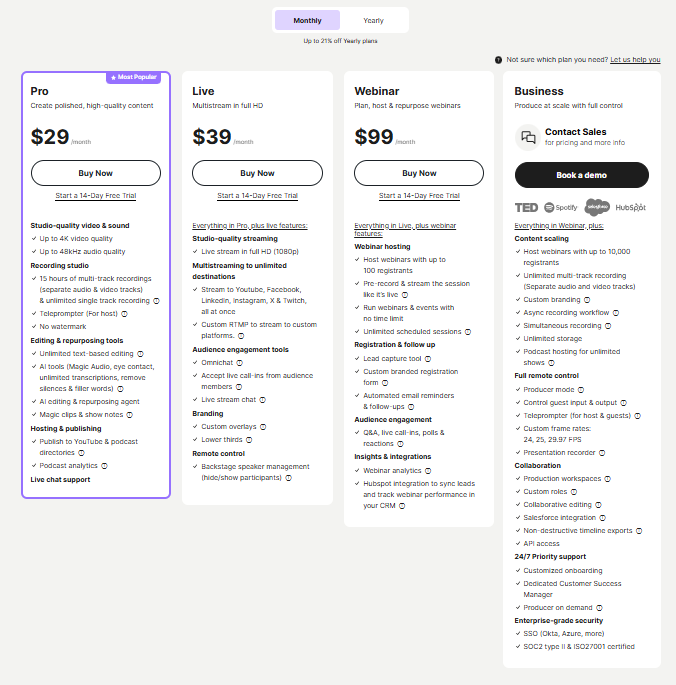 | 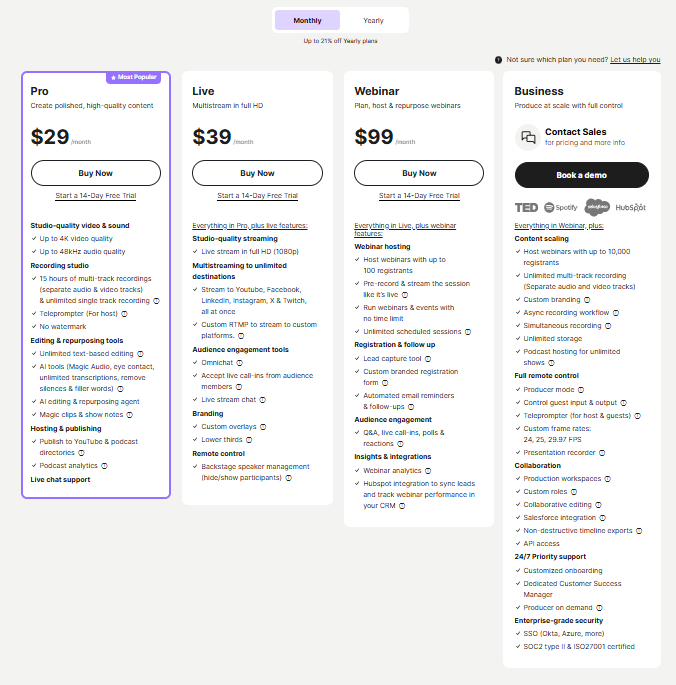 |
Clips by Riverside.fm vs Riverside.fm: Other Details
Organization Types supported |
|
|
|---|---|---|
Platforms Supported |
|
|
Modes of support |
|
|
API Support |
|
|
Get help choosing | Get help choosing |
Clips by Riverside.fm vs Riverside.fm Security & Compliance
Certifications, data handling, and security controls for IT and compliance evaluators.
HIPAA | ✗ No | ✗ No |
|---|---|---|
GDPR | — | ✓ Yes |
Data Encryption | — | ✓ Yes |
Data Residency | 🌐 Global | 🇺🇸 US |
Clips by Riverside.fm User Reviews & Rating Comparison
User Ratings | No reviews available for the product | |
|---|---|---|
Rating Distribution | No reviews available for this product | |
Spotsaas Editor’s POV generated by AI | What buyers like
Common complaints
| Buyer sentiment Users appreciate the high-quality local recordings and integrated editing tools but note occasional glitches and a higher price point for beginners. What buyers like
Common complaints
|
Pros and Cons |
|
|
Positive Reviews | No reviews available for the product | No reviews available for the product |
Integrations
Integration with other apps |
|---|



Clips by Riverside.fm and Riverside.fm Customers
Customers |  Hubspot  Microsoft  The New York Times | Microsoft  Shopify  Spotify |
|---|
Media and Screenshots
Videos |  1 Videos |  2 Videos |
|---|
Top Alternatives to Clips by Riverside.fm and Riverside.fm in 2026
Alternatives |
|---|


Add another option to compare side by side
Search by product name to compare pricing, fit, and buyer feedback in one view.Compare similar software options



Disclaimer: This research has been collated from a variety of authoritative sources. We welcome your feedback at [email protected].
Frequently asked questions
- Which is better, Clips by Riverside.fm or Riverside.fm?
- Riverside.fm edges out the other on user ratings (4.9 vs -1.0). That said, the best pick depends on your use case — use the comparison tables above to evaluate each dimension.
- Do Clips by Riverside.fm and Riverside.fm offer a free trial?
- Riverside.fm offers a free trial. Clips by Riverside.fm does not.
- What is the starting price of Clips by Riverside.fm vs Riverside.fm?
- Clips by Riverside.fm starts at $24 /month. Riverside.fm starts at $24 /month.
- What are the top alternatives to Clips by Riverside.fm?
- Top alternatives to Clips by Riverside.fm include Create, Joomag, TechValidate, ContentFries, vidyo.ai.
- What are the top alternatives to Riverside.fm?
- Top alternatives to Riverside.fm include StreamYard, Clips by Riverside.fm, Stream Club, Streann Studio, SquadCast.