
BeeCut vs X-Me Comparison

BeeCut
Starting at $29.95 /month
- Free Trial
- Large Enterprises
- Medium Business
BeeCut is an intuitive video editing software designed to help individuals and teams produce visually polished videos with minimal effort. Ideal for content creators, small businesses, marketers, educators, and social me…

X-Me
Starting at $10 /month
- Free Trial
- Free Version
- Large Enterprises
- Small Business
Introducing X-Me – an AI Video Generator that changes how professional and personalized videos are created and updated. Avoid costly equipment, unreliable actors, complex editing software, and third-party services that d…
BeeCut leads on user satisfaction with a 4.9-star rating across 99 reviews.
BeeCut vs X-Me — at a glance
| Feature | BeeCut | X-Me |
|---|---|---|
| Rating | 4.9 / 5 | — |
| Reviews | 99 | — |
| Starting price | $29.95 /month | $10 /month |
| Free trial | Yes | Yes |
| Free version | No | Yes |
| Best for | Large Enterprises, Medium Business, Small Business | Large Enterprises, Small Business, Medium Business |
| Category | Video Editing Software | AI Video Generator Software |
| Platforms | SaaS/Web/Cloud, Mobile - Android, Mobile - iOS, Installed - Windows, Installed - Mac | Browser Based (Cloud) |
| API | — | Available |
| Support modes | Online | Online |
Key differences between BeeCut and X-Me
- Pricing: BeeCut starts at $29.95 /month, while X-Me starts at $10 /month.
- Deployment: BeeCut supports SaaS/Web/Cloud, Mobile - Android, Mobile - iOS, Installed - Windows, Installed - Mac; X-Me supports Browser Based (Cloud).
BeeCut vs X-Me — find the better fit before you commit.
Which tool fits your team best
Which is actually cheaper for your team size
Where each product wins, per real buyers
Most Video Editing Software tools look identical on paper. This comparison cuts to the differences that matter — pricing structure, team fit, and what real buyers found after signing up.
Biggest differences
Features
Pricing
Buying details
Security
Buyer feedback
Integrations
Product tour
Other options
Free PDF comparison
Download this BeeCut vs X-Me comparison
Get the full side-by-side as a PDF — these picks plus the top Video Editing Software tools, with verified ratings, pricing and features.
- Side-by-side on pricing, features & ratings
- Plus the category top 10, scored & ranked
- Emailed to you — no on-screen download
No file downloads on screen — we email it to you. One-click unsubscribe anytime.
BeeCut vs X-Me: Biggest differences
Start here before you go deeper into features.
Best for beginner-friendly video editing with automated subtitle features.
- You need an easy-to-use video editor with essential trimming, splitting, and combining tools.
- You want automated speech-to-text for quick subtitle generation to improve accessibility.
- You produce social media content requiring multiple aspect ratios and optimized export formats.
- You require advanced customization options and extensive third-party integrations.
- You need a wide marketplace of add-ons or connectors for specialized workflows.
Best for teams needing quick, secure AI-generated marketing and sales videos.
- You want to create professional videos without costly equipment or actors.
- Your team values real-time collaboration with a simple, user-friendly interface.
- You require data security and compliance for video content creation.
- You need highly customized videos with advanced editing capabilities.
- You are a small team or individual without collaboration requirements.
BeeCut: Best for beginner-friendly video editing with automated subtitle features. X-Me: Best for teams needing quick, secure AI-generated marketing and sales videos.
Description | BeeCut is an intuitive video editing software designed to help individuals and teams produce visually polished videos with minimal effort. Ideal for content creators, small businesses, ... Read More about BeeCut | Introducing X-Me – an AI Video Generator that changes how professional and personalized videos are created and updated. Avoid costly equipment, unreliable actors, complex editing software, ... Read More about X-Me |
|---|---|---|
Entry Level Pricing |
|
|
Free Trial Availability | ||
SpotScoreWhat's this? ↗ | 9.3/10 | 7.4/10 |
User RatingsBased on verified Spotsaas reviews | ||
Best Company Size | 1-50 employees51-500 employees | 50-500 employeesMedium to Large Enterprises |
Get pricing help | Get pricing help |
Where each option fits best
See where each product is strongest, which teams it fits, and what causes buyers to keep looking — before you commit.
Based on buyer reviews and verified product data collected by Spotsaas.
Key strengths
- User-Friendly Interface: BeeCut provides a clean, intuitive interface that is accessible to beginners and non-technical users, allowing fast learning and minimal training.
- Speech Recognition Features: The software includes automated speech-to-text and subtitle generation, simplifying the process of adding captions and improving accessibility.
- Social Media Ready Outputs: With built-in support for multiple aspect ratios (like 1:1, 9:16, and 16:9), BeeCut is well-equipped for creating platform-specific content for Instagram, YouTube, TikTok, and Facebook.
- Smooth Collaboration: With X-Me, teams can collaborate smoothly in real time, keeping everyone on the same page. Reduce email back-and-forth and improve productivity through instant updates and shared resources.
- User-Friendly Interface: Designed with the user in mind, X-Me features an intuitive interface that minimizes the learning curve. Administrators will appreciate how quickly their teams adapt, leading to faster onboarding and immediate benefits.
- Data Security: Security is critical in digital environments. X-Me uses advanced encryption and compliance measures to protect your data, so you can focus on growing your business.
Best fit
- 1–50 Employees
- Marketing, Education, Media & Entertainment, Nonprofits, E-commerce, Freelancing
- Content Creator, Video Editor, Digital Marketer, Social Media Manager, Educator, Freelancer, Influencer
- 50-500 employees.
- Martech, Fintech, SaaS, Sales Automation, Consulting.
- Sales Managers, Account Executives, Business Development Representatives, CRM Administrators.
Reasons buyers look elsewhere
- Professionals seeking complex video editing features like advanced color grading, motion tracking, or 3D editing may opt for alternatives like Adobe Premiere Pro or Final Cut Pro due to BeeCut’s basic toolset.
- Users requiring cloud collaboration or cross-platform synchronization may find BeeCut less suitable, as it lacks deep integration with cloud storage or real-time collaborative editing environments.
- Some users may switch to other tools because BeeCut offers limited audio mixing features compared to platforms like DaVinci Resolve or Audacity-integrated editors.
- Lacks advanced integrations — teams needing API connections to accounting or CRM platforms often switch to competitors with broader third-party support
- Pricing exceeds budget for small teams — organizations under 20 employees frequently choose lower-cost alternatives that cover core functions
- Slow performance and frequent outages — users experiencing load delays or downtime migrate to platforms with faster infrastructure
Software Demo
Demo |
|---|
Need a second opinion?
Get decision help from a software advisor
Share your priorities, budget, and team needs, and we’ll help you narrow the options and understand the tradeoffs before you talk to vendors.

- Independent advice — matched to your business
- Understand the tradeoffs before you talk to vendors
- Free 15-min call with a software advisor.
Step 1 of 4
How big is your team?
We tailor recommendations to companies your size.















How do BeeCut and X-Me Compare on Features?
Total Features | 10 Features | 9 Features |
|---|---|---|
Unique Features | No unique features | No unique features |
Get Quote | Get Quote |
Compare BeeCut and X-Me on pricing
Review starting price, plan structure, and free-trial access side by side so you can see which option fits your budget and buying process.
Pricing Option | ||
|---|---|---|
Starting From |
|
|
Pricing Plans |
|
|
Pricing Page | 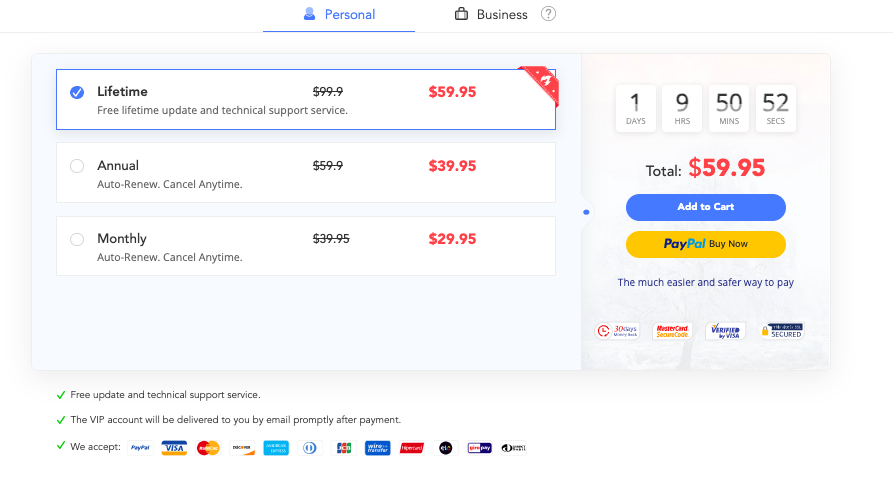 |  |
BeeCut vs X-Me: Other Details
Organization Types supported |
|
|
|---|---|---|
Platforms Supported |
|
|
Modes of support |
|
|
API Support |
|
|
Get help choosing | Get help choosing |
BeeCut User Reviews & Rating Comparison
User Ratings | No reviews available for the product | |
|---|---|---|
Rating Distribution | No reviews available for this product | |
Spotsaas Editor’s POV generated by AI | Buyer sentiment Overall positive sentiment highlights ease of use and versatile editing features, with some concerns about watermark policies and limited advanced options. What buyers like
Common complaints
| Buyer sentiment Overall buyer sentiment is positive regarding ease of use and collaboration, though pricing transparency and advanced features are areas of concern. What buyers like
Common complaints
|
Pros and Cons |
|
|
Positive Reviews | No reviews available for the product | No reviews available for the product |
| Negative Reviews | No reviews available for the product | No reviews available for the product |
Media and Screenshots
Screenshots |  6 Screenshots | No screenshots available. |
|---|---|---|
Videos |  4 Videos |  1 Videos |


Add another option to compare side by side
Search by product name to compare pricing, fit, and buyer feedback in one view.Compare similar software options


Related Blogs and Articles for Ai Video Generator Software
Disclaimer: This research has been collated from a variety of authoritative sources. We welcome your feedback at [email protected].
Frequently asked questions
- Which is better, BeeCut or X-Me?
- BeeCut has a user rating of 4.9, while X-Me has no user ratings yet. The right choice depends on your team size, budget, and specific AI Video Generator Software needs.
- Do BeeCut and X-Me offer a free trial?
- Yes, both BeeCut and X-Me offer a free trial.
- What is the starting price of BeeCut vs X-Me?
- BeeCut starts at $29.95 /month. X-Me starts at $10 /month.
- What are the top alternatives to BeeCut?
- Top alternatives to BeeCut include Typito, WeVideo, VEED, Animoto, InVideo.
- What are the top alternatives to X-Me?
- Top alternatives to X-Me include Perso, Sadtalker AI, Reface, VidAU, Studio Neiro.
- What is the catch with BeeCut?
- What buyers praise about BeeCut: user-friendly interface accessible to beginners; wide range of editing features including filters, text, audio, cropping, cutting, rotating, and transitions. What they raise as reservations: misleading information regarding watermark removal and custom watermark application; limited customization options and add-ons restricting advanced functionality. It does not include Collections and Marketing Management.
- What should I watch out for with X-Me?
- The case for X-Me: real-time collaboration reducing communication overhead; user-friendly interface enabling quick onboarding and ease of use. The case against: lack of detailed pricing information may complicate budgeting; no explicit mention of advanced video editing features. It also lacks Customer Support and CRM.
More AI Video Generator Software comparisons
Side by side breakdowns of the same products against other options in this category.