
PlanSwift is construction and estimating software built to help with project planning and budgeting. The cloud-based platform changes how contractors across trades, from HVAC to electrical fields, manage their takeoffs and estimates, and it aims to replace slow, error-prone manual work with a faster digital workflow.
PlanSwift includes features such as point-and-click takeoff, drag-and-drop assemblies, and advanced estimating utilities that suit a range of trades. A one-time lifetime license starts at $1595, giving users worldwide an affordable yet capable option to replace slow, laborious manual processes with reliable digital measurement and estimation.
The software’s support options stand out: live chat, phone assistance, and email help desks sit alongside live online training so clients get the most out of PlanSwift’s capabilities. With more than 40,000 users across over 60 countries, PlanSwift reflects the rapid, steady growth of digital estimation technology and underscores its wide global reach and effectiveness.
Feedback averages a solid 4.3/5 rating for ease of use, and the software offers native support in English along with French, Italian, and Spanish variations.
Against alternatives like Sigma or SharpeSoft Estimator, PlanSwift competes on a user-friendly interface without giving up detailed functionality. It holds its own on usability and depth of features, even though it does not currently offer API integration.
Key Takeaways
- PlanSwift is estimating software with features like Point & Click Takeoff and Drag & Drop Parts, built to increase accuracy and save contractors time.
- It offers a lifetime license starting at $1595, which includes customer support and updates with no recurring fees.
- Users can customize PlanSwift for trades such as electrical or plumbing work, with specific tools for project planning.
- The software competes with others like Procore and Bluebeam Revu but stands out for its specialized trade features and positive user reviews.
- With a high user satisfaction rating, industry professionals praise PlanSwift for its intuitive design and efficient estimating.
Comprehensive Overview of PlanSwift Features
PlanSwift is construction and estimating software designed for project planning and budgeting. The cloud-based platform reshapes how contractors from HVAC to electrical fields handle their takeoffs and estimates.
It offers features such as point-and-click takeoff, drag-and-drop assemblies, and advanced estimating utilities for diverse trades. The one-time lifetime license, starting at $1595, gives users an affordable yet capable alternative to laborious manual processes.
Support options are strong: live chat, phone assistance, and email help desks come with live online training so clients get the most out of PlanSwift. With over 40,000 users across more than 60 countries, PlanSwift shows the rapid growth of digital estimation technology and a broad global reach.
Feedback averages a solid 4.3/5 rating for ease of use, with native support in English plus French, Italian, and Spanish variations.
Compared with alternatives like Sigma or SharpeSoft Estimator, PlanSwift holds its own on a user-friendly interface without compromising detailed functionality, even though it does not offer API integration currently.
The sections below cover the pricing specifics, the advantages across various industries, and the user reviews that show satisfaction levels.
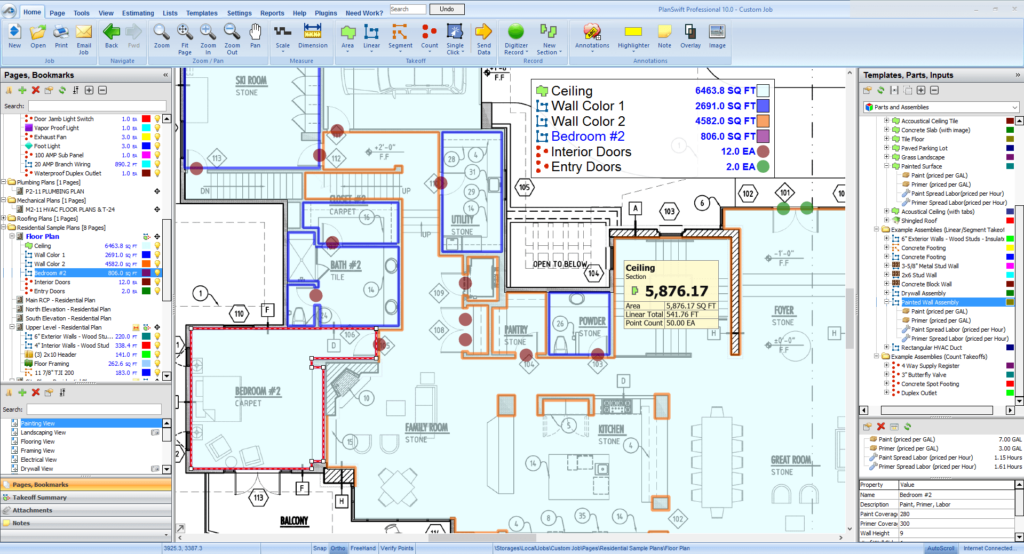
Point & Click Takeoff
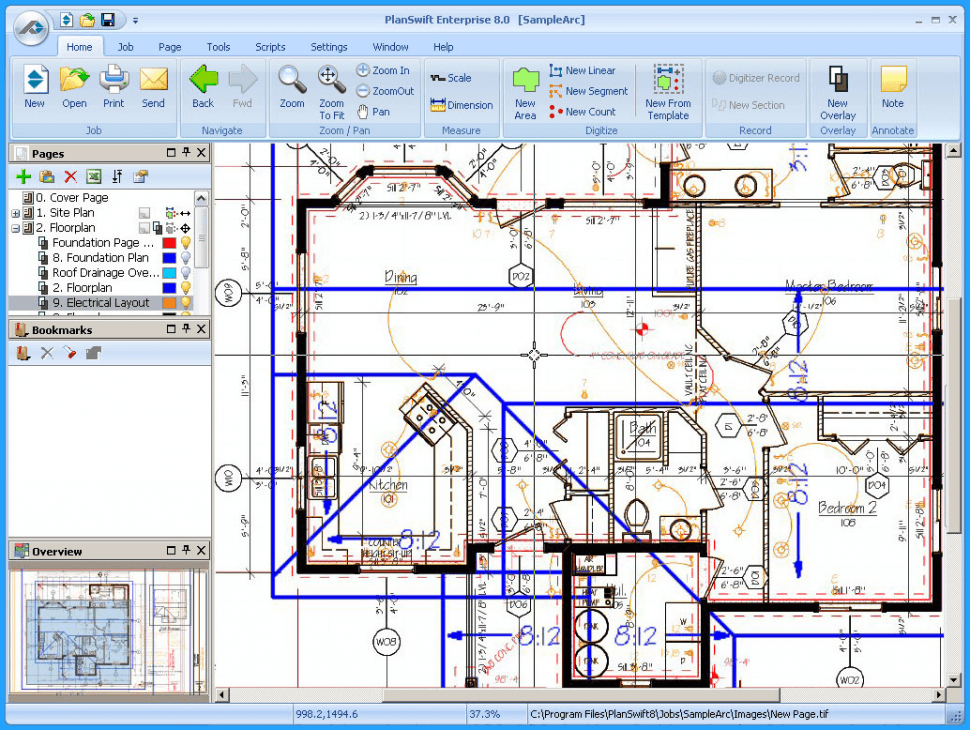
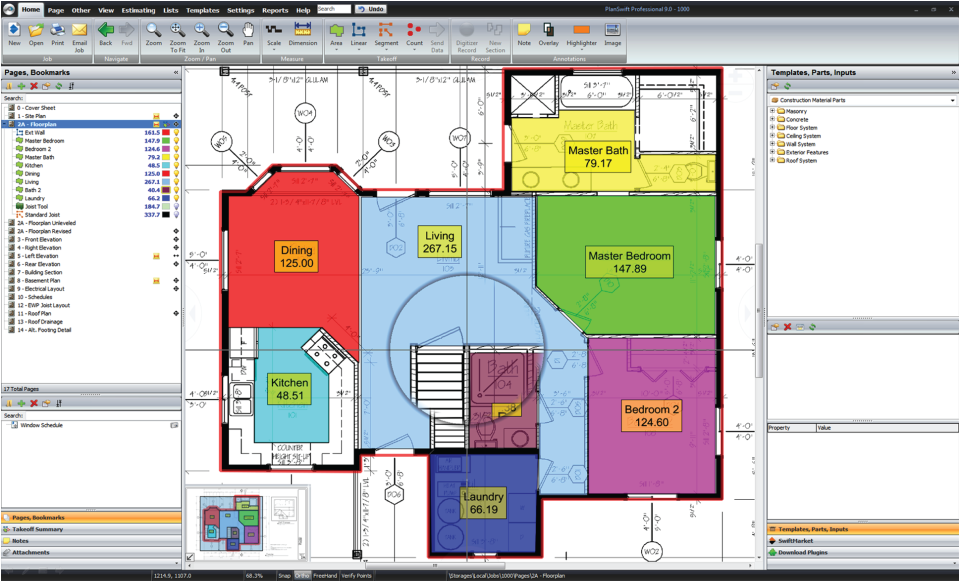
PlanSwift’s Point & Click Takeoff feature speeds up the estimating process for teams of any size. Contractors and estimators measure digital blueprints quickly by clicking on the items or areas they need to quantify, rather than scaling drawings by hand.
This method removes manual counting and reduces the chance of errors, which makes it a reliable choice for construction professionals who want to expedite their project planning and spend less time double-checking figures by hand.
The tool improves accuracy in estimates while saving valuable time on each project. Users can custom-tailor their takeoffs with predefined templates that suit specific trades or project needs, which gives consistent results across different jobs and reduces rework.
It supports multiple file formats, including PDFs, TIFFs, DXFs, and DWFs, so PlanSwift fits into your existing workflow no matter how your drawings and plans arrive from architects or clients.
Drag & Drop Parts/Assemblies
PlanSwift changes how construction professionals handle their quantity calculations and estimates with its drag-and-drop parts/assemblies feature. This capability lets you swiftly combine different assemblies for a variety of takeoff items, keeping your estimates both quick and precise even on complex jobs with many line items.
You can pull predefined or custom parts onto your takeoff and adjust quantities as project requirements change, which makes it simple to keep estimates current when scope shifts partway through a job.
This function not only saves time but also improves accuracy when building the detailed estimates that any successful construction project depends on, and it keeps repeated assemblies consistent from one bid to the next.
Having tools like these at one’s disposal can improve both productivity and profitability, setting up users for continued success in an industry where precision counts on every bid.
Beyond estimation, PlanSwift’s advanced estimating tools add more depth to your approach to project planning.
Advanced Estimating Tools
Building on the intuitive drag-and-drop functionality, PlanSwift adds advanced tools built specifically for precision. They let users quickly generate detailed estimates that factor in materials, labour, equipment, and other resources needed to complete a job.
With capabilities suited to trades such as electrical or plumbing work, contractors can customize their workflow to match specific project needs and account for the materials and labour those trades require.
Instead of hours of manual calculation, these tools automate complex tasks, reduce errors, and save time. Industry professionals document the accuracy of PlanSwift’s estimating features on both commercial and residential construction projects.
The technology supports your building cost analysis and improves the reliability of your bids, so the estimates you submit better reflect the true cost of the work.
PlanSwift Pricing Details
The cost of adding PlanSwift to your project management toolkit matters for an informed decision. The pricing structure offers a lifetime license, so users keep uninterrupted access to tools that support their construction estimating processes.
Here is a closer look at what this investment includes and how it can benefit your day-to-day business operations.
Lifetime License Cost
PlanSwift breaks the mold of subscription-based software with a lifetime license cost. For a one-time payment starting at $1595, users secure perpetual access to PlanSwift’s powerful estimating tools without worrying about monthly or annual fees that add up over the years.
This flat rate means your investment in efficiency and accuracy comes without hidden costs or surprises on your statement.
Making this one-time payment gives you full use of PlanSwift right away, equipping you with advanced features built for precision and ease. Next is what comes included with your purchase, from essential updates to the support services that keep you productive.
Inclusions with Purchase (Updates & Support)
Buying PlanSwift is not only about getting top-notch estimating software; it includes a comprehensive support system so you get the most from your investment. A one-time payment starting at $1595 opens access to a wide range of customer service options designed to help with any issues or questions that come up.
The package comes with chat and phone support, plus resources such as FAQs, forums, email help desks, knowledge bases, and more.
Training is also part of the deal, with live online sessions, webinars, and in-person training to build your skills with the software. With high ratings for value for money (4.2/5) and functionality (4.1/5), users can feel confident in the guidance they receive with PlanSwift.
This support helps PlanSwift fit into various trades, from general contracting to specialized applications in electrical and plumbing work. Next is a closer look at how PlanSwift performs across those different construction trades.
Advantages of Using PlanSwift for Different Trades
PlanSwift handles takeoff and estimating across various trades with tailored solutions that significantly improve accuracy and productivity. Its intuitive interface simplifies project management for general contractors, while its specialized tools meet the precise needs of electrical, plumbing, and other speciality fields that each work to different standards.
General Contractors
General contractors find PlanSwift useful across a wide range of their construction projects. Its powerful point-and-click takeoff gives swift, precise material quantity measurements and speeds up the whole process of project estimation.
The drag-and-drop feature makes it simple to add parts and assemblies to estimates, cutting down on the time this arduous task typically requires and letting contractors turn bids around sooner.
This construction software stands out with its user-friendly interface, which stays accessible even to those who are not as tech-savvy. Contractors report that PlanSwift’s customer service is top-notch, helping them customize the platform to individual needs across different building trades and get up to speed quickly.
It improves construction management by increasing accuracy in cost estimations, which in turn saves money and reduces material waste on job sites where small over-ordering adds up quickly.
Specialized applications such as electrical and plumbing work show more of what PlanSwift’s suite of advanced tools offers for these trades.
Specialized Applications (Electrical, Plumbing, etc.)
PlanSwift supports your project planning and estimation with features built for the construction industry’s specialized trades. Its customizable tools help professionals in electrical, plumbing, HVAC, and more, which makes it a valuable asset for targeted applications.
- Point-and-click functionality simplifies measuring lengths, areas, and volumes on digital blueprints for electricians who deal with intricate wiring layouts.
- Drag-and-drop parts and assemblies let plumbers quickly set up materials lists that reflect real-world project needs, which improves accuracy in estimates.
- HVAC specialists use the advanced estimating tools to factor in all aspects of heating, ventilation, and air conditioning system requirements efficiently.
- For concrete construction, PlanSwift gives precise calculations that help determine exact material quantities, saving both time and money.
Similar Software Analysis: PlanSwift Alternatives and Competitors
The range of takeoff and estimating solutions includes several PlanSwift alternatives, each with distinct tools and functionality for the varied demands of construction professionals.
This comparison benchmarks PlanSwift against its contemporaries and gives contractors the insight to make informed decisions about which software aligns best with their project workflows and financial strategies.
Comparison with Other Estimating Software
Knowing how PlanSwift stacks up against its competitors matters when deciding on the right estimating software for your needs. PlanSwift is a reputable player in the industry, serving professionals from freelancers to large enterprises, and it is recognized for its broad feature set and adaptability across different trades. Here is a side-by-side look at PlanSwift and other leading estimating software solutions.
| Software | Core Features | Pricing Model | User-Friendly Interface | Specialized for Trades | User Reviews |
|---|---|---|---|---|---|
| PlanSwift | Point & Click Takeoff, Drag & Drop Parts, Advanced Estimating | Lifetime License, Includes Updates & Support | Yes | General and Specialized (Electrical, Plumbing, etc.) | Generally Positive |
| Procore | Project Management, Financial Management | Subscription-Based | Yes | General Contractors | Mixed Reviews |
| Bluebeam Revu | PDF Markups, Collaboration, Takeoff Tools | One-Time Purchase & Maintenance Fee | Yes | Architects, Engineers, General Contractors | Highly Positive |
| STACK | Cloud-Based Takeoff, Estimating, Proposal Generation | Freemium, Subscription for Advanced Features | Yes | General and Specialized | Generally Positive |
| Bid2Win | Bidding, Estimating, Project Data Management | Subscription-Based | Somewhat | Heavy Civil Construction | Positive |
This comparative breakdown shows the diverse options available in the market today. Each software presents distinct features and pricing models tailored to the varying demands of construction professionals and the type of work they take on. PlanSwift offers a comprehensive set of tools for a wide array of trades, while other solutions provide focused capabilities for specific niches within the industry. As a member of the Textura family, PlanSwift also connects with other construction collaboration solutions, which can add value for users who want an integrated approach. User reviews indicate the effectiveness and satisfaction of each platform and inform potential buyers about the real-world use of these tools.
PlanSwift User Reviews and Satisfaction
User reviews and satisfaction show how PlanSwift performs in the day-to-day trenches of construction estimating. Industry professionals frequently point to its impact on efficiency and accuracy, with testimonials that showcase the software’s effectiveness across a range of project demands.
Feedback from Industry Professionals
Professionals in the construction industry have weighed in on PlanSwift, and the feedback is clear: its user-friendly interface and accurate estimating tools make it a top choice. With an average rating of 4.3 out of 5 stars from nearly 400 reviews, users are especially satisfied with the customer support offered during their free trial period.
Many highlight how PlanSwift stands out for its intuitive point-and-click takeoff feature, which delivers the precise measurements contractors can trust when they price a job.
Experts compare PlanSwift to software such as Sigma and SharpeSoft Estimator but often prefer it for the drag-and-drop functionality that speeds up creating assemblies.
The ease with which users can navigate the advanced estimating tools reflects PlanSwift’s focus on efficiency within the industry. These endorsements from seasoned professionals give useful signals to anyone considering this estimating platform for their own projects and bidding work.
Conclusion
PlanSwift brings precision to estimating and makes the work more efficient. It supports cost estimation and project management in construction.
With flexible pricing and a strong set of features, PlanSwift is ready to support your projects. Unlock the potential of your builds with a solution built for results, keeping every measurement and estimate on point.
Explore what PlanSwift has to offer today and consider it for your own construction estimating and takeoff work.
(Image Credit: PlanSwift)
FAQs
1. What exactly is PlanSwift?
PlanSwift is a software program for construction estimating and takeoff that helps calculate materials and labor quickly.
2. Who can use PlanSwift?
Contractors, estimators, and construction professionals use PlanSwift to speed up their project planning process.
3. How does PlanSwift help with construction projects?
PlanSwift allows users to drag and drop parts or assemblies onto blueprints on their computer screens to measure quantities instantly.
4. Is there a cost to using PlanSwift?
Yes, using PlanSwift requires purchasing a license or subscription but offers different pricing plans based on your needs.
5. Are there other programs like PlanSwift I can use instead?
Alternative programs such as AutoCAD, Bluebeam Revu, and SketchUp offer similar features for construction estimation.

- Independent picks for exactly what you just read about
- Matched to your team size & needs
- Vendors don't pay for placement
Step 1 of 4
How big is your team?
We tailor recommendations to companies your size.















Related Articles
AI Software
AI in Construction (2026): 8 Use Cases, Tools and Risks for Contractors
Continue reading →
Construction Software
Best Construction Time Tracking Software and Time Clock Apps: Best Time Tracking Solutions for 2026
Continue reading →

Construction Software
Best HR Software for Construction Companies in 2026: Streamline Workforce & Compliance
Continue reading →
Buyers guide
Best Equipment Rental Software in 2026: 8 Tools for Tracking and Utilization
Continue reading →