

Feeling a little frustrated while searching for that perfect video editing tool that sparks your creativity? Yep, I totally get it. Trust me, been there and done that – weighed down by the limitations of Wideo and itching for something more exhilarating.
After extensive testing of countless options and diving headfirst into my research, I’ve managed to cherry-pick 7 exceptional tools designed to add some serious firepower to your creative arsenal.
Key Takeaways
- Video editing tools have become increasingly popular in the creative industry due to the rising demand for video content and the availability of easy-to-use software options.
- Wideo has limitations in terms of advanced editing capabilities, limited effects and transitions, and its pricing structure may not be suitable for all users.
- There are several video editing tools available that can replace Wideo in your creative toolbox, such as Promo.com, VEED, Animaker, Moovly, Adobe Premiere Pro, Adobe Premiere Rush, and WeVideo. These tools offer a range of features to enhance your video editing process at an affordable cost.
The Rise of Video Editing Tools in the Creative Industry
Video editing tools have experienced a significant rise in popularity within the creative industry due to the growing demand for video content and the emergence of easy-to-use software options.
The growing demand for video content
The online world is witnessing a significant shift towards video content. Users around the globe are consuming videos at an unprecedented rate, generating a whopping 80% of all internet traffic.
This boom is driven by many factors, including the rise in mobile usage and increased bandwidth capabilities. In response to this escalating demand, businesses are producing more videos than ever before for marketing campaigns, product demonstrations, and customer service tutorials.
To meet these goals with maximum impact, many brands now rely on social media video production services that ensure high-performing, platform-optimized content.
To keep up with this surge in video consumption, it’s essential for businesses to understand how much data their content requires. A bandwidth usage calculator helps estimate the data needed for streaming high-quality videos smoothly across multiple devices.
Video gives companies an effective tool to engage with their audience visually and emotionally that static images or text simply cannot match. This surge in video popularity has resulted in heightened interest in powerful yet easy-to-use editing tools like Adobe Premiere Pro and Lumen5 mentioned earlier as they allow marketers to create high-quality content swiftly without needing professional editing skills.
The emergence of easy-to-use video editing tools
Video editing tools have significantly evolved over the past few years. Armed with modern technology and user-centric designs, they are revolutionizing the creative industry.
These advanced applications such as Adobe Premiere Pro and Synthesia are catering to non-professionals and professionals alike. This offers a host of features that make video editing an simple task.
It’s no longer about wrestling with complex software or grappling with confusing interfaces. Today, you can find several free video editing options like Clipchamp Create or Quik by GoPro right at your fingertips.
Video makers now enjoy access to quick edits, smooth transitions, special effects, and even AI-powered capabilities for superior results in their Creative Toolbox. The introduction of these sophisticated yet straightforward tools is opening up new avenues for creativity without breaking the bank or causing unnecessary stress during production.
Why Replace Wideo?
Wideo has its limitations, and many users are seeking more advanced features in their video editing tools. Cost considerations also play a role in the decision to replace Wideo with other options that offer better value for money.
Limitations of Wideo
Wideo often poses challenges in terms of advanced editing capabilities. For instance, it lacks some key features such as multi-track timelines and frame-by-frame editing which hampers the editing process for those looking to create more sophisticated videos.
Users may feel restricted due to its limited scope of effects and transitions which can make their videos appear less dynamic and appealing.
Unreasonable pricing is another setback with Wideo. While they offer a free version, it comes with a lot of restrictions including watermark issues that could unprofessionally brand your content.
Their premium plans might seem too expensive, especially for small businesses or independent creators who are budget-conscious but still seek high-quality output. This makes Wideo less desirable when compared to other affordable or even free video editing tools that provide greater flexibility and functionality without compromising on quality.
Seeking more advanced features
I wanted video editing tools that could offer more advanced features than what Wideo had to offer. I needed tools that could take my videos to the next level, allowing me to add special effects, transitions, and other professional touches.
Additionally, I was looking for tools that would give me more control over the editing process, such as advanced colour correction options and audio editing capabilities. Cost was also a consideration for me as I wanted affordable options without compromising on quality.
With these requirements in mind, I explored various video editing tools to find the ones that could meet my needs effectively.
Cost considerations
When choosing a video editing tool to replace Wideo, cost is an important factor to consider. Different tools have varying pricing structures, so it’s essential to find one that fits within your budget.
Some video editing tools offer free versions with limited features, while others require a subscription or one-time payment for access to advanced capabilities. It’s also worth evaluating the value you’ll get from the tool in terms of its functionality and how well it aligns with your creative needs.
By considering the cost of each option alongside its features and potential benefits, you can make an informed decision on which video editing tool is the best fit for your creative toolbox.
In addition to cost considerations, it’s important to take into account the overall value and return on investment a video editing tool can provide. While some options may be more expensive upfront, they often come with powerful features and advanced capabilities that can significantly enhance your workflow and output quality.
When weighing cost considerations against other factors such as usability and functionality, it’s essential to strike a balance that meets both your budgetary constraints and creative requirements.
Top 7 Video Editing Tools to Replace Wideo
This roundup covers seven video editing tools worth trying in place of Wideo, each with a different mix of features and pricing: Promo.com, VEED, Animaker, Moovly, Adobe Premiere Pro, Adobe Premiere Rush, and WeVideo.
Promo.com
Promo.com is a solid replacement for Wideo in your video editing toolbox. The interface is simple enough to pick up quickly, and the feature set lets you put together professional-looking videos without needing any technical expertise.
It comes with a large library of templates, stock footage, and music tracks that you can customize for your project, whether you’re a marketer or just getting started with video editing. Editing options include text overlays, transitions, and special effects, all aimed at making your videos stand out.
It’s affordable and versatile enough to cover most of your video editing needs, which makes it worth considering.
VEED
VEED is another strong Wideo replacement for your creative toolbox, built around a simple interface and a feature set that makes video editing feel smooth rather than fiddly.
You can trim and merge clips, add text and captions, apply filters and effects, and even pull audio out of a video. VEED also supports a range of file formats, which keeps it compatible across different devices and platforms.
Beginners and experienced editors alike get the tools needed to produce professional-looking videos quickly and efficiently. Since VEED runs entirely in the browser, there’s no software to download or install.
Animaker
Animaker is a versatile editor built for creating engaging, professional-looking videos. The interface is simple enough that even beginners can navigate the platform and produce polished visual content without much of a learning curve.
Animaker provides a wide range of templates, animations, and effects that can be customized to fit any project or brand. That makes it useful whether you’re making explainer videos, animated presentations, or social media content.
A library of royalty-free music tracks and sound effects rounds out the toolset. With drag-and-drop editing and a real-time collaboration option, it’s easier to put together captivating videos that grab attention.
Beyond its editing capabilities, Animaker keeps pricing affordable, with plans suited to individuals as well as businesses of different sizes.
Moovly
Moovly is another editor worth considering in place of Wideo in your creative toolbox. It lets you combine images, audio, and video clips into engaging videos, and turn static visuals into dynamic image-to-video content.
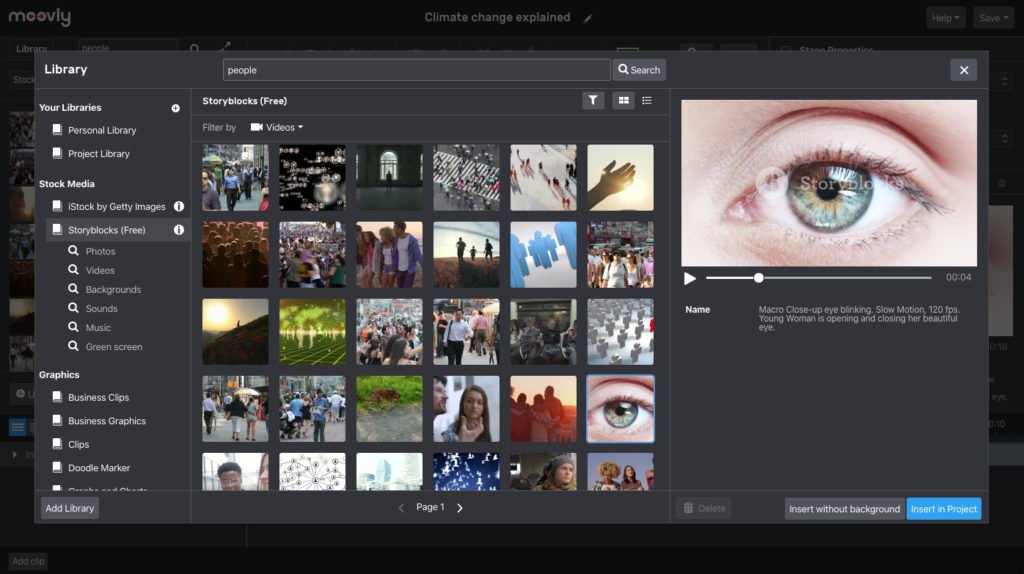
The interface is easy to pick up and comes with plenty of templates, which makes it a good fit for beginners. For more advanced needs, Moovly also offers animation effects and transitions that add visual appeal to your videos.
You can also add voiceovers and subtitles for a more professional touch. Whether you’re a marketer or an amateur videographer, Moovly is definitely worth considering as an alternative to Wideo.
Adobe Premiere Pro
Adobe Premiere Pro is one of the more advanced options on this list for replacing Wideo in your creative toolbox. It offers many advanced features and capabilities that allow you to create professional-quality videos.
With Adobe Premiere Pro, you can edit videos with precision, apply various effects and transitions, add multiple audio tracks, and much more. Despite that depth, the software is approachable enough to be popular with both beginners and experienced editors.
It’s a paid tool, but the cost is worth it for the high-quality results it delivers. Consider adding Adobe Premiere Pro to your creative toolbox for more advanced video editing capabilities.
YouCam Video
YouCam Video is purpose-built for editing portrait-style videos, which makes it a good companion for social media creators who produce content for platforms like TikTok, Instagram Reels, and YouTube Shorts.
Unlike traditional editors that prioritize landscape or cinematic formats, YouCam Video focuses exclusively on vertical video editing, so every generation tool, effect, and filter is optimized for mobile-first, selfie-style content.
WeVideo
WeVideo is a popular video editing tool that offers a range of features for both beginners and professionals. With its intuitive interface, users can easily edit videos, add transitions and effects, and even collaborate with others in real time.
It also provides access to a large library of music tracks and stock footage to enhance your videos. Because WeVideo’s platform is cloud-based, you can work on your projects from anywhere, which is convenient for remote teams or individuals on the go.
Whether you’re creating content for social media or professional presentations, WeVideo is a versatile tool that can help you bring your vision to life.
To ensure user satisfaction, WeVideo offers different pricing plans based on the needs of individuals or businesses. The free plan provides basic editing features but does have limitations on video quality and export options.
How These Tools Compare to Wideo
These top video editing tools offer more advanced features and capabilities compared to Wideo. They are easy-to-use and come at various price points. This ensures there is an option for every budget.
Features and Capabilities
These video editing tools offer a range of features and capabilities to enhance your creative projects. From advanced editing options like adding special effects, transitions, and filters, to the ability to trim, cut, and merge video clips with ease.
Some tools even provide AI-powered features that can automatically generate subtitles, captions, and animations. Additionally, you’ll find easy-to-use interfaces with intuitive controls that make editing a breeze.
Whether you’re a beginner or an experienced editor, these tools have something for everyone.
User-friendliness
Video editing can sometimes be a daunting task, especially for beginners. That’s why it’s essential to choose video editing tools that prioritize user-friendliness. When selecting a replacement for Wideo in your creative toolbox, consider tools like Promo.com and VEED.
These platforms offer intuitive interfaces and simple navigation. This makes it easy for anyone to edit videos without any prior experience or technical knowledge. With these easy-to-use video editing tools at your disposal, you can dive right into creating professional-looking videos with confidence and ease.
Cost
Finding a video editing tool that fits within your budget is an important consideration. While some tools may offer advanced features, they can come with a hefty price tag. However, there are also cost-effective options available that provide excellent editing capabilities without breaking the bank.
Consider free video editing software like VSDC or Camtasia, which offer a range of features at no cost. These tools allow you to access your creativity without having to worry about spending extra money.
Remember, it’s essential to find a tool that meets your editing needs and aligns with your budgetary requirements.
Conclusion: Choosing the Right Video Editing Tool
for choosing the right video editing tool to replace Wideo in your creative toolbox, there are several factors to consider such as the features and capabilities of the tool, its user-friendliness, and cost.
It’s important to stay updated with technology and explore various options before making a decision. With these top 7 video editing tools mentioned in this article, you’ll be able to find a suitable replacement that meets your needs and helps release your creativity in the world of video content creation.
Factors to consider
When selecting a video editing tool to replace Wideo in your creative toolbox, there are several important factors to consider:
Considerations for Choosing a Video Editing Tool
| Consideration | Description |
|---|---|
| Features and Capabilities | Look for extensive editing options and advanced features. |
| User-friendliness | Ensure the tool is easy to navigate and use. |
| Cost | Evaluate pricing and choose a model that fits your budget. |
| Compatibility | Check for OS and file format compatibility, and integration capabilities. |
| Support and Tutorials | Look for complete documentation and support. |
| Performance and Speed | Ensure it offers efficient rendering and high performance. |
| Community and Resources | Consider whether a user community and additional resources are available. |
Importance of staying updated with technology
Staying updated with technology is essential in today’s fast-paced world. As new advancements and innovations emerge, it is important to keep up with the latest trends and tools. By staying updated, you can harness the power of technology to enhance your creative work and stay ahead of the competition.
Whether it’s utilizing AI-powered video editing tools or exploring new features in existing software, staying updated with technology allows you to tap into new possibilities and continuously improve your skills.
Embracing technological advancements ensures that you are well-equipped to meet the ever-changing demands of the creative industry.
Be sure to explore various options.
When looking for a video editing tool to replace Wideo in your creative toolbox, it’s essential to explore various options. There are numerous video editing tools available today that offer advanced features and easy-to-use interfaces.
By exploring different options, you can find the best tool that suits your specific needs and preferences. Consider factors such as features, cost, and user-friendliness when comparing these tools.
With an array of choices at your disposal, you can discover the perfect video editing tool to enhance your creative projects and take them to the next level without limitations or compromises.
FAQs
What are some alternative video editing tools to replace Wideo?
Some alternative video editing tools to replace Wideo include Adobe Premiere Pro, Final Cut Pro, iMovie, Davinci Resolve, and HitFilm Express.
Are these video editing tools suitable for beginners?
Yes, most of these video editing tools have easy-to-use interfaces and offer beginner-friendly features. This makes them suitable for beginners who want to edit videos.
Do I need a powerful computer to use these video editing tools?
While having a powerful computer can enhance the performance of these video editing tools, they can still be used on standard computers as long as they meet the minimum system requirements specified by each software.
Can I use these video editing tools on both Windows and Mac?
Yes, most of these video editing tools are compatible with both Windows and Mac operating systems. However, it’s important to check the system requirements of each software before installing.
Are there any free alternatives among the 7 recommended video editing tools?
Yes, HitFilm Express is a free alternative among the 7 recommended video editing tools. It offers many advanced features without requiring a payment or subscription plan.
Compare alternatives to the tools in this post

- Independent picks for exactly what you just read about
- Matched to your team size & needs
- Vendors don't pay for placement
Step 1 of 4
How big is your team?
We tailor recommendations to companies your size.















Related Articles
Accounting Software
Xero vs QuickBooks 2026: Pricing, Payroll and Who Each Suits
Continue reading →
Accounting Software
FreshBooks vs QuickBooks 2026: Pricing, Clients, Users and Payroll Compared
Continue reading →
Accounting Software
AI for Accounting in 2026: 8 Use Cases, Tools and Controls for Finance Teams
Continue reading →

Accounting Software
Best QuickBooks alternatives in 2026: 5 competitors compared on price (including free)
Continue reading →