
Time tracking sits at the center of how many teams manage their work, and TimeCamp Planner is one of the more capable tools for it. It is a time-tracking application that records hours automatically, handles invoicing, and connects with more than 70 other platforms.
Pricing starts at $6.30 per person each month.
TimeCamp does more than log clock-in and clock-out times. It supports project budgeting, so you can watch spend against a set figure. It lets you adjust billing rates for different tasks or people. It handles custom user roles, timesheet approvals, and invoice handling from inside the same tool. It comes in both a free version and several paid plans, which gives smaller teams a low-cost entry point and larger teams room to add features. For any business that wants a clearer picture of where hours actually go, those functions carry real weight.
These features show how different teams get value from the tool, but no single product fits every workflow. What works for a five-person agency will not always work for a distributed team of a hundred. That is why it helps to look at alternatives such as Connecteam, which adds task automation, and Clockify, which suits hybrid workforces that mix office and remote days. Each product takes a different route to the same goal of accounting for time.
Other options target specific situations. Toggl Track fits small startups that want competitive pricing and simple reporting. Hubstaff is built for remote teams that need to keep tabs on people they cannot see in person. Harvest pairs time tracking with capacity reporting and financial tools, which appeals to freelancers who bill by the hour and need their hours to turn cleanly into invoices.
The sections below cover each of TimeCamp’s feature sets and compare them against competing products, so you can decide which time-tracking tool matches your needs. Read them with your own team size, budget, and billing model in mind, since those are the factors that usually decide the choice.
Here is a closer look at how TimeCamp works.
Key Takeaways
- TimeCamp Planner offers several tools for time tracking and project management and works for businesses of different sizes. Its functions include automated time tracking, budget management, productivity reports, timesheet management, invoicing integration, billable rate setup, and project progress tracking.
- The interface adapts to how you work, whether through a web browser or the mobile and desktop apps on Windows, macOS, or Ubuntu. Navigation is simple, and you can enter time either automatically or by hand.
- Pricing runs from a free version with basic time tracking and leave management, to the Basic plan at $6.30 per person monthly with more than 70 integrations, to the Pro plan at $7 per month with advanced billing features, up to a custom-built Enterprise plan.
- Reports can be shaped to fit specific business needs and exported in formats such as Excel spreadsheets and PDFs. They give managers insight into team performance and finances that supports better decisions.
- Some businesses still look elsewhere because of particular workflow needs or budget limits. The competitors covered here are Connecteam for broad team management, Clockify for hybrid workforces, Toggl Track for small startups with its Team plan from $9 per user monthly and detailed reporting, and Hubstaff for remote teams that need precise employee monitoring.
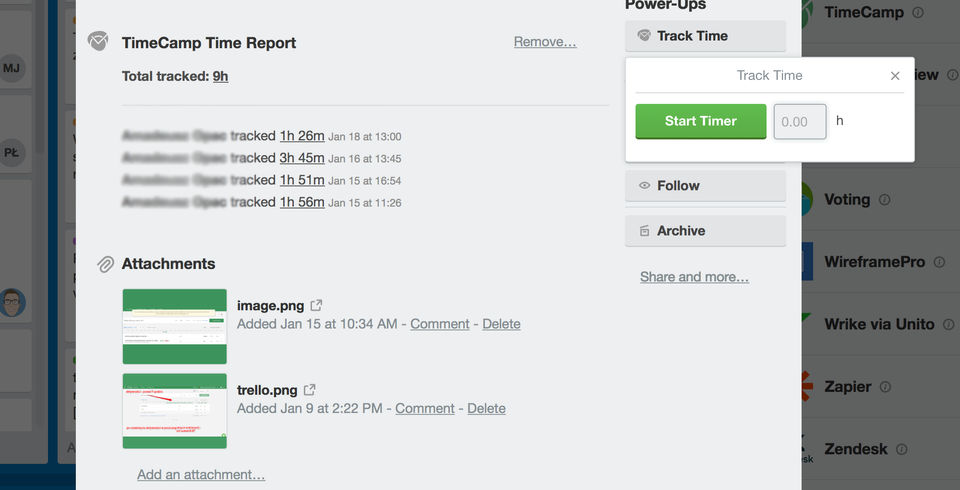
Exploring TimeCamp Planner
TimeCamp Planner is built for detailed project planning and time management. Its clear interface lets teams organize tasks and keep work moving across different levels of an organization, from individual contributors logging their own hours up to managers reviewing where a whole project stands.
Core features and functionalities
TimeCamp Planner covers a wide set of time-tracking tasks with tools aimed at productivity and project management. It handles a range of corporate needs and keeps the interface easy to use.
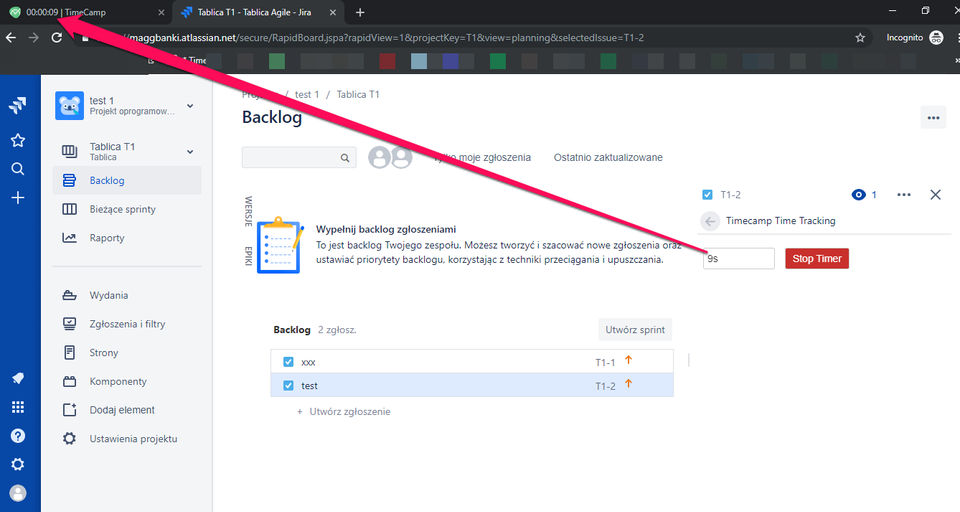
- Automated Time-Tracking: The platform records work hours for you. With automatic and manual modes, employees can track time on tasks without breaking their workflow, and they can correct entries by hand when the automatic capture misses something.
- Budget Management: Set budgets for projects and watch financial progress as it happens. This helps stop overspending and keeps projects within their limits before a small overage turns into a large one.
- Employee Productivity Reports: Detailed reports show how the team performs and which activities take the most time, so managers can adjust how work is distributed and shift effort toward the tasks that matter most.
- Timesheet Management: Approve or reject timesheets in a few clicks. Accurate records of attendance and overtime keep everyone accountable and give payroll a reliable source to work from.
- Invoicing Software Integration: Generate invoices from billable hours inside the platform. This makes client billing faster and shortens payment cycles because the hours flow straight into the bill.
- Billable Rates Setup: Apply different billable rates to specific tasks or employees. That detail supports accurate job costing and profitability analysis.
- Project Management Features: Organize and run projects in one place. TimeCamp lets you assign tasks, set deadlines, and track progress toward completion.
- Task Delegation Abilities: Hand out responsibilities across the team. Clear delegation avoids overlap and confusion about who owns what.
- Progress Tracking for Projects: Share current progress reports that show which milestones are done and which goals are still open, keeping stakeholder expectations in line with reality.
- Stakeholder Management Tools: Keep stakeholders informed with custom reporting that explains how a project is developing.
Ease of use and interface
The TimeCamp Planner interface is easy to pick up. Simple navigation and clear task-monitoring tools let new users get started without a long learning curve, which suits teams working on time-sensitive projects.
The tool fits into your setup whether you use a web browser or the mobile and desktop apps on Windows, macOS, or Ubuntu.
You can track every minute on a task with both automatic and manual modes. That gives team members a clear view of which activities take up their hours, whether they prefer to let the app run in the background or log entries themselves at the end of the day.
As workloads change, custom reporting lets you adjust task delegation and progress tracking without adding needless complexity to the software. The controls stay simple even as the amount of data grows, so the tool does not become harder to use over time.
TimeCamp Pricing Models
TimeCamp’s pricing tiers match different team sizes and budgets. The plans run from a free version to paid subscriptions with more features, and each is set up to support project management and time tracking at a fair price.
Free plan details
TimeCamp’s free plan is a full introduction to time tracking at no cost. You can switch between manual and automatic modes based on your preference, so every minute of work is recorded accurately.
Track billable hours so you or your team get paid correctly for the work done, with no guesswork about how long a task really took. Job costing is included too, letting businesses keep a close eye on project costs and see which jobs earn their keep.
Leave management is part of the free package. You can oversee employee sick leave, vacation days, and holidays, which keeps everyone informed about who is out and when, and keeps the workforce organized around actual availability.
The free plan is a solid base for learning how TimeCamp fits your operations before you move to a paid option.
Paid plan options and what they offer
TimeCamp Planner’s paid plans are set up to scale with your organization and add functions at each price point.
- Basic Plan: Starts at $6.30 per person monthly and suits teams that need core time-tracking capabilities.
- Includes time entries and reporting.
- Gives access to more than 70 integrations with common work tools.
- Pro Plan: At $7 per month, it adds features for businesses that need more than basic tracking.
- Provides budgeting tools to manage project finances.
- Adds billing rates so work hours line up with revenue targets.
- Enterprise Plan: A custom plan for larger organizations that want a fuller feature set and more control.
- Includes custom user roles for precise permissions and workflow management.
- Adds timesheet approvals, which keep client billing and payroll accurate.
Advantages of Using TimeCamp
Unlock the full value of your team’s time: TimeCamp records every minute your team works and turns that record into data you can act on, which feeds directly into project outcomes and profitability.
For businesses focused on performance, it keeps a firm hold on both time management and financial control. The same record that tells you how long work took also tells you what that work cost, which is why the two sides sit together in one tool.
Productivity and project tracking
TimeCamp gives teams solid project tracking, so every minute of work is accounted for. Users see how time goes into each task, which supports accurate productivity analysis and better work distribution.
Managers can spot trends in team productivity and change their approach to improve efficiency. If one type of task consistently runs long, that shows up in the data and can be addressed rather than guessed at.
A detailed view of active projects keeps everyone focused on their goals. TimeCamp also connects with common accounting software so invoice tracking stays simple.
The Pro plan adds advanced billing, which matters for accurate job costing. Freelancers and corporate project managers who want to tighten their invoicing tend to find it useful.
Billable hours and job costing tools
Knowing how much time goes into specific tasks matters, and TimeCamp makes that clear with billable-hours tracking. You assign hourly rates to tasks, which supports accurate invoicing and revenue tracking.
The job costing tools help managers assign resources better by showing which projects use the most time and money.
With that information, teams can make sound choices about project pricing and client billing. Detailed reporting like this helps build stronger time-management strategies.
Professionals rely on these tools to keep finances in order while they focus on delivering good work instead of paperwork. When the numbers are trustworthy, there is less time spent reconciling estimates against actuals at the end of a project.
Invoice management
Handling invoices in TimeCamp is direct and gives corporate users a way to manage the financial side of projects. The Pro plan lets you set hourly rates, produce detailed invoices, and connect with accounting software such as Xero and QuickBooks.
That connection simplifies billing, so teams can track billable hours, manage job costing, and keep financial reporting accurate.
With TimeCamp’s invoice management, you control project invoicing and expense tracking without a separate accounting tool. It captures every billable moment spent on client work and turns those hours into professional invoices that reflect your services.
That saves time and adds reliability to how your company manages its finances. Fewer manual steps between tracked hours and a sent invoice means fewer chances for an error to creep in.
TimeCamp’s Reporting Capabilities
TimeCamp’s reporting tools track project progress and analyze team performance, giving managers the data they need for decisions. With a set of customizable reports, you can look closely at time allocation and finances to improve productivity and profitability across projects.
Types of reports available
TimeCamp Planner’s reports support data analysis and project management. With a selection of customizable reports, you can examine time allocation and productivity to make informed decisions.
- Weekly Reports: Give an overview of total time spent on projects and compare actual hours against estimates. That comparison shows progress at a glance and points to where efficiency can improve, so a project that keeps running over its estimate gets caught early.
- Expense Reports: Track expenses tied to tasks and projects, so businesses can watch their financial resources and stay within budget. Keeping expenses in the same place as time makes the full cost of a project easier to see.
- Assignment Reports: Assign specific tasks to team members and follow those assignments in detail. Seeing who owns each task and how far along it is keeps teams accountable and removes questions about who is doing what.
- Productivity Reports: Show which tasks take the most time and which finish quickly. These patterns help you refine workflows and lift overall performance by pointing out where hours pile up.
- Task Tracking Reports: Record every minute spent on individual tasks. That level of detail makes sure effort is recognized and helps you find bottlenecks that slow a project down.
- Data Visualization Tools: Present complex data through charts and graphs, turning hours of raw numbers into information that supports planning. A visual summary is easier to share with people who do not want to read a spreadsheet.
Customization and export options
TimeCamp’s reporting lets you tailor how you monitor productivity. Build reports that match the specifics of your projects and team performance.
Want a closer look at where time goes? Customize reports to find efficiency bottlenecks or areas to improve. Connecting with accounting software such as Xero and QuickBooks turns raw data into usable insight.
Exporting these reports is simple, which lets you analyze them outside the platform. Project timelines, task completions, and individual contributions can be shared as Excel spreadsheets, PDFs, or direct links, so everyone stays informed and nothing gets missed while you work toward better productivity and time management.
Why Users Might Seek TimeCamp Alternatives
TimeCamp offers a full set of time-tracking and project-management features, but some users find it does not fit their exact workflow or budget.
The search for alternatives usually comes down to wanting a tool that matches an organization’s specific operations or its preferences for functions and user experience.
Possible limitations of TimeCamp
TimeCamp can come up short for companies that need complex workflow management and task delegation. It does not offer much for reorganizing tasks or handling stakeholder involvement.
Progress tracking is limited, and the report customization needed for detailed project analysis is thin. Administrators who want strict clock-in controls will notice that TimeCamp does not alert them about early clock-ins or possible overtime.
For organizations with demanding time-tracking needs, including overtime alerts and controls to prevent unwanted extra hours, those gaps stand out.
The tool does not offer these administrative controls, which can matter for managing labor costs and staying compliant with working regulations. For teams that track hourly staff closely, missing overtime warnings can lead to unexpected costs. That leads some users to look at alternatives with tighter control over team time management.
Those limits point toward other software that may fit certain requirements better, which leads into the next section on top TimeCamp alternatives.
Specific needs not addressed by TimeCamp
For all its tracking strength, TimeCamp can fall short for teams that need advanced workflow management. Beyond capturing time, teams often want tools that reorganize tasks and keep processes moving.
Users who want to delegate responsibilities easily and follow task progress in real time may find those features missing.
Businesses that want to shape their reports may find TimeCamp’s customization limited. When a report cannot be cut the way a manager needs, the data behind it becomes harder to act on. Stakeholders who need detailed oversight of project operations and resource allocation might look for alternatives that give deeper insight into process improvement and team collaboration, both of which drive corporate efficiency.
Top TimeCamp Alternatives
If you want a different option for time tracking and project management, the market has several strong alternatives to TimeCamp. Each brings its own features for different working styles and business needs, so organizations can find a tool that fits their processes and lifts team productivity.
Connecteam: A comprehensive alternative
Connecteam is a capable option built for business and team management. It integrates with third-party systems, including Zapier, which lets users automate tasks and cut manual work.
That makes managing different parts of a workload simpler and gives teams the tools to compete.
Its main strength is flexibility. Connecteam works for teams large or small without a high price tag, and it handles project collaboration and time tracking so every minute and dollar is recorded accurately. A growing team can start small and add people without switching tools.
With those features, Connecteam is a budget-friendly yet complete alternative that can improve day-to-day operations for teams that want management and tracking in one place.
Clockify: Ideal for hybrid workforces
Clockify works well for teams that split time between the office and remote work. Its time-tracking software lets companies manage employee productivity across both settings.
Whether team members work in person or from a distance, Clockify’s interface keeps them connected. Every hour is recorded, so project management stays on track no matter where people are.
The tool includes timesheet management and support for flexible work arrangements, both suited to hybrid employment. Team members can clock in from home or the office in one click, which supports different working styles.
Clockify also gives managers workforce-management tools for varied work environments, and it keeps costs down with a scalable free plan and paid options for larger groups. Teams can begin on the free tier and move up only when they need more.
Toggl Track: Suitable for small startups
Toggl Track is a strong choice for small startups that want to simplify time tracking. Its easy-to-navigate interface offers real-time tracking and offline options, so teams on the move can still record their hours.
Startups also get payroll calculations, which help when managing contractors and employees on different pay arrangements without a separate payroll setup.
Price often matters most for smaller businesses, and Toggl Track keeps it competitive, starting at $9 per user monthly for the Team plan. That plan includes detailed reporting, weekly summaries, time rounding, and more, all aimed at employee management in growing companies.
Hubstaff: Optimized for remote workforces
Hubstaff is a strong fit for remote workforces, handling time tracking and employee monitoring with precision. It suits the needs of virtual teams and offers tools that manage flexible work arrangements.
Its ability to track time on tasks makes it useful for telecommuting, where accountability can be hard to maintain when no one shares an office. The free plan works well for solo entrepreneurs testing productivity tools without an upfront cost, so they can decide whether the approach suits them before paying.
Remote workforce management is easier with Hubstaff’s interface, which gives real-time insight into team activity. It has a limited number of native integrations and does not support Chromebook desktops, but it remains a solid choice for teams working from home.
Next, consider what Harvest offers freelancers who want more autonomy and financial control.
Harvest: Tailored for freelancers
Freelancers find a strong tool in Harvest, a time-tracking and invoicing product built for their needs. It supports time management, expense tracking, and project oversight in one place.
Freelancers can work with confidence knowing they have the tools for capacity reporting and client reporting close at hand.
The interface makes invoice tracking simple and connects with online payments through PayPal and Stripe, so billing is quick.
Around-the-clock customer support means help is always available, which matters for a solo worker who has no in-house IT team to call. Harvest also adds value through productivity features that let freelancers track time and then analyze it with filters, so they can see how each hour goes into a project and price the next one more accurately.
Time Doctor: Beginner-friendly time tracking
Time Doctor makes managing work hours simple, even for people new to time-tracking tools. Its interface removes the guesswork from productivity tracking and timesheet management and works for both individuals and teams that want to monitor progress.
With features like automatic verification of employee attendance and clear dashboards, users can adapt quickly and adjust their workflow.
The software also helps with work-life balance through tools like its widget. It captures screenshots and records activity levels while encouraging a healthier approach to how time is spent on tasks.
The aim is quality work without giving up personal well-being, which is what most corporate teams and individuals want. For a beginner, that balance of monitoring and gentle nudges makes the tool easier to adopt than heavier systems.
Related Software Solutions and Alternatives
Looking at other software can give you a fresh view of how to manage your team’s time and productivity. ClickUp handles more than task management; it tracks time, manages workloads, and keeps tasks organized across teams of different sizes and budgets.
It sits between project-management problems and practical solutions, which makes it a reasonable pick for teams that want tracking and task management in the same place.
NTask uses a cloud-based setup that makes task coordination easier, with Gantt-chart views for planning and resource-allocation features to improve team performance.
Clockify focuses on timesheet management alongside reporting tools for budget tracking, which suits companies that want to analyze financial metrics.
Toggl Track goes past simple time measurement with payroll calculations and detailed reports. It covers precise labor-cost control and supports real-time or offline tracking.
These alternatives widen your toolset and help sharpen your edge in a demanding corporate market. Comparing a few of them against your own workflow is the surest way to find the one that fits.
Conclusion
TimeCamp Planner is a full solution for managing time and improving efficiency. It covers a range of needs, from employee performance tracking to project profitability.
Whether you choose TimeCamp or one of its alternatives, each option offers functions that fit different business operations. Picking the right tool helps teams work better, raises productivity, and keeps project management accurate.
With this look at pricing and features, you have what you need to choose a system that matches your goals. Weigh the free and paid tiers against the size of your team and the way you bill, and the right fit becomes clear.
(Image credit: TimeCamp Planner)
Frequently Asked Questions
1. What is TimeCamp Planner?
TimeCamp Planner is a digital tool that helps you schedule tasks, track time, and manage projects effectively.
2. How much does TimeCamp Planner cost?
The cost of TimeCamp Planner varies depending on the plan you choose; there’s a free version as well as paid plans for additional features.
3. What are the main features of TimeCamp Planner?
Key features include automated time tracking, detailed reports, billable hours calculation, and team productivity monitoring.
4. Can I use TimeCamp Planner on my phone?
Yes, you can use TimeCamp Planner on your phone by downloading its mobile app available for both iOS and Android devices.
5. What are some alternatives to TimeCamp Planner?
Some popular alternatives to TimeCamp Planner include Trello, Asana, Monday.com, and Harvest for project management and time tracking needs.
Compare alternatives to the tools in this post

- Independent picks for exactly what you just read about
- Matched to your team size & needs
- Vendors don't pay for placement
Step 1 of 4
How big is your team?
We tailor recommendations to companies your size.















Related Articles
Best Tools
Best Social Media Management Tools in 2026: Top Platforms for Scheduling, Analytics, and Engagement
Continue reading →

SaaS Insights
Best Social Media Management Software in 2026: Complete Guide for Every Team Size
Continue reading →
Social Media Tools
FastMoss Review 2026: Features, Pricing, and TikTok Shop Analytics Guide
Continue reading →
Best Tools
Best Social Media Management Tools for 2026: Top Picks for Smarter Campaigns
Continue reading →