
Picking between Obsidian and Notion often comes down to one core difference: Obsidian is an offline tool that stores your notes locally, while Notion runs online and needs a connection to work. This comparison breaks down their interfaces, core features, and user opinions so you can decide which one fits you, without having to test both from scratch.
Below, we look at how each tool organizes information, what makes each useful day to day, and where they differ, so you can make an informed choice among note-taking tools.
Key Takeaways
- Obsidian is an offline note-taking tool built around Markdown files, with extensive customization through plugins. Notion is an online tool that goes beyond note-taking, adding collaboration features and customizable templates.
- On interface and organization, Obsidian keeps a simple design focused on text editing, while Notion offers a clean, visual interface with customizable pages and easy tagging. Both tools include folders, tags, nested hierarchies, search functionality, sidebar navigation, and customizable layouts.
- User experience differs between the two tools: Obsidian favors simplicity and advanced features like backlinking but has no built-in collaboration options. Notion is strong for online collaboration but can feel like more than some users need for simple note-taking.
- On essential features, both tools support backlinking. Note sharing is limited in Obsidian compared to Notion’s stronger collaboration tools. Both have reliable automatic note-saving. Notion gives easy access from any device, while syncing notes across devices in Obsidian requires extra payment. On pricing, Obsidian uses a one-time payment, while Notion offers a free version plus paid tiers.
Brief overview of Obsidian and Notion
Obsidian and Notion are both well-known note-taking tools that help you keep track of your ideas, tasks, and information. Obsidian works offline, which suits people who like taking notes in Markdown, and it lets you add more functions through plugins.
Notion, on the other hand, does more than note-taking. You can use it online to work with your team, manage tasks, and even track progress. It also offers free templates that you can change to fit what you need.
Purpose of the comparison (to help readers decide which tool is best for them)
The goal here is to help you find the better fit for your note-taking. You might prefer Obsidian or Notion depending on how you work; both have real strengths, and each is suited to different habits and use cases. Neither one is simply “better” across the board – they’re built around different assumptions about how people want to work. So we’ll look at their features and how easy each is to use, so you can choose the one that fits your needs better.
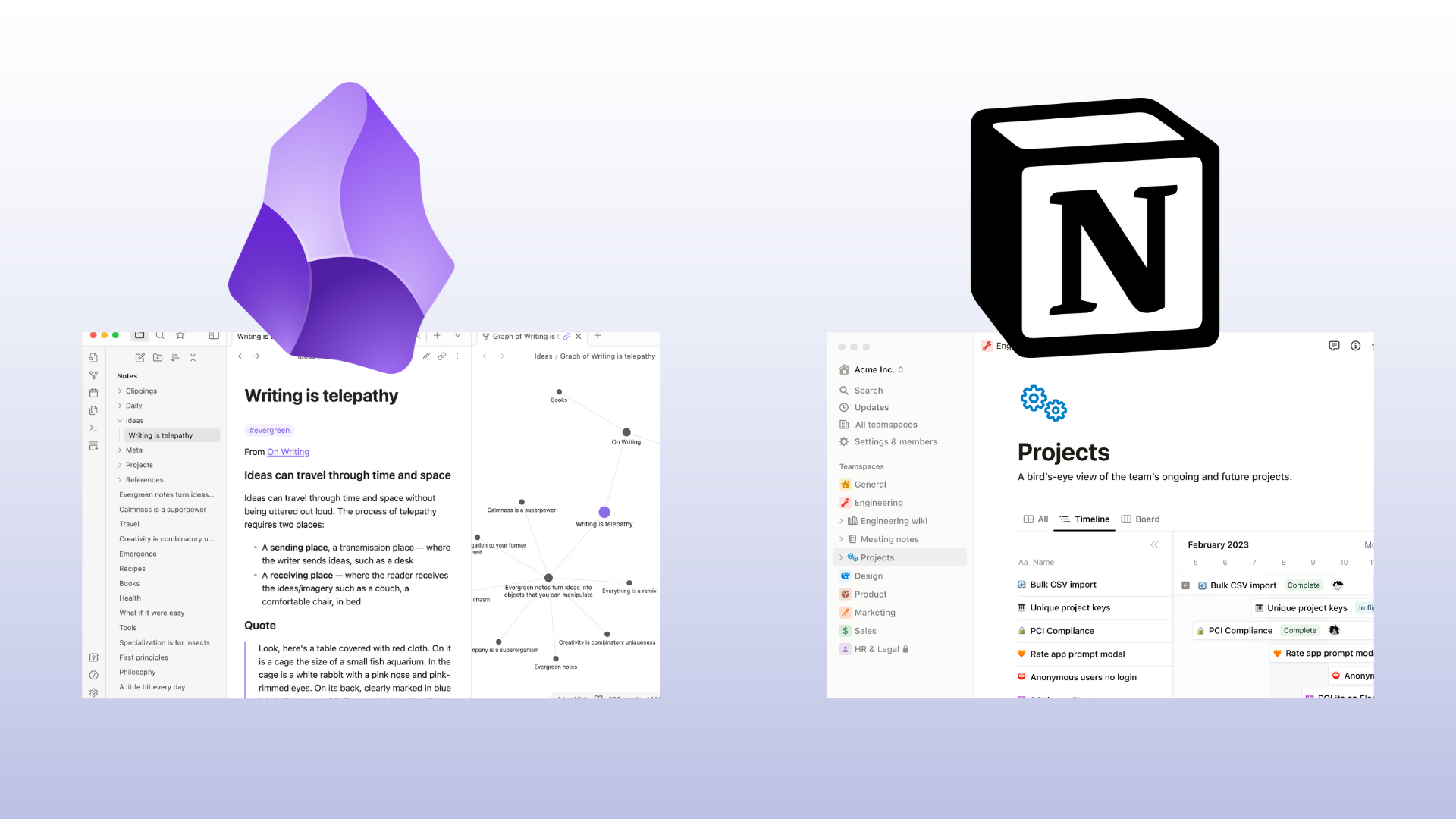
Notion works online, while Obsidian needs no internet connection to run.
Obsidian looks simple on the surface but is capable underneath. You can use it as the base for all your notes, and it uses the Markdown format that technical users tend to prefer for writing and editing plain text. When the built-in feature set isn’t enough, plugins let you extend it further to cover whatever you need.
Notion adds teamwork into the mix too. Besides note-taking, you can track task progress alongside your team from the same workspace. It offers free templates that change based on what you need, so you’re not starting every page from a blank slate.
There is a trade-off with Obsidian, though: if you want to sync notes across devices, you have to pay extra. That point may tip some users toward Notion instead, where this feature comes at no extra cost.
Preferences differ from person to person; some might favor ClickUp over both of these options for its task-focused features, especially if project management matters more to them than freeform note-taking.
Interface and Note Organization
Obsidian and Notion have different UI designs and organizational features. This makes it important to consider the user experience and ease of use when comparing these note-taking tools.
UI design of Obsidian and Notion
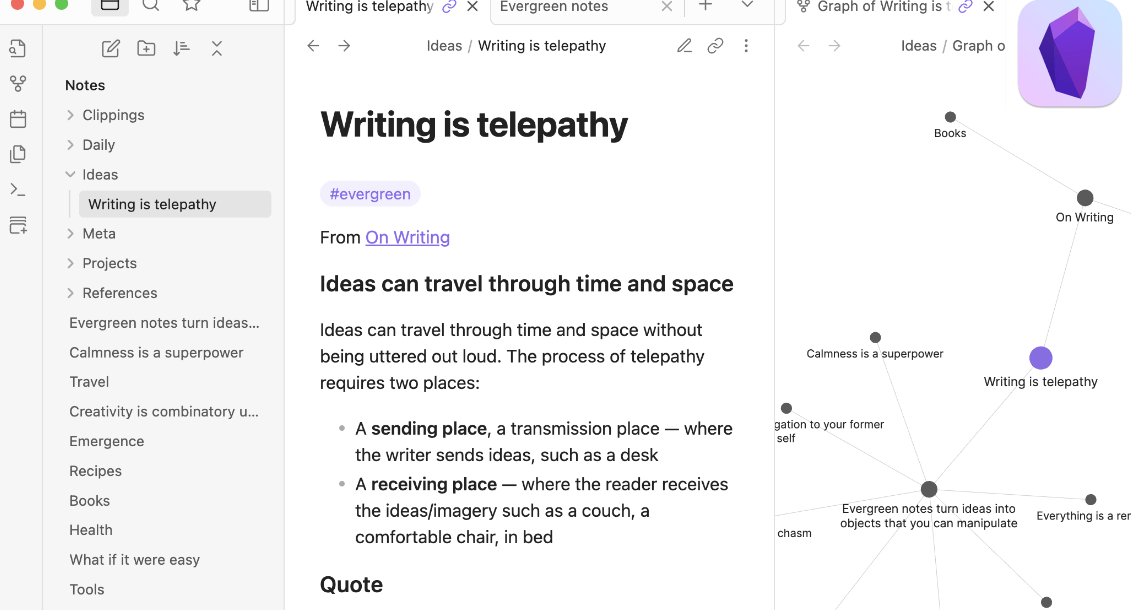
Obsidian has a simple design. It is easy to use and dark in color. The tool’s main part is its text editor. You can take notes here fast. It also has a bar on the left side of the screen.
Here, you can find your files.
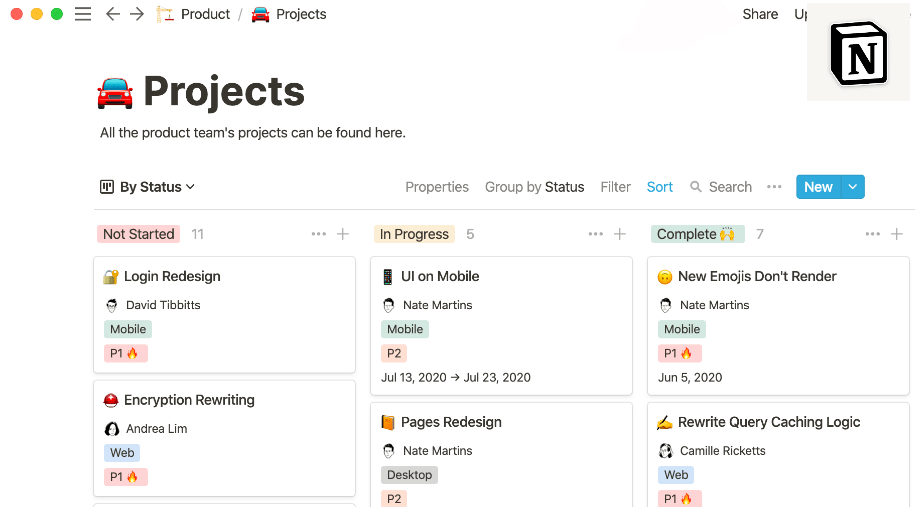
Notion looks different than Obsidian. Its look is light and clean. It lets you make custom pages with blocks of text, images, or other media. This makes it easier for users to view their notes all at once.
Notion also has an easy way to put tags on pages or notes.
Organizational features (folders, tags, etc.)
Organizational features in Obsidian and Notion include:
| Organizational Feature | Obsidian | Notion |
|---|---|---|
| Folders | ✔ | ✔ |
| Tags | ✔ | ✔ |
| Nested Hierarchies | ✔ | ✔ |
| Search Functionality | ✔ | ✔ |
| Sidebar Navigation | ✔ | ✔ |
| Customizable Layouts | Through plugins | Drag-and-drop interface |
| Templates | Plugin ecosystem | Extensive collection of templates |
User experience and ease of use
Obsidian and Notion offer different user experiences for ease of use. Obsidian, being an offline tool, provides a simple interface that focuses on note-taking and knowledge management.
It’s great for users who prefer a Markdown-based app with advanced features like backlinking and a plugin ecosystem for added functionality. On the other hand, Notion is an online tool that offers more flexibility in terms of collaboration, progress tracking, and personalization through free templates.
It’s better suited for productivity management and team collaboration compared to Obsidian. So for user experience and ease of use, it depends on whether you prioritize simplicity or a wider range of features for your note-taking needs.
Essential Features
Obsidian and Notion offer essential features such as backlinking, note sharing, automatic note saving, cross-platform support, and various pricing plans.
Backlinking in Obsidian and Notion
Obsidian and Notion both offer backlinking features that can enhance your note-taking experience. In Obsidian, backlinks allow you to see all the notes that reference a specific note. This helps you connect ideas and navigate through your knowledge base.
Notion also supports backlinking. This makes it easy to create connections between different notes and organize information effectively. Both tools provide a smooth way to explore related content within your notes. This helps you build a complete understanding of your topics.
So whether you choose Obsidian or Notion, you’ll have the ability to use the power of backlinks in organizing and accessing your notes efficiently.
Note sharing and collaboration
Both Obsidian and Notion offer note sharing and collaboration features, but they have some differences. In Obsidian, note sharing is limited to exporting notes as plain text or Markdown files, which can then be shared with others.
Collaboration is not built-in, so you’ll need to use external tools like GitHub for collaborative work. On the other hand, Notion allows for easy online collaboration with team members in real-time.
You can share specific pages or entire workspaces with others and collaborate on projects together. This makes Notion a better choice if you’re looking for strong note-sharing and collaborative capabilities.
Automatic note saving
Both Obsidian and Notion have automatic note-saving features. This means that your notes will be saved automatically as you work, so you don’t have to worry about losing any important information.
In Obsidian, the notes are saved locally on your device, which means they are only accessible offline. On the other hand, Notion stores your notes online. This allows you to access them from any device with an internet connection.
However, it’s important to note that in Obsidian, if you want to sync your notes across multiple devices, you’ll need to pay for a premium subscription. Overall, both tools offer reliable automatic note-saving capabilities for convenient and secure note-taking.
Cross-platform support
Both Obsidian and Notion offer cross-platform support, meaning that you can access your notes on different devices. However, there are some differences in how they handle this feature.
Notion is an online tool, so you can easily access your notes from any device with internet connection. On the other hand, Obsidian is only available offline by default. If you want to sync your notes across multiple devices in Obsidian, you will need to pay extra for their Sync service.
So if having easy access to your notes from anywhere is important to you, Notion might be a better choice.
Pricing plans and options
As for pricing plans and options, both Obsidian and Notion have different tiers to cater to various user needs. Obsidian offers three pricing tiers: Personal, Catalyst, and Commercial, starting at a $25 one-time payment and can go up to $50 per year for the Commercial plan. Notion, on the other hand, provides a free version for individual users and three paid plans: Personal Pro, Business, and Enterprise, starting from $8 per month to customized pricing for Enterprises.
Obsidian’s pricing (2024 updated):
| Pricing Plan | |
|---|---|
| Personal use | Free |
| Catalyst | $25 (one-time payment) |
| Commercial use | $50/year |
Notion’s pricing (2024 updated):
| Pricing Plan | |
|---|---|
| Free Version | Free |
| Plus | $8/user/month |
| Business | $15/user/month |
| Enterprise | Custom Pricing |
This comparison of pricing plans may help potential users decide which tool provides better value for their money. Note that Obsidian charges an additional fee for syncing notes across devices, while Notion provides this feature for free. Notion’s free version gives a good starting point for those who want to test the tool before committing to a plan, while Obsidian only has paid versions.
Obsidian vs. Notion: Comparison
Users have provided feedback on the differences in features and usability of Obsidian and Notion, weighing the pros and cons of each tool to determine which is better for note-taking.
User opinion and feedback
Users of both Obsidian and Notion have shared their opinions and feedback regarding these note-taking tools. While some users prefer the simplicity and offline access of Obsidian, others appreciate the online collaboration features offered by Notion.
Many users find Obsidian’s Markdown-based interface to be more conducive for efficient note-taking, while Notion’s customizable templates make it easier to organize and present information.
Users who prioritize productivity management and collaboration tend to lean towards Notion, while those who want a dedicated note-taking tool with a strong plugin ecosystem often choose Obsidian.
Differences in features and usability
Without a doubt, Obsidian and Notion both provide a range of tools and features beneficial for note-taking. However, they differ in their usability and the nature of their features.
NotionAvailable onlineSupportedSupported, provides better collaboration tools Not as strong strong, with free templates for customization
| Features | Obsidian |
|---|---|
| Availability | Offline only |
| Backlinking | Supported |
| Note Sharing | Limited, requires extra payment for syncing across devices |
| Markdown Support | Extremely strong, ideal for users preferring Markdown-based notes |
| Customization | Limited, but has extensive plugin ecosystem for added functionality |
While Obsidian is known for its Markdown support, Notion shines in areas of availability and collaboration. The right tool depends largely on your personal preferences and needs.
Pros and cons of each tool
Let’s look at the advantages and drawbacks of Obsidian and Notion as note-taking tools. Both have unique features and are each suited to different use cases.
| Obsidian | Notion | |
|---|---|---|
| Pros |
|
|
| Cons |
|
|
While Obsidian shines with its Markdown functionality and extensive plugin ecosystem, it lacks in cross-device synchronization and is offline-based. On the other hand, Notion excels with its versatility in note-taking and team collaboration but falls short in its specialization for note-taking compared to Obsidian.
Verdict on which tool is better for note-taking
For note-taking, the verdict is that Obsidian and Notion cater to different needs. Obsidian is best for users who prefer a Markdown-based app and want a more personal and focused note-taking experience.
It’s great for creating a knowledge base with its extensive plugin ecosystem. On the other hand, Notion shines in productivity management and collaboration. It offers templates for customization. This makes it suitable for team use and progress tracking.
Ultimately, the choice between Obsidian and Notion depends on your preferences and specific requirements for your note-taking needs.
Alternatives to Obsidian and Notion
ClickUp is worth a look as a more task-oriented alternative to either of the two tools above. Below, we compare it with Obsidian and Notion on features, pricing, and whether it suits note-taking or project management better.
Introduction to ClickUp as a more task-oriented tool
ClickUp is a task-oriented tool that goes well beyond note-taking. It covers project management, team collaboration, and progress tracking in a single workspace. With ClickUp, you can create tasks, set deadlines and reminders, assign them to team members, and track their progress from one place, rather than piecing that together across separate apps.
It also provides interactive dashboards and reports to help you analyze your productivity over time. ClickUp suits users who need more than note-taking and want a complete way to manage their tasks and projects.

Comparison with Obsidian and Notion
Obsidian and Notion are two popular note-taking tools, each with its own strengths. Obsidian is an offline tool, so you can access your notes without an internet connection, though syncing them across devices requires an extra payment. Notion is available online and covers more than note-taking: it’s built for team collaboration, progress tracking, and more. If a simple, Markdown-based note-taking app is what you want, Obsidian is likely the better fit. If you need a tool that combines productivity management with collaboration, Notion is the stronger option.
Features and pricing
Obsidian and Notion differ in both features and pricing. Obsidian covers core note-taking features such as backlinking, automatic note-saving, and cross-platform support, though syncing notes across devices costs extra. Notion adds online collaboration tools and progress-tracking features on top of note-taking, along with free templates for customization. On pricing, Obsidian is a one-time payment, while Notion offers both free and paid plans, with more advanced features reserved for the higher tiers.
Verdict on which tool is better for specific purposes (note-taking vs. project management)
For note-taking specifically, Obsidian is the better tool. It’s built for that purpose and fits individual users who prefer a Markdown-based app over a more visual, all-in-one workspace.
If you’re looking for a tool that leans more toward project management and collaboration, Notion is the better choice. It supports team collaboration, progress tracking, and offers free templates for customization, which matters more once you’re coordinating with other people rather than working alone.
So the right pick, Obsidian or Notion, comes down to which of those needs matters more to you.
Conclusion
choosing the best note-taking tool between Obsidian and Notion depends on your specific needs. If you prefer a Markdown-based app with extensive plugin options for personal note-taking and knowledge-base management, Obsidian is a solid choice.
On the other hand, if you’re looking for a versatile tool that offers online collaboration, progress tracking, and productivity management features along with customizable templates, Notion is the better option.
Assessing your priorities will help you make an informed decision about which tool suits you best.
Frequently Asked Questions
What is the difference between Obsidian and Notion?
Is Obsidian or Notion better for organizing my notes?
Can I use Obsidian or Notion on multiple devices?
Are there any costs associated with using Obsidian or Notion?
Which note-taking tool should I choose: Obsidian or Notion?
Compare alternatives to the tools in this post

- Independent picks for exactly what you just read about
- Matched to your team size & needs
- Vendors don't pay for placement
Step 1 of 4
How big is your team?
We tailor recommendations to companies your size.















Related Articles

Buyers guide
How To Choose The Best Online Learning Platform For 2026
Continue reading →

Education Software
Best LMS Software in 2026: Complete Guide for Every Team Size
Continue reading →

Education Software
Legends of Learning: 2,000+ K-8 Games, Free Teacher Plan
Continue reading →

Education Software
ThinkWave Educator 2026 Review: Gradebook, School Management Software, and Support Overview
Continue reading →