

Preserving your favorite movies or home videos can be hard when physical DVDs are prone to damage. Tools like DVDFab help by letting you copy and back up DVD content for free.
This article walks through the top 10 free DVD copying and burning software options for Windows so your video collection lasts. Each tool copies discs, works around copy protections, and saves your movies to a hard drive in a usable format. Here is how simple backing up your discs can be, and which tool fits which type of user.
Key Takeaways
- DVDFab copies and burns DVDs and also removes DVD and some Blu-ray protections, which makes backing up media simple.
- With frequent updates, DVDFab keeps up with the copy protections on new movie releases, so users can keep using it for their latest DVDs.
- DVDFab supports both Windows and macOS, while other free options like DVD Shrink run on older Windows systems without recent updates.
- MakeMKV rips DVDs and Blu-rays into MKV format and updates constantly to get past new copy protections.
- AnyDVD HD offers a full feature set for ripping discs quickly across several Windows versions.
DVDFab Reviews: Free Powerful Software for Copying Blu-ray and DVDs
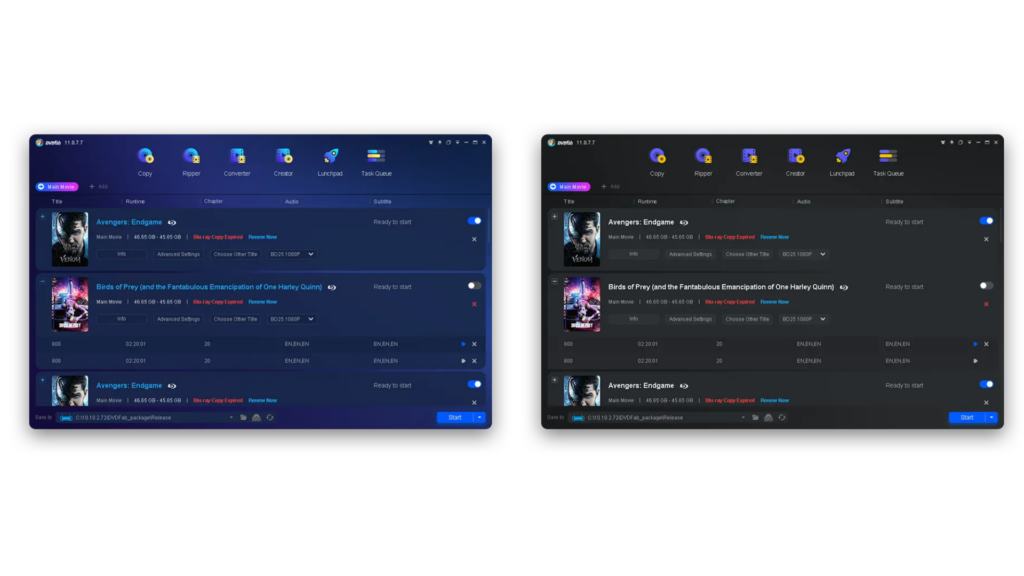
DVDFab is a software package that copies DVDs and Blu-ray and converts video files. It rips discs quickly to a local hard drive as movie folders with identical file structures, so the copy on your computer matches the original disc layout. It also removes all known DVD copy protections and part of Blu-ray protections, which lets you back up media that would otherwise be locked.
(Image Credit: spotSaaS/DVDFab)
Key Features and Benefits
DVDFab packs a lot of copying and burning features into one tool, built around ease of use and speed. It suits both new users who want a simple way to copy a disc and experienced ones who need to handle DVD copy protections and manage a larger media collection.
| Feature | Benefit |
|---|---|
| Bypasses DVD restrictions | The software removes almost all known DVD copy protections, so you can back up your media without trouble. |
| Works with Blu-ray | Beyond DVDs, DVDFab also handles a range of Blu-ray protections, which suits different disc formats. |
| Converts video files | You can convert videos into various formats, so they play across your devices. |
| Rips discs swiftly | Rip discs to your hard drive and keep the original structure in movie folders for easy navigation. |
| Keeps pace with new releases | Continuous updates give DVDFab the latest features to handle newly released movies. |
| User-friendly interface | Work through a clear, intuitive interface that makes copying and burning simple. |
| Compatibility is key | Whether you run Windows or macOS, DVDFab works across both platforms. |
| Assures accessibility | With downloads on MajorGeeks.com, getting DVDFab’s latest version 13.0.0.9 is quick and secure. |
Other Top Free DVD Copying and Burning Software
Besides DVDFab, several other free DVD copying and burning tools for Windows offer their own features and benefits. Some focus on compression, some on ripping to a specific format, and some on removing copy protection. Keep reading to see how they compare and which one suits your setup.
DVD Shrink
DVD Shrink is a user-friendly tool for anyone who needs to compress DVD movies. It reduces video files so they fit onto standard 4.7 GB DVDs without losing much video quality.
The software makes copying and burning DVDs simple, giving you a quick way to keep your media collection on physical discs. Because it focuses on compression, it is a good fit when you want to fit a larger movie onto a single blank disc.
Although it was last updated in 2005, DVD Shrink still works around older DVD copy protections. Newer types of encryption can be a problem, though, because there are no recent updates.
Even so, it remains useful for Windows XP through Windows 7 users who want to manage their movie libraries, and it is a solid free DVD copying option before you move up to the more advanced features of MakeMKV.
MakeMKV
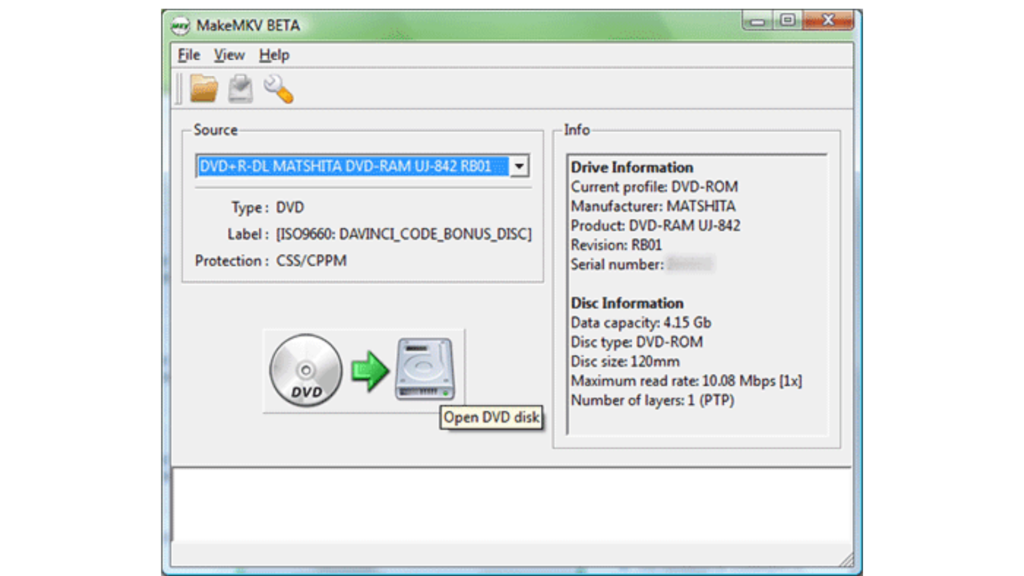
MakeMKV is a strong choice for DVD ripping. It converts your DVDs and Blu-rays into accessible movie folders for free.
It handles the copy protections often found on these discs, and it keeps updating so even the newest releases work. The software also does video file conversion well, keeping clean file structures after the rip so your media is ready to play or store.
Users praise MakeMKV for being simple and effective, since the rip usually comes down to picking a disc and a title. The program supports both Windows and macOS, which fits a broad audience that wants to keep a media collection in digital form rather than on discs.
It carries a high user rating because it handles disc copying so easily while removing the copy protections that trip up many other tools.
With MakeMKV, turning your physical movie library into a digital one is simple, and your files stay accessible over time.
(Image Credit: MakeMKV)
AnyDVD HD
AnyDVD HD removes all known DVD copy protections and some Blu-ray protections, so ripping discs is straightforward. It rips discs to a local hard drive as movie folders with identical file structures.
With constant updates to keep up with newly released movies, AnyDVD HD lets users stay current on decrypting and copying protected DVDs. Its availability on Windows 11, 10, 8, 7, and macOS also makes it usable across a wide range of operating systems.
The varied features of AnyDVD HD make it a strong pick for users who want reliable DVD ripping software without fighting copy protection restrictions. It works in the background on the disc, so you can rip and then convert or store the files as you prefer.
DVD Rebuilder
DVD Rebuilder is a popular free DVD copying and burning choice among Windows users. The program removes copy protections from DVDs and rips discs quickly to the computer’s hard drive.
Constant updates keep it current with new movie releases, so it stays a reliable tool for movie backup and disc-to-hard-drive operations. It gives Windows users a simple way to deal with copy-protected DVDs and to back up favorite movies while staying compatible with the latest releases.
RipIt4Me
After DVD Rebuilder, another free DVD copying and burning tool worth a look is RipIt4Me. It covers the basics for people who want to rip DVDs and back up discs.
Among its key features, RipIt4Me is good at removing copy protections and handling routine disc copying tasks without much setup.
RipIt4Me rips discs quickly to a local hard drive while keeping identical file structures, so the backup mirrors the source disc. Constant updates also keep it working with new DVD releases and their copy protections, which is useful when you back up recent titles.
Everything You Need to Know about CloudConvert: Online File Conversion
Comparison of Key Features across the Mentioned Software
Each DVD copying and burning tool brings its own set of features. The comparison below puts DVDFab next to other well-known free options so you can see which one best matches what you need for copying and burning DVDs.
| Software | Copy Protections Removal | Blu-ray Support | Operating System Compatibility | Update Frequency | File Output Options |
|---|---|---|---|---|---|
| DVDFab | Yes, removes all known DVD protections and some Blu-ray protections | Yes | Windows 11/10/8/7, macOS | Regular updates for new movies | Disc, ISO, movie folders |
| DVD Shrink | Yes, but may not support newer protections without additional software | No | Windows only | Discontinued, no updates | Disc, ISO |
| MakeMKV | Yes, includes some Blu-ray protections | Yes | Windows, macOS, Linux | Regular beta updates | MKV format |
| AnyDVD HD | Yes, removes restrictions on DVDs and Blu-rays | Yes | Windows only | Frequent updates | Disc, ISO, movie folders |
| DVD Rebuilder | No, primarily a re-encoder | No | Windows only | Occasional updates | Disc, ISO |
| RipIt4Me | Yes, designed to work with DVD Decrypter | No | Windows only | Discontinued, no updates | Disc, ISO |
Conclusion
DVDFab is a full solution for copying DVDs and converting video files in 2024. It rips discs to your hard drive quickly and keeps identical file structures, so your backups match the original discs.
Because it removes known DVD copy protections and part of Blu-ray protections, it makes backing up original DVDs or converting them into video and audio formats easy.
Its availability across various Windows platforms and its high user ratings also make it a top choice for anyone who needs efficient DVD copying and burning.
Frequently Asked Questions
How do I copy a DVD using free software on Windows?
To copy a DVD on Windows for free, you can use DVDFab HD Decrypter, HandBrake, or WinX DVD Ripper.
Can I burn DVDs for free on my Windows computer?
Yes, several free tools can burn DVDs on Windows, such as ImgBurn and CDBurnerXP.
What features should I consider in free DVD copying and burning software?
When choosing free DVD copying and burning software, look for support for various disc formats, ease of use, speed, and the ability to create customized discs.
Are there any legal considerations when using free DVD copying software?
Make sure you have the legal right to copy or burn DVDs before using any software. Some content may be protected by copyright laws.
Can I create backup copies of my DVDs with free software?
Yes, many free DVD copying programs let you create backup copies of your DVDs for safekeeping or easy access.

- Independent picks for exactly what you just read about
- Matched to your team size & needs
- Vendors don't pay for placement
Step 1 of 4
How big is your team?
We tailor recommendations to companies your size.















Related Articles
Buyers guide
Twilio Alternatives 2026: 6 Compared and What They Cost
Continue reading →
IT Management
RMM Software: 25 Tools Ranked by 1,843 Reviews
Continue reading →

Buyers guide
How To Choose The Best Freelance Platforms For 2026
Continue reading →

Best Tools
SaveFrom.net: Norton Clears It, the Ads Are the Risk
Continue reading →