
Managing employees efficiently is central to any well-run organization. From hiring top talent to payroll processing, and benefits administration to compliance management, HR teams juggle multiple responsibilities. To simplify these processes, businesses rely on HR software—technology built to automate workforce management instead of handling it by hand.
The question most HR and IT leaders eventually run into isn’t whether to use software for this — it’s which delivery model actually fits the business. That’s where cloud-based and on-premise systems diverge, and the differences go well beyond where the servers happen to sit.
As organizations scale, the need for efficient, centralized HR solutions grows fast. Businesses today have two primary options when selecting HR software: Cloud-Based HR Software and On-Premise HR Software. Each option comes with its own advantages, cost structure, and technical requirements, which makes it worth evaluating carefully before deciding which one fits your needs.
The decision isn’t purely technical, either. It touches how your HR team works day to day, how quickly you can onboard new employees, and how much your IT department has to get involved every time something needs updating. Getting it wrong can mean paying for capabilities you don’t use, or hitting a wall on customization right when your business needs it most.
Quick Comparison of Cloud vs On-Premise HR: Key Insights
- Cloud-based HR suits small businesses, while on-premise HR works better for large enterprises that need extensive customization and data control.
- Cloud solutions offer lower upfront costs, but ongoing subscriptions add up, whereas on-premise solutions require higher initial investment but reduce long-term expenses.
- Cloud-based HR software scales easily, accommodating growth without infrastructure changes, while on-premise solutions demand additional IT resources for expansion.
- On-premise HR software gives you full data control and security, while cloud-based solutions provide built-in compliance and vendor-managed security measures.
- Businesses can explore cloud HR software with free trials, letting them assess usability, scalability, and integration capabilities before committing.
What is Cloud-Based vs On-Premise HR Software? A Complete Overview
Choosing the best HR software is a strategic decision that affects workforce management, data security, and operational efficiency. Businesses have to decide between Cloud-Based HR Software, which offers flexibility and lower upfront costs, and On-Premise HR Software, which gives greater control over data and customization.
Let’s take a closer look at how each option works, along with their must-have features for HR Software. Understanding the mechanics of each model first makes the pros-and-cons comparison later in this guide much easier to apply to your own situation.
What is Cloud-Based HR Software? Features, Benefits, and Best Use Cases
Cloud-based HR software, also known as Software-as-a-Service (SaaS) HR software, is hosted on remote servers and accessed via the Internet. Instead of purchasing and maintaining software on local servers, businesses subscribe to a service where the provider handles infrastructure, security, and updates.
This scalable model lets businesses start with basic features and expand as their workforce grows. It’s particularly popular among small-to-mid-sized businesses that want easy deployment without the IT overhead — you’re essentially renting access to a system someone else keeps running, patched, and backed up, instead of owning and maintaining that infrastructure yourself.
Cloud HR Software Features: Scalability, Access, and Security
| Feature | Description |
|---|---|
| Web & Mobile Accessibility | HR teams and employees can log in from anywhere, whether at the office, at home, or on the go. Mobile apps allow access to leave requests, payroll, and performance dashboards on smartphones. |
| Automatic Updates & Maintenance | The software provider handles all updates. This ensures businesses always have access to the latest features. No manual intervention is required. This reduces the workload for internal IT teams. |
| Subscription-Based Pricing (SaaS Model) | Businesses pay a monthly or annual fee, typically based on the number of employees or features required. No large upfront investment. This makes it budget-friendly for startups and small businesses. |
| Data Security & Compliance Management | Cloud HR providers follow strict security protocols, including encryption, multi-factor authentication, and compliance certifications (GDPR, HIPAA, SOC 2). Regular data backups ensure information is protected even in case of a system failure. |
| Scalability & Integrations | Can scale easily with business growth, adding more users or advanced HR functionalities as needed. Supports integration with payroll, benefits administration, applicant tracking systems (ATS), and workforce analytics tools. |
Who Should Use Cloud-Based HR Software? Ideal Scenarios
- Growing businesses or tech startups that need quick deployment and scalable pricing.
- Remote and hybrid teams that need anytime, anywhere access.
- Companies with minimal IT resources looking for hassle-free maintenance.
What is On-Premise HR Software? Full Control, Customization & Security
On-premise HR software is installed on a company’s internal servers, giving businesses full control over data security, system customizations, and integrations. This model is preferred by organizations that handle sensitive employee data and must comply with strict industry regulations.
Unlike cloud solutions, on-premise software requires IT teams to handle maintenance, updates, and security protocols. It involves higher upfront costs, but it also eliminates long-term subscription fees, which makes it a viable option for businesses chasing cost-effective solutions over time. The tradeoff is that your IT staff effectively becomes the vendor’s support desk, patch team, and security team all at once, so this route works best when you already have that capacity in-house.
On-Premise HR Features: Data Control, Compliance & Customization
| Feature | Description |
|---|---|
| Full Control Over Data & Customization | Businesses own their data. This reduces reliance on external vendors. Customization options allow companies to modify workflows, reports, and dashboards to match internal processes. |
| One-Time Licensing Costs | Unlike cloud software, which operates on a recurring subscription, on-premise HR software involves a one-time licensing fee. This can lead to long-term cost savings for businesses that prefer an upfront investment. |
| Enhanced Security & Compliance | All employee data remains within the company’s private servers. This reduces exposure to third-party risks. Ensures compliance with strict data protection regulations (e.g., healthcare, finance, government). |
| Works Without Internet Dependency | On-premise HR software functions independently of internet connectivity. This ensures uninterrupted access. Ideal for businesses operating in high-security environments where external access is restricted. |
| Advanced Customization & Integration Options | Businesses can deeply integrate HR software with existing payroll, ERP, and time-tracking systems. Offers greater flexibility in workflow automation, reporting, and system integrations tailored to business needs. |
When to Choose On-Premise HR Software: Use Cases & Advantages
- Enterprises with large IT teams that can manage installations and updates.
- Businesses in regulated industries that need complete data ownership and security control.
- Companies that need deep customizations beyond what SaaS solutions offer.
Cloud vs On-Premise HR: Which One Fits Your Business Best?
Choosing between cloud-based and on-premise HR software depends on your business size, IT capabilities, budget, and compliance requirements.
- Cloud-Based HR Software is best for growing businesses, remote teams, and companies wanting a hassle-free, scalable HR solution.
- On-Premise HR Software is ideal for large organizations that need strict data control, deep customization, and long-term cost efficiency.
In the next section, we’ll compare both sides to help you identify the best option for your needs. Neither model is objectively “better” — the right pick comes down to how your business is structured today and where you expect it to be in a few years, not just which option looks cheaper on paper right now.
| Factor | Cloud-Based HR Software | On-Premise HR Software |
|---|---|---|
| Deployment | No installation needed, accessible from anywhere | Requires IT setup, limited remote access |
| Cost | Monthly/yearly subscription model, lower upfront costs | High upfront costs, ongoing maintenance expenses |
| Security | Managed by provider, risk of third-party breaches | Full control over security and compliance |
| Updates & Maintenance | Automatic updates, minimal IT involvement | Requires manual updates and in-house IT team |
| Scalability | Easily scalable as the business grows | Scaling requires additional infrastructure |
| Customization | Limited deep customization, dependent on provider | Highly customizable based on internal needs |
| Compliance & Data Privacy | Compliance depends on vendor’s security policies | More control over compliance (e.g., GDPR, HIPAA) |
| Integration | Smooth third-party integrations via APIs | More complex integrations requiring IT support |
How to Decide Between Cloud and On-Premise HR Systems
Cloud-Based HR Software is Best for
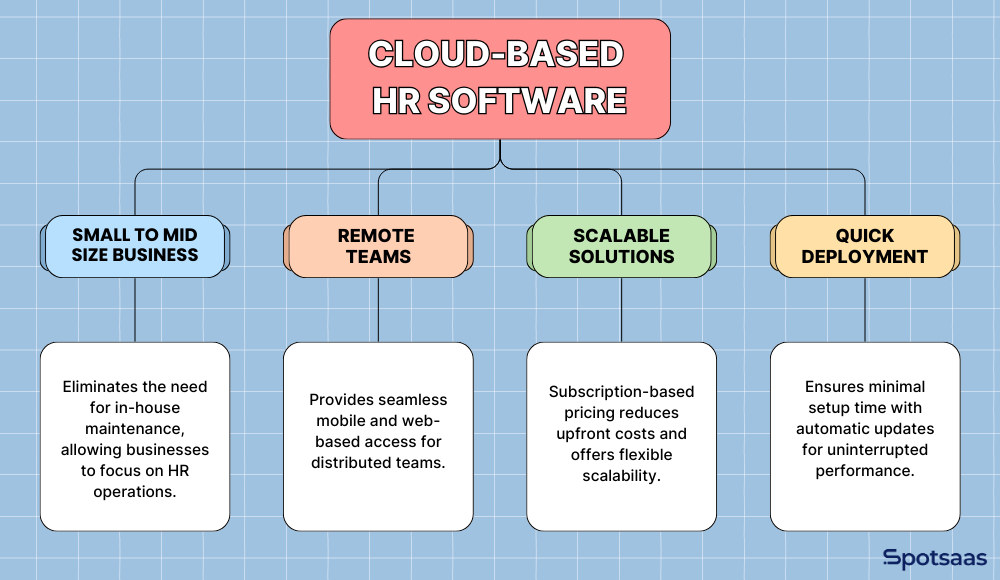
Small to Medium-Sized Businesses with Limited IT Resources
Organizations without a dedicated IT team benefit from cloud-based solutions since they cut out the need for in-house server maintenance and manual updates. That frees up businesses, including construction companies, to focus on HR operations instead of technical upkeep.
Companies with a Remote or Hybrid Workforce
Cloud-based HR software lets employees and HR teams access the system from anywhere, which makes it a strong choice for businesses with distributed teams. With mobile and web-based access, HR tasks get handled efficiently no matter where people are working from — an employee in one time zone can submit a leave request that an HR manager in another time zone approves without either of them being tied to an office network.
Organizations Looking for Cost-Effective, Scalable Solutions
Subscription-based pricing models reduce upfront costs and offer the flexibility to scale as the business grows, which makes cloud-based solutions a cost-efficient option. To stay efficient while scaling, organizations should also look for ways to optimize cloud costs and avoid paying for resources they aren’t using.
Businesses Needing Quick Deployment and Automatic Updates
With minimal setup requirements, cloud-based HR software can be up and running quickly. Automatic updates mean businesses always have the latest features without needing IT to step in, which adds up to less downtime and steadier software improvements without extra cost.
On-Premise HR Software is Best for
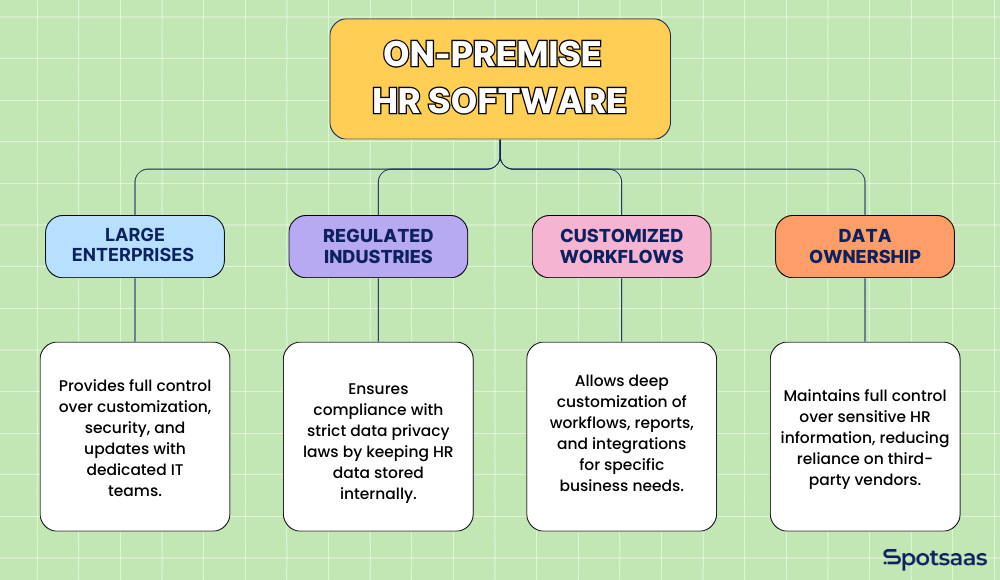
Large Enterprises with Dedicated IT Teams
Organizations with solid IT infrastructure can manage on-premise HR software efficiently, keeping full control over customization, security, and updates. That setup gives them the flexibility to tailor the software to internal operational needs, right down to how specific workflows are structured or how data is stored across departments.
Industries with Strict Regulatory Compliance
Businesses in sectors such as healthcare companies and finance companies that must follow heavy data privacy and security regulations often prefer on-premise solutions to keep full control over their HR data.
With data stored internally, companies can put security protocols in place that line up with regulatory requirements, and they don’t have to rely on a third-party vendor’s audit trail or attestations to prove compliance during a regulatory review.
Companies with Highly Customized HR Workflows
On-premise HR software allows for extensive customization, letting businesses tailor workflows, reports, and integrations to their specific operational needs — useful for organizations with complex HR processes that need tailored automation.
Organizations That Prioritize Complete Data Ownership
Businesses that need absolute control over their data, security protocols, and compliance measures benefit from on-premise solutions, which keep sensitive HR information within internal servers.
This cuts down the risks tied to third-party data management and potential security breaches, since there’s no external provider in the chain who could be the point of failure if something goes wrong.
Pros and Cons of Cloud HR Software: A Balanced Comparison
| Pros | Cons |
|---|---|
| Lower upfront cost with pay-as-you-go pricing | Less control over data security (data stored in vendor’s cloud) |
| Quick setup and deployment with no hardware requirements | Subscription fees add up over time (higher TCO for large companies) |
| Anywhere access for remote and hybrid teams | Limited customization compared to on-premise solutions |
| Automatic software updates and minimal IT workload |
Pros and Cons of On-Premise HR: Control vs Complexity
| Pros | Cons |
|---|---|
| Full control over data security and compliance | High upfront cost for software, servers, and IT staff |
| One-time licensing fee (can be more cost-effective long-term) | Complex setup and maintenance requiring dedicated IT resources |
| Highly customizable to fit unique business needs | Limited accessibility (not ideal for remote teams) |
| No dependency on external vendors for system maintenance | Manual software updates can lead to outdated systems |
Emerging Trends in HR Software: Hybrid Models, AI, and Compliance
HR technology is evolving fast, with businesses adopting new approaches to improve efficiency, security, and employee experience. None of this is happening in a vacuum — it’s a direct response to distributed teams, tighter data regulations, and HR departments that are expected to do more with the same headcount. Here are some of the key trends shaping HR software adoption today.
Hybrid HR Solutions
Many businesses are moving toward a hybrid HR approach, combining on-premise and cloud-based systems. This model offers the flexibility of cloud-based features like automation and remote access, while keeping critical data security on internal servers.
Hybrid solutions help organizations balance customization, compliance, and scalability based on their operational needs — for example, running payroll and core HR records on-premise for compliance reasons, while handling recruitment or employee self-service through a cloud layer that’s easier to update and access remotely.
AI-Powered HR Tech
The rise of AI-driven HR software is changing recruitment, payroll, and employee engagement. AI tools assist with automated resume screening, predictive hiring, and workforce analytics. This gives HR teams more data to work with when making decisions. AI-powered chatbots and virtual assistants are also taking over parts of employee onboarding and self-service HR tasks, cutting down manual workload — freeing HR staff to spend more time on things that actually need a human, like resolving disputes or coaching managers.
Data Privacy Regulations
With strict data protection laws such as GDPR, CCPA, and HIPAA compliance, businesses are prioritizing HR software that keeps them secure and compliant. Companies look for solutions that offer data encryption, multi-factor authentication, and real-time monitoring to protect sensitive employee information while staying compliant with global regulations.
Employee Self-Service Portals
Modern HR software is improving the employee experience with self-service dashboards that let staff access payroll, request leave, and manage benefits on their own. These portals cut down the administrative load on HR teams while improving employee engagement and retention — employees generally prefer being able to check their own pay stub or update their address without having to file a ticket with HR and wait for a reply.
As businesses keep digitizing HR processes, adopting AI, hybrid models, and compliance-focused solutions will matter more for improving efficiency and security in workforce management.
HR Software Cost Comparison: Cloud vs On-Premise Pricing Breakdown
The cost of HR software depends on several factors, including initial investment, ongoing expenses, scalability, and long-term ownership costs. Cloud-based HR software offers a low upfront investment with predictable subscription pricing, while on-premise HR software may provide long-term savings for businesses that plan to use it for many years and can absorb the larger day-one cost.
Use a comparison checklist to weigh both options against your budget, IT resources, and long-term business goals. It’s worth running the numbers over a multi-year horizon, not just year one, since that’s usually where the two pricing models diverge the most.
| Cost Factor | Cloud-Based HR Software | On-Premise HR Software |
|---|---|---|
| Initial Costs | Requires minimal upfront investment, with a subscription-based pricing model. No need for expensive hardware or an IT team. | Involves higher initial costs, including licensing fees, server setup, and IT infrastructure investments. |
| Ongoing Costs | Recurring subscription fees include software access, updates, security patches, and vendor support. Costs may rise as the business grows. | Requires budgeting for maintenance, security updates, and IT staff salaries. No recurring software fees, but ongoing expenses exist. |
| Scaling Costs | Easily scalable by adjusting subscription plans. Businesses pay only for what they use. This makes it cost-effective for growing teams. | Scaling requires additional investments in hardware, infrastructure upgrades, and IT resources. Expanding storage or adding users can be costly. |
| Total Cost of Ownership (TCO) | Becomes more expensive over time for large enterprises due to continuous subscription payments. Costs increase as the company scales. | More cost-effective for businesses planning long-term use. After the initial investment, ongoing costs are lower for enterprises with stable IT teams. |
How to Choose the Best HR Software for Your Business in 2026
Choosing the right HR software takes a careful look at your business needs, budget, and technical capabilities. Businesses need to weigh whether cloud-based or on-premise HR software fits their operational goals better, and that decision usually comes down to a handful of practical questions, not one single deciding factor.
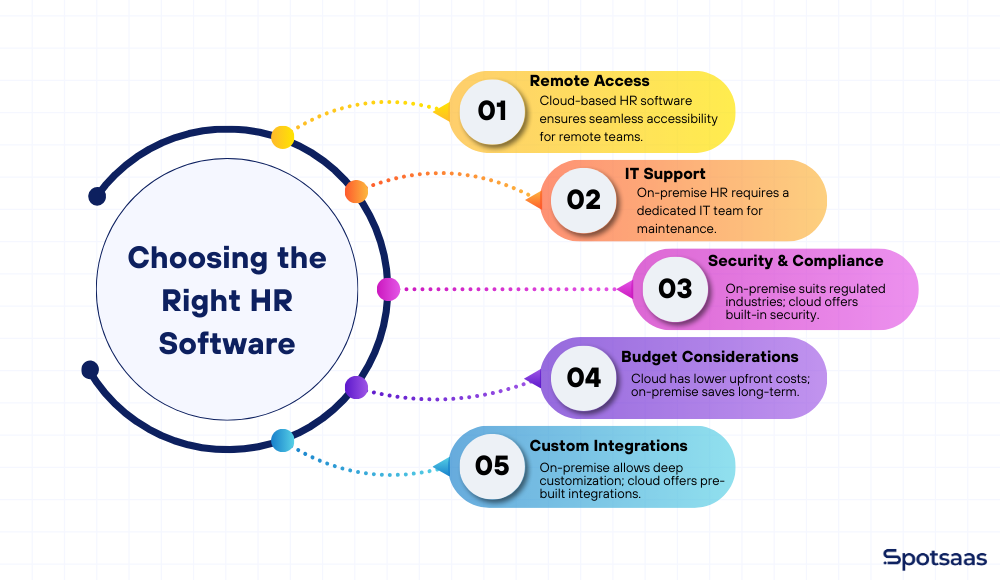
Remote Access to HR Tools
Businesses with remote or hybrid teams should lean toward cloud-based HR software for easy access from any location. On-premise solutions may not work as well unless you already have VPN or remote access infrastructure in place, since employees would otherwise need to tunnel into the company network just to check a pay stub.
IT Team for Software Deployment and Updates
If your company has a dedicated IT team, on-premise HR software can be a viable option. If IT resources are limited, though, cloud-based HR software is the better call, since it needs minimal maintenance and updates itself automatically.
Data Security & Compliance Priorities
Companies in highly regulated industries (such as healthcare, finance, or government) that need full control over data security may prefer on-premise HR software. Cloud-based solutions, on the other hand, come with built-in security measures and compliance support, but store data on third-party servers.
Budget for Implementation and Ongoing Costs
Cloud-based HR software has lower upfront costs but requires ongoing subscription fees. On-premise software costs more up front, but it may pay off in the long run for businesses that prefer a one-time investment over recurring payments.
HR software implementation also tends to be faster and more straightforward with cloud-based solutions, while on-premise systems can need more time, IT support, and infrastructure setup during implementation.
Custom Integrations with Existing HR & Payroll Tools
Companies that rely on customized HR workflows should look closely at integration capabilities. On-premise solutions allow for deep customization, while cloud-based HR software typically offers pre-built third-party integrations.
Weighing these factors together helps businesses land on whether cloud-based or on-premise HR software is the better fit for their needs. None of these factors work well in isolation — a company with a great IT team but low customization needs might still be better served by cloud software, for instance, simply because it frees that IT team up for other priorities.
Final Verdict: Cloud vs On-Premise HR Software in 2026
The right HR software depends on business size, budget, security needs, and IT capabilities. Cloud-based HR software works well for SMBs and fast-growing companies, offering low upfront costs, scalability, and remote access. On-premise HR software suits large enterprises and heavily regulated industries, offering more control, security, and customization.
Businesses should carefully weigh cost, security, and IT resources before deciding — and if you’re not sure, a free trial of cloud-based HR software is a low-risk way to test the fit. Getting this choice right leads to a more efficient, compliant HR management experience that actually matches the organization’s needs.
FAQ’s: Cloud-Based vs On-Premise HR Software
Which is better, cloud-based or on-premise HR software?
The best choice depends on your business size, budget, security needs, and IT capabilities.
Is cloud-based HR software secure?
Yes, reputable providers offer encryption, multi-factor authentication, and compliance with GDPR, CCPA, and SOC 2.
Does on-premise HR software require an IT team?
Yes, businesses need an in-house IT team for maintenance, updates, and security management.
Which option is more cost-effective?
Cloud-based HR software has lower upfront costs, while on-premise solutions can be cheaper in the long term.
Can I switch from on-premise to cloud-based HR software?
Yes, data migration is possible, but businesses should assess compatibility, security, and integration needs.

- Independent picks for exactly what you just read about
- Matched to your team size & needs
- Vendors don't pay for placement
Step 1 of 4
How big is your team?
We tailor recommendations to companies your size.















Related Articles
Applicant Tracking Software
monday.com for HR and Recruiting (2026): Hiring Pipelines, Onboarding and When You Need an ATS
Continue reading →
HR software
Gusto vs QuickBooks Payroll 2026: Prices, Features and Verdict
Continue reading →
Best Tools
Best PEO for Small Business in 2026: 8 Providers, Prices and Certification
Continue reading →
HR software
Gusto vs Paychex 2026: Published Prices vs Quote-Based Payroll
Continue reading →