

Training Post Review: Is It The Right Learning Management System (LMS) Software For Your Team?
Best for SMB teams · Mid-market · Enterprise
 SOC 2
SOC 2Add to compare
Training Post offers custom pricing plan
Overview
Pricing
Features
Buyer feedback
Alternatives
Media
Security & Compliance
Support
FAQ
Blogs
What is Training Post?
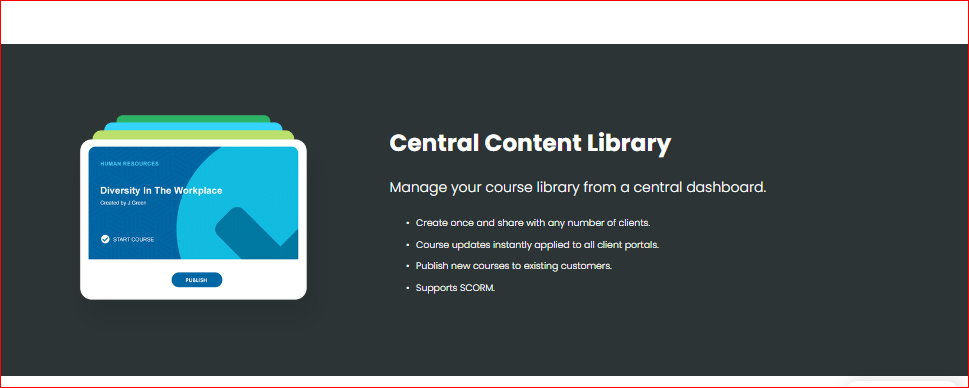
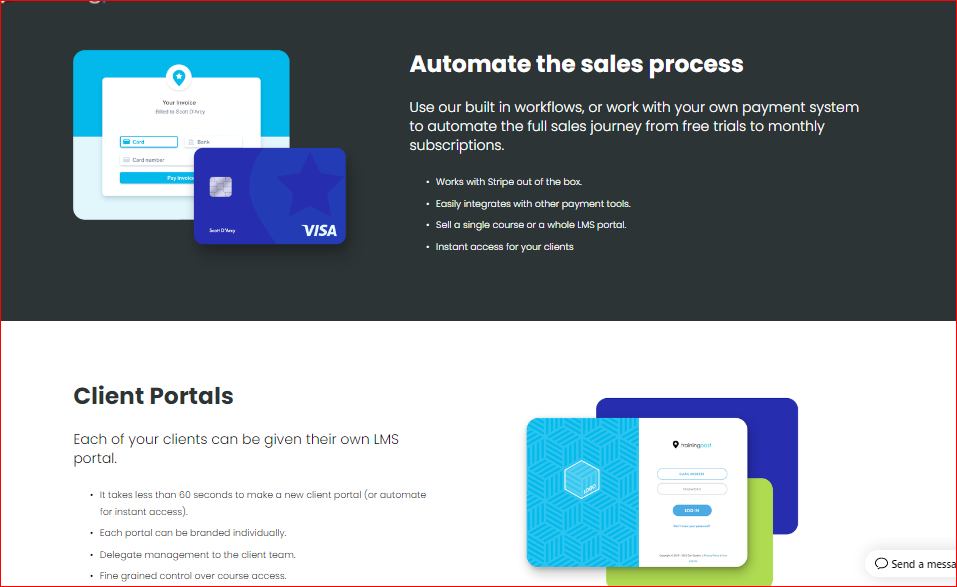
Training Post is a powerful learning management system (LMS) designed specifically for business-to-business training providers, offering seamless automation, scalability, and flexibility. It streamlines the sales process with built-in workflows and Stripe integration, enabling effortless transactions for single courses or full LMS portals. The Client Portals feature allows businesses to create individually branded portals within seconds, complete with delegated management and fine-grained course access control. A central content library ensures easy course management and instant updates, while SCORM compatibility supports custom and third-party content. Additional features like progress tracking, certification, user groups, and mobile access make Training Post an ideal cloud-based LMS for efficient, scalable training operations.
Pricing
Training Post offers custom pricing plan
Best For
Suited for small teams, SMBs, and enterprise
Security & Compliance
SOC 2Data residency:Global
Training Post Screenshots

Training Post was reviewed internally using user feedback, in-house testing, and market research to assess its performance, reliability, and user experience. Learn how we review products and our evaluation process.

Who should consider Training Post
- Team types
- Large Enterprises, Medium Business
Why teams choose Training Post
Supports custom courses, off-the-shelf eLearning, and third-party content integration.
Manage, update, and distribute courses efficiently across multiple client portals.
Instantly create and customize branded learning portals with delegated client management.
Is Training Post right for you?
What buyers should know before choosing Training Post
Training Post LMS is a B2B learning management system built for training providers who need to automate course delivery and client management. The client portal lets you create branded LMS spaces quickly—setup takes under a minute.
The central content library syncs course updates across all client instances, and SCORM support covers most standard course formats. Before shortlisting, verify two key limitations.
First, payment processing only integrates with Stripe; if you need Authorize. net, PayPal, or another processor, you'll need a workaround or custom integration.
Second, the automation features (workflows, scheduling, notifications) have a learning curve—plan 2–3 hours of setup time per workflow, and budget for onboarding if your team hasn't used automation tools before. In your demo, confirm that the content library sync works for your course structure (video, SCORM packages, PDFs, quizzes), test the client portal branding options to ensure it matches your brand guidelines, and ask about API access if you plan to connect it to your CRM or accounting software.
Pricing is per-client-seat, so calculate your total cost based on your largest client base, not just average clients.
Training Post pros and cons
- Training Post pros
Supports custom courses, off-the-shelf eLearning, and third-party content integration.
Manage, update, and distribute courses efficiently across multiple client portals.
Instantly create and customize branded learning portals with delegated client management.
- Training Post cons
Some businesses may require additional tools beyond Stripe for payment flexibility.
Branding options exist, but deeper UI customization may be restricted.
Ready to try it?
Get started with Training Post
Connect with the team for a personalised demo.
Still comparing?
See how it stacks up
Compare Training Post side-by-side with top Learning Management System (LMS) Software alternatives.



What is the pricing of Training Post?
Training Post uses custom pricing — plans are tailored to your team size and needs. Contact them for a quote.
Training Post Pricing Plans
Weighing your options?
Not sure if Training Post fits your budget?
Training Post reviews and ratings
What buyers like
- Supports custom courses, off-the-shelf eLearning, and third-party content integration.
- Manage, update, and distribute courses efficiently across multiple client portals.
- Instantly create and customize branded learning portals with delegated client management.
Common complaints
- Some businesses may require additional tools beyond Stripe for payment flexibility.
- Branding options exist, but deeper UI customization may be restricted.
Be the first to review Training Post
You'll help thousands of buyers make a smarter decision.

- See if Training Post fits your business
- Real pricing — no sales pressure
- A demo or quick answers, your call
Step 1 of 4
How big is your team?
We tailor recommendations to companies your size.















What are the features of Training Post?
Assignments are an essential feature of software programs that allow users to systematically organize, track, and manage tasks and projects.…
Bills management is a crucial aspect of any personal or professional budgeting system. It involves the tracking and organizing of various bi…
A client portal is a software that allows your company to share digital files, information, and services with customers. For example, it wil…
The Content Library feature is a powerful tool designed to help users manage, organize, and access a vast array of digital content in one ce…
Your staff will receive online courses and other learning resources through a corporate learning management system. It aids in the onboardin…
A custom domain is a one-of-a-kind branded name for a website. The custom domain of Nation Builder, for example, is nationbuilder.com. Vanit…
To improve attraction, brands are turning to individualized branding tactics. Brands are putting more power in the hands of consumers than e…
A real-time email marketing dashboard displays metrics. This allows individuals to track the effectiveness of an email marketing initiatives…
Desktop interface refers to the graphical user interface (GUI) that appears on a computer screen, allowing users to interact with their comp…
Due date tracking is a feature of software that allows users to efficiently manage their tasks and deadlines. It provides a comprehensive ov…
Email Alerts are a powerful feature in most software applications that allows users to stay informed and updated on important events, tasks,…
A learning portal is an online platform designed to facilitate learning and development for individuals and organizations. It provides a cen…
Real-time data gathering and transfer between the jobsite and project managers at the office is possible with mobile access. Employees on th…
Multi-factor authentication (MFA) is a security mechanism that verifies a user's identity for a login or other transaction by requiring mult…
Payments are an essential feature in any software that deals with transactions or monetary activities. This feature allows users to make and…
The technique of determining how much progress has been achieved toward the conclusion of an ongoing project is known as progress tracking.…
A report is a type of writing that is organized around identifying and examining issues, events, or results that have occurred in the physic…
A SCORM compliant system is a learning management system that follows the guidelines outlined in the SCORM (Sharable Content Object Referenc…
Single sign-on (SSO) allows users to log in to various applications with a single set of credentials, making it safe and straightforward. It…
User Management is a crucial feature in software which aims to efficiently manage the users accessing the system. This feature enables the a…
The process of buying and selling actual goods and services through the internet is known as ecommerce. It entails the exchange of data or c…
With the growing popularity of eLearning and its application to corporate training needs, many companies are popping up offering eLearning s…
Training Post security and data handling
Key compliance certifications and security features for IT and security teams evaluating Training Post.
Certifications

Developer & data
Alternatives to Training Post
Recommended
Streamline your training with Trainual.
Excellent





Training Post Support Options
Frequently Asked Questions About Training Post
Common questions buyers ask before choosing Training Post.
Training Post is a Learning Management System (LMS) Software. Training Post offers Client Portal, Reports, SCORM Compliance, Content Library, Multi-factor Authentication and many more functionalities.
Buyers commonly note the following limitations of Training Post: Some businesses may require additional tools beyond Stripe for payment flexibility.; Branding options exist, but deeper UI customization may be restricted..
Some top alternatives to Training Post includes Trainual, ClassTrack, NEO LMS, JoomlaLMS and Discovery Education.
Training Post offers Quotation Based pricing model
The starting price is not disclosed by Training Post. You can visit Training Post pricing page to get the latest pricing.
Free buyer scorecard
Evaluate Training Post with the learning management software buyer scorecard
A weighted learning management software scorecard to assess Training Post objectively and compare it against the alternatives.
- Weighted criteria you can edit
- Score vendors side-by-side
- Shareable with your buying committee
No file downloads on screen — we email it to you. One-click unsubscribe anytime.
Ready to try it?
Get started with Training Post
Get connected with the team for a personalised demo.
About the reviewer
Rajat Gupta is the founder of Spotsaas. Over the past two years, he has reviewed 2,000+ tools across CRM, HR, AI, and finance — applying hands-on product research and a background in commerce and the CFA program to evaluate software through a business and ROI lens. His goal: help teams make software decisions they won't regret.
Disclaimer: This research has been collated from a variety of authoritative sources. We welcome your feedback at [email protected].