
IBM MaaS360 Review: Is It The Right Unified Endpoint Management (UEM) Software For Your Team?
Best for SMB teams · Mid-market · Enterprise
Free Trial Available
 GDPR
GDPR SOC 2
SOC 2 HIPAA
HIPAA ISO 27001
Add to compare
Starts from $4 / client device per month* when monthly
Overview
Pricing
Features
Buyer feedback
Alternatives
Media
Security & Compliance
Support
FAQ
Blogs
What is IBM MaaS360?
IBM MaaS360 is an enterprise-grade mobile device and endpoint management solution designed to help IT teams securely manage smartphones, tablets, laptops, desktops, and IoT devices from a single platform. Built for CIOs, CISOs, and IT administrators, MaaS360 supports a wide range of use cases, including bring your own device (BYOD), unified endpoint management (UEM), and mobile threat defense (MTD). Key features include AI-driven risk assessments, real-time threat detection, secure containerization of apps, and user risk scoring. It offers a frictionless identity and access management experience, strong data loss prevention (DLP), and zero-touch deployment. IBM MaaS360 seamlessly integrates with various enterprise systems and cloud services to support secure, efficient mobile workforces across industries.
Pricing
Starts from $4 / client device per month* when monthly
Free Trial available
Best For
Suited for small teams, SMBs, and enterprise
Security & Compliance
SOC 2GDPRHIPAAISO 27001SSO & MFA supported
Data residency:Global
Platform
Web + mobile app (iOS & Android)
Installed - Windows
Installed - Mac
IBM MaaS360 Screenshots
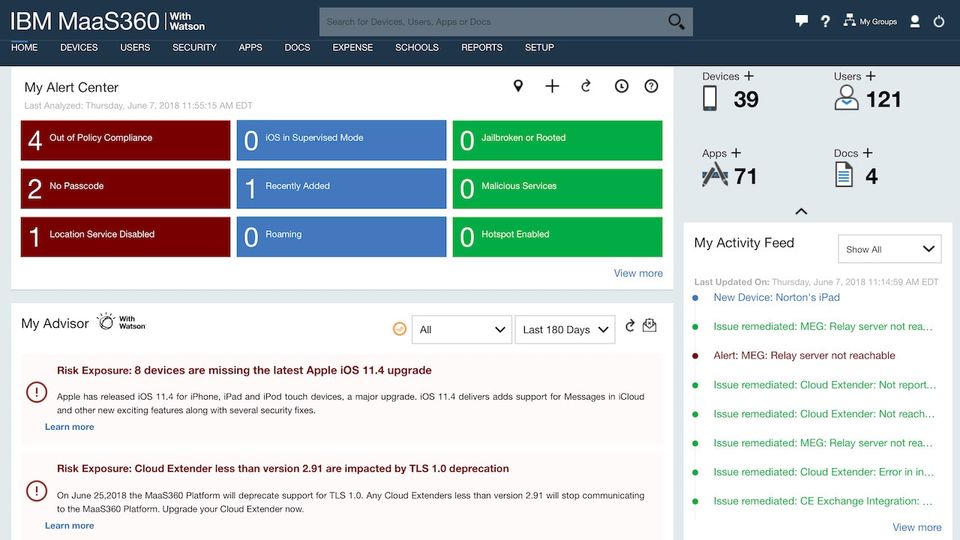
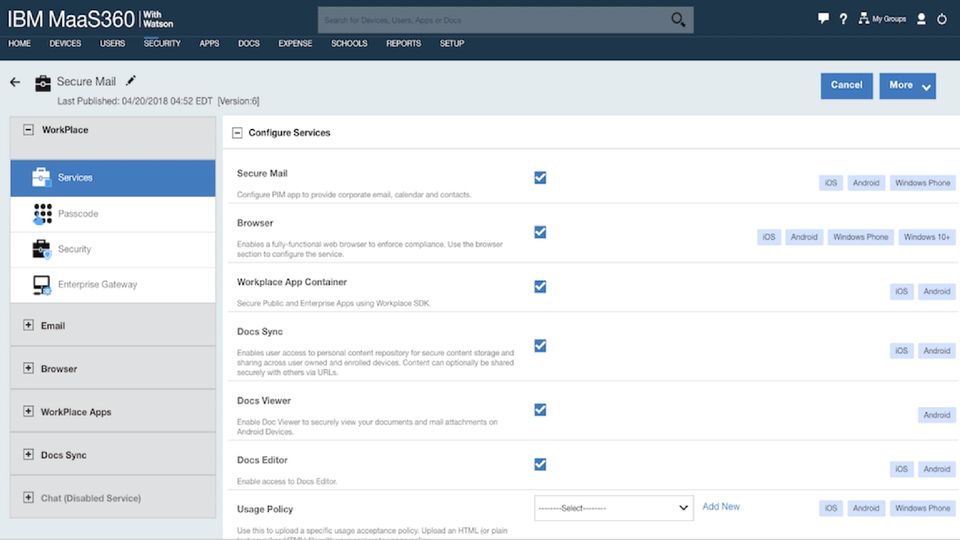


IBM MaaS360 was reviewed internally using user feedback, in-house testing, and market research to assess its performance, reliability, and user experience. Learn how we review products and our evaluation process.

Who should consider IBM MaaS360
- Use cases
- Healthcare, Finance, Manufacturing
- Team types
- IT Administrators, CISOs
- Company size
- 100-10,000+ employees, Large Enterprises
- Workflow style
- Enterprise-focused and process-heavy
- Setup complexity
- High
Why teams choose IBM MaaS360
Scalable to manage hundreds of thousands of devices
AI-powered threat intelligence and automated security recommendations
Role-based administration for secure and streamlined management
Is IBM MaaS360 right for you?
Best for large enterprises needing scalable, AI-driven unified endpoint management.
Choose IBM MaaS360 if
- You manage hundreds of thousands of devices across diverse platforms and locations.
- You require AI-powered threat intelligence with automated security recommendations.
- You need role-based administration to securely delegate endpoint management tasks.
Consider alternatives if
- You are a small business with limited IT resources and need simpler solutions.
- You need highly customizable reporting and modern, intuitive user interfaces.
What buyers should know before choosing IBM MaaS360
IBM MaaS360 is a powerful and scalable Unified Endpoint Management (UEM) solution that provides businesses with extensive device security, compliance monitoring, and AI-driven insights. Its ability to track and manage hundreds of thousands of endpoints makes it a strong choice for large organizations.
The platform’s role-based administration enhances security while reducing IT workload. However, its complex interface and steep learning curve may pose challenges for new users.
Additionally, premium pricing for advanced features could be a barrier for smaller businesses. Overall, MaaS360 is a robust UEM solution ideal for enterprises seeking a security-first approach to endpoint management.
IBM MaaS360 pros and cons
- IBM MaaS360 pros
Scalable to manage hundreds of thousands of devices
AI-powered threat intelligence and automated security recommendations
Role-based administration for secure and streamlined management
- IBM MaaS360 cons
Occasional lags or delays in policy enforcement in large deployments
Advanced AI and security features require higher-tier plans
Ready to try it?
Get started with IBM MaaS360
Start your free trial — no credit card required.
Still comparing?
See how it stacks up
Compare IBM MaaS360 side-by-side with top Unified Endpoint Management (UEM) Software alternatives.



What is the pricing of IBM MaaS360?
IBM MaaS360 Pricing Plans
Essentials
$4
per client device per month*
AI & Analytics Advisor
Device Mgmt & App Mgmt
Identity Management
Mobile Expense Management
Granular Patch Management
Show more +
Deluxe
$5
per client device per month*
Essentials+
Security-rich Mobile Mail
Enterprise Email
AI Chatbot & Voice Assistant
Premier
$6.25
per client device per month*
Deluxe+
Business Dashboard For Apps
OS VPN & Secure Browser
App Security
Content Management
Show more +
Enterprise
$9
per client device per month*
Premier+
Mobile Threat Management
Application Patching
Mobile Document Editor
Mobile Document Sync
Weighing your options?
Not sure if IBM MaaS360 fits your budget?
IBM MaaS360 reviews and ratings
Buyer sentiment
Overall positive sentiment highlights strong security features and scalability, tempered by concerns about UI complexity and pricing.
What buyers like
- Scalability
- AI-driven security insights
- Role-based access control
Common complaints
- User interface complexity
- Limited reporting customization
Are you using IBM MaaS360?

- See if IBM MaaS360 fits your business
- Real pricing — no sales pressure
- A demo or quick answers, your call
Step 1 of 4
How big is your team?
We tailor recommendations to companies your size.















What are the features of IBM MaaS360?
IBM MaaS360 provides real-time alerting capabilities that notify IT administrators of critical security events, configuration changes, or de…
IBM MaaS360 offers complete applications management tools that let IT teams distribute, configure, update, and remove apps across various de…
Blacklisting, also known as blocklisting, is a software feature that allows users to control and limit access to certain content or websites…
IBM MaaS360 includes powerful configuration management tools that let IT teams define and apply consistent settings across all managed devic…
Customization is a powerful feature offered by various software solutions that allows users to tailor the software according to their specif…
IBM MaaS360 enforces encryption standards to protect sensitive data both at rest and in transit across managed devices. It supports native d…
The platform features advanced endpoint monitoring that continuously assesses the health, activity, and compliance status of all enrolled de…
IBM MaaS360 speeds up the process of enrolling new devices into the management system through automated workflows and self-service portals.…
Maintenance management in IBM MaaS360 allows IT teams to schedule, track, and automate updates or patches across all connected devices. The…
IBM MaaS360 supports Android, iOS, Windows, macOS, and Chrome OS. This multi-OS support lets enterprises manage diverse device environments…
With IBM MaaS360, organizations can manage a wide array of devices including smartphones, tablets, laptops, desktops, and IoT endpoints. Its…
IBM MaaS360 helps organizations meet regulatory compliance standards such as GDPR, HIPAA, and ISO by enforcing encryption, access control, a…
Remote management is a software feature that allows users to access and control their computer or network from a remote location. This featu…
Remote monitoring lets users track and monitor devices from a central location. It provides visibility into the health, status, and performa…
Reporting provides complete visibility of the project and a clear grasp of what has to be done to the on-site personnel. The reporting proce…
A report is a type of writing that is organized around identifying and examining issues, events, or results that have occurred in the physic…
Usage Monitoring Tracking refers to the combined process of observing, recording, and analyzing the utilization of resources, systems, appli…
Whitelisting is a software feature that allows users to create a list of trusted sources, programs, or processes that are given permission t…
IBM MaaS360 security and data handling
Key compliance certifications and security features for IT and security teams evaluating IBM MaaS360.
Certifications
Security features
Developer & data
Alternatives to IBM MaaS360





Why buyers keep looking beyond IBM MaaS360
The interface requires MDM expertise — teams new to device management often switch to Jamf or Microsoft Intune for simpler onboarding
Report and dashboard customization is limited, forcing organizations needing advanced analytics or compliance reporting to use separate tools
Pricing scales sharply for enterprises with advanced modules — larger deployments often choose SOTI MobiControl or ManageEngine for better per-seat costs
Performance consistency varies across operating systems and device models, creating friction in diverse BYOD environments
Integration with Google Workspace, Slack, and Atlassian tools is less direct than competing UEM platforms
App-level policy controls lack granularity for development and finance teams — VMware Workspace ONE offers finer-grained app sandboxing
IBM MaaS360 Support Options
Frequently Asked Questions About IBM MaaS360
Common questions buyers ask before choosing IBM MaaS360.
IBM MaaS360 is a Unified Endpoint Management (UEM) Software. IBM MaaS360 offers Multi-device Support, Multi-OS Support, Applications Management, Blacklisting, Remote Management and many more functionalities.
IBM MaaS360 is a strong fit if: You manage hundreds of thousands of devices across diverse platforms and locations.; You require AI-powered threat intelligence with automated security recommendations.. Consider alternatives if: You are a small business with limited IT resources and need simpler solutions.; You need highly customizable reporting and modern, intuitive user interfaces..
Buyers commonly note the following limitations of IBM MaaS360: Occasional lags or delays in policy enforcement in large deployments; Advanced AI and security features require higher-tier plans; Dashboard and navigation are less modern and intuitive than competitors.
Some top alternatives to IBM MaaS360 includes Scalefusion, Ivanti Unified Endpoint Manager, Microsoft Intune, MobileIron UEM and BlackBerry UEM.
IBM MaaS360 offers Free Trial, Subscription, Quotation Based pricing models
The starting price of IBM MaaS360 is $4/client device per month* when monthly
Ready to try it?
Get started with IBM MaaS360
Start your free trial — no credit card required.
About the reviewer
Rajat Gupta is the founder of Spotsaas. Over the past two years, he has reviewed 2,000+ tools across CRM, HR, AI, and finance — applying hands-on product research and a background in commerce and the CFA program to evaluate software through a business and ROI lens. His goal: help teams make software decisions they won't regret.
Disclaimer: This research has been collated from a variety of authoritative sources. We welcome your feedback at [email protected].