
X Cloud vs WebDrive Comparison

X Cloud
Starting at Contact for pricing
- Individuals
- Freelancers / Consultants
X Cloud is a decentralized cloud storage platform that revolutionizes traditional centralized storage. Its core software creates a powerful network by combining public and private cloud systems, providing unparalleled se…

WebDrive
Starting at $150 one-time purchase
- Free Trial
- Freelancers / Consultants
- Large Enterprises
WebDrive is a secure and reliable file access client designed for IT managers and business teams who need seamless connectivity across cloud and on-premise storage environments. It allows organizations to map popular ser…
X Cloud vs WebDrive — at a glance
| Feature | X Cloud | WebDrive |
|---|---|---|
| Rating | — | — |
| Reviews | — | — |
| Starting price | Contact for pricing | $150 one-time purchase |
| Free trial | No | Yes |
| Free version | No | No |
| Best for | Individuals, Freelancers / Consultants, Large Enterprises | Freelancers / Consultants, Large Enterprises, Medium Business |
| Category | Cloud File Storage Software | Cloud File Storage Software |
| Integrations | — | 2+ apps |
| Platforms | SaaS/Web/Cloud, Mobile - Android, Mobile - iOS, Installed - Windows, Installed - Mac | SaaS/Web/Cloud |
| API | — | — |
| Support modes | 24/7 (Live rep), Online | Online, Business Hours |
| Certifications | — | SOC 2 |
| Data residency | Global | Global |
Key differences between X Cloud and WebDrive
- Pricing: WebDrive starts at $150 one-time purchase. X Cloud pricing is not publicly listed.
- Free trial: WebDrive offers a free trial; X Cloud does not.
- Target audience: X Cloud is built for Individuals and Freelancers / Consultants, while WebDrive targets Freelancers / Consultants and Large Enterprises.
- Deployment: X Cloud supports SaaS/Web/Cloud, Mobile - Android, Mobile - iOS, Installed - Windows, Installed - Mac; WebDrive supports SaaS/Web/Cloud.
X Cloud vs WebDrive — find the better fit before you commit.
Which tool fits your team best
Which is actually cheaper for your team size
Where each product wins, per real buyers
Most Cloud File Storage Software tools look identical on paper. This comparison cuts to the differences that matter — pricing structure, team fit, and what real buyers found after signing up.
Biggest differences
Features
Pricing
Buying details
Security
Buyer feedback
Integrations
Product tour
Other options
Free PDF comparison
Download this X Cloud vs WebDrive comparison
Get the full side-by-side as a PDF — these picks plus the top Cloud File Storage Software tools, with verified ratings, pricing and features.
- Side-by-side on pricing, features & ratings
- Plus the category top 10, scored & ranked
- Emailed to you — no on-screen download
No file downloads on screen — we email it to you. One-click unsubscribe anytime.
Biggest differences
Start here before you go deeper into features.
Decentralized cloud storage offering enhanced security and scalability.
- You need a hybrid public-private cloud storage solution.
- Security and privacy are top priorities for your file storage.
- You want a scalable network leveraging user computing resources.
- You require a well-established platform with verified user ratings.
- You prefer traditional centralized cloud storage services.
Best for secure, seamless mapping of cloud storage as local drives without VPNs.
- You need to map multiple cloud services like SharePoint and Google Drive as local drives.
- Your IT team wants to simplify remote file access without complex VPN configurations.
- Enterprise-grade security features like MFA, SSO, and DLP compatibility are required.
- Your team requires built-in real-time collaborative editing within the file access tool.
- You need integrated project management or advanced analytics and reporting features.
X Cloud: Decentralized cloud storage offering enhanced security and scalability. WebDrive: Best for secure, seamless mapping of cloud storage as local drives without VPNs.
Description | X Cloud is a decentralized cloud storage platform that revolutionizes traditional centralized storage. Its core software creates a powerful network by combining public and private cloud ... Read More about X Cloud | WebDrive is a secure and reliable file access client designed for IT managers and business teams who need seamless connectivity across cloud and on-premise storage environments. It allows ... Read More about WebDrive |
|---|---|---|
Entry Level Pricing |
|
|
Free Trial Availability |
| |
Best Company Size | — | 50–1,000+ Employees |
Get pricing help | Get pricing help |
Where each option fits best
See where each product is strongest, which teams it fits, and what causes buyers to keep looking — before you commit.
Based on buyer reviews and verified product data collected by Spotsaas.
Key strengths
No key benefits available yet.
- Simplified Remote Access: Access files from anywhere without the complexity of VPNs, using familiar drive mappings across cloud and NAS platforms.
- Enterprise-Grade Security: Stay compliant with MFA, SSO, DLP, and secure file locking to protect sensitive data during remote and on-premise access.
- Easy Deployment for IT Teams: Preconfigure, remotely install, and standardize access across large organizations with silent setup and minimal training requirements.
Best fit
No best-fit guidance available yet.
- 50–1,000+ Employees
- Information Technology, Education, Healthcare, Financial Services, Legal Services, Government Agencies, Media & Entertainment
- IT Managers, System Administrators, Data Security Officers, Remote Work Coordinators, Compliance Managers, Business Analysts
Reasons buyers look elsewhere
No alternatives guidance available yet.
- Some users prefer platforms offering real-time collaborative editing rather than relying on file locking.
- Competitors often provide integrated project management tools, reducing the need for third-party apps.
- Businesses seeking advanced analytics and reporting features may find WebDrive’s focus on file access limiting.
Software Demo
Demo |
|---|
Need a second opinion?
Get shortlist help from a software advisor
Share your priorities, budget, and team needs, and we’ll help you narrow the options and understand the tradeoffs before you talk to vendors.

- Independent advice — matched to your business
- Understand the tradeoffs before you talk to vendors
- Free 15-min call with a software advisor.
Step 1 of 4
How big is your team?
We tailor recommendations to companies your size.















How do X Cloud and WebDrive Compare on Features?
Total Features | 10 Features | 9 Features |
|---|---|---|
Unique Features | No unique features | No unique features |
Get Quote | Get Quote |
Compare X Cloud and WebDrive on pricing
Review starting price, plan structure, and free-trial access side by side so you can see which option fits your budget and buying process.
Pricing Option | ||
|---|---|---|
Starting From |
|
|
Pricing Plans |
|
|
Pricing Page |  | 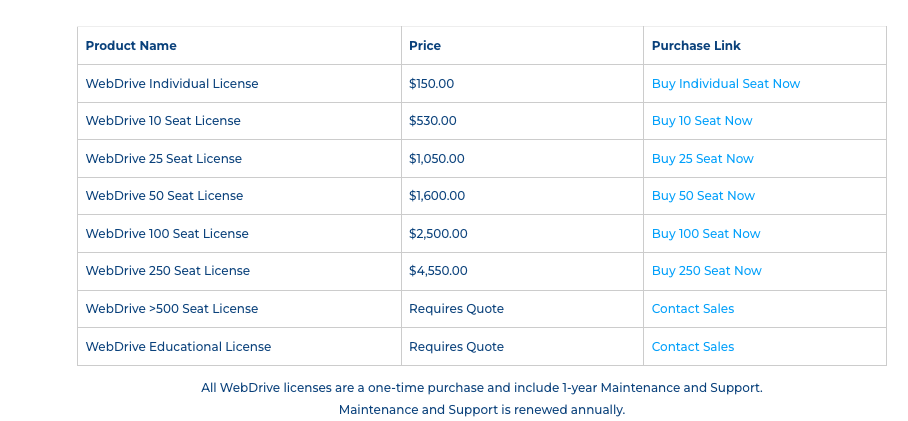 |
Other Details
Organization Types supported |
|
|
|---|---|---|
Platforms Supported |
|
|
Modes of support |
|
|
API Support |
|
|
Get help choosing | Get help choosing |
Security & Compliance
Certifications, data handling, and security controls for IT and compliance evaluators.
SOC 2 | — | ✓ Yes |
|---|---|---|
HIPAA | — | ✗ No |
Data Encryption | — | ✓ Yes |
Data Residency | 🌐 Global | 🌐 Global |
X Cloud User Reviews & Rating Comparison
Spotsaas Editor’s POV generated by AI | No expert review available for this product | What buyers like
Common complaints
|
|---|---|---|
Pros and Cons | No pros or cons available for this product |
|
Integrations
Integration with other apps | No Integration information available. |
|---|


List of Customers
Customers | No Customers information available. |  Honeywell  IHG  NASA |
|---|
Media and Screenshots
Screenshots |  2 Screenshots | 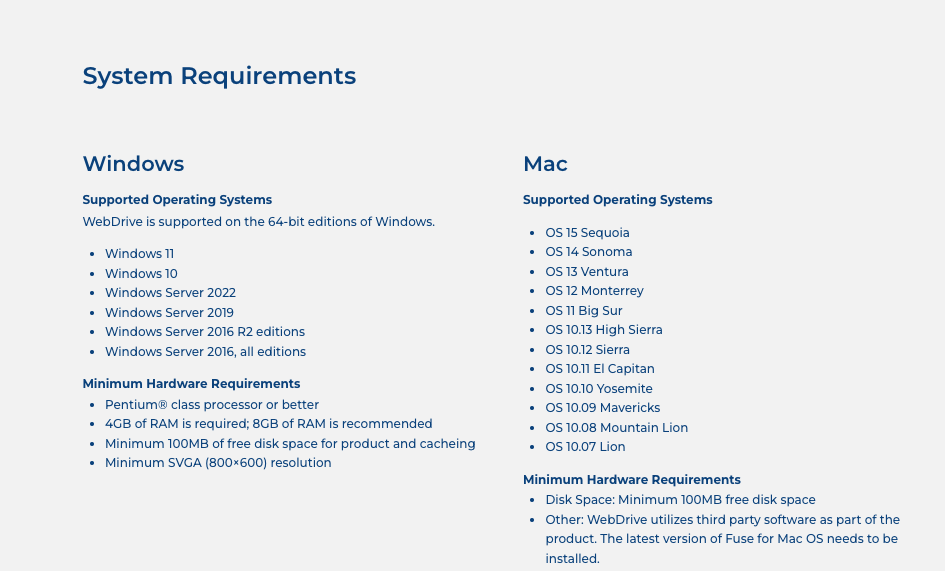 6 Screenshots |
|---|---|---|
Videos |  2 Videos |  1 Videos |
Top Alternatives to X Cloud and WebDrive in 2026
Alternatives |
|---|



Add another option to compare side by side
Search by product name to compare pricing, fit, and buyer feedback in one view.Compare similar software options



Related Blogs and Articles for Cloud File Storage Software


Disclaimer: This research has been collated from a variety of authoritative sources. We welcome your feedback at [email protected].
Frequently asked questions
- Which is better, X Cloud or WebDrive?
- X Cloud and WebDrive are closely matched with equal user ratings of -1.0. The right choice depends on your team size, budget, and specific Cloud File Storage Software needs.
- Do X Cloud and WebDrive offer a free trial?
- WebDrive offers a free trial. X Cloud does not.
- What is the starting price of X Cloud vs WebDrive?
- X Cloud starts at Contact for pricing. WebDrive starts at $150 one-time purchase.
- What are the top alternatives to X Cloud?
- Top alternatives to X Cloud include Internxt Drive, MultCloud, Equinix SmartKey, Filebase, Qualified.
- What are the top alternatives to WebDrive?
- Top alternatives to WebDrive include Vawlt, Deepbrid, FileWhopper, idgard, euBackups.