
wyBuild vs Ninite Pro Comparison

wyBuild
Starting at $172.99
- Free Trial
- Large Enterprises
- Medium Business
Introducing wyBuild, the ultimate solution for painless and efficient software updates. With its tagline "Automatic Updates, Make Patches," wyBuild takes the hassle out of keeping your Windows app up-to-date. Boasting a…

Ninite Pro
Starting at $35 /Month
- Free Trial
- Freelancers / Consultants
- Large Enterprises
Ninite Pro is a cloud-based patch management and software deployment solution designed to help IT administrators, managed service providers, and enterprise teams manage Windows systems with ease. Built for organizations…
Ninite Pro leads on user satisfaction with a 4.8-star rating across 39 reviews.
SpotSaaS Analysis
wyBuildNinite Pro
The core difference between wyBuild and Ninite Pro lies in their target users and functionality; wyBuild is tailored for small to medium businesses focusing on simple Windows app patching, while Ninite Pro is designed for mid-to-large IT teams requiring centralized management for software installations. Ideal buyers for wyBuild are developers of Windows desktop applications seeking an easy patching solution, whereas Ninite Pro is best suited for IT administrators in larger organizations looking for efficient software deployment and updates.
- Best for simple Windows-only app patch creation - Ideal for small to medium businesses - User-friendly interface with drag-and-drop features - Focuses on streamlined patching for desktop applications - Price: $172.99 - Suitable for teams valuing ease of use
- Best for centralized Windows patching and app deployment - Ideal for mid-to-large IT teams - Supports a wide range of industries including healthcare and finance - Emphasizes time-saving automation and minimal setup - Price: $35 - Designed for IT administrators and network engineers
wyBuild vs Ninite Pro — at a glance
| Feature | wyBuild | Ninite Pro |
|---|---|---|
| Rating | — | 4.8 / 5 |
| Reviews | — | 39 |
| Starting price | $172.99 | $35 /Month |
| Free trial | Yes | Yes |
| Free version | No | No |
| Best for | Large Enterprises, Medium Business, Small Business | Freelancers / Consultants, Large Enterprises, Medium Business |
| Category | Patch Management Software | Patch Management Software |
| Platforms | Installed - Windows | SaaS/Web/Cloud, Installed - Windows |
| API | — | — |
| Support modes | Online | Online |
| Data residency | US | US |
Key differences between wyBuild and Ninite Pro
- Pricing: wyBuild starts at $172.99, while Ninite Pro starts at $35 /Month.
- Target audience: wyBuild is built for Large Enterprises and Medium Business, while Ninite Pro targets Freelancers / Consultants and Large Enterprises.
- Deployment: wyBuild supports Installed - Windows; Ninite Pro supports SaaS/Web/Cloud, Installed - Windows.
wyBuild vs Ninite Pro — find the better fit before you commit.
Which tool fits your team best
Which is actually cheaper for your team size
Where each product wins, per real buyers
Most Patch Management Software tools look identical on paper. This comparison cuts to the differences that matter — pricing structure, team fit, and what real buyers found after signing up.
Biggest differences
Features
Pricing
Buying details
Security
Buyer feedback
Integrations
Product tour
Other options
Talk to an expert Talk to an expert | Talk to an expert Talk to an expert |
Biggest differences
Start here before you go deeper into features.
Best for simple, Windows-only app patch creation and automatic updates.
- You develop or maintain Windows desktop applications needing streamlined patching.
- Your team values a user-friendly interface with drag-and-drop patch creation.
- You want integrated, secure update delivery leveraging the open-source wyUpdate.
- You require patch management across multiple operating systems beyond Windows.
- You need a cloud-based or SaaS update solution with extensive user community support.
Best for streamlined Windows patching and app deployment in mid-to-large IT teams.
- You need centralized, web-based management of Windows software installations and updates.
- Your organization values time-saving automation and minimal setup complexity.
- You manage 50 to 10,000+ Windows devices and require real-time monitoring and device tagging.
- You require extensive customization of software installations beyond the provided catalog.
- Your environment depends on niche or uncommon applications not supported by Ninite Pro.
wyBuild: Best for simple, Windows-only app patch creation and automatic updates. Ninite Pro: Best for streamlined Windows patching and app deployment in mid-to-large IT teams.
Description | Introducing wyBuild, the ultimate solution for painless and efficient software updates. With its tagline "Automatic Updates, Make Patches," wyBuild takes the hassle out of keeping your ... Read More about wyBuild | Ninite Pro is a cloud-based patch management and software deployment solution designed to help IT administrators, managed service providers, and enterprise teams manage Windows systems with ... Read More about Ninite Pro |
|---|---|---|
Entry Level Pricing |
|
|
Free Trial Availability | ||
User RatingsBased on verified Spotsaas reviews | ||
Best Company Size | Small BusinessMedium Business | 50-500 employees500-10,000+ employees |
Get pricing help | Get pricing help |
Where each option fits best
See where each product is strongest, which teams it fits, and what causes buyers to keep looking — before you commit.
Based on buyer reviews and verified product data collected by Spotsaas.
Key strengths
No key benefits available yet.
- Centralized Software Management: Manage installation, updates, and removals across all Windows devices from a single web-based dashboard, improving efficiency and control.
- Bandwidth Efficiency Through Caching: Intelligent download caching reduces network load by routing updates through designated cache servers, enabling faster deployments and saving bandwidth.
- Real-Time Device Monitoring and Tagging: Provides live status updates and allows flexible device organization through tagging, enabling IT teams to focus on specific groups or clients easily.
Best fit
No best-fit guidance available yet.
- 50–10,000+ Employees
- IT Services, Managed Service Providers (MSPs), Healthcare, Education, Finance, Manufacturing
- IT Administrators, System Administrators, Managed Service Providers, Network Engineers, IT Operations Managers
Reasons buyers look elsewhere
No alternatives guidance available yet.
- Users often look for multi-OS support, including macOS and Linux, which Ninite Pro does not currently offer.
- Some organizations require built-in management of custom or in-house applications, a feature missing from Ninite Pro.
- Alternatives may provide deeper integration with comprehensive endpoint management platforms, covering antivirus, monitoring, and asset management.
Software Demo
Demo |  Ninite Pro has not given any software demo yet If you're the owner of this profile, add your demo.Contact us |
|---|
Need a second opinion?
Get shortlist help from a software advisor
Share your priorities, budget, and team needs, and we’ll help you narrow the options and understand the tradeoffs before you talk to vendors.
How do wyBuild and Ninite Pro Compare on Features?
Total Features | 0 Features | 4 Features |
|---|---|---|
Unique Features | No features | No unique features |
Get Quote | Get Quote |
Compare wyBuild and Ninite Pro on pricing
Review starting price, plan structure, and free-trial access side by side so you can see which option fits your budget and buying process.
Pricing Option | ||
|---|---|---|
Starting From |
|
|
Pricing Plans |
|
|
Pricing Page |  | 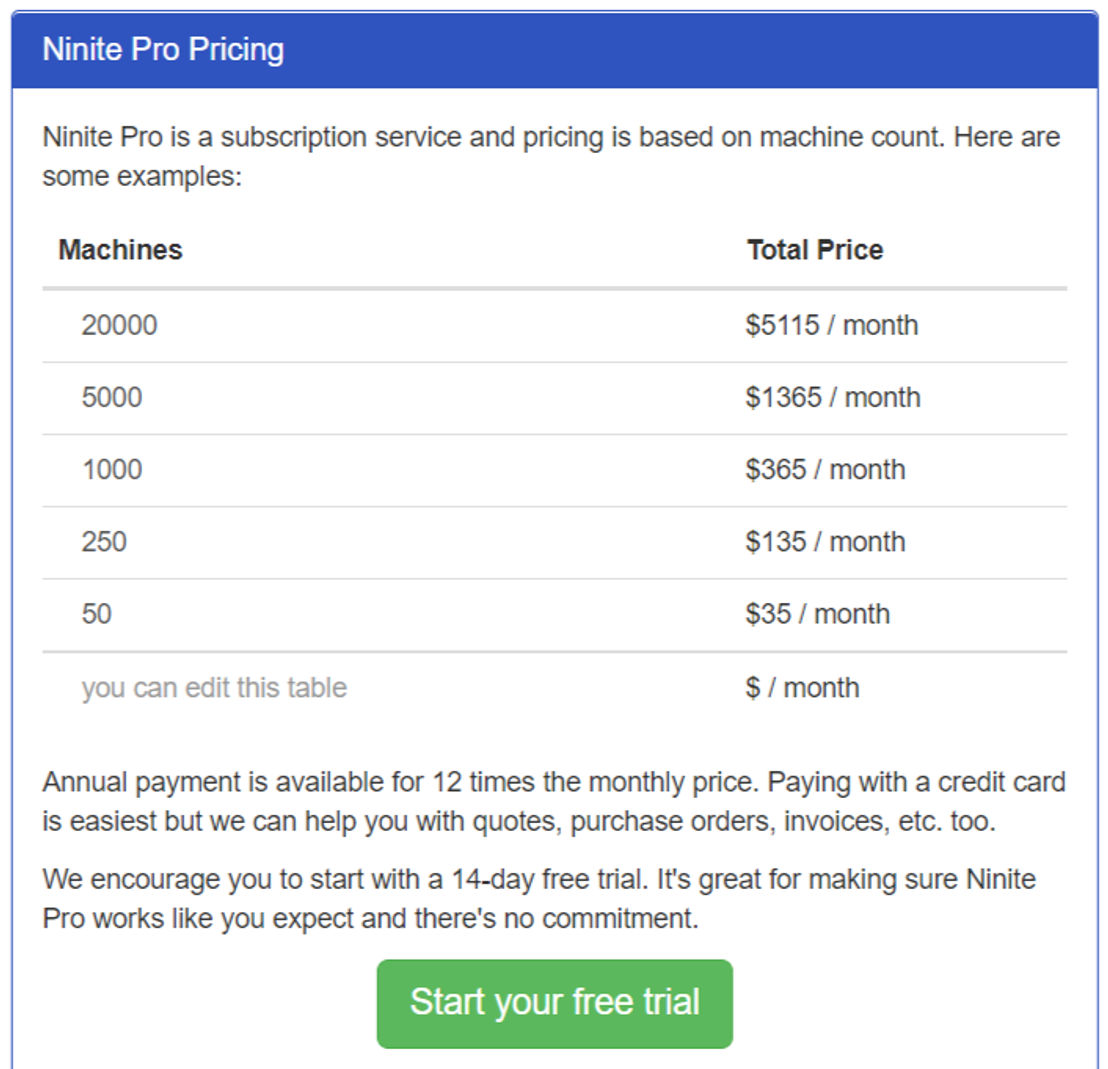 |
Other Details
Organization Types supported |
|
|
|---|---|---|
Platforms Supported |
|
|
Modes of support |
|
|
API Support |
|
|
Get help choosing | Get help choosing |
Security & Compliance
Certifications, data handling, and security controls for IT and compliance evaluators.
Data Residency | 🇺🇸 US | 🇺🇸 US |
|---|
wyBuild User Reviews & Rating Comparison
User Ratings | No reviews available for the product | |
|---|---|---|
Rating Distribution | No reviews available for this product | |
Spotsaas Editor’s POV generated by AI | Buyer sentiment Insufficient user feedback and ratings to determine overall buyer sentiment. What buyers like
Common complaints
| Buyer sentiment Users overwhelmingly appreciate Ninite Pro's ease of use and time-saving automation for Windows software management, despite some limitations in app selection and customization. What buyers like
Common complaints
|
Pros and Cons |
|
|
Positive Reviews | No reviews available for the product | No reviews available for the product |
List of Customers
Customers |  Philips  Toyota  Ubisoft | No Customers information available. |
|---|
Media and Screenshots
Screenshots | No screenshots available. | 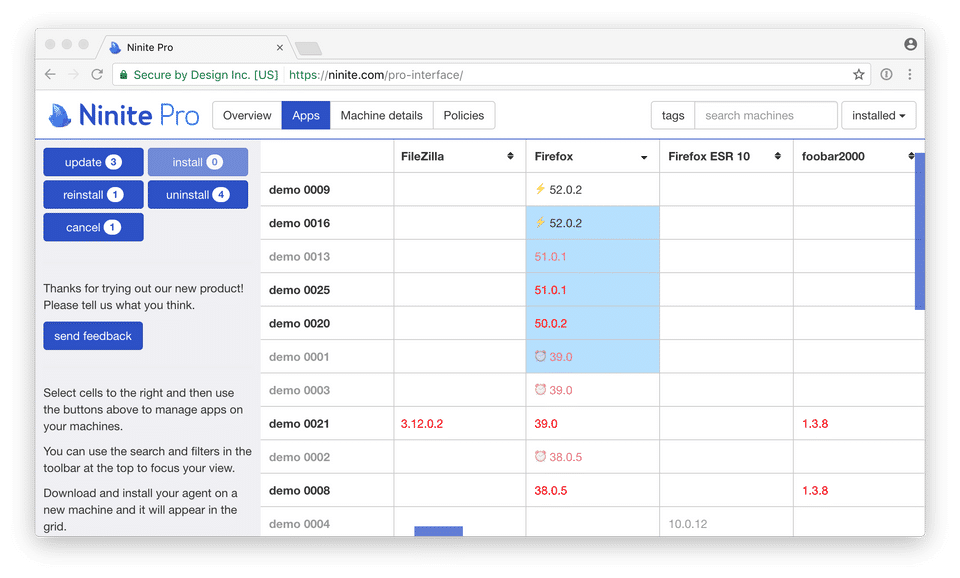 4 Screenshots |
|---|---|---|
Videos |  1 Videos | No videos available. |
Top Alternatives to wyBuild and Ninite Pro in 2026


Add another option to compare side by side
Search by product name to compare pricing, fit, and buyer feedback in one view.Compare similar software options





Disclaimer: This research has been collated from a variety of authoritative sources. We welcome your feedback at [email protected].
Frequently asked questions
- Which is better, wyBuild or Ninite Pro?
- Ninite Pro edges out the other on user ratings (4.8 vs -1.0). That said, the best pick depends on your use case — use the comparison tables above to evaluate each dimension.
- Do wyBuild and Ninite Pro offer a free trial?
- Yes, both wyBuild and Ninite Pro offer a free trial.
- What is the starting price of wyBuild vs Ninite Pro?
- wyBuild starts at $172.99. Ninite Pro starts at $35 /Month.
- What are the top alternatives to wyBuild?
- Top alternatives to wyBuild include Patch, Ivanti Patch for SCCM, ManageEngine Patch Connect Plus, Patch My PC, SolarWinds Patch Manager.
- What are the top alternatives to Ninite Pro?
- Top alternatives to Ninite Pro include ManageEngine Patch Connect Plus, Patch My PC, ManageEngine Patch Manager Plus, PDQ Deploy, Patchdeck.