
Ninite Pro Review: Is It The Right Patch Management Software For Your Team?
Best for SMB teams · Mid-market · Enterprise
Free Trial Available
Starts from $35 / Month when monthly
Overview
Pricing
Features
Buyer feedback
Alternatives
Media
Security & Compliance
Support
FAQ
Blogs
What is Ninite Pro?
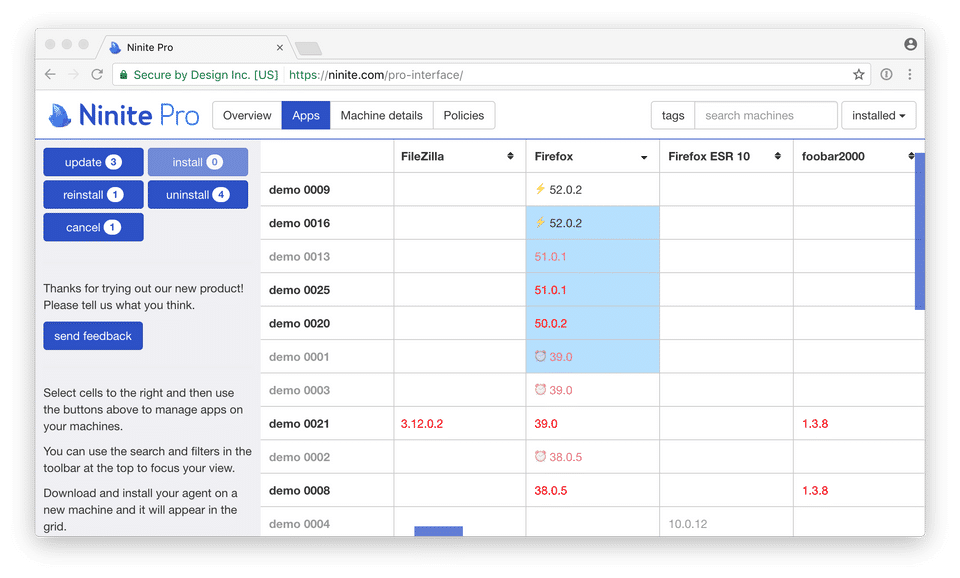
Ninite Pro is a cloud-based patch management and software deployment solution designed to help IT administrators, managed service providers, and enterprise teams manage Windows systems with ease. Built for organizations of all sizes, it allows seamless installation, updating, and removal of applications through an intuitive live web interface. Key features include remote patching, bulk app management, automatic update policies, caching for bandwidth savings, and real-time monitoring of online and offline machines. With tagging, sorting, and reporting tools, IT teams can quickly organize and oversee hundreds or thousands of devices. Ninite Pro integrates with RMM tools and supports command-line operations, making it ideal for IT managers, system administrators, and MSPs who need reliable, centralized software management.
Pricing
Starts from $35 / Month when monthly
Free Trial available
Best For
Suited for small teams, SMBs, and enterprise
Security & Compliance
Data residency:🇺🇸
Platform
Web-based — no mobile app
Installed - Windows
Ninite Pro Screenshots


Ninite Pro was reviewed internally using user feedback, in-house testing, and market research to assess its performance, reliability, and user experience. Learn how we review products and our evaluation process.

Who should consider Ninite Pro
- Use cases
- IT Services and Managed Service Providers (MSPs), Healthcare and Education organizations managing Windows devices, Finance and Manufacturing companies requiring centralized patch management
- Team types
- IT Administrators, System Administrators
- Company size
- 50-500 employees, 500-10,000+ employees
- Workflow style
- Simple and streamlined
- Setup complexity
- Low
Why teams choose Ninite Pro
Centralized management of software installation, updates, and removals via a web dashboard
Bandwidth savings through intelligent caching of updates
Real-time device monitoring and flexible device tagging for targeted management
Is Ninite Pro right for you?
Best for streamlined Windows patching and app deployment in mid-to-large IT teams.
Choose Ninite Pro if
- You need centralized, web-based management of Windows software installations and updates.
- Your organization values time-saving automation and minimal setup complexity.
- You manage 50 to 10,000+ Windows devices and require real-time monitoring and device tagging.
Consider alternatives if
- You require extensive customization of software installations beyond the provided catalog.
- Your environment depends on niche or uncommon applications not supported by Ninite Pro.
What buyers should know before choosing Ninite Pro
Ninite is a game-changer when it comes to efficiently updating and installing a variety of Windows programs with just a few clicks. Users praise its intuitive interface and the convenience it brings to updating multiple applications seamlessly.
The software excels in automating routine tasks, saving time and ensuring hassle-free installations. While some users expressed a desire for a broader selection of supported applications and customization options, the overall sentiment towards Ninite remains overwhelmingly positive.
Its ability to streamline software deployment and ensure only necessary programs are installed is a significant advantage. Ninite's capability to simplify the software update process across multiple systems, coupled with its ease of use and effectiveness, makes it a valuable tool for both individual users and managed service providers.
If you are looking for a straightforward, time-saving solution for software installations, Ninite stands out as a must-have tool in your toolkit.
Ninite Pro pros and cons
- Ninite Pro pros
Centralized management of software installation, updates, and removals via a web dashboard
Bandwidth savings through intelligent caching of updates
Real-time device monitoring and flexible device tagging for targeted management
- Ninite Pro cons
Limited application catalog restricting software choices
Challenges integrating unsupported or additional programs
Ready to try it?
Get started with Ninite Pro
Start your free trial — no credit card required.
Still comparing?
See how it stacks up
Compare Ninite Pro side-by-side with top Patch Management Software alternatives.



What is the pricing of Ninite Pro?
Ninite Pro Pricing Plans
Weighing your options?
Not sure if Ninite Pro fits your budget?
Ninite Pro reviews and ratings
Buyer sentiment
Users overwhelmingly appreciate Ninite Pro's ease of use and time-saving automation for Windows software management, despite some limitations in app selection and customization.
What buyers like
- Ease of use
- Time-saving automation
- Centralized software management
Common complaints
- Limited application catalog
- Lack of customization options
Are you using Ninite Pro?

- See if Ninite Pro fits your business
- Real pricing — no sales pressure
- A demo or quick answers, your call
Step 1 of 4
How big is your team?
We tailor recommendations to companies your size.















What are the features of Ninite Pro?
Managers plan, coordinate, regulate, and lead operations that assure compliance with laws and standards through compliance management. It is…
Patch Management in Ninite Pro lets IT teams automate the detection, distribution, and installation of software patches across multiple Wind…
Policy Management is a software feature that lets organizations create, update, and enforce policies across their network from a central rep…
Remote access is a software feature that allows users to access a computer or network from a remote location. This means that individuals ca…
Ninite Pro security and data handling
Key compliance certifications and security features for IT and security teams evaluating Ninite Pro.
Developer & data
Alternatives to Ninite Pro



Effortlessly streamline third-party ...
Very Good


Why buyers keep looking beyond Ninite Pro
Users often look for multi-OS support, including macOS and Linux, which Ninite Pro does not currently offer.
Some organizations require built-in management of custom or in-house applications, a feature missing from Ninite Pro.
Alternatives may provide deeper integration with comprehensive endpoint management platforms, covering antivirus, monitoring, and asset management.
Users seek solutions with agentless management to avoid the overhead of deploying software agents on each device.
Some competitors offer enhanced reporting and analytics features beyond basic patch and software management.
Cost structures and licensing models of other products may be more appealing for very large or specialized enterprise environments.
Ninite Pro Support Options
Frequently Asked Questions About Ninite Pro
Common questions buyers ask before choosing Ninite Pro.
Ninite Pro is a Patch Management Software. Ninite Pro offers Compliance Management, Patch Management, Policy Management and many more functionalities.
Ninite Pro is a strong fit if: You need centralized, web-based management of Windows software installations and updates.; Your organization values time-saving automation and minimal setup complexity.. Consider alternatives if: You require extensive customization of software installations beyond the provided catalog.; Your environment depends on niche or uncommon applications not supported by Ninite Pro..
Buyers commonly note the following limitations of Ninite Pro: Limited application catalog restricting software choices; Challenges integrating unsupported or additional programs; Download speed degradation when running multiple installations concurrently.
Some top alternatives to Ninite Pro includes ManageEngine Patch Manager Plus, PDQ Deploy, Automox, JetPatch and SnaPatch.
Ninite Pro offers Free Trial, Subscription pricing models
The starting price of Ninite Pro is $35/Month when monthly
Ready to try it?
Get started with Ninite Pro
Start your free trial — no credit card required.
About the reviewer
Rajat Gupta is the founder of Spotsaas. Over the past two years, he has reviewed 2,000+ tools across CRM, HR, AI, and finance — applying hands-on product research and a background in commerce and the CFA program to evaluate software through a business and ROI lens. His goal: help teams make software decisions they won't regret.
Disclaimer: This research has been collated from a variety of authoritative sources. We welcome your feedback at [email protected].