
StageWave Comparison

StageWave
Starting at $13.29 /month
- Free Trial
- Large Enterprises
- Medium Business
Transform your smartphone into a powerful bodypack with StageWave! This revolutionary sound technology creates a seamless connection between in-ear monitors and your mobile device. Control the monitoring mix with complet…
StageWave — find the better fit before you commit.
Which tool fits your team best
Which is actually cheaper for your team size
Where each product wins, per real buyers
Most Audio Editing Software tools look identical on paper. This comparison cuts to the differences that matter — pricing structure, team fit, and what real buyers found after signing up.
Biggest differences
Features
Pricing
Buying details
Security
Buyer feedback
Integrations
Product tour
Other options
Talk to an expert Talk to an expert |
Free PDF comparison
Download this StageWave comparison
Get the full side-by-side as a PDF — these picks plus the top Audio Editing Software tools, with verified ratings, pricing and features.
- Side-by-side on pricing, features & ratings
- Plus the category top 10, scored & ranked
- Emailed to you — no on-screen download
No file downloads on screen — we email it to you. One-click unsubscribe anytime.
StageWave: Biggest differences
Start here before you go deeper into features.
Large Enterprises, Medium Business, Small Business
Description | Transform your smartphone into a powerful bodypack with StageWave! This revolutionary sound technology creates a seamless connection between in-ear monitors and your mobile device. Control ... Read More about StageWave |
|---|---|
Entry Level Pricing |
|
Free Trial Availability | |
Best Company Size | 1–50 employees |
Get pricing help |
Where each option fits best
See where each product is strongest, which teams it fits, and what causes buyers to keep looking — before you commit.
Based on buyer reviews and verified product data collected by Spotsaas.
Key strengths
- Affordable Wireless IEM Monitoring: Converts a smartphone into a fully‑featured in-ear monitoring receiver—saving musicians from costly traditional wireless setups while maintaining high audio quality
- Multi‑Channel Stereo Control: Offers up to 16 independent stereo mixes with per-channel EQ, compressor, reverb, delay, and intuitive app-based control—without adding cables or RF interference
- Cross‑Platform & Flexibility: Supports iOS, Android, macOS, and Windows; works via Wi‑Fi or Ethernet; offers QR-code pairing for fast setup and real-time mix adjustments
Best fit
- 1–50 employees
- Live Music Performance, Recording Studios, Worship Services, Theatre, Touring Musicians
- Sound Engineer, Musician, Live Audio Technician, Audio Director, Worship Leader, Touring Producer
Reasons buyers look elsewhere
- Wi-Fi latency averages 20-30ms, creating 50ms+ delays for drummers or musicians needing sub-10ms response times
- Requires MU-MIMO routers, gigabit Ethernet, and PCs with 7th gen i5+, 8GB RAM, and ASIO support to handle 8+ devices
- Audio dropouts and glitches occur frequently in dense Wi-Fi environments, with some users reporting 15-20% packet loss
Software Demo
Demo |
|---|

Need a second opinion?
Get decision help from a software advisor
Share your priorities, budget, and team needs, and we’ll help you narrow the options and understand the tradeoffs before you talk to vendors.

- Independent advice — matched to your business
- Understand the tradeoffs before you talk to vendors
- Free 15-min call with a software advisor.
Step 1 of 4
How big is your team?
We tailor recommendations to companies your size.















StageWave Features
Total Features | 2 Features |
|---|---|
Unique Features | No unique features |
Get Quote |
StageWave Pricing and trial details
Review starting price, plan structure, and free-trial access side by side so you can see which option fits your budget and buying process.
Pricing Option | |
|---|---|
Starting From |
|
Pricing Plans |
|
Pricing Page |  |
StageWave: Other Details
Organization Types supported |
|
|---|---|
Platforms Supported |
|
Modes of support |
|
API Support |
|
Get help choosing |
User Reviews & Rating Comparison
Spotsaas Editor’s POV generated by AI | What buyers like
Common complaints
|
|---|---|
Pros and Cons |
|
Media and Screenshots
Screenshots | 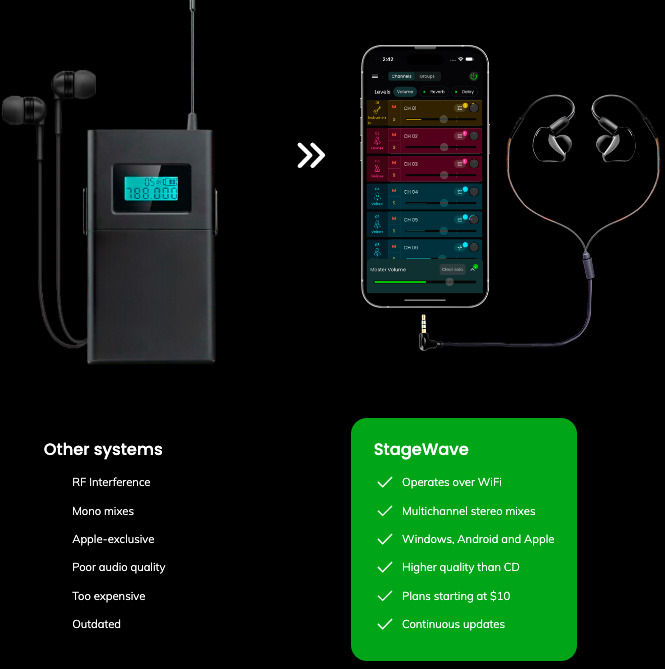 3 Screenshots | No screenshots available. |
|---|---|---|
Videos |  1 Videos | No videos available. |
Add another option to compare side by side
Search by product name to compare pricing, fit, and buyer feedback in one view.Compare similar software options





Disclaimer: This research has been collated from a variety of authoritative sources. We welcome your feedback at [email protected].