
Squarespace vs Webflow vs Elementor vs Unbounce Comparison

Squarespace
Starting at $12 /Month
- Free Trial
- Medium Business
- Small Business
Squarespace is the easiest way to create an amazing website, blog or online store. With the beautiful templates and themes, anything from a personal portfolio, online store to a wedding site can be created in minutes. Th…

Webflow
Starting at $12 /Month
- Individuals
- Freelancers / Consultants
Webflow is an easy-to-use website builder that gives you the tools to design and build websites without code. It helps you skip the heavy lifting of writing code by hand, allowing you to create responsive websites that w…

Elementor
Starting at $9 /month
- Freelancers / Consultants
- Large Enterprises
Elementor's website builder makes it easy to create professional, visually stunning websites. This software features one-click installation and intuitive drag and drop controls that are sure to take your website to the n…

Unbounce
Starting at $81 /Month
- Free Trial
- Freelancers / Consultants
- Large Enterprises
Unbounce is a landing page builder for marketers that lets you design and publish high-converting landing pages -- without having to write a single line of code. Unbounce's powerful drag-and-drop editor means you don't h…
Squarespace leads on user satisfaction with a 4.5-star rating across 3,521 reviews.
Squarespace vs Webflow vs Elementor vs Unbounce — at a glance
| Feature | Squarespace | Webflow | Elementor | Unbounce |
|---|---|---|---|---|
| Rating | 4.5 / 5 | 4.0 / 5 | 3.7 / 5 | 4.0 / 5 |
| Reviews | 3,521 | 603 | 1,122 | 890 |
| Starting price | $12 /Month | $12 /Month | $9 /month | $81 /Month |
| Free trial | Yes | No | No | Yes |
| Free version | No | No | No | No |
| Best for | Medium Business, Small Business | Individuals, Freelancers / Consultants, Large Enterprises | Freelancers / Consultants, Large Enterprises, Medium Business | Freelancers / Consultants, Large Enterprises, Medium Business |
| Category | Website Builder Software | Website Builder Software | Website Builder Software | Landing Page Software |
| Platforms | SaaS/Web/Cloud, Mobile - Android, Mobile - iOS | SaaS/Web/Cloud | SaaS/Web/Cloud | SaaS/Web/Cloud |
| API | Available | Available | Available | Available |
| Support modes | 24/7 (Live rep), Online | Online | Online | 24/7 (Live rep), Business Hours, Online |
| Certifications | SOC 2, GDPR | SOC 2, GDPR | GDPR | SOC 2, GDPR |
| Data residency | Global | Global | US | Global |
Key differences between Squarespace and Webflow
- Pricing: Squarespace starts at $12 /Month, while Webflow starts at $12 /Month.
- Free trial: Squarespace offers a free trial; Webflow does not.
- Target audience: Squarespace is built for Medium Business and Small Business, while Webflow targets Individuals and Freelancers / Consultants.
- User satisfaction: Squarespace scores higher with a 4.5-star average.
- Deployment: Squarespace supports SaaS/Web/Cloud, Mobile - Android, Mobile - iOS; Webflow supports SaaS/Web/Cloud.
Compare Squarespace vs Webflow vs Elementor vs Unbounce — and walk away knowing which one fits.
Which tool fits your team best
Which is actually cheaper for your team size
Where each product wins, per real buyers
Most Website Builder Software tools look identical on paper. This comparison cuts to the differences that matter — pricing structure, team fit, and what real buyers found after signing up.
Biggest differences
Features
Pricing
Buying details
Security
Buyer feedback
Integrations
Product tour
Other options
Biggest differences
Start here before you go deeper into features.
Best for small businesses needing easy, stylish websites with built-in tools.
- You want a simple drag-and-drop builder with no coding required
- You need professional, mobile-friendly templates that look great out of the box
- You prefer an all-in-one platform including hosting, SEO, e-commerce, and email marketing
- Your business requires highly customized website designs beyond template limits
- You need complex domain management or custom email integrations for enterprise use
Best for designers needing advanced, code-like website customization without coding.
- You are a professional designer or freelancer building custom client websites.
- You need responsive marketing sites with full design flexibility across devices.
- You want to speed up development by reducing manual coding dependency.
- You are a beginner with no web development experience seeking a very simple builder.
- You require a large plugin ecosystem or extensive template marketplace.
Best for creating professional websites with easy drag-and-drop and templates.
- You want a simple, intuitive builder with minimal setup complexity.
- You need extensive pre-built templates and dynamic content blocks for fast site creation.
- You value responsive customer support to quickly resolve issues.
- You require complex, large-scale enterprise website architectures.
- You prefer fully code-based or highly technical web development environments.
Best for marketers needing easy, code-free, high-converting landing pages.
- You want a drag-and-drop editor that non-developers can use easily.
- You need built-in A/B testing and conversion analytics to optimize campaigns.
- You require seamless integration with popular CRMs like Hubspot and Salesforce.
- Your team needs extensive custom development or advanced third-party integrations.
- You want access to a large app marketplace for extended functionality.
Squarespace: Best for small businesses needing easy, stylish websites with built-in tools. Webflow: Best for designers needing advanced, code-like website customization without coding.
Description | Squarespace is the easiest way to create an amazing website, blog or online store. With the beautiful templates and themes, anything from a personal portfolio, online store to a wedding ... Read More about Squarespace | Webflow is an easy-to-use website builder that gives you the tools to design and build websites without code. It helps you skip the heavy lifting of writing code by hand, allowing you to ... Read More about Webflow | Elementor's website builder makes it easy to create professional, visually stunning websites. This software features one-click installation and intuitive drag and drop controls that are ... Read More about Elementor | Unbounce is a landing page builder for marketers that lets you design and publish high-converting landing pages -- without having to write a single line of code. Unbounce's powerful ... Read More about Unbounce |
|---|---|---|---|---|
Entry Level Pricing |
|
|
|
|
Free Trial Availability |
|
| ||
Spotsaas ScoreWhat's this? ↗ | 9.8/10 | 9.4/10 | 9.4/10 | 9.8/10 |
User RatingsBased on verified Spotsaas reviews | ||||
Best Company Size | 1-50 employees51-500 employees | 1-50 employees51-500 employees | 1-100 employeesMedium business | Small BusinessMedium Business |
Get pricing help | Get pricing help | Get pricing help |
Where each option fits best
See where each product is strongest, which teams it fits, and what causes buyers to keep looking — before you commit.
Based on buyer reviews and verified product data collected by Spotsaas.
Key strengths
No key benefits available yet.
No key benefits available yet.
- Intuitive Drag-and-Drop Builder: Elementor’s no-code design system allows users to create fully responsive, professional websites without any prior coding experience. The visual editor is user-friendly, making it accessible for beginners while still powerful for advanced users.
- Pre-Built Templates and Dynamic Content Blocks: Elementor offers a wide library of content blocks, widgets, and templates that allow rapid page construction. This reduces design time and ensures design consistency, especially for marketing teams or agencies handling multiple sites.
- Fast Deployment with One-Click Installation: The software simplifies setup with one-click installation and streamlined onboarding, making it easy to launch pages and entire sites within hours instead of days—ideal for startups, small businesses, and freelancers.
No key benefits available yet.
Best fit
No best-fit guidance available yet.
No best-fit guidance available yet.
- 1–100 Employees
- Marketing, E-commerce, Blogging, Online Education, Creative Services, Hospitality, SaaS, Nonprofits
- Web Designer, Digital Marketer, Content Creator, Small Business Owner, Graphic Designer, Marketing Manager, WordPress Developer
No best-fit guidance available yet.
Reasons buyers look elsewhere
No alternatives guidance available yet.
No alternatives guidance available yet.
- Elementor’s extensive use of widgets and visual effects can sometimes lead to bloated code, which may affect site speed and Core Web Vitals unless optimized manually.
- Since Elementor focuses on front-end design, developers requiring backend logic customization may need to supplement it with custom PHP or third-party plugins—whereas headless CMSs like Webflow or Strapi offer more backend flexibility.
- Elementor is tightly coupled with the WordPress ecosystem. Users looking for independent SaaS website builders (like Wix, Squarespace, or Webflow) may prefer platforms that don’t require WordPress hosting and maintenance.
No alternatives guidance available yet.
Software Demo
Demo |
|---|
Need a second opinion?
Get shortlist help from a software advisor
Share your priorities, budget, and team needs, and we’ll help you narrow the options and understand the tradeoffs before you talk to vendors.
How do Squarespace, Webflow, Elementor and Unbounce Compare on Features?
Total Features | 21 Features | 18 Features | 31 Features | 13 Features |
|---|---|---|---|---|
Unique Features | No unique features | No unique features | No unique features | No unique features |
Get Quote | Get Quote | Get Quote |
Compare Squarespace, Webflow, Elementor and Unbounce on pricing
Review starting price, plan structure, and free-trial access side by side so you can see which option fits your budget and buying process.
Pricing Option | ||||
|---|---|---|---|---|
Starting From |
|
|
|
|
Pricing Plans |
|
|
| |
Pricing Page |  |  |  |  |
Other Details
Organization Types supported |
|
|
|
|
|---|---|---|---|---|
Platforms Supported |
|
|
|
|
Modes of support |
|
|
|
|
API Support |
|
|
|
|
Get help choosing | Get help choosing | Get help choosing |
Security & Compliance
Certifications, data handling, and security controls for IT and compliance evaluators.
SOC 2 | ✓ Yes | ✓ Yes | — |
|---|---|---|---|
HIPAA | ✗ No | ✗ No | ✗ No |
GDPR | ✓ Yes | ✓ Yes | ✓ Yes |
ISO 27001 | — | — | — |
Single Sign-On (SSO) | — | ✓ Yes | ✗ No |
Multi-Factor Auth (MFA) | ✓ Yes | ✓ Yes | ✗ No |
Data Encryption | ✓ Yes | ✓ Yes | — |
Audit Logs | — | — | ✗ No |
Data Residency | 🌐 Global | 🌐 Global | 🇺🇸 US |
Squarespace vs Webflow vs Elementor User Reviews & Rating Comparison
User Ratings | ||||
|---|---|---|---|---|
Rating Distribution | ||||
Spotsaas Editor’s POV generated by AI | Buyer sentiment Users generally praise Squarespace for its ease of use, beautiful templates, and all-in-one functionality, while noting limitations in customization and pricing. What buyers like
Common complaints
| Buyer sentiment Users appreciate Webflow's powerful design flexibility and code-like precision but note a learning curve and pricing concerns. What buyers like
Common complaints
| Buyer sentiment Overall positive sentiment highlights ease of use and customer support, tempered by occasional technical issues and complexity for advanced users. What buyers like
Common complaints
| Buyer sentiment Users generally praise Unbounce for its ease of use, powerful integrations, and effective A/B testing, though some find the feature set complex and the app marketplace limited. What buyers like
Common complaints
|
Pros and Cons |
|
|
|
|
Positive Reviews | No reviews available for the product | No reviews available for the product | No reviews available for the product | No reviews available for the product |
List of Customers
Customers | No Customers information available. | No Customers information available. | No Customers information available. |  Unbounce_customers_0  Unbounce_customers_1  Unbounce_customers_2 |
|---|
Media and Screenshots
Screenshots | No screenshots available. |  3 Screenshots | 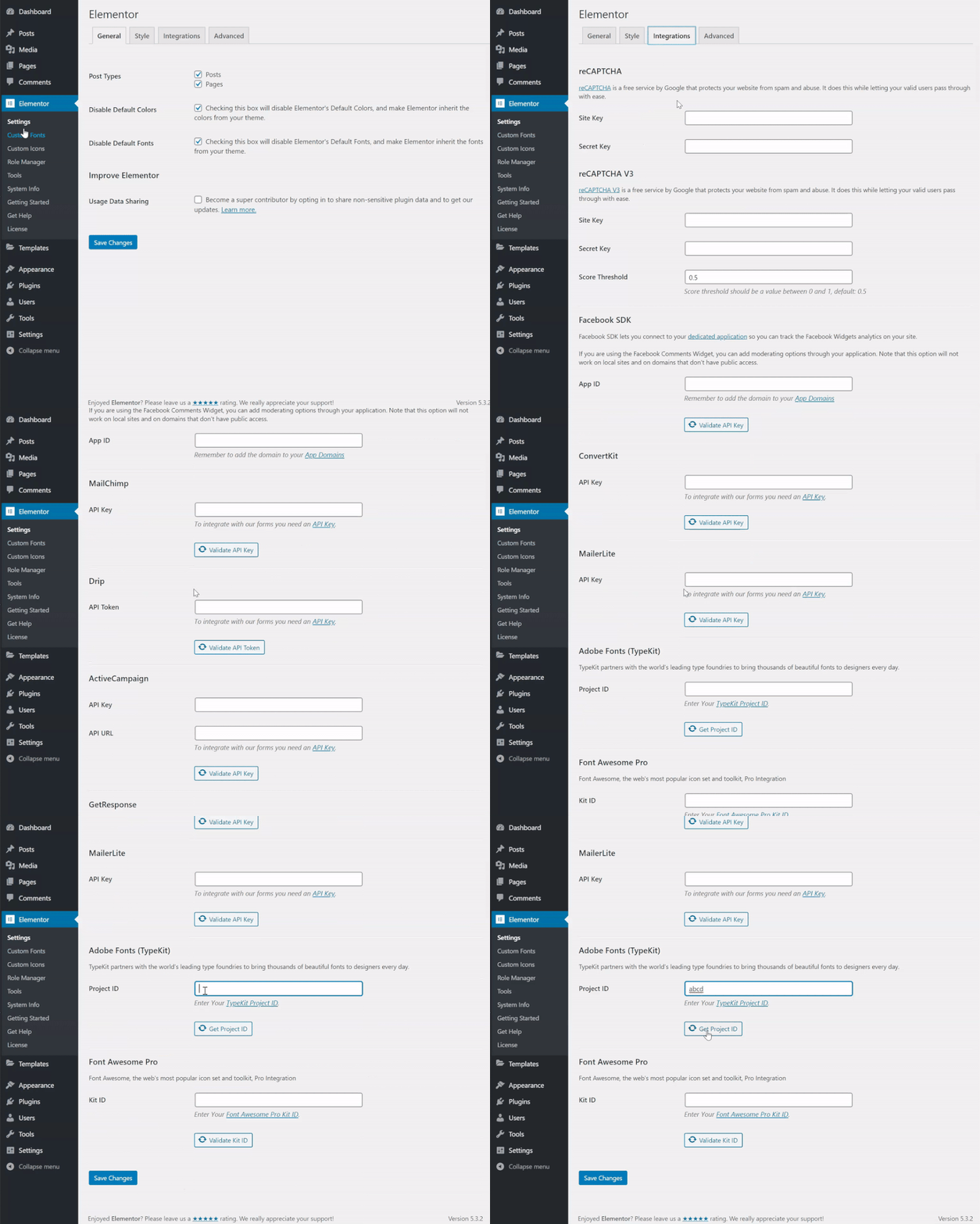 4 Screenshots |
|---|---|---|---|
Videos |  2 Videos |  3 Videos |  2 Videos |
Alternatives
Alternatives |
|---|


Add another option to compare side by side
Search by product name to compare pricing, fit, and buyer feedback in one view.Compare similar software options




Related Blogs and Articles for Website Builder Software

Disclaimer: This research has been collated from a variety of authoritative sources. We welcome your feedback at [email protected].
Frequently asked questions
- Which is better, Squarespace or Webflow?
- Squarespace edges out the other on user ratings (4.5 vs 4.0). That said, the best pick depends on your use case — use the comparison tables above to evaluate each dimension.
- Do Squarespace and Webflow offer a free trial?
- Squarespace offers a free trial. Webflow does not.
- What is the starting price of Squarespace vs Webflow?
- Squarespace starts at $12 /Month. Webflow starts at $12 /Month.
- What are the top alternatives to Squarespace?
- Top alternatives to Squarespace include Unbounce, VWO Deploy, WordPress, SITE123, Wix.
- What are the top alternatives to Webflow?
- Top alternatives to Webflow include Unbounce, VWO Deploy, Bubble, WordPress, Wix.