
Microsoft SQL Server vs DQLABS Comparison

Microsoft SQL Server
Starting at Contact for pricing
- Free Trial
- Freelancers / Consultants
- Large Enterprises
Microsoft SQL Server is the powerful relational database engine that provides fast, reliable access to data for running business, Web and line-of-business applications. SQL Server helps protect and grow investment in exi…

DQLABS
Starting at Contact for pricing
- Free Trial
- Large Enterprises
- Medium Business
DQLABS is an easy-to-use and powerful data management tool for any laboratory. The software organizes the daily routine in the lab by using bar coding and scan-in technology. DQLABS will standardize daily tasks, increase…
DQLABS leads on user satisfaction with a 5.0-star rating across 11 reviews.
Microsoft SQL Server vs DQLABS — at a glance
| Feature | Microsoft SQL Server | DQLABS |
|---|---|---|
| Rating | 4.4 / 5 | 5.0 / 5 |
| Reviews | — | 11 |
| Starting price | Contact for pricing | Contact for pricing |
| Free trial | Yes | Yes |
| Free version | No | No |
| Best for | Freelancers / Consultants, Large Enterprises, Medium Business | Large Enterprises, Medium Business, Small Business |
| Category | Database Management Software | Data Management Software |
| Platforms | SaaS/Web/Cloud, Installed - Windows, Installed - Mac | SaaS/Web/Cloud |
| API | Available | Available |
| Support modes | 24/7 (Live rep), Online | 24/7 (Live rep), Online |
| Certifications | SOC 2, HIPAA, GDPR, ISO 27001 | — |
| Data residency | US | US |
Key differences between Microsoft SQL Server and DQLABS
- Target audience: Microsoft SQL Server is built for Freelancers / Consultants and Large Enterprises, while DQLABS targets Large Enterprises and Medium Business.
- User satisfaction: DQLABS scores higher with a 5.0-star average.
- Deployment: Microsoft SQL Server supports SaaS/Web/Cloud, Installed - Windows, Installed - Mac; DQLABS supports SaaS/Web/Cloud.
Microsoft SQL Server vs DQLABS — find the better fit before you commit.
Which tool fits your team best
Which is actually cheaper for your team size
Where each product wins, per real buyers
Most Database Management Software tools look identical on paper. This comparison cuts to the differences that matter — pricing structure, team fit, and what real buyers found after signing up.
Biggest differences
Features
Pricing
Buying details
Security
Buyer feedback
Integrations
Product tour
Other options
Talk to an expert Talk to an expert |
Free PDF comparison
Download this Microsoft SQL Server vs DQLABS comparison
Get the full side-by-side as a PDF — these picks plus the top Database Management Software tools, with verified ratings, pricing and features.
- Side-by-side on pricing, features & ratings
- Plus the category top 10, scored & ranked
- Emailed to you — no on-screen download
No file downloads on screen — we email it to you. One-click unsubscribe anytime.
Biggest differences
Start here before you go deeper into features.
Best for robust, secure database management within Microsoft-centric environments.
- You need strong integration with Microsoft tools like Azure and Power BI.
- Your organization handles large, complex databases requiring high performance and security.
- Your team includes database administrators or BI developers familiar with Microsoft ecosystems.
- You have a tight budget and cannot accommodate higher licensing costs.
- Your infrastructure relies heavily on non-Microsoft platforms such as Linux.
Best for streamlined laboratory data management with barcode and real-time analytics.
- You need to standardize and automate daily lab tasks using barcode scanning.
- Your team requires integrated data migration, transformation, and visualization capabilities.
- Security and compliance for sensitive laboratory data are top priorities.
- You require transparent, out-of-the-box pricing information before evaluation.
- Your workflows demand extensive integrations or customizations beyond current capabilities.
Microsoft SQL Server: Best for robust, secure database management within Microsoft-centric environments. DQLABS: Best for streamlined laboratory data management with barcode and real-time analytics.
Description | Microsoft SQL Server is the powerful relational database engine that provides fast, reliable access to data for running business, Web and line-of-business applications. SQL Server helps ... Read More about Microsoft SQL Server | DQLABS is an easy-to-use and powerful data management tool for any laboratory. The software organizes the daily routine in the lab by using bar coding and scan-in technology. DQLABS will ... Read More about DQLABS |
|---|---|---|
Free Trial Availability |
| |
SpotScoreWhat's this? ↗ | 9.4/10 | 8.8/10 |
User RatingsBased on verified Spotsaas reviews | ||
Best Company Size | 50 to 500 employees501 to 10,000 employees | 50-500 employeesMedium to large enterprises |
Get pricing help | Get pricing help |
Where each option fits best
See where each product is strongest, which teams it fits, and what causes buyers to keep looking — before you commit.
Based on buyer reviews and verified product data collected by Spotsaas.
Key strengths
- Reliable Performance: Microsoft SQL Server's advanced query optimization and in-memory technology let organizations handle large volumes of transactions smoothly, keeping your data-driven applications running efficiently.
- Scalability and Flexibility: Whether you're a small business or a large enterprise, SQL Server adapts to your growth. It supports everything from basic workloads to complex, high-demand environments, making it a great fit for diverse operational needs.
- Security Features: SQL Server includes built-in encryption and threat detection. These features protect your sensitive data against unauthorized access and cyber threats.
- Simplified Data Management: With DQLABS, we let managers and administrators efficiently handle vast amounts of data. The intuitive interface simplifies complex tasks, allowing teams to focus on strategic initiatives rather than getting bogged down in operational details.
- Better Decision-Making: Executives can use real-time analytics and insights from DQLABS to make informed decisions. Access to visualized data trends lets you plan and execute business strategies more effectively.
- Advanced Security Features: We understand the importance of data security. DQLABS implements advanced security protocols that protect sensitive information, giving you peace of mind while maintaining compliance with industry standards.
Best fit
- 50 to 10,000 employees
- Fintech, Healthcare, Retail, Education, and SaaS
- Database Administrators, Data Analysts, Business Intelligence Developers, and IT Managers
- 50 to 500 employees
- Martech, Revtech, Fintech, Sales Automation, SaaS, and Consulting
- Sales Managers, Account Executives, Business Development Representatives, and CRM Administrators
Reasons buyers look elsewhere
- Licensing costs exceed budgets for small to mid-sized teams — open-source alternatives like PostgreSQL or MySQL offer lower total cost of ownership
- Cloud-native deployments require managed services (AWS RDS, Azure Database) that SQL Server doesn't match without additional infrastructure investment
- Missing specialized features like real-time streaming (Kafka integration) or advanced ML analytics force teams to layer separate tools
- Users may seek alternatives to DQLABS if they require more specialized features tailored to specific industries, which could enhance their data management and analytics capabilities beyond what DQLABS offers.
- Organizations might consider other solutions if they experience scalability issues with DQLABS, particularly as their data volume grows and they need a system that can efficiently handle larger datasets.
- Budget constraints could lead users to explore alternatives, especially if they find competitive products that provide similar functionalities at a lower cost or with more flexible pricing structures.
Software Demo
Demo |
|---|
Need a second opinion?
Get shortlist help from a software advisor
Share your priorities, budget, and team needs, and we’ll help you narrow the options and understand the tradeoffs before you talk to vendors.

- Independent advice — matched to your business
- Understand the tradeoffs before you talk to vendors
- Free 15-min call with a software advisor.
Step 1 of 4
How big is your team?
We tailor recommendations to companies your size.















How do Microsoft SQL Server and DQLABS Compare on Features?
Total Features | 9 Features | 10 Features |
|---|---|---|
Unique Features | No unique features | No unique features |
Get Quote | Get Quote |
Compare Microsoft SQL Server and DQLABS on pricing
Review starting price, plan structure, and free-trial access side by side so you can see which option fits your budget and buying process.
Pricing Option | ||
|---|---|---|
Pricing Plans |
|
|
Pricing Page |  | 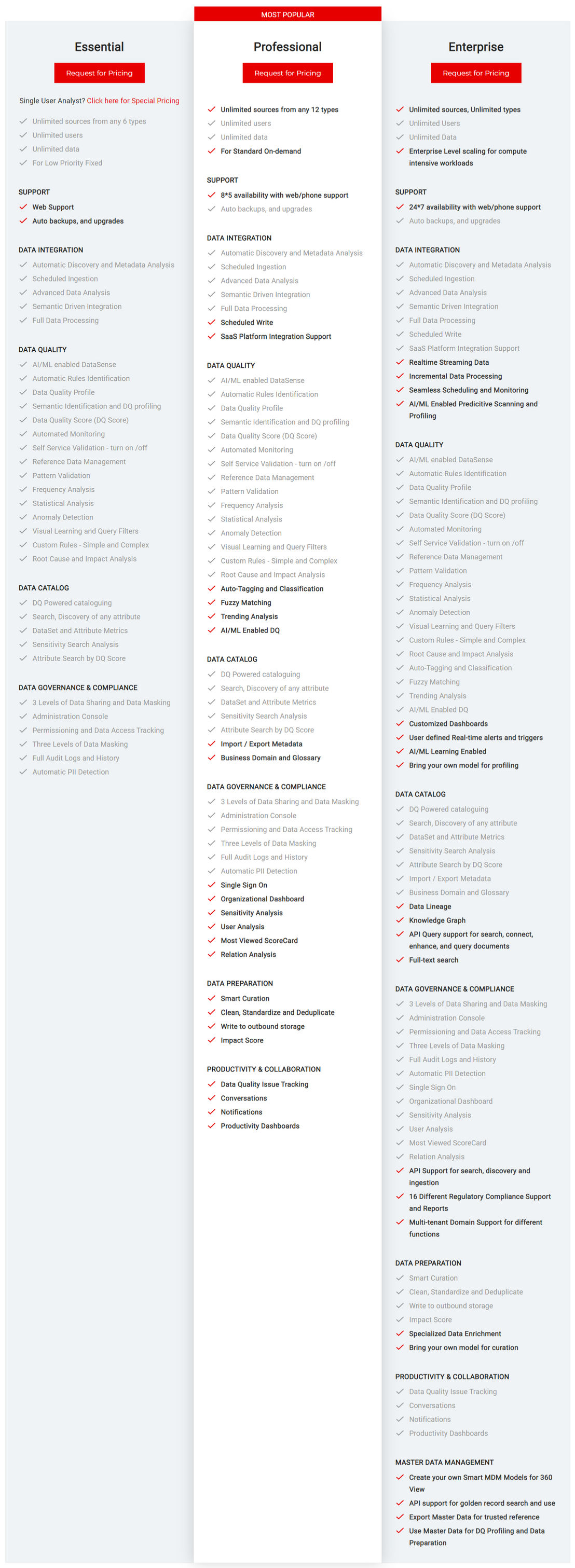 |
Other Details
Organization Types supported |
|
|
|---|---|---|
Platforms Supported |
|
|
Modes of support |
|
|
API Support |
|
|
Get help choosing | Get help choosing |
Security & Compliance
Certifications, data handling, and security controls for IT and compliance evaluators.
SOC 2 | ✓ Yes | — |
|---|---|---|
HIPAA | ✓ Yes | — |
GDPR | ✓ Yes | — |
ISO 27001 | ✓ Yes | — |
Single Sign-On (SSO) | ✓ Yes | — |
Multi-Factor Auth (MFA) | ✓ Yes | — |
Data Encryption | ✓ Yes | — |
Audit Logs | ✓ Yes | — |
Data Residency | 🇺🇸 US | 🇺🇸 US |
Microsoft SQL Server User Reviews & Rating Comparison
User Ratings | No reviews available for the product | |
|---|---|---|
Rating Distribution | ||
Spotsaas Editor’s POV generated by AI | Buyer sentiment Overall positive sentiment highlights SQL Server's robust performance, scalability, and security, tempered by concerns over cost and platform compatibility. What buyers like
Common complaints
| Buyer sentiment Buyers praise DQLABS for its ease of use, powerful data management features, and strong security, though pricing transparency is a common concern. What buyers like
Common complaints
|
Pros and Cons |
|
|
Positive Reviews | No reviews available for the product | No reviews available for the product |
List of Customers
Customers |  Rolls Royce |  HunterLab  People Element  Housing Finance Commission |
|---|
Media and Screenshots
Screenshots | No screenshots available. |  2 Screenshots |
|---|---|---|
Videos |  3 Videos |  1 Videos |
Top Alternatives to Microsoft SQL Server and DQLABS in 2026
Alternatives |
|---|


Add another option to compare side by side
Search by product name to compare pricing, fit, and buyer feedback in one view.Compare similar software options



Related Blogs and Articles for Data Management Software

Disclaimer: This research has been collated from a variety of authoritative sources. We welcome your feedback at [email protected].
Frequently asked questions
- Which is better, Microsoft SQL Server or DQLABS?
- DQLABS edges out the other on user ratings (5.0 vs 4.4). That said, the best pick depends on your use case — use the comparison tables above to evaluate each dimension.
- Do Microsoft SQL Server and DQLABS offer a free trial?
- Yes, both Microsoft SQL Server and DQLABS offer a free trial.
- What is the starting price of Microsoft SQL Server vs DQLABS?
- Microsoft SQL Server starts at Contact for pricing. DQLABS starts at Contact for pricing.
- What are the top alternatives to Microsoft SQL Server?
- Top alternatives to Microsoft SQL Server include Oracle Essbase, Microsoft Power BI, Oracle Database, MySQL, dbForge Studio for MySQL.
- What are the top alternatives to DQLABS?
- Top alternatives to DQLABS include Semantic Fact, Lotame, IBM Operational Decision Manager, Telmai, SAS Data Quality.