
Kannu vs LMS Collaborator vs Trainual Comparison

Kannu
Starting at Contact for pricing
- Free Trial
- Medium Business
- Small Business
Kannu is a Learning Management System (LMS) software for schools and corporations. Kannu is built using the most modern technology available to ensure that the product will be easy to use, scalable, and secure for years…

LMS Collaborator
Starting at Contact for pricing
- Large Enterprises
- Medium Business
LMS Collaborator automates the corporate learning process with a comprehensive and user-friendly platform. Companies can quickly create and upload content, evaluate employee progress, and stay in the loop by getting noti…

Trainual
Starting at $249 /month
- Free Trial
- Medium Business
- Small Business
Trainual gives user the right balance of technological innovation and practical project management to help the business run smoothly. No matter what kind of training user provides the business, Trainual will help to Mana…
Kannu leads on user satisfaction with a 4.7-star rating across 66 reviews.
Kannu vs LMS Collaborator vs Trainual — at a glance
| Feature | Kannu | LMS Collaborator | Trainual |
|---|---|---|---|
| Rating | 4.7 / 5 | — | 4.7 / 5 |
| Reviews | 66 | — | 520 |
| Starting price | Contact for pricing | Contact for pricing | $249 /month |
| Free trial | Yes | No | Yes |
| Free version | No | No | No |
| Best for | Medium Business, Small Business | Large Enterprises, Medium Business, Small Business | Medium Business, Small Business |
| Category | Learning Management System (LMS) Software | Corporate Learning Management System | Training Management Systems |
| Platforms | SaaS/Web/Cloud | SaaS/Web/Cloud | SaaS/Web/Cloud, Mobile - Android, Mobile - iOS |
| API | — | Available | — |
| Support modes | Business Hours, Online | Online | Business Hours, Online |
| Certifications | GDPR | — | SOC 2, GDPR |
| Data residency | US | US | US |
Key differences between Kannu and LMS Collaborator
- Free trial: Kannu offers a free trial; LMS Collaborator does not.
- Target audience: Kannu is built for Medium Business and Small Business, while LMS Collaborator targets Large Enterprises and Medium Business.
- Deployment: Kannu supports SaaS/Web/Cloud; LMS Collaborator supports SaaS/Web/Cloud.
Compare Kannu vs LMS Collaborator vs Trainual — and walk away knowing which one fits.
Which tool fits your team best
Which is actually cheaper for your team size
Where each product wins, per real buyers
Most Learning Management System (LMS) Software tools look identical on paper. This comparison cuts to the differences that matter — pricing structure, team fit, and what real buyers found after signing up.
Biggest differences
Features
Pricing
Buying details
Security
Buyer feedback
Integrations
Product tour
Other options
Talk to an expert Talk to an expert | Talk to an expert Talk to an expert |
Free PDF comparison
Download this Kannu vs LMS Collaborator vs Trainual comparison
Get the full side-by-side as a PDF — these picks plus the top Learning Management System (LMS) Software tools, with verified ratings, pricing and features.
- Side-by-side on pricing, features & ratings
- Plus the category top 10, scored & ranked
- Emailed to you — no on-screen download
No file downloads on screen — we email it to you. One-click unsubscribe anytime.
Biggest differences
Start here before you go deeper into features.
Best LMS for culture-driven, adaptive learning in education and mid-sized companies.
- You need an LMS focused on higher education, K–12, or vocational training.
- You want adaptive microlearning that personalizes training pace and content.
- You value gamification and real-time analytics to boost engagement and track progress.
- Your organization requires heavy technical or compliance training features.
- You are a small business seeking a minimal, cost-effective LMS solution.
Large Enterprises, Medium Business, Small Business
Best for streamlined onboarding and training in small to mid-sized businesses.
- You need a centralized knowledge base for SOPs and training materials.
- You want automated onboarding workflows with role-based task assignments.
- Your team size is between 10 and 250 employees in industries like real estate or healthcare.
- Your organization requires highly customizable training modules.
- You are a very large enterprise with complex, multi-layered training workflows.
Kannu typically suits Medium Business and Small Business. LMS Collaborator tends to fit Large Enterprises and Medium Business better. The right choice depends on your team size, workflow, and whether a free trial matters.
Description | Kannu is a Learning Management System (LMS) software for schools and corporations. Kannu is built using the most modern technology available to ensure that the product will be easy to use, ... Read More about Kannu | LMS Collaborator automates the corporate learning process with a comprehensive and user-friendly platform. Companies can quickly create and upload content, evaluate employee progress, and ... Read More about LMS Collaborator | Trainual gives user the right balance of technological innovation and practical project management to help the business run smoothly. No matter what kind of training user provides the ... Read More about Trainual |
|---|---|---|---|
Entry Level Pricing |
|
|
|
Free Trial Availability |
|
| |
SpotScoreWhat's this? ↗ | 9.0/10 | Not Available | Not Available |
User RatingsBased on verified Spotsaas reviews | |||
Best Company Size | 50-5000+ employeesMedium Business | — | 10-25 employees26-250 employees |
Get pricing help | Get pricing help |
Where each option fits best
See where each product is strongest, which teams it fits, and what causes buyers to keep looking — before you commit.
Based on buyer reviews and verified product data collected by Spotsaas.
Key strengths
- Adaptive Microlearning Platform: Kannu delivers personalized, bite-sized training sessions that adapt to each employee's knowledge level and learning pace, improving engagement and retention.
- Gamified Learning Experience: The platform incorporates gamification elements such as points, leaderboards, and rewards to make learning more interactive and enjoyable, encouraging active participation.
- Real-Time Performance Insights: Kannu provides actionable analytics and reports on employee progress and knowledge gaps, letting you make informed decisions about training strategies and resource allocation.
No key benefits available yet.
- Centralized Knowledge Base: Organizes SOPs, policies, and training materials in one accessible platform.
- Automated Onboarding: Simplifies the onboarding process with automated workflows and role-based assignments.
- Tracking and Accountability: Provides tools to track training completion and verify e-signature compliance.
Best fit
- 50–5,000+ employees
- Higher Education, K–12 Education, Vocational Training, Lifelong Learning, International Schools
- Educators, Instructional Designers, Curriculum Coordinators, Learning & Development Managers, School Administrators
No best-fit guidance available yet.
- 10–250 employees
- Real Estate, Healthcare, Construction, Legal, Business Services
- HR Managers, Operations Directors, Training Coordinators, Team Leaders
Reasons buyers look elsewhere
- Companies not prioritizing mobile learning experiences may explore other platforms that offer more extensive mobile functionalities.
- Organizations requiring in-depth analytics and reporting features may consider alternatives that offer more advanced data visualization and customization options.
- Institutions favoring on-premise deployment options may consider alternatives, as Kannu is primarily a cloud-based platform.
No alternatives guidance available yet.
- Customization options are limited compared to competitors like TalentLMS or Docebo
- New users report difficulty navigating the platform's full feature set during initial setup
- Integration library is smaller than alternatives — teams needing Salesforce, Workday, or custom API connections often look elsewhere
Software Demo
Demo |
|---|
Need a second opinion?
Get shortlist help from a software advisor
Share your priorities, budget, and team needs, and we’ll help you narrow the options and understand the tradeoffs before you talk to vendors.

- Independent advice — matched to your business
- Understand the tradeoffs before you talk to vendors
- Free 15-min call with a software advisor.
Step 1 of 4
How big is your team?
We tailor recommendations to companies your size.















How do Kannu, LMS Collaborator and Trainual Compare on Features?
Total Features | 12 Features | 12 Features | 13 Features |
|---|---|---|---|
Unique Features | No unique features | No unique features | No unique features |
Get Quote | Get Quote |
Compare Kannu, LMS Collaborator and Trainual on pricing
Review starting price, plan structure, and free-trial access side by side so you can see which option fits your budget and buying process.
Pricing Option | |||
|---|---|---|---|
Starting From |
|
|
|
Pricing Plans |
|
| |
Pricing Page | Pricing information not available | 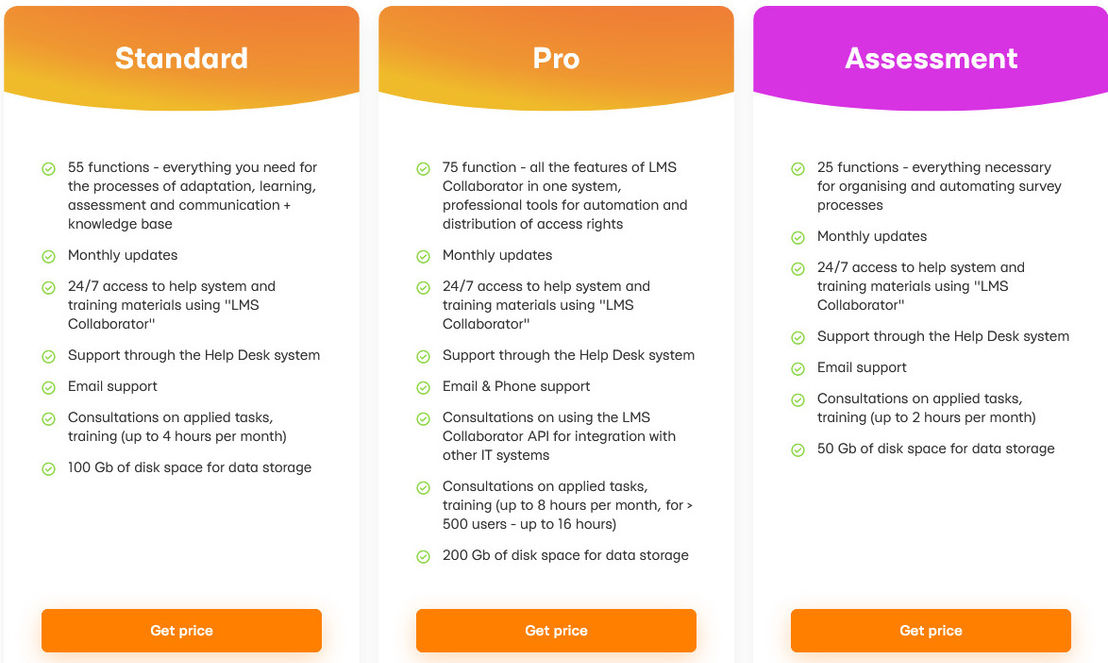 |  |
Other Details
Organization Types supported |
|
|
|
|---|---|---|---|
Platforms Supported |
|
|
|
Modes of support |
|
|
|
API Support |
|
|
|
Get help choosing | Get help choosing |
Security & Compliance
Certifications, data handling, and security controls for IT and compliance evaluators.
SOC 2 | — | — |
|---|---|---|
HIPAA | ✗ No | ✗ No |
GDPR | ✓ Yes | — |
ISO 27001 | — | — |
Single Sign-On (SSO) | ✓ Yes | — |
Multi-Factor Auth (MFA) | — | — |
Data Encryption | ✓ Yes | — |
Audit Logs | — | — |
Data Residency | 🇺🇸 US | 🇺🇸 US |
Kannu vs LMS Collaborator User Reviews & Rating Comparison
User Ratings | 4.7 (based on 66 reviews) | No reviews available for the product | 4.7 (based on 520 reviews) |
|---|---|---|---|
Rating Distribution | No reviews available for this product | ||
Spotsaas Editor’s POV generated by AI | Buyer sentiment Users appreciate Kannu's engaging, culture-focused learning approach and adaptive features but note limitations for technical training and customization. What buyers like
Common complaints
| What buyers like
Common complaints
| Buyer sentiment Users generally praise Trainual for its ease of use, centralized training management, and automation features, while noting some limitations in customization and setup complexity. What buyers like
Common complaints
|
Pros and Cons |
|
|
|
List of Customers
Customers |  Adobe  Stanford University  Princeton University | No Customers information available. | Stanford University  ups  DESIGN PICKLE |
|---|
Media and Screenshots
Screenshots |  1 Screenshots |  2 Screenshots |
|---|---|---|
Videos |  2 Videos |  1 Videos |
Alternatives
Alternatives |
|---|


Add another option to compare side by side
Search by product name to compare pricing, fit, and buyer feedback in one view.Compare similar software options



Related Blogs and Articles for Corporate Learning Management System

Disclaimer: This research has been collated from a variety of authoritative sources. We welcome your feedback at [email protected].
Frequently asked questions
- Which is better, Kannu or LMS Collaborator?
- Kannu edges out the other on user ratings (4.7 vs -1.0). That said, the best pick depends on your use case — use the comparison tables above to evaluate each dimension.
- Do Kannu and LMS Collaborator offer a free trial?
- Kannu offers a free trial. LMS Collaborator does not.
- What is the starting price of Kannu vs LMS Collaborator?
- Kannu starts at Contact for pricing. LMS Collaborator starts at Contact for pricing.
- What are the top alternatives to Kannu?
- Top alternatives to Kannu include Trainual, TalentLMS, Brightspace, Edmodo, Lernit.
- What are the top alternatives to LMS Collaborator?
- Top alternatives to LMS Collaborator include Trainual, TalentLMS, Syberworks Training Center, LearningCart, Clearline Safety LMS.