
Activated Insights vs Rosemark Comparison
Activated Insights
Starting at Contact for pricing
- Large Enterprises
- Medium Business
Activated Insights is a healthcare software platform focused on partner-driven solutions for senior living, home care, and post-acute providers. It helps organizations recruit caregivers faster, deliver engaging training…

Rosemark
Starting at Contact for pricing
- Large Enterprises
- Small Business
Rosemark is a home care software platform for managing caregivers on mobile and web. It tracks client call activity, handles real-time scheduling edits, logs training and interviews, and generates reports across multiple…
Activated Insights vs Rosemark — at a glance
| Feature | Activated Insights | Rosemark |
|---|---|---|
| Rating | — | — |
| Reviews | — | — |
| Starting price | Contact for pricing | Contact for pricing |
| Free trial | No | No |
| Free version | No | No |
| Best for | Large Enterprises, Medium Business, Small Business | Large Enterprises, Small Business, Medium Business |
| Category | Home Health Care Software | Home Health Care Software |
| Platforms | SaaS/Web/Cloud, Mobile - Android, Mobile - iOS | Browser Based (Cloud), Mobile - Android, Mobile - iOS |
| API | Available | Available |
| Support modes | Business Hours, Online | 24/7 (Live rep), Online |
| Certifications | — | HIPAA |
| Data residency | US | US |
Key differences between Activated Insights and Rosemark
- Deployment: Activated Insights supports SaaS/Web/Cloud, Mobile - Android, Mobile - iOS; Rosemark supports Browser Based (Cloud), Mobile - Android, Mobile - iOS.
Activated Insights vs Rosemark — find the better fit before you commit.
Which tool fits your team best
Which is actually cheaper for your team size
Where each product wins, per real buyers
Most Home Health Care Software tools look identical on paper. This comparison cuts to the differences that matter — pricing structure, team fit, and what real buyers found after signing up.
Biggest differences
Features
Pricing
Buying details
Security
Buyer feedback
Integrations
Product tour
Other options
Talk to an expert Talk to an expert | Talk to an expert Talk to an expert |
Free PDF comparison
Download this Activated Insights vs Rosemark comparison
Get the full side-by-side as a PDF — these picks plus the top Home Health Care Software tools, with verified ratings, pricing and features.
- Side-by-side on pricing, features & ratings
- Plus the category top 10, scored & ranked
- Emailed to you — no on-screen download
No file downloads on screen — we email it to you. One-click unsubscribe anytime.
Activated Insights vs Rosemark: Biggest differences
Start here before you go deeper into features.
Large Enterprises, Medium Business, Small Business
Best for simple, real-time caregiver management in home health agencies.
- You need seamless mobile and web integration for caregiver coordination.
- Your focus is on real-time scheduling edits and activity monitoring.
- You operate a small to medium home health care agency needing streamlined management.
- Your organization requires extensive clinical documentation features.
- You need transparent pricing and a broad user community for support.
Activated Insights typically suits Large Enterprises and Medium Business. Rosemark tends to fit Large Enterprises and Small Business better. The right choice depends on your team size, workflow, and whether a free trial matters.
Description | Activated Insights is a healthcare software platform focused on partner-driven solutions for senior living, home care, and post-acute providers. It helps organizations recruit caregivers ... Read More about Activated Insights | Rosemark is a home care software platform for managing caregivers on mobile and web. It tracks client call activity, handles real-time scheduling edits, logs training and interviews, and ... Read More about Rosemark |
|---|---|---|
Free Trial Availability |
|
|
Best Company Size | 51–200 employees | Small BusinessMedium Business |
Get pricing help | Get pricing help |
Where each option fits best
See where each product is strongest, which teams it fits, and what causes buyers to keep looking — before you commit.
Based on buyer reviews and verified product data collected by Spotsaas.
Key strengths
- Reputation & Market Differentiation: Organizations can use satisfaction scores, awards, and recognition programs powered by Activated Insights to improve their public reputation. This helps attract both caregivers and clients while building trust with referral partners and families.
- Data-Driven Leadership Decisions: Through dashboards and benchmarking, leadership teams can compare their organization’s performance against regional and national peers. This data supports strategic decisions related to staffing, training investments, culture initiatives, and quality improvement programs.
- Faster, Smarter Recruitment: Activated Insights includes recruitment tools that help providers connect with qualified caregivers faster. Automated outreach, screening insights, and feedback data help hiring teams understand candidate quality and engagement, shortening time-to-hire in competitive labor markets.
No key benefits available yet.
Best fit
- 51–200 employees
- Senior Living, Home Health Care, Hospice Care, Skilled Nursing Facilities, Assisted Living, Post-Acute Care, Healthcare Workforce Analytics
- Director of Operations, HR Manager / Talent Director, Workforce Experience Manager, Recruitment Manager, Caregiver Engagement Lead, Quality Assurance Manager, Training & Development Manager, Experience Analytics Specialist, Marketing & Reputation Manager
No best-fit guidance available yet.
Reasons buyers look elsewhere
- Some care organizations look for platforms with deeper mobile workflows for field staff, real-time task management, or clinical integrations. Others may prioritize predictive analytics tied directly to financial performance or census forecasting, which may require complementary analytics solutions.
- Other users may seek simpler survey tools with minimal setup if they only need basic satisfaction scores without benchmarking or analytics depth. Smaller agencies may also prefer lightweight tools with faster onboarding and lower costs.
- Some organizations choose alternatives when they are looking for broader HR, payroll, or scheduling functionality rather than experience and engagement insights. Providers that want an all-in-one operational system may prefer platforms that combine workforce management, clinical documentation, and billing in one solution.
No alternatives guidance available yet.
Software Demo
Demo |
|---|
Need a second opinion?
Get decision help from a software advisor
Share your priorities, budget, and team needs, and we’ll help you narrow the options and understand the tradeoffs before you talk to vendors.

- Independent advice — matched to your business
- Understand the tradeoffs before you talk to vendors
- Free 15-min call with a software advisor.
Step 1 of 4
How big is your team?
We tailor recommendations to companies your size.















How do Activated Insights and Rosemark Compare on Features?
Total Features | 12 Features | 6 Features |
|---|---|---|
Unique Features | No unique features | No unique features |
Get Quote | Get Quote |
Compare Activated Insights and Rosemark on pricing
Review starting price, plan structure, and free-trial access side by side so you can see which option fits your budget and buying process.
Pricing Option | ||
|---|---|---|
Pricing Plans |
|
|
Pricing Page | 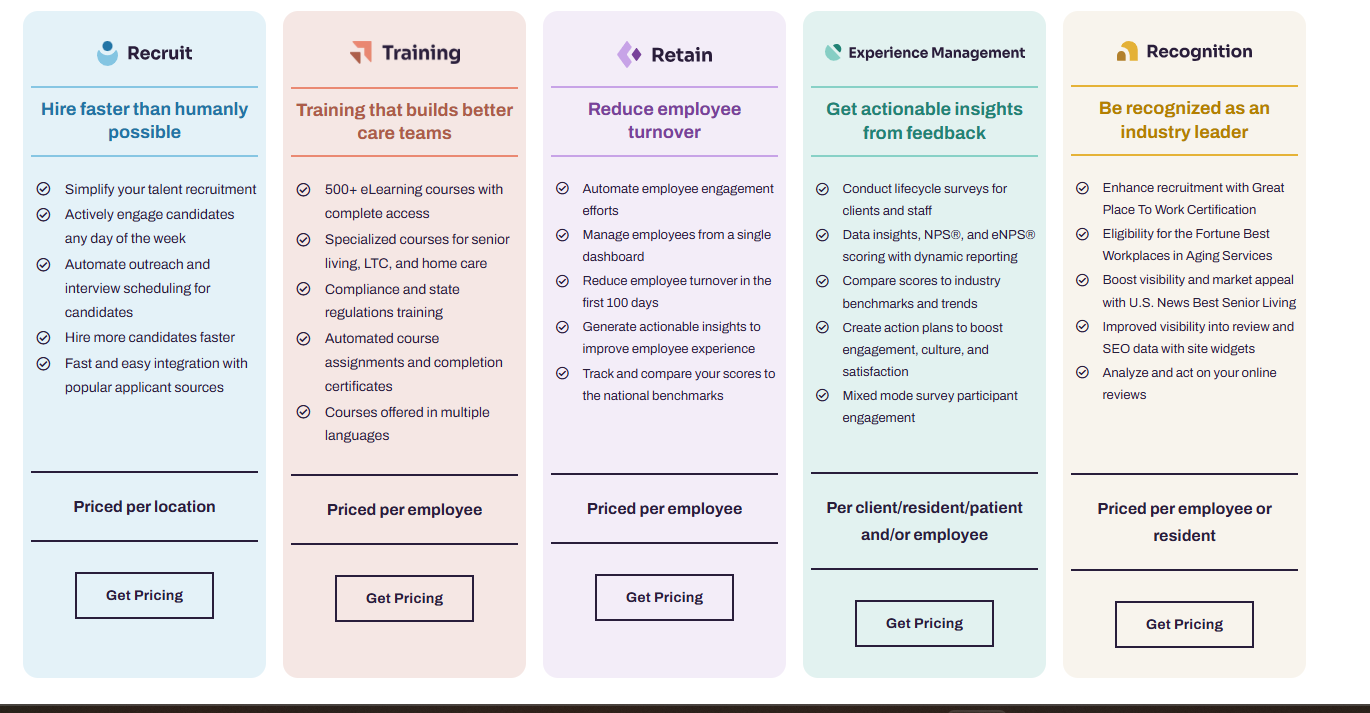 |  |
Activated Insights vs Rosemark: Other Details
Organization Types supported |
|
|
|---|---|---|
Platforms Supported |
|
|
Modes of support |
|
|
API Support |
|
|
Get help choosing | Get help choosing |
Activated Insights vs Rosemark Security & Compliance
Certifications, data handling, and security controls for IT and compliance evaluators.
HIPAA | — | ✓ Yes |
|---|---|---|
Data Encryption | — | ✓ Yes |
Data Residency | 🇺🇸 US | 🇺🇸 US |
Activated Insights User Reviews & Rating Comparison
Spotsaas Editor’s POV generated by AI | What buyers like
Common complaints
| Buyer sentiment Limited review data available, but the single rating indicates high satisfaction with caregiver management simplicity. What buyers like
Common complaints
|
|---|---|---|
Pros and Cons |
|
|
Activated Insights and Rosemark Customers
Customers |  Juniper  Visiting Angels  Homewatch CareGivers | No Customers information available. |
|---|
Media and Screenshots
Videos | No videos available. |  1 Videos |
|---|
Top Alternatives to Activated Insights and Rosemark in 2026

Add another option to compare side by side
Search by product name to compare pricing, fit, and buyer feedback in one view.Compare similar software options




Related Blogs and Articles for Home Health Care Software
Disclaimer: This research has been collated from a variety of authoritative sources. We welcome your feedback at [email protected].
Frequently asked questions
- Which is better, Activated Insights or Rosemark?
- Activated Insights and Rosemark are closely matched with equal user ratings of -1.0. The right choice depends on your team size, budget, and specific Home Health Care Software needs.
- Do Activated Insights and Rosemark offer a free trial?
- Neither Activated Insights nor Rosemark currently lists a free trial.
- What is the starting price of Activated Insights vs Rosemark?
- Activated Insights starts at Contact for pricing. Rosemark starts at Contact for pricing.
- What are the top alternatives to Activated Insights?
- Top alternatives to Activated Insights include KanTime Healthcare Software, Generations Homecare System, Alora Home Health, PointClickCare Skilled Nursing Platform, PointClickCare Home Health Care Platform.
- What are the top alternatives to Rosemark?
- Top alternatives to Rosemark include CareSmartz360, MatrixCare Private Duty, AdaCare, Generations Homecare System, Alora Home Health.