

Tracking time and attendance is one of those admin jobs that quietly eats hours every pay period. uAttend’s cloud-based employee management systems take that job off your plate by recording work hours automatically instead of on paper or a spreadsheet. This post walks through how the hardware and software work together to record work hours accurately, cut payroll errors, and give managers a live view of who is on the clock.
Here is a closer look at what uAttend does and how it fits different business sizes.
Key Takeaways
- uAttend runs on cloud technology, so managers get real-time updates and access from any device with an internet connection, and staff can punch in through biometric devices that log the entry the moment it happens.
- The DR Series and JR Series clocks cover several punch methods – facial recognition, voice control, fingerprint scanning, and RFID badge reading – and feed that attendance data straight into payroll systems.
- Because the data updates live, businesses can watch labor costs as they build up and make staffing calls on the same day, while the mobile apps let managers handle the workforce away from the office.
- Plans start at $25 per month for small teams, which keeps uAttend within reach for a one-location shop as well as a company running several sites, without dropping features.
- User reviews point to uAttend’s customer service and its plain, easy-to-learn interface as the main reasons the product earns high satisfaction scores.
Understanding uAttend
uAttend uses cloud computing to handle employee time management. It stores and processes attendance data on remote servers, not a machine in the back office, which means the records update in real time and stay reachable from anywhere with an internet connection.
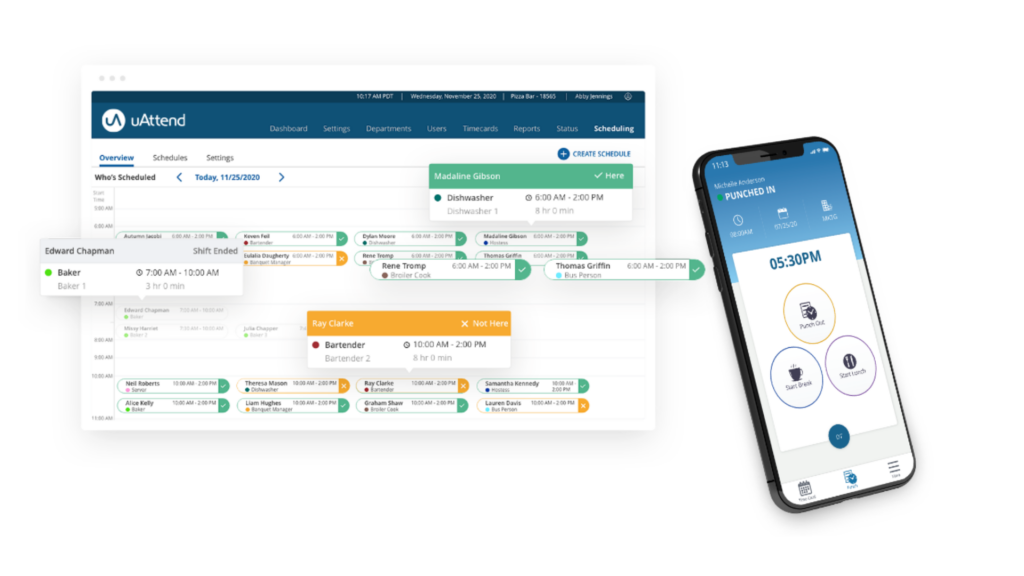
Employees clock in on biometric devices such as fingerprint scanners or facial-recognition time clocks, and the punch is captured instantly. That removes the manual step of filling in a timesheet, cuts down the mistakes that come with hand entry, and gives payroll a clean set of hours to work from.
The interface keeps scheduling and attendance tracking straightforward and adds a layer of data security on top. The screens are built to be self-explanatory, so a manager who is not technical can set up shifts and pull records without training.
uAttend connects to various payroll systems, which cuts the administrative back-and-forth of re-keying hours. With smartphone app support, managers keep an eye on the team while employees log time and submit requests from their own phones, so the whole timekeeping loop stays in one place.
uAttend Cloud-Based Employee Management Systems
uAttend sells a range of cloud-based clocks, including the DR Series Touch-Free Voice Control and Facial Recognition Time Clocks and the JR Series Biometric Finger Scan and RFID Time Clock.
Both lines record time and attendance and connect to mobile platforms so the data is available for real-time data access the moment an employee punches in.
DR Series Touch-Free Voice Control and Facial Recognition Time Clocks
The DR Series puts biometrics on the wall of the workplace. These clocks go past a keypad or a swipe card by offering facial recognition and voice control, so staff can clock in without touching the device – a practical fit for offices that want to limit shared-surface contact.
An employee walks up to the clock, has their face recognized or speaks a command, and their attendance is registered on the spot. That speeds up the check-in and sends the record straight into payroll systems without a second entry step.
Connectivity is where the DR Series earns its keep. It links to wi-fi networks and routers, so the punches sync in real time and the hours stay accurate from any spot within internet range.
The biometric data is stored securely, and HR teams get the benefit of automated timekeeping that no longer depends on someone collecting and typing up cards. Next up is the JR Series Biometric Finger Scan and RFID Time Clock and the punch options it adds for the shop floor.
JR Series Biometric Finger Scan and RFID Time Clock
The JR Series biometric finger scan and RFID time clock gives businesses more than one way to punch. It combines a fingerprint scanner for biometric identification, an RFID reader for a quick badge swipe, and a personal PIN entry for anyone who prefers to type a code.
Having three input methods on one device means employees can clock in quickly and securely whichever way suits them, and the hours are logged accurately either way.
The uAttend JR2000 model sells for $199. Along with the price, it offers WiFi or LAN connectivity so it slots into an existing office network, and it comes with free lifetime support – a sign that uAttend backs the hardware after the sale. Feeding the punches into a payroll system takes little setup once the clock is online.
Features of uAttend Systems
The uAttend cloud-based employee management systems center on three things: real-time data access, integration with mobile platforms, and accurate time and attendance tracking. Together they give a business enough to run its workforce without a separate spreadsheet or manual log.
Real-time data access
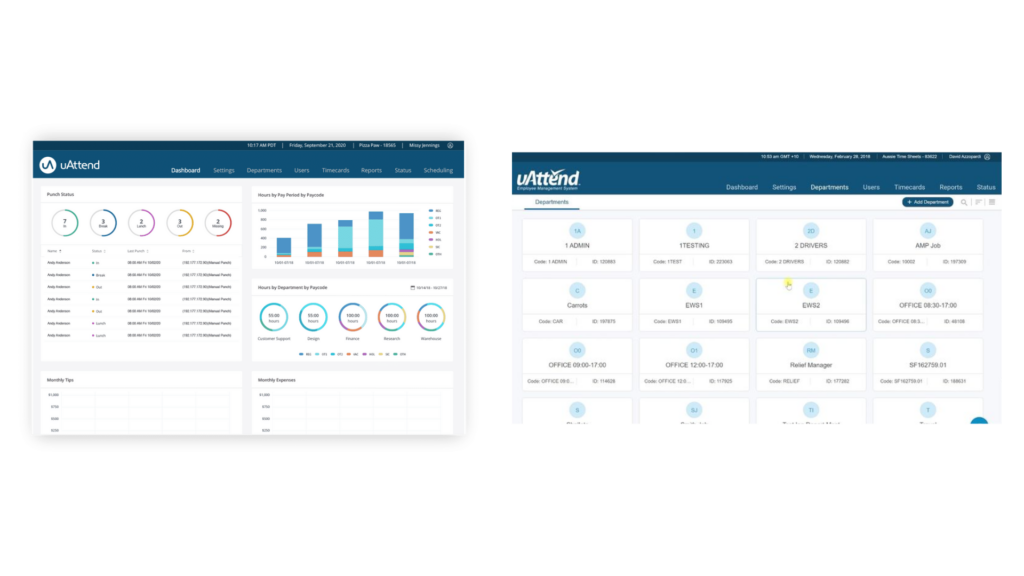
uAttend shows attendance data as it comes in. You can stay informed about employee attendance, time-off requests, and schedule changes the moment they are logged, rather than waiting for an end-of-week report.
That live view lets you watch labor costs add up and check employee hours during the day, not after the fact. Managers can spot productivity trends early and adjust staffing before overtime piles on.
Working from current numbers makes decisions and resource planning tighter. Because the interface pairs with mobile platforms, you can pull the same information from a phone whether you are on site, at home, or between locations.
Easy integration with mobile platforms
The uAttend cloud system pairs with mobile platforms so employees can clock in and out from their smartphones. Combined with the touch-free clocks that use facial recognition and voice-controlled punching, the setup gives staff a straightforward way to record time whether they are at a wall clock or on their phone.
Staff can view schedules and file time-off requests from anywhere through the uAttend Scheduling feature, so they manage their own hours without going through the office. Because the clocks connect over WiFi or LAN, they sync cleanly with mobile devices for day-to-day time tracking.
The uAttend JR2000 clock is quick to set up, and the free lifetime support means help is on hand if the mobile side needs tuning as the team grows.
Accurate time and attendance tracking
Accurate time and attendance tracking is the point of the whole system. With uAttend’s cloud-based employee management systems, a business can pull real-time data to check who is on time and who is out.
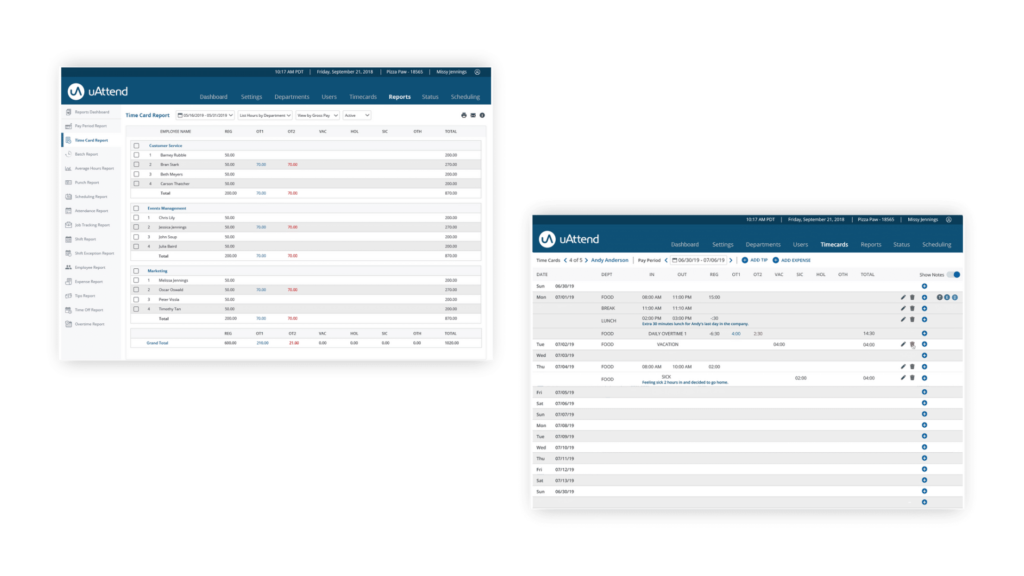
The touch-free clocks with facial recognition and voice-controlled punching cut the errors that come with hand-written cards. The reporting tools break down attendance patterns in detail, which helps a business tighten its record-keeping and catch problems like repeat late arrivals.
Handling attendance well keeps payroll accurate and productivity measurable. With uAttend logging the hours, a business tracks and manages work time reliably instead of reconstructing it from memory at the end of the month.
The Efficiency of uAttend Systems
Better time management and cleaner attendance records are two of the clearest gains uAttend delivers. Both are covered below, with a look at how the cloud setup keeps them running for the manager and the employee.
Maximizing employee time management
uAttend helps a business get more out of the time it already tracks. With real-time data access, employees can see their own attendance and keep their records tidy without waiting on HR.
The accurate time and attendance tracking keeps the workforce numbers correct, and the integration with mobile platforms lets staff handle their time from wherever they happen to be that shift.
Businesses running uAttend report a clear improvement in managing employee time. Because the system lives in the cloud, both the web app and the mobile app reach the same records, which gives managers and employees the same view without passing files back and forth.
Streamlining attendance records
Cleaning up attendance records is the next payoff. With uAttend’s cloud-based systems, a company keeps its attendance data accurate and reachable in one place instead of across binders and spreadsheets.
The real-time access means HR and employees can check hours the instant they are recorded. Because the touch-free voice control and facial recognition clocks feed the record directly, the entries stay accurate and are open from any spot with internet access, on desktop or phone.
That automation cuts the manual work out of the process and still gives a full picture of how attendance trends over weeks and months.
Backed by a plain interface and solid technical support, uAttend’s biometric fingerprint recognition takes record-keeping past the paper timesheet on both accuracy and day-to-day convenience.
User Experiences with uAttend Systems
Reviews are the best test of whether a time clock holds up in daily use. Here is what businesses say about running uAttend across attendance and time tracking.
Overall Rating
Users across a mix of industries rate uAttend highly for its ease of use, customer service, and value for money. Companies in food production, transportation, insurance, and construction have all reported a positive effect on their operations.
Several reviewers credit uAttend with cleaning up their accounting and getting a firmer grip on production hours. The setup and everyday use draw praise, as do the responsive customer service and the fingerprint readers holding up over time.
The recommendations lean toward businesses that run multiple locations or manage a large headcount. The plain interface, the removal of manual hour tracking, and the tighter attendance records are the practical wins reviewers name most often.
Ratings Breakdown
uAttend holds an overall rating of 4.6 across 439 reviews. Reviewers score it highest on ease of use, customer support, value for money, and functionality in the uAttend Cloud-Based Employee Management Systems.
Some reviewers flag limits such as the lack of an employee request calendar and the need to sync new employees to clocks by hand, but the overall read stays positive, with most people satisfied with uAttend’s features and affordability.
The feedback spans transportation, food production, farming, electrical and electronic manufacturing, construction, and retail, which shows the system works across a wide set of business types.
Popular Comparisons
The most common comparison is between uAttend’s DR Series Touch-Free Voice Control and Facial Recognition Time Clocks and the JR Series Biometric Finger Scan and RFID Time Clock. The DR Series handles touch-free, voice-controlled punching, while the JR Series relies on a fingerprint scanner and an RFID reader for clock-ins.
Each clock suits a different setting – the DR Series for contact-free entry, the JR Series for teams that want a badge or a fingerprint – so the choice comes down to how a workplace prefers to punch.
Buyers also weigh uAttend’s real-time data access against other web-based timekeeping tools like TimeClock Plus and similar cloud-based HR applications.
uAttend Pricing
uAttend charges a monthly subscription scaled to headcount, starting at $25 for 1–9 employees and rising to $41 for 10–19 employees. The touch-free clocks with facial-recognition authentication and voice-controlled punching are a one-time hardware purchase that starts at $299.
The JR2000 clock, which connects over WiFi or LAN, costs $199. Note that extra charges apply for additional time clocks, administrators, and data exports. Advanced payroll options such as earlyPAY are bundled in at no added cost.
Across small shops and larger teams, uAttend keeps the plans priced within reach while covering the core features a business needs to run its time and attendance.
Conclusion
uAttend’s cloud-based employee management systems take the guesswork out of tracking work hours. With real-time data access and accurate time tracking, you keep productivity measurable and your attendance records clean without chasing paper timesheets.
The plain interface and detailed reporting tools make the day-to-day easy to run, and the hardware range covers most ways a team might want to punch in. For a business that wants to spend less time on timekeeping and more on the work itself, uAttend is a practical option worth a look.
(Image Credit: uAttend)
Frequently Asked Questions
What are the benefits of using uAttendu0026#8217;s cloud-based systems?
uAttendu0026#8217;s cloud-based employee management systems give dairy farmers and other businesses easy-to-use tools to track time, avoid errors, and keep productivity high using biometric time clocks or RFIDs.
How does uAttend keep employee data secure?
uAttend protects staff details with advanced encryption, so only those with the correct password can reach sensitive information, and it does so over a secured internet connection.
Can I integrate uAttend systems with my existing computer network?
Yes. uAttendu0026#8217;s networking feature lets you add the platform to your current setup without hassle, so operations keep running from the start.
Is it complicated to set up a biometric time clock for my business?
No. Installing a biometric time clock is straightforward with uAttendu0026#8217;s clear instructions, and you get immediate gains in attendance accuracy so you can focus on growing the business.
Compare alternatives to the tools in this post

- Independent picks for exactly what you just read about
- Matched to your team size & needs
- Vendors don't pay for placement
Step 1 of 4
How big is your team?
We tailor recommendations to companies your size.















Related Articles
HR software
Gusto vs QuickBooks Payroll 2026: Prices, Features and Verdict
Continue reading →
Best Tools
Best PEO for Small Business in 2026: 8 Providers, Prices and Certification
Continue reading →
HR software
Gusto vs Paychex 2026: Published Prices vs Quote-Based Payroll
Continue reading →
HR software
Gusto Review 2026: Pros, Cons, Pricing and Who It Fits
Continue reading →