

Scrumban blends Scrum and Kanban to improve workflow efficiency, flexibility, and project management. It started out as a transitional framework for teams shifting from Scrum to Kanban, but it has since become a standalone Agile approach that combines Scrum’s structured planning with Kanban’s adaptability.
Teams adopt Scrumban because it removes Scrum’s rigid sprint structure while keeping Kanban’s continuous flow of work. This hybrid model suits teams that need more flexibility, want to eliminate bottlenecks, and aim to improve their processes on an ongoing, iterative basis rather than only at the end of a sprint.
With work-in-progress (WIP) limits, just-in-time planning, and pull-based task management, Scrumban helps teams deliver efficiently without the constraints of fixed iterations. By the end of this guide, you’ll understand how it fits into agile project management and whether it’s the right fit for your team’s workflow.
Where Scrum asks teams to commit to a fixed batch of work every sprint, and Kanban asks for almost no upfront planning at all, Scrumban sits between the two. That middle ground is the whole reason it exists: it’s for teams who find Scrum too rigid but Kanban too unstructured for their comfort.
What is Scrumban?
Scrumban is a hybrid Agile framework that merges elements of Scrum and Kanban into a more flexible, efficient workflow. Originally designed as a transition method for teams moving from Scrum to Kanban, it has evolved into a standalone approach that balances structure with adaptability.
Scrumban keeps Scrum’s planning discipline while adding Kanban’s continuous flow and work-in-progress (WIP) limits. This lets teams prioritize tasks dynamically instead of being constrained by fixed sprints. Unlike Scrum, where work is planned in time-boxed iterations, Scrumban runs on a pull-based system, meaning tasks get worked on as capacity allows rather than being forced into a rigid cycle.
How Does It Differ from Scrum and Kanban?
| Feature | Scrum | Kanban | Scrumban |
|---|---|---|---|
| Workflow | Sprint-based | Continuous flow | Hybrid (flow-based with structured planning) |
| Planning | Sprint backlog | Work-in-progress (WIP) limits | Pull-based, just-in-time planning |
| Roles | Defined roles (Scrum Master, Product Owner, Team) | No fixed roles | Flexible roles |
| Meetings | Daily standups, sprint planning, retrospectives | As needed | Minimal meetings, focus on continuous improvement |
| Best for | Teams needing structured iteration cycles | Teams needing continuous flow | Teams needing flexibility while maintaining structure |
How Scrumban Works – Key Principles
Scrumban runs on a flexible, flow-based system built to improve productivity while cutting down on inefficiencies. Unlike Scrum’s rigid sprint cycles, it lets teams work at their own pace while still maintaining structure and continuous improvement. Below are the key principles behind how Scrumban operates.
Pull-Based Workflow
In traditional Scrum, work is planned in time-boxed sprints, which requires teams to complete a set of tasks within a fixed period. Scrumban instead uses a pull-based system, where tasks are pulled into progress only when the team has capacity. This prevents work overload and keeps the workflow steady and manageable.
- Developers or team members pull the next highest-priority task from the backlog when they have the bandwidth.
- There are no fixed iterations or sprint planning meetings, which allows for continuous work progression.
- This makes it a good fit for teams working on ongoing projects, support tasks, or unpredictable workloads.
By following a pull-based system, teams reduce the risk of unfinished tasks piling up while still maintaining productivity.
Work-in-Progress (WIP) Limits
One of Scrumban’s most useful features is its Work-in-Progress (WIP) limits, which help prevent bottlenecks and keep tasks flowing smoothly.
- WIP limits restrict the number of active tasks a team or individual can handle at a time.
- Example: a team may set a WIP limit of three tasks per developer to prevent overload and keep focus sharp.
- Once a team member completes a task, they pull the next item from the backlog.
This approach keeps teams from juggling too many tasks at once, which supports a consistent, efficient workflow.
Just-in-Time Planning
Unlike Scrum, where teams plan tasks at the start of each sprint, Scrumban only plans when it’s actually necessary.
- Instead of planning every two weeks, teams trigger planning sessions once the backlog reaches a predefined threshold.
- This supports adaptive planning, meaning teams can adjust priorities as new requirements come in.
- It helps teams stay responsive to real-time changes instead of being locked into predefined sprint goals.
Just-in-time planning cuts out unnecessary backlog grooming and makes sure teams only plan work when it’s actually needed.
Continuous Improvement (Kaizen)
Scrumban focuses on continuous improvement by measuring and optimizing team performance using agile methodologies.
- Teams track cycle time, lead time, and throughput to analyze performance and identify inefficiencies.
- Instead of fixed Sprint Reviews, teams hold ongoing retrospectives to refine processes and eliminate waste.
- This encourages Kaizen (continuous improvement), helping teams improve their workflow over time.
By analyzing real-time performance data, teams can make informed decisions and streamline their processes without being tied to a rigid framework.
How These Principles Benefit Teams
| Principle | Key Benefit |
|---|---|
| Pull-Based Workflow | Prevents overload and enables a steady task flow. |
| Work-in-Progress (WIP) Limits | Ensures efficiency by controlling the number of active tasks. |
| Just-in-Time Planning | Reduces unnecessary meetings and backlog grooming. |
| Continuous Improvement (Kaizen) | Uses real-time data to optimize team performance. |
Put together, these principles give teams a structured yet flexible approach to agile work management. Teams that use them reduce inefficiencies, improve adaptability, and keep delivery consistent, without the fixed constraints of traditional sprint cycles.
Benefits of Scrumban
Scrumban balances structure and flexibility, which makes it a good fit for teams that need a dynamic workflow without the constraints of traditional Scrum. By combining Kanban’s continuous flow with Scrum’s structured planning, it helps teams work more efficiently and adapt quickly when priorities shift.
Increased Flexibility
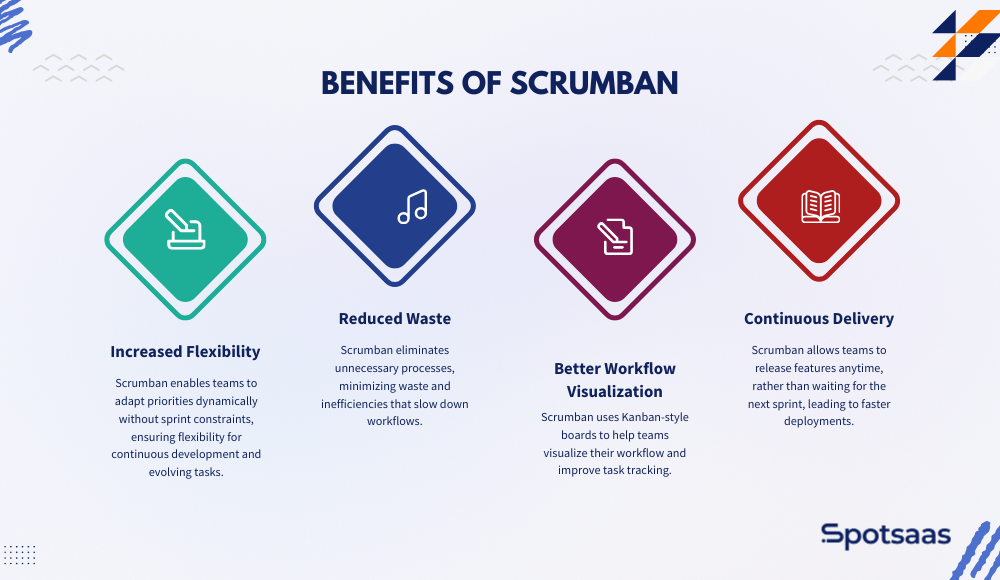
Unlike Scrum, which requires fixed-length sprints, Scrumban lets teams adjust priorities dynamically.
How It Helps Teams
Teams aren’t confined to sprint cycles, so they can respond to new requirements in real time. Tasks are pulled into progress only when capacity allows, which avoids unnecessary task assignments. This approach suits teams handling continuous development, maintenance work, or unpredictable workloads.
With that adaptability, teams can shift focus as priorities change without having to wait for a sprint to end.
Reduced Waste
Scrumban cuts out unnecessary processes, which reduces waste and the inefficiencies that slow workflows down.
How It Helps Teams
It reduces excessive sprint planning, backlog grooming, and daily meetings. Just-in-Time (JIT) planning makes sure teams only plan when backlog tasks reach a threshold, which keeps sprint backlogs from getting overloaded with unprioritized tasks.
By cutting non-essential activity, teams can spend more time delivering value and less time in meetings.
Better Workflow Visualization
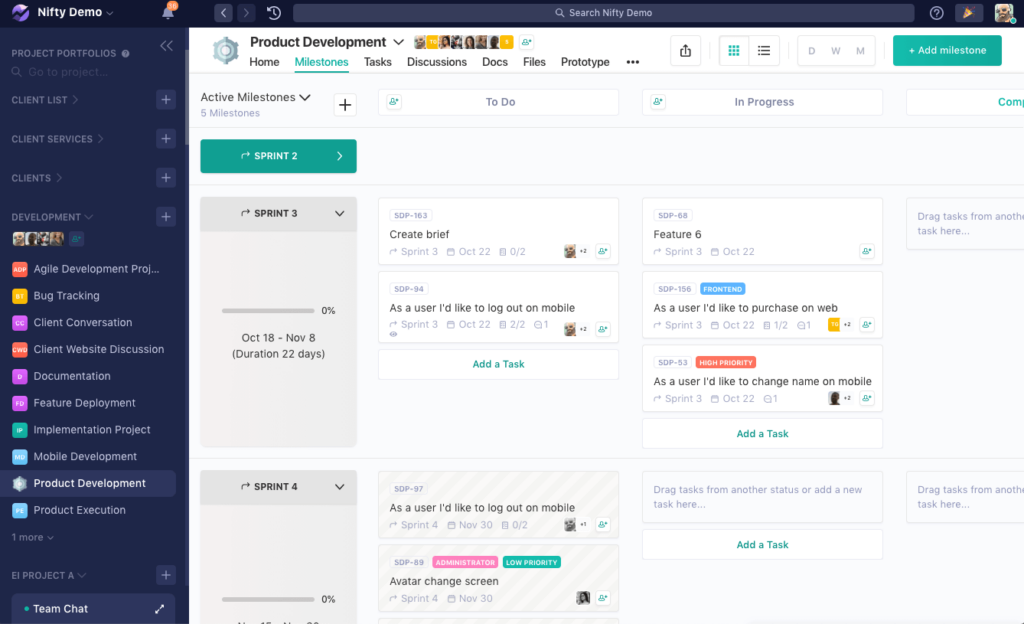
Scrumban uses Kanban-style boards to help teams visualize their workflow and improve task tracking.
How It Helps Teams
Clear task visualization lets teams see work-in-progress, bottlenecks, and completed tasks in real time. Work-in-Progress (WIP) limits keep tasks moving forward without overwhelming the team, and data-driven decisions, based on cycle time and throughput metrics, help optimize work processes.
Making tasks visible and easy to track is what improves efficiency and collaboration across the team.
Continuous Delivery
Scrumban lets teams release features anytime instead of waiting for the next sprint, which leads to faster deployments.
How It Helps Teams
With no fixed sprint deadlines, teams can push updates whenever a task is finished. Incremental delivery lets teams ship small, frequent improvements instead of waiting on a large release, which fits well for product teams, DevOps, and continuous integration (CI/CD) environments.
This streamlined approach means customers get updates and improvements faster, which tends to improve satisfaction over time.
How Scrumban Enhances Productivity
| Benefit | How It Helps Teams |
|---|---|
| Increased Flexibility | Allows dynamic priority changes without waiting for sprints to end. |
| Reduced Waste | Eliminates unnecessary planning and backlog grooming. |
| Better Workflow Visualization | Improves tracking of tasks and work-in-progress. |
| Continuous Delivery | Enables faster and more frequent product releases. |
Taken together, these benefits are what make Scrumban appealing for teams transitioning from Scrum, looking for a more adaptive approach, or handling continuous work: it boosts efficiency, simplifies workflows, and shortens delivery cycles.
When Should You Use Scrumban?
Scrumban blends Scrum’s structured planning with Kanban’s flexibility. Some teams are better off with pure Scrum or pure Kanban, but for teams that need a balance between the two, Scrumban is often the better fit.
Knowing when to reach for Scrumban can help teams improve workflow efficiency, reduce bottlenecks, and adapt more easily to change. The scenarios below are where it tends to fit best.
Teams Transitioning from Scrum to Kanban
Teams used to Scrum’s time-boxed sprints can adopt Scrumban to move toward a more flexible, flow-based system without discarding every Scrum element at once. Work-in-Progress (WIP) limits help manage workloads while keeping some structure in place. Just-in-Time (JIT) planning cuts down on unnecessary sprint planning sessions, letting teams focus on real-time priorities instead.
Projects Requiring Continuous Flow of Work
Some projects need a continuous flow of tasks rather than sprint-based execution. For teams working on long-term, evolving projects, Scrumban gives them the flexibility to pull tasks as needed instead of being boxed in by fixed-length sprints.
It removes the risk of carrying unfinished work into the next sprint and lets work progress at an optimal pace without arbitrary deadlines forcing the issue.
Maintenance and Support Teams Handling Unpredictable Requests
Scrumban works particularly well for teams handling ongoing maintenance, bug fixes, and customer support tasks. Unlike Scrum, which requires planning work ahead of time, Scrumban lets teams manage unpredictable incoming requests efficiently.
Teams can prioritize urgent issues without disrupting the rest of the workflow, and WIP limits make sure tasks get handled at a sustainable pace instead of overwhelming the team.
Agile Teams Struggling with Scrum’s Rigid Iterations but Still Needing Structure
Some teams find Scrum’s rigid sprint cycles too restrictive but still want some level of process organization. Scrumban lets teams keep elements of Scrum, such as backlog management and retrospectives, while benefiting from Kanban’s continuous delivery model.
Teams can adapt workflows as needed instead of being locked into a predefined sprint structure. Planning happens on demand rather than at the start of each sprint, which gives teams more control over how and when they execute tasks.
Implementing Scrumban: Step-by-Step Guide
Rolling out Scrumban gives teams a structured yet flexible approach to agile project management. Following the steps below helps teams optimize workflows, balance workloads, and keep improving efficiency over time.
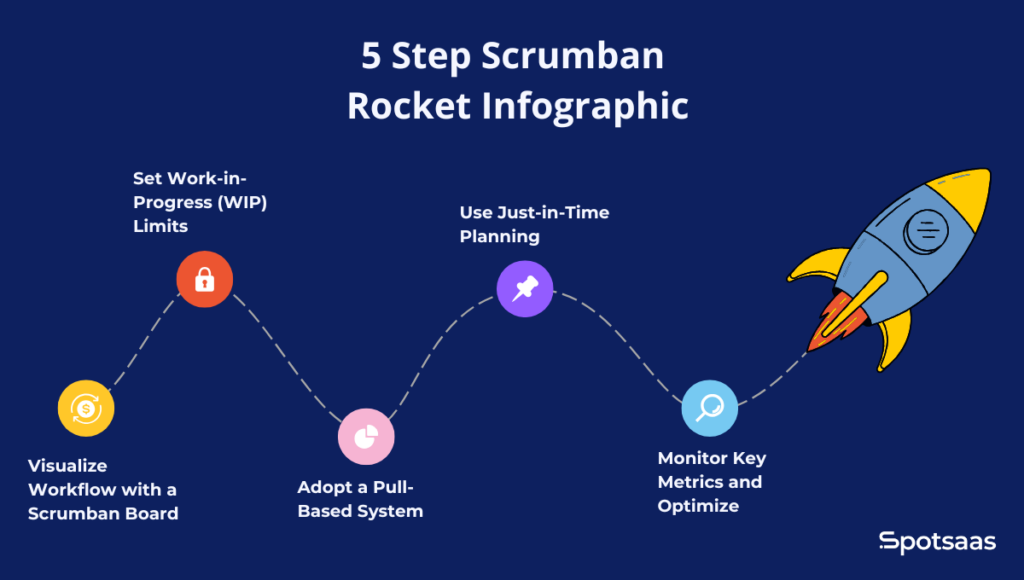
Step 1: Visualize Workflow with a Scrumban Board
A Scrumban board is the central tool for tracking tasks and keeping workflow visibility intact. Teams should build a Kanban-style board with columns such as To-Do, In Progress, Testing, and Done to categorize tasks by their current status.
Depending on how complex the workflow is, additional columns like Review, Blocked, or Ready for Deployment can be added. A well-structured board gives teams real-time visibility into task progress, which helps them find and resolve bottlenecks quickly.
Step 2: Set Work-in-Progress (WIP) Limits
To keep the workflow efficient and prevent multitasking overload, Scrumban introduces Work-in-Progress (WIP) limits, which cap the maximum number of tasks that can be in progress at any given time.
For instance, a development team might set a WIP limit of three tasks per developer, so no one gets overburdened and work keeps moving at a steady pace. This approach stops unfinished work from piling up, which helps teams stay focused, reduces stress, and improves task completion rates.
Step 3: Adopt a Pull-Based System
Unlike Scrum’s predefined sprint cycles, Scrumban follows a pull-based system where tasks move forward based on team capacity. Instead of assigning tasks in advance, team members pull work from the backlog only when they’re ready to take on something new.
This removes unnecessary pressure from fixed sprint deadlines and lets teams maintain a steady workflow without excessive planning overhead. A pull-based approach supports a self-managed work environment, where teams prioritize high-value tasks based on real-time needs instead of predefined iterations.
Step 4: Use Just-in-Time Planning
Scrumban replaces traditional sprint-based planning with Just-in-Time (JIT) planning, so teams plan work only when it’s necessary. Instead of scheduling work at the start of each sprint, planning is triggered once the backlog reaches a predefined threshold.
This method cuts down on unnecessary meetings and keeps teams focused on the most relevant, highest-priority tasks. With JIT planning in place, teams can adapt to changing requirements quickly, avoiding the rigidity of time-boxed sprint planning while still keeping their workflows structured.
Step 5: Monitor Key Metrics and Optimize
To keep improving, Scrumban teams should track key performance metrics that help identify inefficiencies and optimize workflow processes. The important ones are Cycle Time, which measures how long a task takes to move from “To-Do” to “Done”; Lead Time, which tracks the total duration from task creation to completion; and Throughput, which measures how many tasks get completed within a given timeframe.
Common Challenges and How to Overcome Them
Scrumban strikes an effective balance between Scrum and Kanban, but teams transitioning to it can run into a few challenges while adapting to its flexible workflow. Here are the most common ones, along with the best strategies for handling them.
Lack of Defined Roles
One of the biggest adjustments for teams moving from Scrum to Scrumban is the absence of predefined roles such as Scrum Master and Product Owner. In Scrum, each role has distinct responsibilities, but Scrumban allows for a more flexible, role-free structure, which can sometimes create confusion about who’s accountable for what.
Resistance to Change
Teams that have run Scrum for a long time may resist adopting Scrumban, since it requires a shift from sprint-based work cycles to a more flexible pull-based system. Some team members may feel uncertain about how work gets structured without sprints, and leadership may hesitate to move away from traditional planning methods.
Difficulty in Measuring Success
Since Scrumban doesn’t rely on time-boxed sprints, it can be hard for teams to measure success and track progress without the usual sprint goals and velocity calculations. Without proper tracking in place, leadership may struggle to assess team efficiency and overall project performance.
How Overcoming These Challenges Improves Scrumban Adoption
| Challenge | Solution |
|---|---|
| Lack of Defined Roles | Assign responsibilities based on expertise rather than predefined roles. |
| Resistance to Change | Implement Scrumban gradually and offer team training. |
| Difficulty in Measuring Success | Use Kanban metrics like cycle time, lead time, and throughput to track performance. |
Moving to Scrumban requires a shift in mindset, but addressing these common challenges head-on lets teams implement this hybrid approach successfully and improve their workflow efficiency. Working through these changes is what lets teams capture the real benefits of flexibility, adaptability, and continuous improvement, rather than getting stuck halfway through the transition.
Tools for Managing Scrumban Workflows
| Tool | Features | Best For |
|---|---|---|
| Jira | Kanban boards, backlog management | Software development teams |
| Trello | Drag-and-drop workflow, task tracking | Small teams & startups |
| Monday.com | Visual project tracking, automation | Agile teams in any industry |
| Asana | Task dependencies, collaboration tools | Cross-functional teams |
Conclusion
Scrumban successfully blends Scrum’s structured planning with Kanban’s flexibility, giving teams an adaptive approach to agile project management. By letting teams work at their own pace while keeping structured workflows in place, it offers an efficient, scalable, practical solution for teams managing continuous tasks, transitioning from Scrum, or handling unpredictable workloads.
Putting Work-in-Progress (WIP) limits, a pull-based task system, and Just-in-Time planning into practice helps teams optimize efficiency, cut down on bottlenecks, and improve overall productivity. Using the right workflow visualization tools and tracking key performance metrics like cycle time, lead time, and throughput on top of that supports continuous improvement and better-informed decisions.
For teams that want agility without giving up structure, Scrumban gives them a way to have both. Adopting its principles tends to improve collaboration, streamline workflows, and support long-term project efficiency, which is why it keeps showing up as a practical choice for evolving agile environments.
Frequently Asked Questions
What is Scrumban, and how does it differ from Scrum and Kanban?
Scrumban blends Scrum’s structured planning with Kanban’s flexible workflow, eliminating fixed sprints and using a pull-based system.
When should a team use Scrumban?
Scrumban is ideal for teams transitioning from Scrum to Kanban, handling continuous workflows, or managing unpredictable tasks.
How does Scrumban improve workflow efficiency?
It optimizes work using Work-in-Progress (WIP) limits, Just-in-Time planning, and Kanban visualization to enhance task management.
How do you measure success in Scrumban without sprints?
Teams track Cycle Time, Lead Time, and Throughput to measure efficiency instead of relying on sprint-based progress.
What tools are best for managing Scrumban workflows?
Tools like Jira, Trello, Monday.com, and Asana help teams manage Scrumban boards, workflows, and task tracking.

- Independent picks for exactly what you just read about
- Matched to your team size & needs
- Vendors don't pay for placement
Step 1 of 4
How big is your team?
We tailor recommendations to companies your size.















Related Articles
Applicant Tracking Software
monday.com for HR and Recruiting (2026): Hiring Pipelines, Onboarding and When You Need an ATS
Continue reading →
Project Management
monday.com for Remote Teams (2026): Async Updates, Dashboards and Slack, Zoom and Teams Setup
Continue reading →
Project Management
monday.com for Nonprofits (2026): Programs, Grants, Volunteers and Donor Tracking
Continue reading →
Project Management
monday.com for Construction (2026): What It Covers and Where Procore or Buildertrend Fit Better
Continue reading →