

A computer that runs slowly and shows constant pop-ups is often a sign of infection. SpyHunter is built to defend against malware and spyware that cause these problems.
This post walks through how to clean your system using SpyHunter’s tools so you can stay safe online. It covers how the program detects threats, the features it offers, the way it protects your system, and the extra tools it includes for privacy and cleanup.
Key Takeaways
- SpyHunter defends against a wide range of cyber threats, including malware, spyware, ransomware, and potentially unwanted programs (PUPs).
- The program uses advanced detection such as heuristic analysis to identify both known and unknown threats, along with real-time scanning for proactive protection.
- Extra tools include a File Shredder for secure data deletion and Secure Disk Erase for wiping entire disks, both aimed at protecting your privacy.
- With custom malware fixes and one-on-one customer support, SpyHunter gives personalized help for specific security issues.
- Safe System-Level Malware Removal lets SpyHunter clear stubborn malware by booting into a specialized environment separate from Windows.
Understanding Malware and Spyware Threats
Before removing cyber threats, it helps to understand malware and spyware. These invasive programs are built to disrupt, damage, or gain unauthorized access to your system.
Malware is a broad term for malicious software such as computer viruses, worms, trojan horses, and ransomware. Each type behaves differently, but all of them are designed to cause harm. Spyware is a sneaky variant that hides on your device, tracking your internet activity and stealing sensitive information without your consent.
The impact ranges from annoying ads caused by adware to severe data breaches caused by spyware. Some infections are only a nuisance, while others put your money and identity at risk. Browser hijackers can take over your web browsing and redirect you to unwanted sites, while scamware tricks you into paying for unnecessary services or fake technical support.
Left unchecked, these attacks expose personal data to cybercriminals who could use it for financial gain or identity theft. Staying alert and using protective measures is key to shielding your computer against these intrusions.
Introduction to SpyHunter
With so many threats posed by malware and spyware, it makes sense to look at tools designed to fight them. SpyHunter is a strong antivirus application built to find, isolate, and remove malicious software that compromises your security and privacy.
It gives users a full defense against the cyber threats that can hide behind a single click. As new threats appear, the program is designed to keep up rather than fall behind.
SpyHunter has a user-friendly interface that combines powerful features for experienced users while staying approachable for people less familiar with cybersecurity.
Its detection algorithm is tuned to spot both known malware variants and emerging threats through heuristic analysis, protecting your system without constant manual oversight.
Certified by respected organizations such as AppEsteem and AV-TEST, SpyHunter has earned a 100% effectiveness score verified by industry experts.
Features of SpyHunter
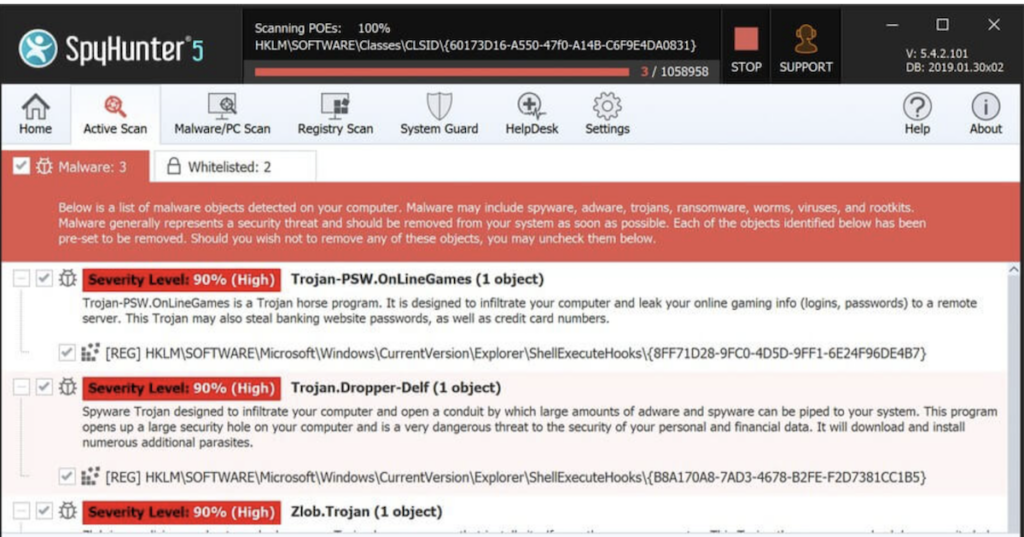
SpyHunter offers several strong features: malware and PUP detection, vulnerability detection, advanced system guards, custom malware fixes, one-on-one customer support, and safe system-level malware removal.
Here is how each of these features protects your system from cyber threats.
Malware & PUP Detection & Removal
Keeping your devices safe means staying one step ahead of cyber threats. SpyHunter does this with a strong engine that quickly detects and removes malware and potentially unwanted programs (PUPs).
Its scanning system finds viruses that hide in the corners of your device, so nothing malicious goes unnoticed. It checks the places where malware tends to bury itself, not just the obvious files.
Real-time scanning acts as a gatekeeper, blocking harmful software before it can cause damage. Heuristic analysis looks deeper, searching for patterns that might signal a zero-day attack or advanced persistent threat. Instead of relying only on known malware fingerprints, it flags files that behave in suspicious ways.
This approach keeps the protection current against even the most cunning tactics used by modern cybercriminals.
Vulnerability Detection
Alongside its malware and PUP detection, SpyHunter offers vulnerability detection. This feature identifies reported vulnerabilities in legitimate software, adding another layer of defense against cyber attacks.
By running vulnerability assessments, SpyHunter makes sure potential exploit points are found and protected from intrusion. Attackers often target weak spots in trusted software, so catching them early closes a common route into your system.
The vulnerability scan works as a proactive shield against attempts to breach your system’s defenses. Through it, SpyHunter strengthens network security by pinpointing software vulnerabilities and hardening your system against threats.
Advanced System Guards
Advanced System Guards in SpyHunter add extra security for your system. With real-time malware blocking, they stop unwanted apps from getting onto your device before they can run and cause problems.
The system guards also include vulnerability detection to protect against reported vulnerabilities in legitimate programs, giving you protection against hacker attacks. They also support privacy protection with a file shredder, secure disk erase, duplicate file scan, and large file scan, all built to make your system more secure.
Custom Malware Fixes
SpyHunter also offers custom malware fixes that target specific threats. This feature provides personalized solutions and targeted removal of advanced malware, including ransomware and viruses.
With these custom fixes, users can manage background processes tied to tech problems such as Discord showing a black screen or printer driver errors. Because each fix is matched to the issue at hand, it can address problems that a general scan might miss.
SpyHunter’s focus on precise remediation gives full resolution of complex malware problems while providing advanced threat-blocking.
With custom malware solutions and advanced protection, users can handle tricky tech issues and keep their systems safe from new cyber threats.
Webroot Antivirus Review: The Importance Of Antivirus Software In Cybersecurity Measures
One-on-One Customer Support
For malware problems, SpyHunter goes beyond standard features with personalized one-on-one customer support. This direct access to technical help means users get tailored solutions for malware troubleshooting.
The in-house HelpDesk provides individual assistance, letting customers raise concerns and receive custom fixes for their specific malware issues. Rather than working through generic steps, users can get help aimed at the exact problem on their machine.
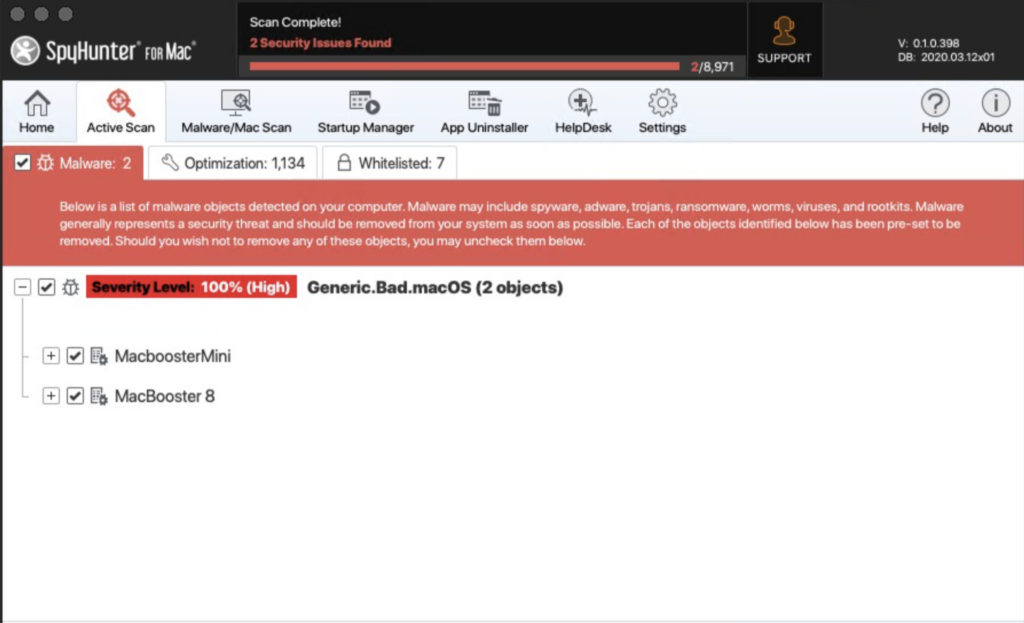
For SpyHunter for Mac, one-on-one technical support helps users deal with Mac-specific malware. Whether the goal is improving performance or fixing security concerns, this personalized support lets users handle Mac malware with confidence and expert guidance.
Safe System-Level Malware Removal
SpyHunter offers Safe System-Level Malware Removal by booting the system into a customized environment made for malware cleanup. This lets SpyHunter run at a lower level than Windows, using its built-in Compact OS to remove stubborn and persistent malware. Some threats resist removal while Windows is running, and this approach reaches them where a normal scan cannot.
The program’s heuristic analysis also identifies zero-day threats and exposes the tactics used by advanced persistent threats, giving full protection against changing malware methods.
Users can also get personalized technical support through the SpyHunter HelpDesk, with one-on-one assistance for custom fixes suited to their specific system-level removal needs.
How SpyHunter Protects Your System
SpyHunter protects your system with an advanced optimization scan that helps find and remove malware and spyware. With heuristic detection and network protection, SpyHunter keeps your system safe from cyber threats in real time.
Advanced Optimization Scan
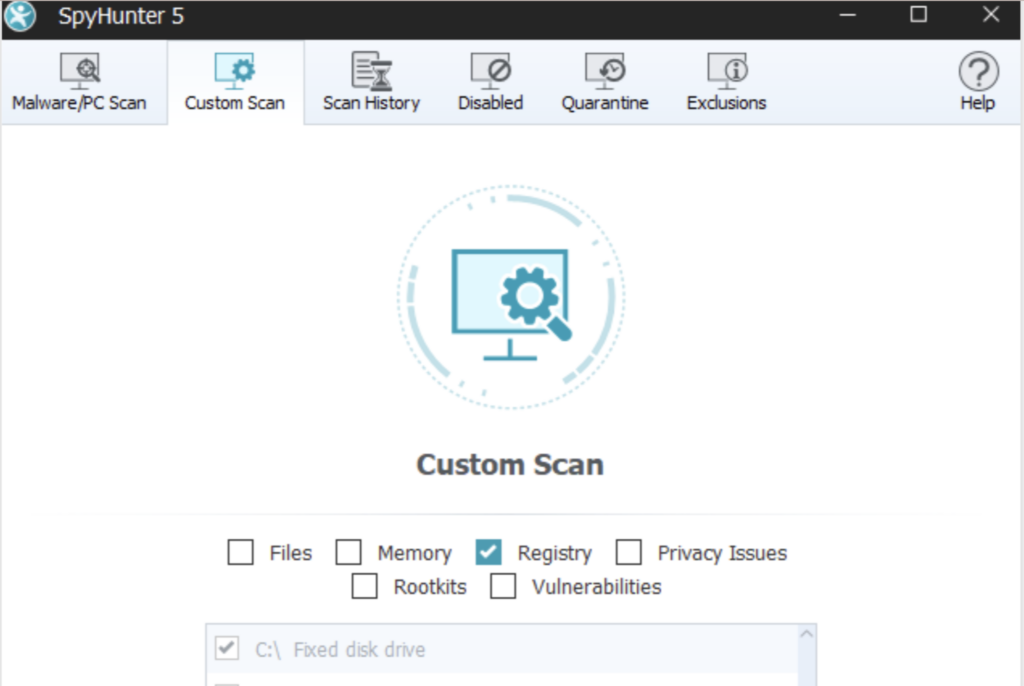
SpyHunter’s advanced optimization scan goes beyond basic malware removal to improve your system’s performance. By clearing disk space and finding duplicate or large files, the scan helps make your computer faster and more responsive.
It also includes privacy protection features to guard sensitive information from threats. With this tool, SpyHunter offers a way to both remove malware and tune up your system, so one scan handles cleanup and performance together.
The scan is useful for anyone who wants system optimization because it covers both security and performance. The file deletion tool clears unnecessary clutter, while the secure data erasure feature adds more privacy protection.
Heuristic Detection Capabilities
SpyHunter uses heuristic detection to spot new and unknown threats early. This analysis method lets the program uncover zero-day attacks and expose the tactics used by advanced persistent threats, adding another layer of defense against changing malware.
By continually studying patterns and behaviors, SpyHunter can adapt to emerging threats and improve how well it catches them. This matters because new malware appears constantly, and signature lists alone cannot keep pace with it.
Its heuristic analysis helps it keep pace with cybercriminals and protect your system from the latest malware strains. With this proactive approach to threat detection, your system stays shielded from even sophisticated malicious software.
Network Protection
Beyond heuristic detection, SpyHunter provides strong network protection to safeguard your system. With real-time system guards and malware blocking, SpyHunter offers full security against online threats.
By watching network activity and stopping malicious objects from disrupting your internet connection, the program delivers reliable network protection. This helps block threats that try to reach your system over the network rather than through downloaded files.
SpyHunter’s vulnerability scan also finds reported vulnerabilities in legitimate programs, serving as a proactive defense against hacker attacks. This protects both system security and data security, so your sensitive information stays safe while you browse or work online.
Additional Tools of SpyHunter
Along with malware detection and removal, SpyHunter offers extra tools such as a file shredder, secure disk erase, and quarantine and exclusions features.
These tools add more security so your system stays protected from threats, and each one covers a different part of keeping your data safe.
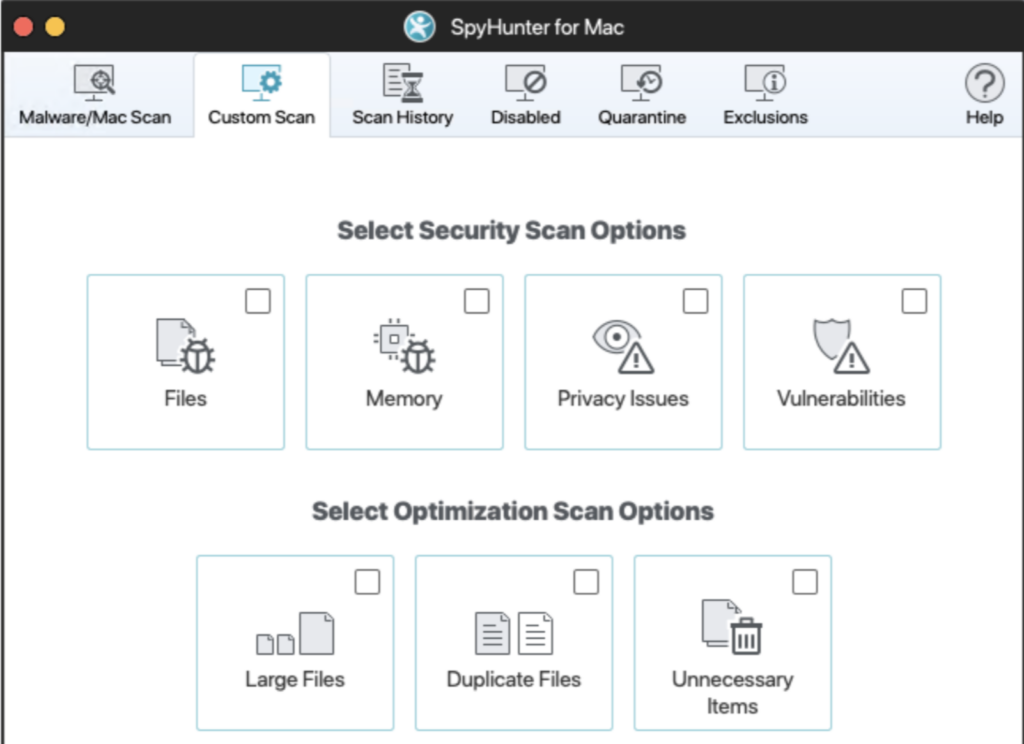
File Shredder
SpyHunter’s File Shredder protects your privacy by permanently deleting sensitive data, leaving no trace for recovery. It is part of SpyHunter Pro’s privacy protection suite, with tools to securely remove any personal information or confidential files.
Using the File Shredder, you can be sure your data is securely erased and kept away from unauthorized access.
The File Shredder goes beyond standard deletion, offering more control over your personal privacy and security. As part of removing malware and spyware, it adds to SpyHunter’s overall security. Ordinary deletion often leaves data that can be recovered, so shredding closes that gap and keeps sensitive files from resurfacing.
Adding this tool to your security routine helps keep sensitive information private. It gives you more control over your digital footprint, with efficient and effective data shredding.
Secure Disk Erase
The Secure Disk Erase feature lets users securely wipe entire disks for complete data destruction and privacy protection. It goes beyond simple deletion, using data sanitization techniques that make erased data unrecoverable.
With this feature, users can be sure that sensitive information is permanently removed from their systems, which adds to overall data security. This is useful when you sell, donate, or retire a device and want to be certain nothing personal is left behind.
Disk wiping with Secure Disk Erase improves privacy and also helps system performance by freeing up space and making sure no remnants of deleted files remain.
Quarantine and Exclusions
SpyHunter includes an Exclusions feature that lets users mark certain objects to be skipped in future system scans, protecting legitimate files while the program focuses on real threats.
Any items SpyHunter removes are kept safely in Quarantine, so they can be restored if needed. This added layer of protection makes sure important files are not targeted by mistake and gives you peace of mind when dealing with malware or spyware. If a safe file is ever flagged, you can recover it rather than losing it for good.
Conclusion
Protecting your system against malicious software matters. With SpyHunter, you can actively guard your devices from malware and spyware. Strong computer security helps you fend off cyber threats.
Take charge of your internet security with advanced protection features, and keep your system running smoothly by removing malware and spyware.
(Image Credit: SpyHunter)
Frequently Asked Questions
How do I know if my computer is infected with malware or spyware?
Your computer may show signs such as unusual pop-ups, slow performance, unexpected changes in settings, and unexplained use of data.
Can SpyHunter remove all types of malware and spyware from my computer?
SpyHunter can detect and remove various types of malware and spyware, including trojans, adware, worms, keyloggers, and more.
Is it safe to use SpyHunter to remove malware from my computer?
Using SpyHunter’s scanning technology should not noticeably affect your system’s performance during regular use.
Will using SpyHunter affect the performance of my computer?
Using SpyHunter’s scanning technology should not noticeably affect your system’s performance during regular use.
Can I schedule scans with SpyHunter to regularly check for malware on my computer?
Yes, you can set up scheduled scans with SpyHunter so your computer is regularly checked for potential threats.
Related Articles
Cybersecurity
10 Best CrowdStrike Alternatives in 2026 (Ranked for Every Security Team)
Continue reading →

Cybersecurity
Best Cybersecurity Software in 2026: Complete Guide for Every Business Size
Continue reading →
Cybersecurity
Best Identity and Access Management Software (IAM) in 2026
Continue reading →
Buyers guide
How To Choose The Best Security Awareness Training Software For 2026
Continue reading →