
ProPresenter Reviews: Easy-to-use Presentation Software with Modernized Interface

Building presentations and live streams can feel like a lot of work, even if you have done it for years. ProPresenter is versatile presentation software used across a range of industries, from worship services to live sports broadcasting.
This article walks through ProPresenter’s features and tools so your visual content holds an audience’s attention. Read on to get more out of your presentations.
Key Takeaways
- ProPresenter is versatile presentation software with high-quality video output and a multi-layered architecture, which supports live productions and multimedia presentations.
- The software includes specialized tools such as ProVideoPlayer for advanced screen control, ProVideoServer as a broadcast server, Scoreboard for live sports updates, and ProContent, a library of over 50,000 media assets.
- Through direct integration within the platform and custom themes, users can build consistent, visual presentations across worship services, education, broadcast events, and live sports coverage.
- Other features include content organization with multilayer control over videos and slides, plus mobile app support to keep audiences engaged during live streams or events.
- The modernized interface makes the software simpler to move through, and the updated editor gives users detailed control when they customize a presentation.
What is ProPresenter?
ProPresenter is an easy-to-use presentation software that fits the needs of many industries, from churches running worship services to professionals working in broadcasting and live events.
It does more than build slides. Users can add high-quality video content to create immersive experiences for their audience. That range carries over to education and live sports, where clear visuals and timely updates matter.
ProPresenter was built to be both simple and capable, handling complex tasks such as video layering and editing inside one intuitive interface. Mobile apps let users manage a presentation on the move, and tutorials cover each feature step by step.
Free trial options let interested users test the full software before they commit. It runs on both Mac and Windows, which keeps it accessible and makes it a common choice for presentations across many settings.
Key Features of ProPresenter
ProPresenter delivers high-quality video output and a multi-layered architecture, which suits live productions and multimedia presentations. Its modernized interface and advanced editor give users a clear platform for building dynamic content.
High-Quality Video Output
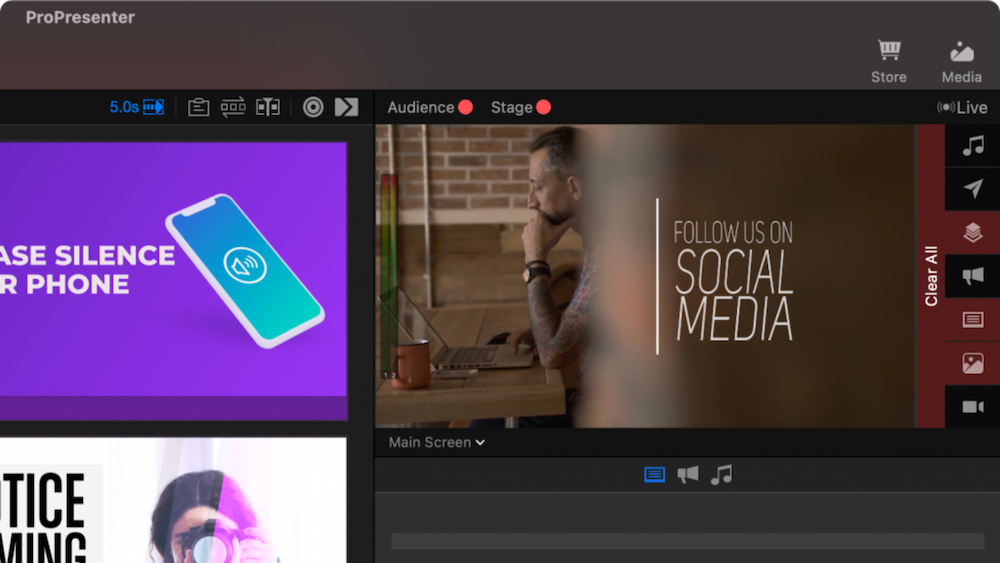
ProPresenter’s revamped video engine produces crisp, clear visuals for a presentation or live stream. Content projected on large screens keeps vibrant colors and sharp images from start to finish.
This step up in quality arrives at no extra cost, alongside features such as multi-screen output and alpha-channel support.
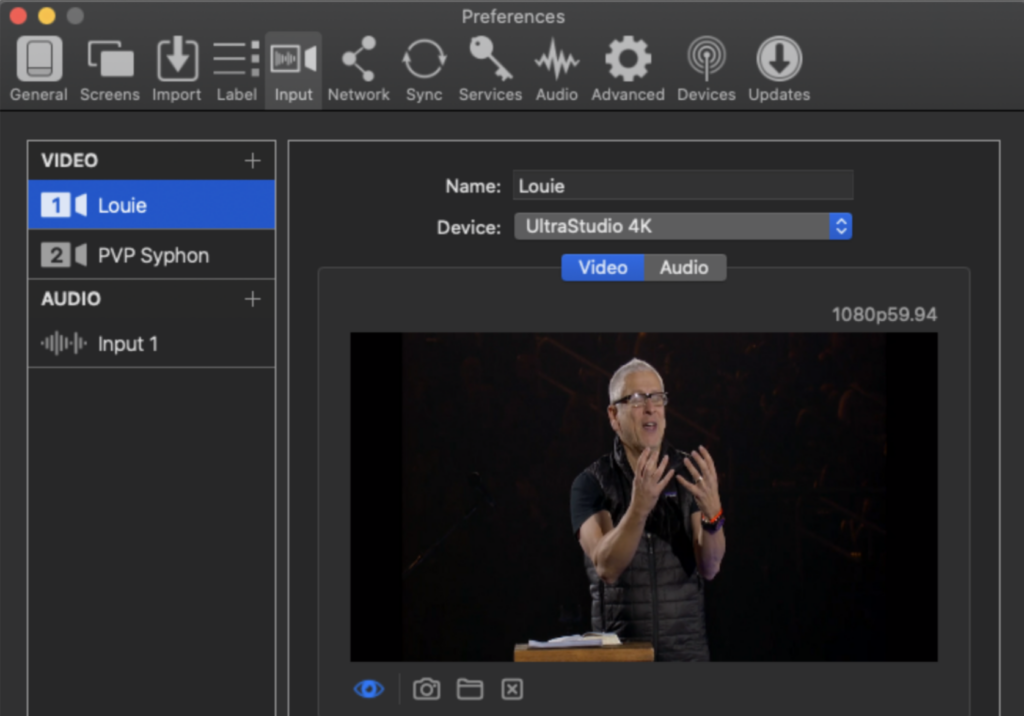
ProPresenter 7 lets you manipulate live video with precision while playback stays smooth. The multi-layered architecture hands you fine control over every part of a video presentation.
Background layers, slide management, and prop handling can each be adjusted in real time, so a video builds into a clear visual story. Added capabilities such as edge blending and NDI output give professionals broadcast-level results.
Because these controls are independent, an operator can change a background clip without touching the slide on top of it, or swap a prop while a live feed keeps running. That separation is what keeps the picture stable during a busy production, and it is a large part of why the video engine feels like a step up from earlier versions.
Multi-Layered Architecture
ProPresenter 7 raises the level of your presentations with its multi-layered architecture. This feature lets you manage separate on-screen elements independently.
You can adjust backgrounds, overlay live video feeds, and change slides at the same time without one affecting another. That control produces a dynamic visual experience that keeps an audience watching.
The layered structure earns its keep when you are handling several tasks during a live presentation. New props drop in and screen areas mask off cleanly, which supports real-time storytelling.
The interface keeps these complex actions approachable, so operators who are not technical can still run them. With advanced editing tools on hand, refining each layer down to text formatting is straightforward.
Modernized Interface
The modernized interface in ProPresenter 7 gives users an updated experience that is easier to move through and operate. The redesigned layout improves the software’s look and cuts steps out of the workflow.
Dark mode now reduces eye strain and improves visibility during long sessions.
The revamped editor adds slide annotations, custom shapes and patterns, color-change triggers, and text-resizing options. These tools let users build detailed, visual presentations with precision.
Advanced Editor
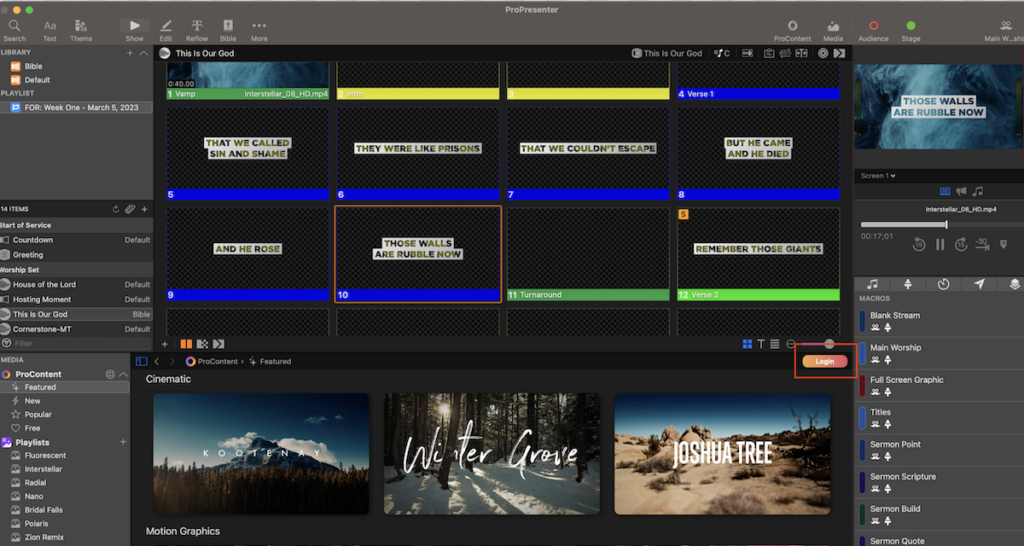
ProPresenter’s Advanced Editor adds editing tools such as slide annotations, geometric shapes, and color gradients. It handles dynamic text resizing and responsive linked text containers so visuals stay aligned.
You can also apply conditional text visibility and data-driven text boxes to change what a slide shows based on your content.
Get more from your presentations using ProPresenter’s Advanced Editor. Editing tools such as slide notes, responsive text resizing, and conditional text visibility triggers let you build dynamic, visual content that connects with an audience.
Specialized ProPresenter Tools
Add depth to your presentations with tools such as ProVideoPlayer, ProVideoServer, ProPresenter Scoreboard, and ProContent. Each one extends the platform for video playback, server integration, scoreboard management, and content creation.
ProVideoPlayer
ProVideoPlayer is an all-in-one media server software with advanced screen control and video processing. It was built for presentations and live streams, and it adds real capability to the ProPresenter suite.
With ProVideoPlayer, users manage multimedia content, apply projection mapping, automate content delivery, and run stage display during live events or presentations.
Its features give users precise video processing controls and visual content management, which helps raise the quality of live streaming and presentations.
The projection mapping and automated content delivery matter most in rooms with unusual screen shapes or several outputs at once. Instead of lining up each surface by hand, an operator can set the mapping once and let the software send the right content to the right place, then run the stage display so on-stage talent sees notes and cues while the audience sees the finished output.
ProVideoServer
ProVideoServer is a multi-channel broadcast video ingest and playout server built for presentations and live streams across many industries. Its advanced video processing engine keeps playback and control steady across a wide range of events and productions.
Because it handles multi-channel broadcast ingest and playout, ProVideoServer suits churches, universities, corporate events, sports broadcasting, and similar organizations.
It works alongside ProPresenter and the related tools to give teams one connected live production setup.
For a church that streams its service, a university that records lectures, or a corporate event with several stages, that shared setup matters. The same server can ingest and play out multiple channels, so the images an audience sees stay in sync across screens through a long production.
ProPresenter Scoreboard
For live sports events and broadcasts, ProPresenter Scoreboard proves its worth. It combines real-time data feeds, video feeds, and on-screen graphics into dynamic visuals for interactive displays.
Features such as in-game stats and statistic updates let the scoreboard deliver a professional viewing experience for audiences during a live broadcast.
Because the scoreboard pulls from real-time data feeds, scores and stats update on screen as the game moves, without an operator retyping numbers between plays. Combined with the video feeds and graphics, that keeps the display accurate and interactive across the length of an event.
ProContent
ProContent is a tool within the ProPresenter suite that offers a subscription-based media library with over 50,000 high-quality visual assets. It covers needs such as worship visuals, sermon series graphics, and social media templates for presentations and live streams.
The platform includes strong search and direct integration within ProPresenter, so users can find and drop customizable visuals into their content.
Because so many options can be customized, users can improve their presentations and live productions with the visuals ProContent supplies.
Also read Visme Reviews: Create Professional Presentations and Infographics Online
Integration and Compatibility of ProPresenter
ProPresenter offers direct integration within the software, strong search, a library of 50,000 media assets, and the option to build custom themes. Here is how those features improve your presentations and live streams.
Direct Integration Within ProPresenter
ProPresenter 7 offers direct integration within the software, with compatibility and unified presentation capabilities. A single machine and one license control all outputs, which simplifies managing presentations and live streams.
A clear interface, consistent themes, editing tools, and language support make it easy to build strong content and reach diverse audiences.
Those unified capabilities mean several media sources run from one machine under one license, so teams deliver high-quality presentations and live streams with fewer moving parts.
Industry Leading Search
ProPresenter’s search speeds up your workflow. Look through a library of 50,000 media assets to find the right content for a presentation fast.
Images, videos, and other media are quick to locate, which helps you reach your audience during a live stream. Built-in search also opens up a wide set of ProPresenter themes and visual elements for many settings.
Integration within ProPresenter lets you build visuals without extra hassle. Search moves through the multimedia options quickly, so you can assemble a presentation with less friction.
50,000 Media Assets
ProPresenter’s subscription-based library holds over 50,000 media assets. That access to visual and multimedia content lets you improve your presentations and live streams.
Direct integration within ProPresenter puts this large set of digital assets close at hand, so you can hold an audience’s attention.
The collection of high-quality media assets spans many themes and styles. From videos to images, the ProContent library gives you a wide range of resources for real-time visuals.
That depth of content raises the quality and engagement of your presentations.
Custom ProPresenter Themes
Custom ProPresenter themes give you room to build visually striking presentations for specific events or services. In ProPresenter 7, users design themes that keep visual consistency and support multimedia integration.
These themes sit inside the software’s interface, which makes text formatting and dynamic visual effects easy to apply. The revamped video engine improves playback, and the editor adds slide notes, shapes and gradients, and dynamic text scaling.
With custom themes, presenters give their work a cohesive, professional look that improves engagement and stays with an audience.
A theme also saves time on repeat events. Once the fonts, colors, and layout are set for a service or a broadcast, that look carries across every slide without redoing the formatting each week, and the same theme can be adjusted for a one-off event when the occasion calls for it.
Benefits of Using ProPresenter
ProPresenter gives you flexibility and advanced features. Organize and customize your content, and stay connected to your audience during a live stream.
More Flexibility Than Traditional Slide Software
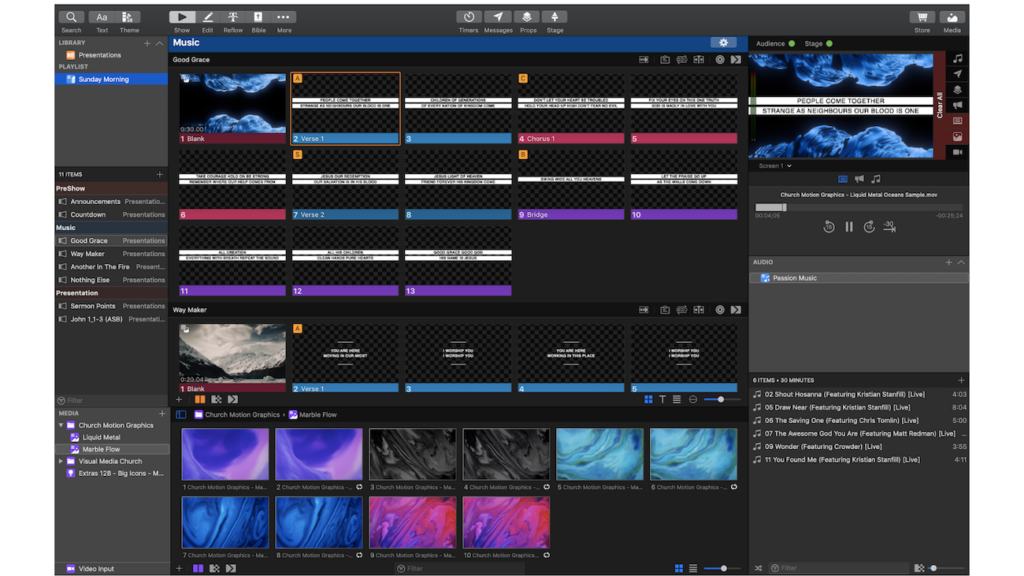
ProPresenter gives you more flexibility than traditional slide software. Features such as stage display, object builds, and mobile integration let you create dynamic presentations that stand out.
Multimedia elements drop in cleanly, and you can control a presentation remotely for a setup that fits how you work.
ProPresenter also offers multiscreen output options, high-quality transitions, and a modernized interface that keeps operation smooth. That flexibility lets you adapt a presentation to different settings and audiences.
For creative freedom in your presentations, ProPresenter gives you plenty of room to work.
Easy-to-Use with Advanced Features
That flexibility pairs with an easy-to-use design, so users get advanced functionality without a steep learning curve.
ProPresenter 7 makes dynamic visual content simpler to build through its improved interface and slide customization tools. Multilanguage support, multiscreen displays, live event support, and real-time statistics tracking let users deliver presentations without technical roadblocks.
Its video integration adds to the experience with capabilities for live production visuals.
The point of this combination is that a single operator can run a fairly complex show without a specialist crew. Multiscreen displays, live event support, and real-time statistics all sit inside the same interface, so the person at the keyboard is not switching between separate applications to keep a presentation moving.
Organize the Way You Want
Customizing a presentation is simple in ProPresenter. The software lets you organize content exactly how you want, with multilayered control over backgrounds, live video, slide management, and more.
Its editing tools and support for multiple languages let you build visual experiences that match your own preferences and requirements.
ProPresenter goes past standard presentation software with background control, streaming support, and integration with other products. You can adapt a presentation to different production protocols while keeping a consistent, professional look across your materials.
In practice this means the same content can be arranged one way for a worship service and another for a broadcast, without rebuilding the slides. The multilayered control over backgrounds, live video, and slide management is what makes that reuse possible, and the multiple-language support widens who the finished presentation can reach.
Stay Connected
Whether you are running live event production, education technology presentations, or sports broadcasting, staying connected matters. ProPresenter’s mobile presentation apps and its media integration keep your audience engaged and informed throughout a multimedia presentation.
The search feature also gives you quick access to the 50,000 available media assets, which links your content to your audience in any setting.
Beyond live streaming and esports events, ProPresenter’s modernized interface makes it easy for presenters to work with their material and customize themes around their own needs.
Applications of ProPresenter
ProPresenter fits many settings, including worship environments, live production, education, broadcast, live sports, and eSports. Its flexibility and features suit presentations and live streams across those fields.
Worship Software
Worship software matters for church presentations and services. Thanks to ProPresenter’s features and multi-layered architecture, it has become the go-to choice for many religious institutions.
Tools within ProPresenter, such as stage display and multiviewer capabilities, bring worship media into a presentation cleanly. Churches can then deliver high-quality visual content that engages their congregations.
ProPresenter also offers direct integration with various church technologies, which makes it easier to manage display outputs and media during a service. Handling complex layouts while driving all outputs from one machine gives churches a reliable, efficient setup.
Live Production
ProPresenter suits live event production with its multi-layered multimedia software. The video engine and custom presentation themes improve stage display technology.
Because it can stream directly to social media platforms, ProPresenter is a common pick for live sports broadcasting and esports event management.
The visual scoreboard feature in ProPresenter Scoreboard provides real-time stats and content editing across multiple screens. Features like these keep the software in demand for fast-paced live production.
Education
Education institutions around the world use ProPresenter’s features to build engaging presentations that improve student engagement and stability. With over 130 Bible translations available for scripture display, education settings can add diverse content to a dynamic learning environment.
From large universities like Purdue University and University of Florida to local public school systems, ProPresenter fits many education institutions with its approachable design and support for multiple languages.
Mobile apps and tutorials keep it accessible for educators and students, which makes it simple to bring into a presentation.
ProPresenter also imports audio and video content into presentations at education institutions. Its editing tools let teachers customize visual materials to specific requirements without losing ease of use.
The mix of large universities such as Purdue University and University of Florida alongside local public school systems shows how far the software scales. A campus lecture hall and a single classroom both draw on the same feature set, and the tutorials help staff at either end get up to speed on scripture display, video import, and the editor.
Broadcast
ProPresenter is widely used in broadcast for features such as high-quality video output and strong search. Its tools were built for live event production, which makes it a valuable resource for broadcasters.
ProPresenter 7 adds capabilities such as stage display through SDI or NDI and the option to set up a multi-viewer showing all display outputs, so it has become a core part of broadcasting technology.
Its specialized tools and integration with broadcast equipment let professionals improve live sports production and hold audiences with strong visuals.
Live Sports
ProPresenter is a key tool for live sports events, with features such as real-time data, graphics overlay, and scoreboard software. From high school games to major athletic venues, it fits live event production and sports broadcasting.
Its handling of live streaming and its advanced graphics make it a core part of sports technology.
ProPresenter has appeared at every Olympics in the last decade, which shows its role in the industry and its strength for sports presentation and video production.
eSports
eSports events reach a higher level with ProPresenter. Its real-time data, virtual scoreboards, and dynamic graphics shape how gaming events and online competitions look.
Features such as live streaming and interactive displays improve the visuals in eSports tournaments, giving players and viewers an immersive experience.
ProPresenter 7 brings multimedia presentations together with current technology for eSports production. Its adaptability and features make it a strong choice for delivering top experiences during live sports or gaming events.
The overlap with live sports is deliberate. A gaming tournament and a broadcast game both need virtual scoreboards, dynamic graphics, and a reliable live stream, so the same tools carry over from one to the other. For an eSports organizer, that means the visuals on screen can match the pace of a match without a separate production stack.
Conclusion
ProPresenter is a versatile cross-platform presentation software made for many industries. With its advanced features and modernized interface, it lets users tell engaging stories in any setting.
From worship environments to corporate events, this guide has covered how to get the most out of ProPresenter.
For live production or education, ProPresenter offers more flexibility than traditional slide software, with independent control of backgrounds, live video layers, slides, props, masks and more.
Its integration options and high-quality video output make it a capable tool for multimedia presentations. It is worth trying for your own visual storytelling.
(Image Credit: Renewed Vision)
Frequently Asked Questions
What is ProPresenter?
ProPresenter is a software tool made to improve live presentations, worship services, and live streams.
How can ProPresenter improve my presentation quality?
ProPresenter improves your presentations with features such as smooth slide transitions, video playback, and dynamic content integration.
Can I use ProPresenter for live streaming events?
Yes. ProPresenter connects to live streaming platforms and adds visual elements to your broadcasts, so you can run the stream and the on-screen content from the same tool.
What are the key benefits of using ProPresenter for presentations?
ProPresenter lets you build visual content that holds an audience, supports storytelling, and keeps a professional look during events or live streams.
Is technical expertise required to operate ProPresenter effectively?
No. ProPresenter does not require deep technical knowledge, since it offers a user-friendly interface and intuitive controls for presentations and live streaming sessions.

- Independent picks for exactly what you just read about
- Matched to your team size & needs
- Vendors don't pay for placement
Step 1 of 4
How big is your team?
We tailor recommendations to companies your size.















Related Articles
Accounting Software
How To Choose The Best Procure-to-Pay Software For 2026
Continue reading →

Accounting Software
Best QuickBooks Alternatives in 2026: Top Accounting Software Options
Continue reading →

Accounting Software
How To Choose The Best Interior Design Software For 2026
Continue reading →
Accounting Software
Free Design Tools: Say Goodbye to Boring Invitations in 2026
Continue reading →