

Managing time and attendance is a common challenge for businesses. Payentry provides a single solution that handles this process from clock-in to payroll. This article covers the main advantages of using Payentry, from its user-friendly interface to secure data management, and how each one helps a business run more smoothly.
Here is what payroll looks like with Payentry, and what employees and managers can do with it.
Key Takeaways
- Payentry handles time management through a mobile app with facial recognition that prevents fraud and keeps clocking in quick.
- The platform protects employee information with several layers of security, including two-factor authentication.
- Self-service features let employees handle administrative tasks on their own, reaching key documents and updating personal details without going through HR.
- Payentry’s tracking tools record work hours by department so records stay accurate.
- Managers and employees can message each other inside the app, which keeps workforce communication in one place.
Understanding Payentry and Its Time and Attendance Solutions
Payentry’s time tracking goes beyond basic clock-in and clock-out. Employers reach these tools through the Payentry mobile app or a kiosk clock, where employees log their work hours.
Features such as facial recognition cut down on fraudulent time reporting by confirming the person at the clock is who they claim to be, which keeps wage calculations accurate and payroll honest.
Employees can send notes to their managers straight from the app, so questions about hours get handled in context rather than over email or a separate chat tool. That direct line keeps managers informed about who is on the clock and where. The latest version also lets workers set their own tax document preferences and view company resource information in the app, so common requests no longer sit in an HR queue.
Payentry follows its privacy policy closely and holds firm standards for how data is handled, all on a secure app that stays easy to use.
Key Benefits of Using Payentry for Time Management
Payentry’s time management gives employees a clear interface for tracking their time and attendance, whether they punch from a phone or a shared kiosk. It also keeps employee data secure, which gives employers confidence when handling pay rates, deductions, and other sensitive information.
A Clear, User-friendly Interface
Payentry’s mobile app gives employees a simple way to work through their daily tasks. Clocking in and out is secure and quick, with facial recognition technology that helps prevent wage and hour fraud.
That feature adds security and cuts steps at the same time, so a shift can start without a manager standing by to verify each punch. It saves time for employers and staff alike.
The app’s self-service tools let workers handle many of their own administrative needs. They can pull tax documents such as W-2s or 1099-M forms whenever they need them, without filing a request with HR and waiting for a reply. The same tools cover routine lookups like pay history and personal details.
That independence helps with compliance, since the right forms are always available at tax time, and it gives employees direct access to their own records instead of routing every question through a manager or the payroll team.
Reliable and Secure Data Management
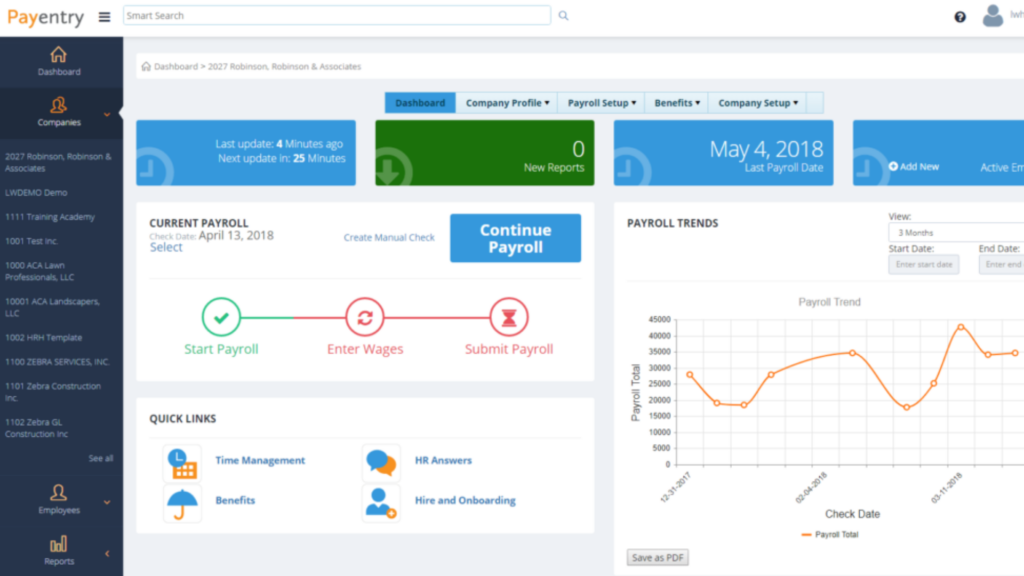
Payentry treats data management as a core part of the product, not an add-on. The platform stores time-tracking records with several layers of protection, including two-factor authentication for sensitive actions like direct deposit and deduction edits. That extra step means a stray password alone is not enough to change where someone’s pay goes.
Its biometric measures add another layer. Facial recognition at kiosk clocks ties each punch to a specific person, which guards against wage fraud and buddy punching. The same setup speeds up employee onboarding and supports tax compliance and government regulations tied to human resource management. Together these controls keep the system dependable and hard to breach.
Additional Features of Payentry’s Time and Attendance Solution
Payentry’s Time and Attendance solution includes several features that improve day-to-day time management:
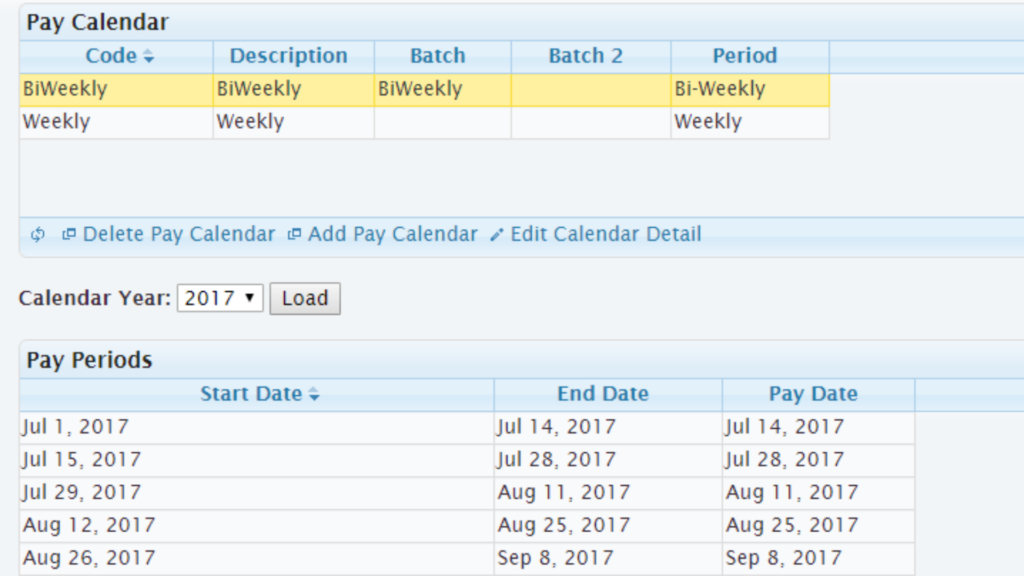
- Employee self-service that opens up pay history, paystub details, tax forms, contact information, status and position, accruals, direct deposits, and deductions inside the app.
- Time tracking that lets employees clock in and out and also view tax forms such as 1099-M, W-2, and 1095-C.
- Payroll details available in the app, so financial information stays transparent for employees.
- Tax form management that keeps documents like 1099-M, W-2, and 1095-C on hand for reference and record-keeping.
- Clock-in and clock-out steps that follow wage and hour rules.
- Manager messaging so users can send notes through the app and keep exchanges between employees and managers in one thread.
- Departmental tracking so employees can log hours against different departments or jobs and keep those records accurate.
Also read ClickUp vs. Clockify: Comparing Project Time-Tracking Tools
Conclusion
Payentry’s time and attendance tools give businesses a clear interface for managing employee information and secure handling of sensitive data. Biometric time clocks and workforce management tools round out the picture, covering both the daily punch and the payroll records behind it.
For teams that want accurate time tracking and dependable records, the result is less manual work for administrators and a clearer view of employee performance and scheduling. Employees get self-service access to their own hours and documents, and managers get the reporting they need to keep labor costs and compliance in check.
(Image Credit: Payentry)
What to Evaluate in a Payroll and Time Provider
Quick Answer: Five checks matter more than the feature list: which states the provider files in, whether tax filing is included or an add-on, how time data flows into payroll, what support looks like at year end, and how cleanly your data exports if you leave.
State coverage is the one that catches people out. Providers vary in where they file, and discovering a gap after your first out-of-state hire is expensive and disruptive to correct mid-year. Ask for the specific list rather than accepting an assurance that multi-state is supported.
The time-to-payroll connection is the second. If approved hours do not flow automatically into the pay run, someone re-keys them every cycle, which is both slow and a recurring source of pay errors. For businesses with hourly staff this integration is usually where the actual saving sits.
When to Switch Payroll Providers
Three signals reliably indicate it is time: repeated filing or calculation errors, support that cannot resolve issues within a pay cycle, and pricing that has drifted well above comparable providers without a corresponding change in service.
If any apply, time the move for a quarter or calendar-year boundary and run one parallel cycle before going live. Our guide to switching payroll providers covers the sequence, and payroll software for small business compares ten alternatives with published rates.
Questions to Ask Before Signing
Four that reliably surface problems: which specific states do you file in, what is included versus charged separately, what are your support response times in the first week of January, and how does my data export if I leave. Vague answers to any of these are worth taking seriously.
The export question in particular tells you something about the relationship. A provider comfortable explaining exactly how you would leave is usually confident you will not need to, and it is the one question buyers most often skip.
Frequently Asked Questions
How can Payentry help with time and attendance tracking?
Payentry tracks employee work hours and attendance through digital timesheets, biometric clocks, mobile punching, and integration with scheduling software.
Can Payentry generate reports for labor costs and work hours?
Yes. Payentry produces detailed reports on labor costs, overtime, absenteeism, and employee work hours, which supports decisions and compliance.
What are the benefits of using Payentry for time and attendance management?
Payentry supports accurate payroll processing, better workforce productivity, compliance with labor regulations, and simpler administrative tasks tied to time tracking.
Does using Payentry reduce human error in time and attendance records?
Yes. Automated tracking cuts manual errors in recording work hours and calculating wages, and it keeps payroll data precise.
Can employees access their own timekeeping information through Payentry?
Yes. Through Payentry’s self-service portals, employees can view their schedules and check accrued leave balances in real time.
What should you look for in a payroll provider?
Which states it files in, whether tax filing is included rather than an add-on, how time and attendance data reaches payroll, support responsiveness at year end, and how your data exports if you leave.
How much does small business payroll software cost?
Typically a base fee of $35 to $50 monthly plus $4 to $6 per employee. A ten-person business commonly pays $75 to $110. Multi-state filing, benefits administration and contractor payments increase that.
Does payroll software include time tracking?
Some include it, others charge separately or integrate with a dedicated tool. For hourly staff, what counts is whether approved hours reach payroll without manual re-entry; whether the tool is bundled or integrated is secondary.
What happens if a payroll provider files taxes late?
Penalties and interest accrue from the day after the deadline. Full-service providers generally take responsibility for filings they were engaged to make, so check what the agreement actually commits to before assuming you are covered.
How do you know if you have outgrown your payroll provider?
Recurring errors, support that cannot resolve issues within a pay cycle, missing capability such as a state you now employ in, or pricing well above comparable providers without matching service. Any one is worth a comparison.
Can you run payroll for employees in multiple states?
Yes, but each state requires its own withholding and unemployment registration, and providers differ in which they support. Confirm your specific states are covered before hiring across a state line, not afterwards.
What is full-service payroll?
Payroll where the provider calculates pay, withholds taxes, makes deposits and files returns on your behalf, taking responsibility for accuracy and timeliness. Self-service calculates what you owe and leaves deposits and filings with you.
Do payroll providers handle year-end forms?
Full-service providers generate and file W-2s and 1099s and make them available to employees. Confirm whether distribution to employees is included or charged separately, as practice varies between providers.
Should payroll and HR be one system?
If you want one employee record, yes — deductions and leave then flow into pay automatically. Separate systems work when you already run a strong HR platform and prefer a specialist payroll provider alongside it.
What is the difference between payroll software and a payroll service?
Software gives you tools to run payroll yourself. A service runs it for you, often with a dedicated contact. Full-service payroll software sits between the two, automating filings while leaving you to approve each run.
How do you evaluate payroll customer support?
Ask about response times during the first week of January and the final week of a quarter, when every client needs help simultaneously. Support quality in those windows is what actually matters and is rarely what gets demonstrated.
Can you get payroll data out if you switch providers?
You should be able to export payroll history, year-to-date figures and filings, and it is worth confirming the format before signing. Retain those records after leaving, since tax authorities can request them for several years.
Do payroll providers handle new state registrations?
Some assist, others leave it entirely with you. Registration is required in each state where you employ someone, so clarify who does it before your first out-of-state hire, not after.
What is a pay run and how often should it happen?
A pay run is one cycle of calculating and paying wages. Frequency is usually weekly, biweekly, semi-monthly or monthly, and some states set minimum frequencies for certain workers — worth checking against your own schedule.
Can you negotiate payroll pricing?
Often yes, particularly on annual commitments or when consolidating payroll with time tracking and benefits. Providers quoting without publishing have more room to move than those with public rate cards.
What should you check in a payroll provider contract?
Notice period to terminate, whether the provider takes responsibility for filings it makes, how fees change at renewal, and what data you can export on exit. Renewal uplift in particular is easy to miss at signing.

- Independent picks for exactly what you just read about
- Matched to your team size & needs
- Vendors don't pay for placement
Step 1 of 4
How big is your team?
We tailor recommendations to companies your size.















Related Articles
Applicant Tracking Software
monday.com for HR and Recruiting (2026): Hiring Pipelines, Onboarding and When You Need an ATS
Continue reading →
HR software
Gusto vs QuickBooks Payroll 2026: Prices, Features and Verdict
Continue reading →
Best Tools
Best PEO for Small Business in 2026: 8 Providers, Prices and Certification
Continue reading →
HR software
Gusto vs Paychex 2026: Published Prices vs Quote-Based Payroll
Continue reading →