
OptiSigns changes how businesses communicate on screen. It turns any TV into a working digital sign for $10 per month, and it keeps the whole setup easy to run and affordable to maintain over time.
With this software, you can manage content on several screens from anywhere, and everything stays in real-time sync. Your latest promotion can run across a full network of displays at once, using app integrations with popular platforms such as Instagram and YouTube so the content pulls in automatically.
Businesses everywhere use it for stronger engagement, simpler advertising, and clearer messages that reach viewers. Setting it up stays straightforward, because OptiSigns supports a range of devices, including Amazon FireStick, Android gadgets, and even Raspberry Pi hardware, so most teams can work with the equipment they already own.
Building a display is quick too. More than 500 free templates are ready to use, and they sit alongside scheduling tools that let you plan when each piece of content appears.
You can test the platform without any risk. The 14-day free trial does not ask for credit card details, so you can start straight away. Adoption tends to satisfy users, since more than 2,500 reviews average a 4.8-star rating, and names like Uber are among its customers.
Users who need help, or who want to learn more about digital signage, have support around the clock. Email support lines stay open at all hours, and they are backed by chat services and detailed FAQs that cover how to get the most from the software and your investment in it.
Set against other providers in the market, OptiSigns brings its strengths into focus. Its app integration range and device flexibility set it apart, and users regularly praise their experience with the product.
Digital signage has a wide field of options, but OptiSigns is a strong choice for your business needs today, and for tomorrow as well, since user feedback points steadily toward good results with the software.
Read on to see whether OptiSigns is the fit you have been searching for.
Key Takeaways
- OptiSigns is a digital signage tool that can turn any TV into an engaging advertising display, with the flexibility to manage content across multiple screens from one central location.
- The platform prices start at $10 per month and include a 14-day free trial, so businesses of all sizes can find an option that fits their budget without hidden fees.
- Features include over 500 free customizable templates, integration with more than 100 apps, remote control for updating content in real time, and compatibility with devices like Amazon FireStick and Android systems.
- OptiSigns puts weight on user experience with an easy-to-navigate interface, backed by US-based customer support through email, phone, or chat, plus resources such as tutorials and FAQs to help new users get started.
- Alternatives to OptiSigns include Yodeck for affordability and Raspberry Pi support, Play Digital Signage for its content editor, Raydiant for interactive experiences, and ScreenCloud for its range of apps and integrations.
Understanding OptiSigns: A Comprehensive Overview
OptiSigns changes how businesses share their messages. For $10 per month, it converts any TV into a working digital sign, and that keeps both the cost and the effort low for teams of any size.
The software runs content on several screens at once from any location, and it keeps them in real-time sync. A single promotion can appear across a whole network of displays through app integrations with platforms such as Instagram and YouTube, which means the media updates without manual work at each screen.
Companies use it for better engagement, simpler advertising, and messages that land with viewers. Setup stays easy because the platform supports a range of devices, including Amazon FireStick, Android units, and Raspberry Pi boards, so the hardware rarely holds a project back.
Designing a display is fast as well, with over 500 free templates on hand and scheduling tools to plan the timing of each message.
New users can try the product with no risk. The 14-day free trial skips the credit card requirement, so nothing gets in the way of testing. After adoption, most users are satisfied, and more than 2,500 reviews average a 4.8-star rating, with clients that include Uber.
Anyone who needs help, or who wants to learn more about digital signage, has support at all hours. Email lines, chat, and detailed FAQs explain how to get the most from the tool, so you are not left guessing about how to use your investment.
Set against competitors, OptiSigns is notable for its broad app integration and its device flexibility, and reviewers frequently commend the experience they have with the platform.
There are many digital signage products to weigh, but OptiSigns is a sound choice for present and future needs, backed by feedback that reports good outcomes with the software over time.
Read on to find out whether OptiSigns is the fit you have been looking for.
The core functionality of OptiSigns
OptiSigns turns any TV into a lively digital display, and it connects traditional signage with modern technology. At its core, the tool lets businesses manage content across multiple screens from one central portal, so a single person can run a whole fleet of displays.
Users can build custom playlists with little effort, schedule different media types such as images and videos to play at set times, and use transitions that keep audiences engaged as one piece of content moves to the next.
The software includes a large library of over 500 free templates, which makes professional-looking designs available to people of all skill levels. Built-in playback analytics show which content captures the most attention, so every message can be tuned to land better with viewers.
With support for popular devices such as Amazon FireStick and Android systems, OptiSigns is flexible enough to fit most presentation environments. Next, here are the main benefits OptiSigns offers businesses in a fast-moving market.
Key benefits for businesses
Adding OptiSigns to your business workflow changes how you share information and engage with customers. This digital signage solution turns standard displays into interactive platforms, using tools like kiosks and QR codes to build customer experiences that go beyond a static image on a wall.
Real-time updates are simple to make, which keeps content current and relevant for any setting. That ranges from retail spaces that run appealing promotions to boost sales, to assisted living facilities that organize daily schedules for their residents on a clear display.
Give your team workplace productivity features such as wireless conference room controls and key performance indicator (KPI) dashboards. With these tools on hand, employees can collaborate and stay informed on the crucial metrics that drive the company’s success.
The platform works across many industries. Whether it improves communication in a healthcare setting or keeps gym members motivated with the latest fitness content, businesses get an approach suited to how they display the information that matters most to their audience.
Next, here is how OptiSigns pricing fits various budgets, so you can get the most from these benefits for your organization.
Detailed Look at OptiSigns Pricing
Understanding the OptiSigns pricing structure is an important step for any business that wants a cost-effective digital signage solution. Knowing what each tier includes makes it easier to plan the spend with confidence.
The company keeps a transparent approach to pricing, with clear tiers that suit different organizational needs and budgets. That clarity is a useful consideration when you plan a marketing strategy and want to know the cost up front.
Overview of pricing options
OptiSigns gives you a simple way to manage your digital displays at competitive prices. With packages that start as low as $10 per month, most budgets find a fit that works for them.
- Starting price point: OptiSigns begins at an affordable rate of $10 monthly, which makes it an accessible entry-level option for businesses that are exploring digital signage for the first time.
- Variety of packages: Different pricing tiers cater to different needs and company sizes, so you can select a plan that matches your specific requirements without paying for extras you do not need.
- Free trial availability: A free trial lets you test the software before you commit, so you can explore the features and gauge the value it offers before spending anything.
- No hidden fees: Users value transparent pricing with no surprises. The cost is stated up front, which supports effective budget planning and financial clarity.
- Subscription flexibility: Monthly or annual subscription options provide flexibility, so you can choose what works best for your operating pace and your cash flow.
- User reviews endorse cost-efficiency: With a 4.8/5 rating from over 2.5K reviews, the feedback supports confidence in the spend, and users report satisfaction with the service relative to the cost.
Free trial availability
Try OptiSigns without spending a cent by using the 14-day trial offer. You get full access to all of the features and can see how the product fits into your business operations before you commit financially.
There is no need for a credit card, which makes it easy to start right away with nothing to lose.
Use the trial period to work through the platform’s features first-hand and see how simple managing digital signage can be. Afterward, if you are satisfied, you can choose from various subscription options starting at just $10 per month, matched to your specific needs.
Top Features of OptiSigns
OptiSigns includes a set of strong features that turn screens into communication tools, with efficiency and customization kept at the front. Here is how the software improves the way you manage content, through app integration and media options that suit your particular business needs.
Content management and scheduling
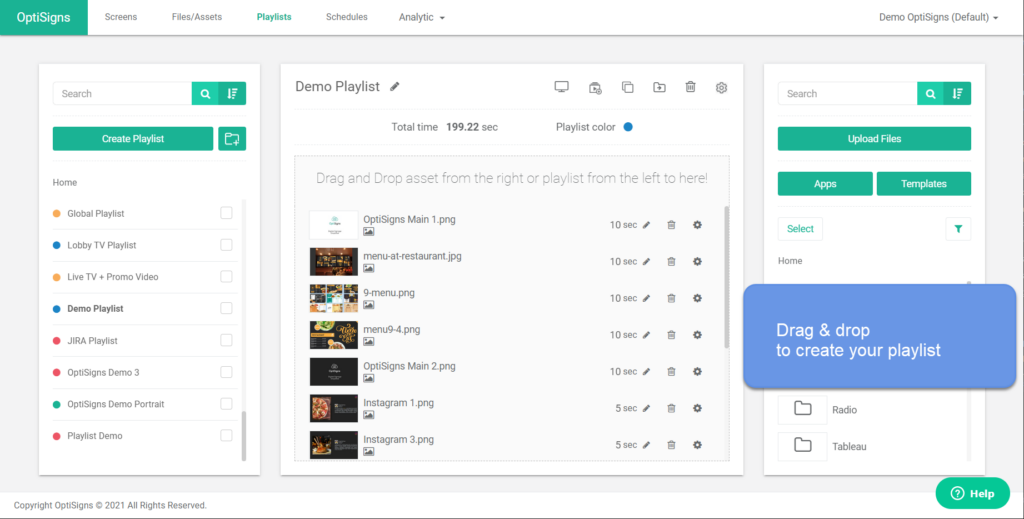
Managing content across multiple displays is straightforward with the OptiSigns scheduling features. Users can drag and drop media into their playlists, tailor their messaging with a selection of more than 500 free templates, and make immediate updates or scheduled changes in real time, all from a remote location.
This level of control keeps your content fresh, relevant, and engaging for your audience, no matter how many screens you run.
OptiSigns provides multilingual support to reach different audiences and API integration that connects with other applications. With firm control over scheduling, businesses can set the best times to display specific content, so screens capture attention at the moments that matter most.
Next, here is how OptiSigns connects through its extensive app integrations.
Integration with 100+ apps
Beyond content management, OptiSigns integrates across more than 100 applications. That range means users can pull content directly from favorite sources such as Instagram, Facebook, and YouTube, without stitching each feed together by hand.
For businesses that want to show real-time data or social media feeds on their signs, this connectivity is essential. Your digital signage can display the latest Twitter updates or engaging YouTube videos with only minimal setup, which is exactly what OptiSigns brings to the table.
Compatibility is not limited by device type either. Whether you use an Amazon FireStick in a boutique cafe or a Raspberry Pi in a corporate office hallway, OptiSigns keeps your content looking good on any screen it drives.
This flexibility extends through various operating systems, from Android to Linux, which gives users consistent performance no matter what hardware is at hand.
And when the time comes for those inevitable updates and changes, they are as simple as connecting new apps through the OptiSigns interface, which keeps your displays current and working without a hitch.
Customizable templates and media support
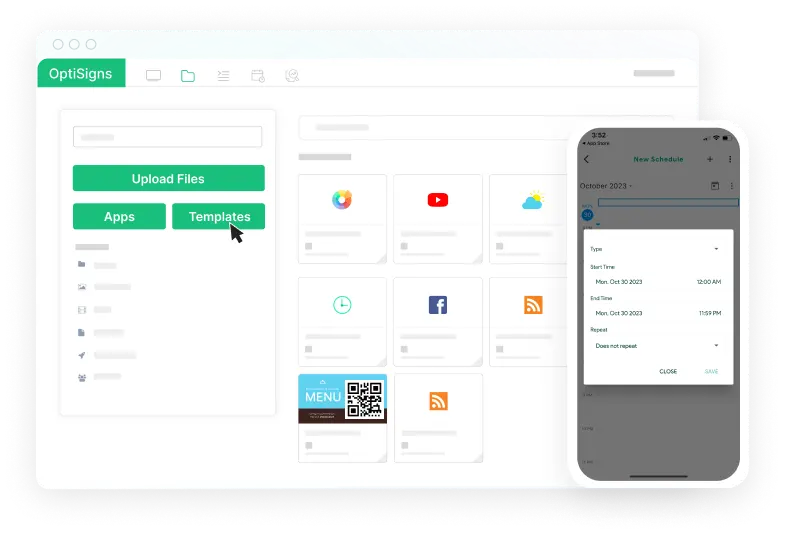
Building on its app integration, OptiSigns adds a large library of more than 500 free, customizable templates. These layouts are plentiful and highly editable, so businesses can craft their own brand messages instead of a generic look.
With template customization on hand, users can adjust designs to fit any occasion or promotion, and they can do it without advanced design skills.
OptiSigns does well on media compatibility, since it supports an array of media types, including crisp images, engaging videos, and essential documents. That range keeps your content varied and appealing to the people who watch it.
The platform also simplifies the creation of custom playlists, complete with screen transitions for smooth viewing. Remote editing lets you update screens instantly from anywhere, which keeps your displays current and impactful.
User-Friendly Design and Compatibility
OptiSigns gives a clear user experience with its intuitive interface, which supports efficient management of your digital signage content across many platforms. Its compatibility with major operating systems simplifies the process, so you can engage audiences and support your marketing strategy without a steep learning curve.
Major platform compatibility
OptiSigns sets a high bar for device flexibility and cross-platform compatibility in the digital signage field. It integrates with a wide array of operating systems, such as Amazon FireStick, Android, Windows, Linux, Raspberry Pi, and Roku devices.
This broad compatibility means that no matter your preferred hardware or software environment, OptiSigns can fit into your setup without causing disruption to what you already run.
Users value how OptiSigns supports multiple devices across various platforms, including web browsers, Android apps, and iOS offerings for iPhone and iPad. With this integration across so many devices, businesses can manage their digital signage content more efficiently than they could before.
The ease of use comes from a well-designed system that adapts to user preferences while keeping strong functionality on all of the supported platforms.
Simplified content management system
Managing your digital signage content has never been easier, thanks to a design that keeps compatibility and control simple. With the OptiSigns content management system, you can handle multiple screens from anywhere through the intuitive online portal.
This lets businesses update their displays without having to be physically present at each location, which saves time for teams that cover many sites.
The platform supports a range of devices, including Amazon FireStick, Android, and Windows, which makes it a good fit for almost any environment. You can customize your visual communication by scheduling multimedia content, creating tailored playlists with smooth screen transitions, or choosing from more than 500 free templates.
Advanced analytics track playback and help you fine-tune your messaging for a stronger effect over time.
Customer Reviews and Feedback on OptiSigns
Customer reviews and feedback are a useful measure of how OptiSigns performs in the real world, and they reveal a clear picture of the user experience and overall satisfaction. These personal accounts show how OptiSigns measures up to its promises on digital signage efficiency and impact.
General sentiments from user reviews
OptiSigns has earned wide praise, reflected in a 4.8/5 rating from over 2,500 reviews. Users consistently report satisfaction with the platform’s ease of use and its feature-rich interface.
The software serves a range of needs, from freelancers to large enterprises, with big names such as Uber and Safeway among its customers. Positive feedback points to the user-friendly design as a key reason it simplifies visual communication and advertising displays for businesses.
The high satisfaction rate is reinforced by 98% of users reporting positive experiences after they put OptiSigns to work in their operations. That record shows the system’s reliability for enterprise use across various industries for more than a decade.
Looking at the specific pros and cons from customers, it becomes clear that the OptiSigns commitment to improving business tools through technology connects well with its user base.
Pros and cons according to customers
Building on the general sentiments above, here are specific pros and cons of OptiSigns as noted by customers. These points reflect the real experiences of the people who have put this digital signage solution to work in their business processes.
- User experience: Customers often highlight the clean user interface, and they cite easy navigation and simple content management. This matches the 98% positive reviews that describe OptiSigns as user-friendly.
- Technical support: US-based customer support through email, phone, or a dedicated support system is frequently praised. Quick response times and helpful assistance are points of satisfaction for many users.
- Remote control: Users value the ability to manage multiple screens and content remotely, which gives flexibility to update and control displays across various locations.
- Compatibility: The platform’s ability to work with a range of hardware and operating systems comes up often as a strong advantage, since it means broad usability.
- Content management: The easy-to-use content management system allows efficient scheduling and updates, which saves time and reduces hassle for businesses.
- Learning curve: New users may find it hard to navigate all of the features at first, though with the resources provided by OptiSigns this can be overcome quickly.
- Pricing concerns: Some users mention concerns about pricing options when they consider scaling up to large deployments.
- Integration hurdles: Businesses sometimes have difficulty integrating specific apps or media formats with the OptiSigns system, despite its compatibility with over 100 apps.
Support and Resources Provided by OptiSigns
OptiSigns supports a user-friendly experience through both an intuitive interface and strong support with a range of resources. Here is how OptiSigns gives users the tools and assistance they need to run their digital signage without friction.
Accessibility of customer support
OptiSigns understands that reliable assistance matters. It has invested in a support system that includes email, chat, and phone options to help users troubleshoot any issue they might run into along the way.
Its US-based customer care team is ready to provide technical help, whether you prefer to work through a detailed manual or speak directly with an expert.
If you are new to digital signage, OptiSigns offers a knowledge base filled with user guides and FAQs to get you up and running smoothly. The online support services aim for quick responses, so help is close at hand whenever you need it.
With these resources available 24/7, managing your content stays simple, which sets the stage for exploring other features like customizable templates and media support.
Resources for getting started
Beyond the customer support offered by OptiSigns, users also have access to a wealth of resources that simplify the adoption process. Newcomers will find an abundance of tools to kickstart their experience with digital signage.
- Free trial: Before you go all in, use the platform’s free trial. It gives full access to features without requiring credit card details, which makes it easy to test the product without any financial commitment.
- Support center: If you hit an issue or need guidance, the support center is stocked with FAQs and troubleshooting tips that cover common hurdles and technical questions.
- Blog posts: Stay informed on best practices and industry trends through the blog. These articles provide useful context and creative ideas for improving digital signage strategies.
- Video tutorials: Visual learners can benefit from a series of step-by-step videos. These tutorials break complex tasks into manageable steps for setting up and managing content.
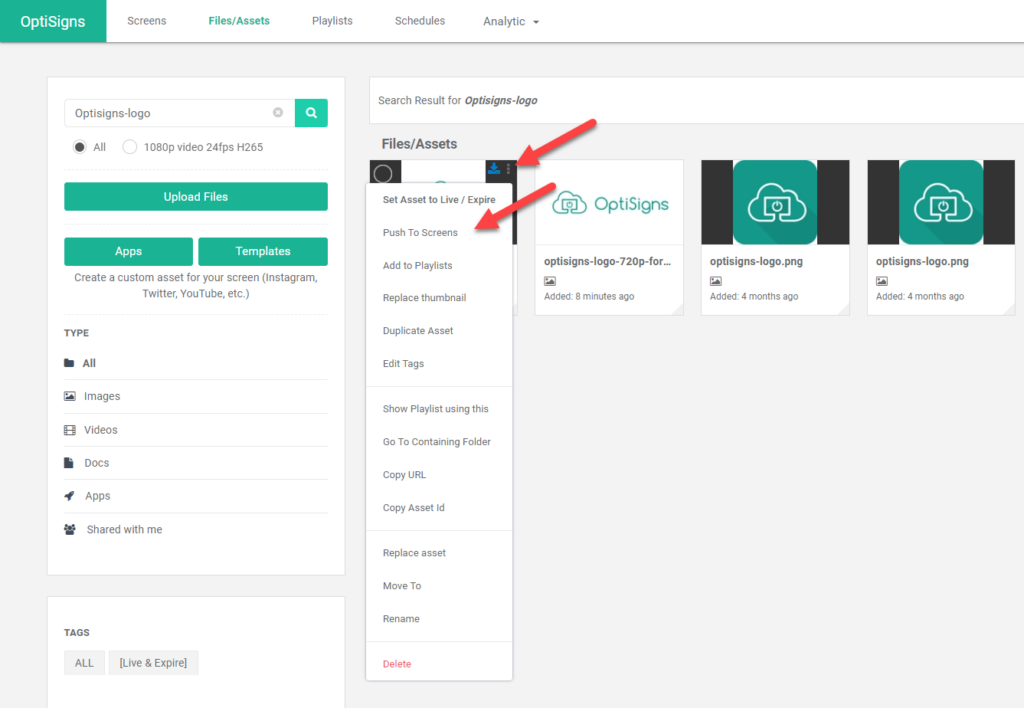
- Templates gallery: With over 500 free templates available, users can create professional-looking content without needing design expertise, and the templates cover various industries and purposes.
- Analytics tools: Track the success of your campaigns with analytics that include playback reporting. These insights let you make data-driven decisions and adjust your strategy accordingly.
- API documentation: For those who want to integrate OptiSigns with other systems or build custom solutions, the API documentation provides the technical specifications and guidelines they need.
- Getting started guides: Step into OptiSigns with comprehensive guides that walk you through setup, from unboxing the hardware to publishing your first campaign.
Comparing OptiSigns: Alternatives and Competitors
Evaluating OptiSigns means assessing how it measures up against its peers in a crowded digital signage market. This comparison covers the distinct features and value that set OptiSigns apart, so you can decide whether the solution aligns with your specific business needs and technical requirements.
Popular alternatives to OptiSigns
Comparing OptiSigns with other digital signage solutions helps you understand the wide field of options available. These alternatives cater to a range of needs, with distinct features and pricing that may align better with specific business requirements. Here is a look at how OptiSigns stacks up against some popular competitors in the market:
| Alternative | Key Features | Pricing | Distinct Advantage |
|---|---|---|---|
| Yodeck | Drag-and-drop interface, plug-and-play functionality with Raspberry Pi | Free plan for 1 screen, tiered pricing based on the number of screens | Strong on affordability and Raspberry Pi integration |
| Play Digital Signage | Rich content editor, support for various file formats | Free for the first screen, subscription model thereafter | Strong content editing capabilities |
| Raydiant | Interactive experiences, in-store music solutions | Custom pricing based on business needs | Focuses on interactive digital experiences |
| ScreenCloud | Easy-to-use software, hundreds of apps and integrations | Starter to enterprise-level pricing with a free trial | User-friendly with extensive app ecosystem |
| REACH | Content delivery to any screen, integration with other software | Pricing upon request, tailored to organization size | Excellent for multi-screen and integration flexibility |
| Xibo | Open-source, customizable layouts | Free self-hosted version, cloud hosting at a monthly fee | Cost-effective for tech-savvy users preferring self-hosting |
| EasySignage | Simple setup, Google Slides and social media integration | Competitive pricing starting with a free plan | Suits businesses looking for simplicity and Google ecosystem compatibility |
| Fugo | Cloud-based CMS, analytics and collaboration tools | Monthly subscription per screen with a free trial | Analytics-driven with an emphasis on collaboration |
| Zeetaminds | 4K content support, AI-based analytics | One-time licensing fee with no recurring costs | Attractive for those requiring high-resolution content with AI insights |
| MediaTile | HumanKiosk solution, cellular connectivity | Customized solution-based pricing | Innovator in 4G/5G connected signage solutions |
| NoviSign | Interactive digital signage, creative widgets | Transparent pricing with volume discounts | Interactive content with creative freedom |
| Screenly | 4K Digital Signage, offline playback | Pricing based on version (OSE is free, Pro version paid) | High-definition display quality and reliability |
Each of these alternatives offers functions that may be pivotal for different business situations. Assessing your own needs will guide you toward the digital signage choice that suits you best.
How OptiSigns stands out from the competition
OptiSigns sets itself apart with its wide app integration, which gives users a large array of content options. With access to over 100 apps, the platform lets businesses present dynamic and engaging digital signage that improves their brand experience.
This compatibility turns screens into strong tools for communication and advertising, suited specifically to a variety of business needs.
The software’s flexibility extends to hardware as well, since it supports numerous devices for smooth operation across different systems. Meanwhile, its library of over 500 free templates lets users craft eye-catching displays without needing extensive design expertise.
Paired with advanced analytics, businesses gain data that helps improve signage performance. A 4.8/5 rating based on thousands of reviews shows that reliability and usability sit at the core of why OptiSigns outshines its competitors in the digital signage market.
Making an Informed Decision: Is OptiSigns Right for You?
Whether OptiSigns aligns with your digital signage needs depends on its blend of features, cost-effectiveness, and user experience. A careful look will show if the solution can improve your content management strategy and simplify communication across your screens.
Scenario-based recommendations
OptiSigns is more than another digital display tool; it is a solution built for varied needs and scenarios. Assessing your situation accurately will help you decide if OptiSigns is the ideal fit for you.
- If you run a small business with a limited budget, the $10 monthly subscription may be an attractive option, since it provides remote content management without breaking the bank.
- For those managing multiple locations, such as chain stores or restaurants, OptiSigns handles many screens from one central portal.
- Event organizers can benefit from OptiSigns by using customizable templates for quick content creation that keeps attendees informed and engaged.
- Educators who want to add dynamic learning materials to classrooms will find the device compatibility useful for integrating with existing hardware like Raspberry Pi or Android devices.
- Marketing professionals who need real-time performance analytics will value the reporting features that track screen playback and user engagement.
- Retail businesses that update promotions regularly will find the content scheduling tools helpful for keeping displays current without manual updates each time.
- Restaurants that want to change menu boards often can use templates designed for easy editing and updates.
- Gyms or fitness centers can use the remote access and control feature to schedule workout classes or motivational content across multiple screens throughout their facility.
Final considerations for potential users
Before choosing OptiSigns as your digital signage solution, consider how its features align with your business needs. If you need a tool that offers content scheduling and handles device compatibility across various platforms like Amazon FireStick, Android, and Windows, this software can simplify your advertising efforts.
Custom playlist creation is simple with over 500 templates at your disposal, which can be a real time-saver for busy teams.
Examine user feedback closely. An average rating of 4.8 out of 5 from 2.5K reviews signals strong customer satisfaction. If advanced analytics are important to you, the playback reporting provided by OptiSigns gives clear insight into what is working and what is not, which helps you make data-driven decisions about your content strategy.
Look beyond the surface and make sure the integrated applications truly benefit your workflow before you decide to use OptiSigns for your digital displays.
Related Digital Solutions and Comparisons
Looking at the wider field of digital solutions, this section covers similar tools like ServeManager, with comparisons to arm readers with the knowledge to improve their digital signage strategies.
This analysis supports informed decision-making when you select the technology that best fits your business objectives and operational demands.
Exploring similar tools like ServeManager
ServeManager is a strong tool that many professionals use for process serving management, but it is just one of several digital solutions in the display management field. For those seeking alternatives in digital signage, tools like Yodeck, Play Digital Signage, and Raydiant offer their own sets of features for different business needs.
Each platform brings its own strength, from Yodeck’s emphasis on affordability and ease of use, to Play Digital Signage’s rich design capabilities, and Raydiant’s focus on interactive experiences.
Staying informed about all of the available options helps you select the content management system that best fits your requirements. ScreenCloud stands out with its extensive integration options, while REACH appeals with its media support for engaging audiences.
Xibo offers strong customization opportunities; EasySignage promises ease of use; Fugo does well on scheduling flexibility; Zeetaminds specializes in analytics insights; MediaTile provides cloud-based convenience; NoviSign adds social engagement features; and Screenly delivers high-quality playback performance.
Considering these comparisons, think about how each solution aligns with your specific organizational goals before the discussion returns to customer reviews and feedback on OptiSigns.
Conclusion
OptiSigns is a flexible solution for businesses that want to strengthen their communication strategy. You can display dynamic content across various screens, all of it manageable from one central hub.
Your search for strong yet affordable signage software could end here, since OptiSigns offers a solid feature set paired with competitive pricing that fits a range of marketing needs.
Consider the platform and see how it can change the way you connect with your audience through engaging visual displays.
(Image credit: OptiSigns)
Frequently Asked Questions
1. What is OptiSigns?
OptiSigns is a digital signage software that lets you turn any screen into an advertisement or sign to display information.
2. How much does OptiSigns cost?
The price of OptiSigns varies based on the plan chosen, but they typically start with a basic free option and have monthly subscription rates for advanced features.
3. Can I use my own photos and videos with OptiSigns?
Yes, you can upload and display your own photos and videos using OptiSigns on your digital signs.
4. Are there any good alternatives to OptiSigns?
There are several alternatives to OptiSigns, including Yodeck, ScreenCloud, and BrightSign depending on your needs and budget.
5. What kind of support does OptiSigns offer?
OptiSigns offers customer support through email, phone calls, and online resources like FAQs and tutorials to help users manage their screens.
Compare alternatives to the tools in this post

- Independent picks for exactly what you just read about
- Matched to your team size & needs
- Vendors don't pay for placement
Step 1 of 4
How big is your team?
We tailor recommendations to companies your size.















Related Articles
IT Management
RMM Software: 25 Tools Ranked by 1,843 Reviews
Continue reading →

Buyers guide
How To Choose The Best Freelance Platforms For 2026
Continue reading →
Best Tools
SaveFrom.net: Norton Clears It, the Ads Are the Risk
Continue reading →
IT Management
What is User Acceptance Testing (UAT)? A Complete Guide (2026)
Continue reading →